

惯性聚合 高效追踪和阅读你感兴趣的博客、新闻、科技资讯
阅读原文 在惯性聚合中打开

推荐订阅源

Simon Willison's Weblog
G
Google Developers Blog
Spread Privacy
Spread Privacy
I
InfoQ
V
V2EX
S
Schneier on Security
小众软件
小众软件
C
CERT Recently Published Vulnerability Notes
博客园 - 聂微东
奇客Solidot–传递最新科技情报
奇客Solidot–传递最新科技情报
Stack Overflow Blog
Stack Overflow Blog
T
Threat Research - Cisco Blogs
L
Lohrmann on Cybersecurity
Recent Announcements
Cyber Security Advisories - MS-ISAC
Attack and Defense Labs
云风的 BLOG
云风的 BLOG
The Hacker News
The Hacker News
S
SegmentFault 最新的问题
C
Cybersecurity and Infrastructure Security Agency CISA
NISL@THU
NISL@THU
OSCHINA 社区最新新闻
OSCHINA 社区最新新闻
GbyAI
GbyAI
Latest news
Latest news
S
Secure Thoughts
Project Zero
Project Zero
MongoDB | Blog
MongoDB | Blog
I
Intezer
Security Latest
Security Latest
Apple Machine Learning Research
Vercel News
Vercel News
N
Netflix TechBlog - Medium
V2EX - 技术
V2EX - 技术
量子位
T
Threatpost
T
The Blog of Author Tim Ferriss
Y
Y Combinator Blog
T
Tor Project blog
A
Arctic Wolf
Microsoft Security Blog
T
The Exploit Database - CXSecurity.com
大猫的无限游戏
大猫的无限游戏
T
Tailwind CSS Blog
freeCodeCamp Programming Tutorials: Python, JavaScript, Git & More
C
Check Point Blog
博客园 - Franky
Google DeepMind News
The Register - Security
The GitHub Blog
The GitHub Blog
L
LINUX DO - 热门话题

Linux – 魔帆博客

Git配置:如何优雅的配置多用户并使用 ssh 密钥验证 | 魔帆博客 Git 提示 fatal: unsafe repository is owned by someone else 错误 | 魔帆博客 Linux 报错Certificate verification failed: The certificate is NOT trusted. | 魔帆博客 Fedora 系统升级 32->34 跨版本升级 | 魔帆博客 教程:如何更新安装 docker-compose V2 和使用 docker switch | 魔帆博客 Docker WSL1/2 迁移 Linux 发行版目录 | 魔帆博客 双重验证 Authy 导出所有 TOTP token 和 golang 配置 GOPROXY 解决网络问题 | 魔帆博客 Linux 教程:Linux 初学者必了解的概念 | 魔帆博客 创建支持安全启动(Secure Boot)的 Arch Linux ISO 安装镜像 | 魔帆博客 使用 Aria2 搭建离线下载服务器 | 魔帆博客 【记录】Deepin 桌面无限转圈(风火轮) | 魔帆博客 梅林固件KoolProxy插件崩溃连接ssh卸载指南(北) | 魔帆博客 Arch Linux 通过 xdg-mime 设置默认文件管理器解决总是用 Visual Studio Code 打开文件夹的问题 | 魔帆博客
[Linux] dconf 系统配置编辑器——我的系统我做主 | 魔帆博客
chenjunyu19 · 2018-08-18 · via Linux – 魔帆博客

2018081801491937

dconf 是什么

简单来说,dconf 是一种基于键的配置存储系统,有点类似于 Windows 下的注册表

为什么要编辑 dconf

通常来说,应用程序并不会把所有的设置都暴露给用户来修改,对于大多数用户而言,这是好的,但是,对于我这样爱折腾的高级用户肯定是不够的。

如何编辑 dconf

命令行

直接在终端使用 dconf 命令即可。本文不作讨论。

图形界面编辑器

这里用到的是 dconf 系统配置编辑器,Arch Linux 用户直接安装软件包 dconf-editor 即可,其它发行版用户请自行摸索软件包名称。

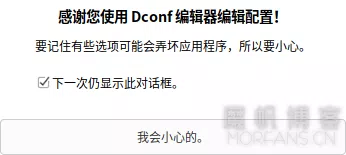
打开软件后,你会看到这样一个提示,请认真阅读。接下来,你就可以翻一翻有哪些有趣的设置键了。
2018081801492442

玩法举例

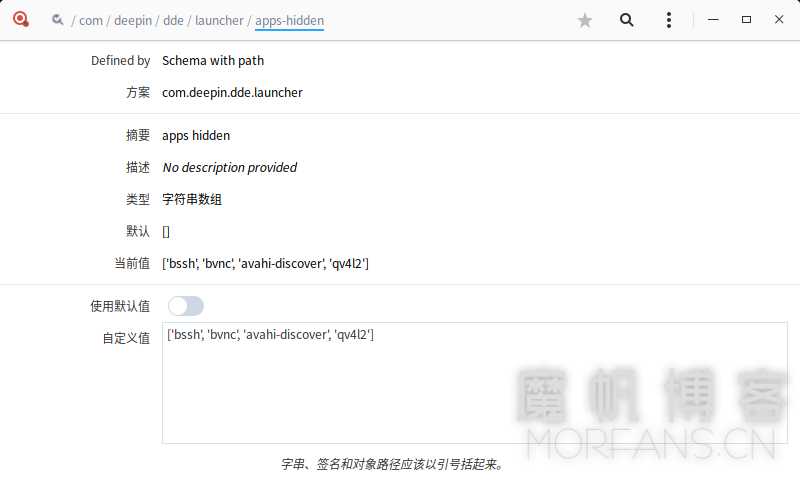
比如说,我们可以设置 dde-launcher 要隐藏哪些应用的图标,可以说是很实用了。
2018081801492116

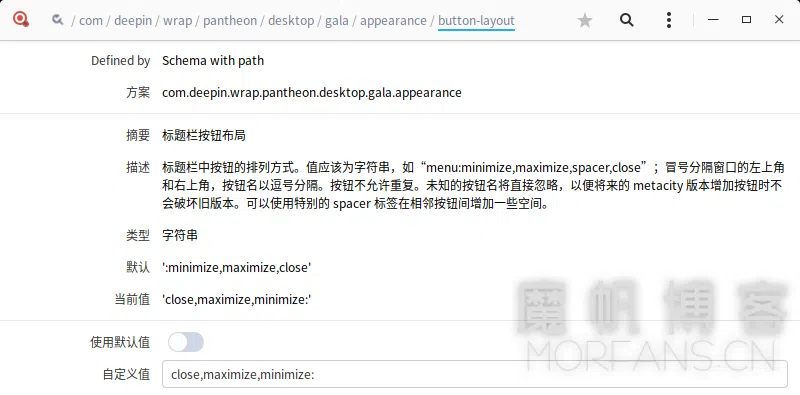
再如,我们可以改变窗口标题栏的按钮位置,使控制按钮像 Mac OS 一样在左边。
2018081801492353