惯性聚合 高效追踪和阅读你感兴趣的博客、新闻、科技资讯
阅读原文 在惯性聚合中打开

推荐订阅源

博客园 - 【当耐特】
罗磊的独立博客
J
Java Code Geeks
博客园_首页
量子位
腾讯CDC
阮一峰的网络日志
阮一峰的网络日志
Jina AI
Jina AI
WordPress大学
WordPress大学
宝玉的分享
宝玉的分享
人人都是产品经理
人人都是产品经理
博客园 - 叶小钗
freeCodeCamp Programming Tutorials: Python, JavaScript, Git & More
Security Latest
Security Latest
Cloudbric
Cloudbric
Last Week in AI
Last Week in AI
酷 壳 – CoolShell
酷 壳 – CoolShell
博客园 - 聂微东
让小产品的独立变现更简单 - ezindie.com
C
CXSECURITY Database RSS Feed - CXSecurity.com
IT之家
IT之家
雷峰网
雷峰网
Apple Machine Learning Research
奇客Solidot–传递最新科技情报
奇客Solidot–传递最新科技情报
C
Cybersecurity and Infrastructure Security Agency CISA
L
Lohrmann on Cybersecurity
爱范儿
爱范儿
月光博客
月光博客
Spread Privacy
Spread Privacy
T
Tailwind CSS Blog
C
CERT Recently Published Vulnerability Notes
S
Schneier on Security
V
Vulnerabilities – Threatpost
Cisco Talos Blog
Cisco Talos Blog
美团技术团队
Simon Willison's Weblog
Threat Intelligence Blog | Flashpoint
博客园 - 司徒正美
The Cloudflare Blog
G
GRAHAM CLULEY
I
Intezer
博客园 - 三生石上(FineUI控件)
有赞技术团队
有赞技术团队
P
Privacy International News Feed
cs.CL updates on arXiv.org
Hugging Face - Blog
Hugging Face - Blog
大猫的无限游戏
大猫的无限游戏
钛媒体:引领未来商业与生活新知
钛媒体:引领未来商业与生活新知
P
Privacy & Cybersecurity Law Blog
Engineering at Meta
Engineering at Meta

9to5Mac

Apple permanently closing three US stores, here’s when [Updated] Apple Arcade just added 4 new ad-free games with these titles now available At least for now, Liquid Glass in Pixelmator Pro remains a Creator Studio exclusive Apple @ Work: How to add an existing Mac to Apple Business Manager without wiping it Hands-on: SkyDex turns your daily weather check into a Pokémon adventure App Store fight continues as Apple and Epic clash over court-ordered stay OpenAI says to update Mac apps including ChatGPT and Codex as security precaution Apple TV in-person ‘experience’ coming later this month in LA New iPhone Fold leaks cover ‘Ultra’ name, launch timing, more Report: Apple tops global smartphone market for first time in Q1 as overall shipments drop Car Keys in Apple Wallet coming soon to major new vehicle brand Apple previews AI, accessibility, and AirPods Pro 3 research for CHI 2026 April 10, 2026 – Apple Store closures, more VSCO report explores how photographers perceive, adopt, and actually use AI XChat, X’s standalone messaging app, launching soon with these features Apple TV has three shows with finales this week, here’s what’s ending iOS 26.4 adds setting to let you change new Liquid Glass effect Hands-on: Satechi’s 3-in-1 Qi2 charger brings 25W of power with a clean Apple aesthetic [Video] iOS 27 adding new ‘Siri’ app to Home Screen: Here are the rumored features Deals: All 15-inch M5 MacBook Air models $150 off, Series 11 $99 off, Nomad leather iPhone 17 cases, more Amazon launches ‘Prime Video Ultra’ with new features, higher price How the Mac changed the way I clear mental clutter YouTube Premium is getting a US price hike of up to $4/month Tribit StormBox Micro 3: My favorite travel speaker just got better and cheaper FBI used iPhone notification data to retrieve deleted Signal messages Adobe’s low-processing camera app expands support to select iPads and the iPhone 17e New Apple TV movie starring Keanu Reeves now available to stream Apple collector showcases 50 years of Mac startup sounds [Video] WhatsApp is bringing Status updates to the top of the Chats tab iOS 26’s Messages app got a big upgrade for an essential feature Survival horror game Cronos: The New Dawn coming natively to Apple Silicon Macs Report: Apple saw 9% growth in Mac shipments during Q1 2026 OpenAI introduces $100/month Pro plan aimed at Codex users, here’s what it includes Instagram now lets you edit your comments after posting Apple updates Creator Studio apps including Logic Pro and Pixelmator Pro, more Leaker gives iPhone 18 Pro updates on two design changes Researchers detail how a prompt injection attack bypassed Apple Intelligence protections DIY MacBook Neo upgrade can boost the SSD to 1TB using iPhone parts iPhone Fold visualized, HomeKit Adaptive Temperature, MacBook Neo shortages - 9to5Mac Ex-Apple engineers create an AI button that looks like an iPod Shuffle – but can’t explain why iPhone Fold unboxing video is a fake, not the real thing Apple releases macOS 26.4.1 software update, here’s what’s new Apple TV just added two exciting new series to future lineup Anthropic scales up with enterprise features for Claude Cowork and Managed Agents April 9, 2026 – iOS 26.4.1 released, more Deals: 1TB M5 MacBook Air $150 off, Apple Thunderbolt 5 cables up to 48% off, Magic Keyboard Amazon low, more Spotify’s newest feature lets you focus on audio without distractions Europe’s largest Apple museum opens to the public in the Netherlands iOS 26.4.1 now available for iPhone users, here’s what’s fixed Discounted M5 MacBook Pro hits Apple refurb store with key storage distinction [U] Report: iPhones accounted for half of the top 10 best-selling smartphones in Q4 2025 iPhone 18 Pro’s rumored camera feature could prove that less is more So long, Llama: Meta unveils Muse Spark AI with Contemplating mode Apple seeks internal data from Samsung in South Korea in ongoing antitrust case Stolen Device Protection now enabled by default for enterprise devices in iOS 26.4.1 You can now buy official repair parts for MacBook Neo, iPhone 17e, Studio Display XDR, more iOS 26.4.1 fixes iPhone bug that stopped iCloud data from syncing, including Apple Passwords iPadOS 26.4 adds convenient new feature for iPad power users ChatGPT just added its first streaming video app, here’s what it can do Overcast launches podcast transcripts in new app update for iPhone Day One journaling app introduces ‘Gold’ plan with AI summaries and Daily Chat Amazon says these 13 Kindle devices won’t be able to get new books soon CarPlay in iOS 26 has my top new Apple Music feature, here’s how to use it Astropad unveils Workbench for Mac: ‘Remote desktop made for the AI era’ Shrinking creator explains finale ending, confirms season 4 cast and time jump Deals: 24GB M5 MacBook Air all-time low $150 off, 16-inch M5 Pro MacBook $199 off, black Apple USB-C cables, more Car Keys in Wallet recently launched for two major vehicle brands, with more soon April 8, 2026 – New CarPlay apps, iPhone Fold reports iPhones on space missions are as valuable as they are fun Insta360 jumps on the rear iPhone screen trend with its new Snap monitor Apple TV unveils return of acclaimed London crime thriller Apple very cautious about iPhone Ultra sales, as Samsung wins major concession FBI says cyber fraud cost Americans $21B last year – here’s what you need to know Apple gets bottom ranking for repairability of iPhones and MacBooks – with one exception Apple Arcade could use an ‘always allow’ feature that’s separate from App Store Apple TV: Six-part Vietnam docuseries picks up 3 News & Documentary Emmy nominations This clever Shortcut lets you download latest Artemis II images directly from NASA [U: updated shortcut] Vision Pro is about to get Steam Link app for gaming, download beta here New video reveals iPhone 18 Pro Max, iPhone Fold dummy models WhatsApp’s improved CarPlay experience is now available to all iPhone users 9to5Mac Overtime 066: Every time I breathe there's a new Claude update - 9to5Mac iOS 27 release date: Here’s when the next major iPhone update is coming Deals: 16GB M5 MacBook Air $150 off, Apple Watch Ultra 3 $99 off, 24GB M5 MacBook Pro, Magic Mouse, more watchOS 26.4 fixes a major Apple Watch Workout app complaint Mint Mobile launches $45/month bundle for wireless and home internet 9to5Mac Daily: April 7, 2026 – Apple’s MacBook Neo quandary - 9to5Mac Apple study details an AI-powered tool that helps developers build interface prototypes Aqara releases new Thermostat Hub W200 with Apple Adaptive Temperature support M5 MacBook Air is no longer Apple’s entry point so who is it for now? [Video] iOS 26 added my favorite new iPhone ringtone, listen here Studio Display XDR medical imaging feature gets FDA clearance [U: Now available] The best CarPlay tips and tricks Anthropic unveils powerful Mythos AI model, working with Apple in cybersecurity initiative iPhone Fold is ‘on track’ to launch this September, per Mark Gurman Google Chrome rolling out vertical tabs and fullscreen reading mode MacBook Neo facing 3-week delays at Apple, here’s how to buy one sooner Dark Matter season 2 gets release date on Apple TV Apple faces supply chain problem as MacBook Neo demand exceeds expectations ‘iPhone Ultra’ is the likely name of Apple’s foldable, says leaker Spotify Prompted Playlists now work for podcasts as well as music
How to create a macOS Golden Gate USB install drive [Video] - 9to5Mac
https://www.facebook.com/JeffBenjam · 2026-06-28 · via 9to5Mac
Golden Gate Install Drive feature image showing a SanDisk USB drive

In this hands-on guide, I’ll show you how to transform a USB drive into a macOS Golden Gate USB installer. Having access to a macOS Golden Gate USB installer is useful for upgrading from macOS Tahoe or earlier versions of macOS across multiple Macs, among other use cases. Have a look at my full hands-on video walkthrough, and be sure to subscribe to 9to5Mac on YouTube for more Mac guides and tutorials.

Before we begin, please remember that a USB installer is not a requirement to install macOS Golden Gate. Upon its release, and even in beta, you can use macOS Software Update to download and install it. As noted at the outset, one of the main benefits of creating a macOS Golden Gate USB install drive is that it lets users install macOS across multiple Macs and/or speeds up the process on a Mac with a slower Internet connection.

Selecting a USB drive

You’ll need a blank USB drive with at least 16GB of storage to follow this tutorial. Almost any drive, including an SSD, will work, but I’m using a portable SanDisk flash drive with both USB-C and USB-A connections for added flexibility. You can purchase the same USB flash drive, with 128GB of storage, for a very reasonable price.

macOS Golden Gate USB installer video guide

Subscribe to 9to5Mac on YouTube for more videos

Download the macOS Golden Gate installer

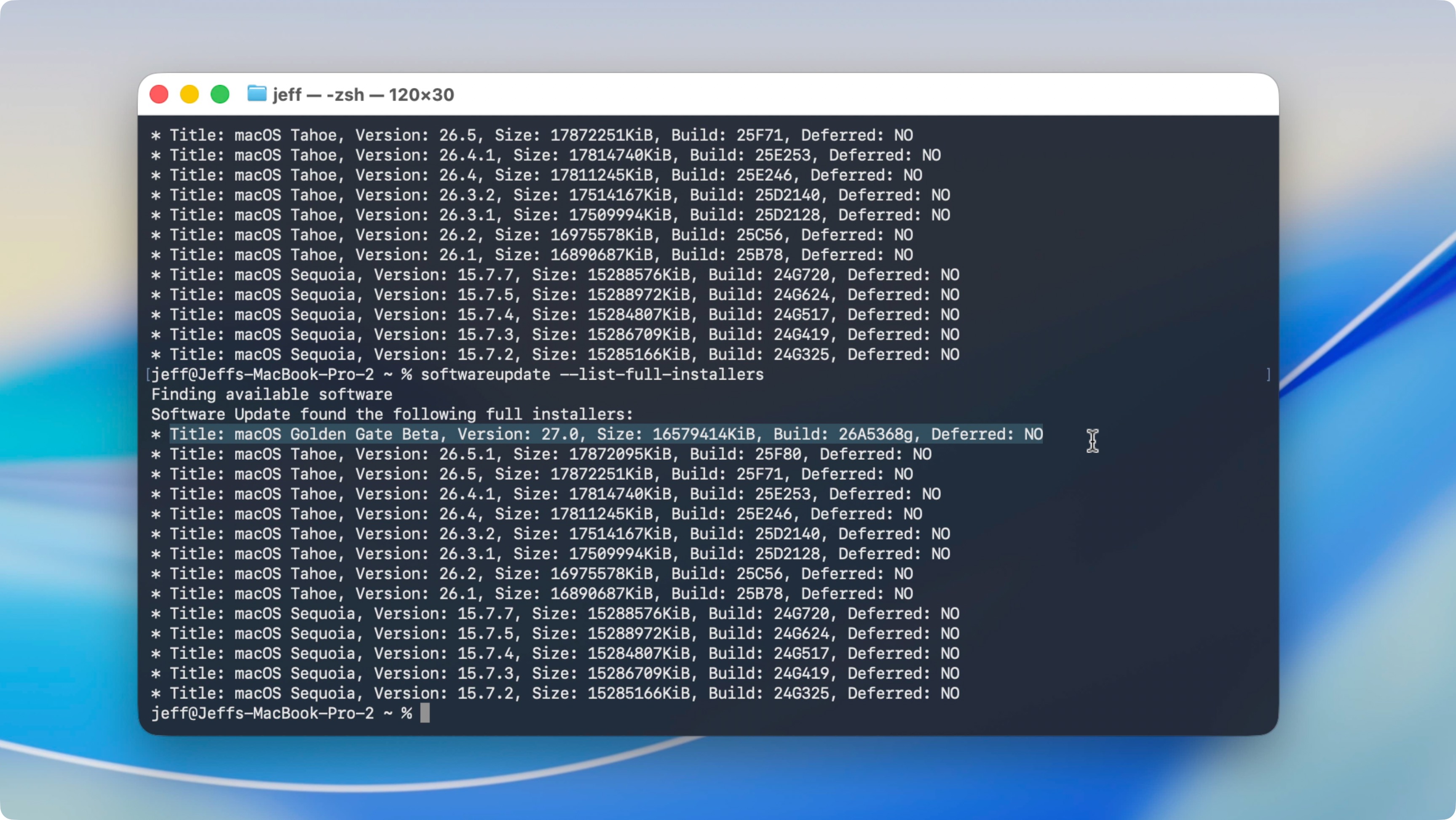
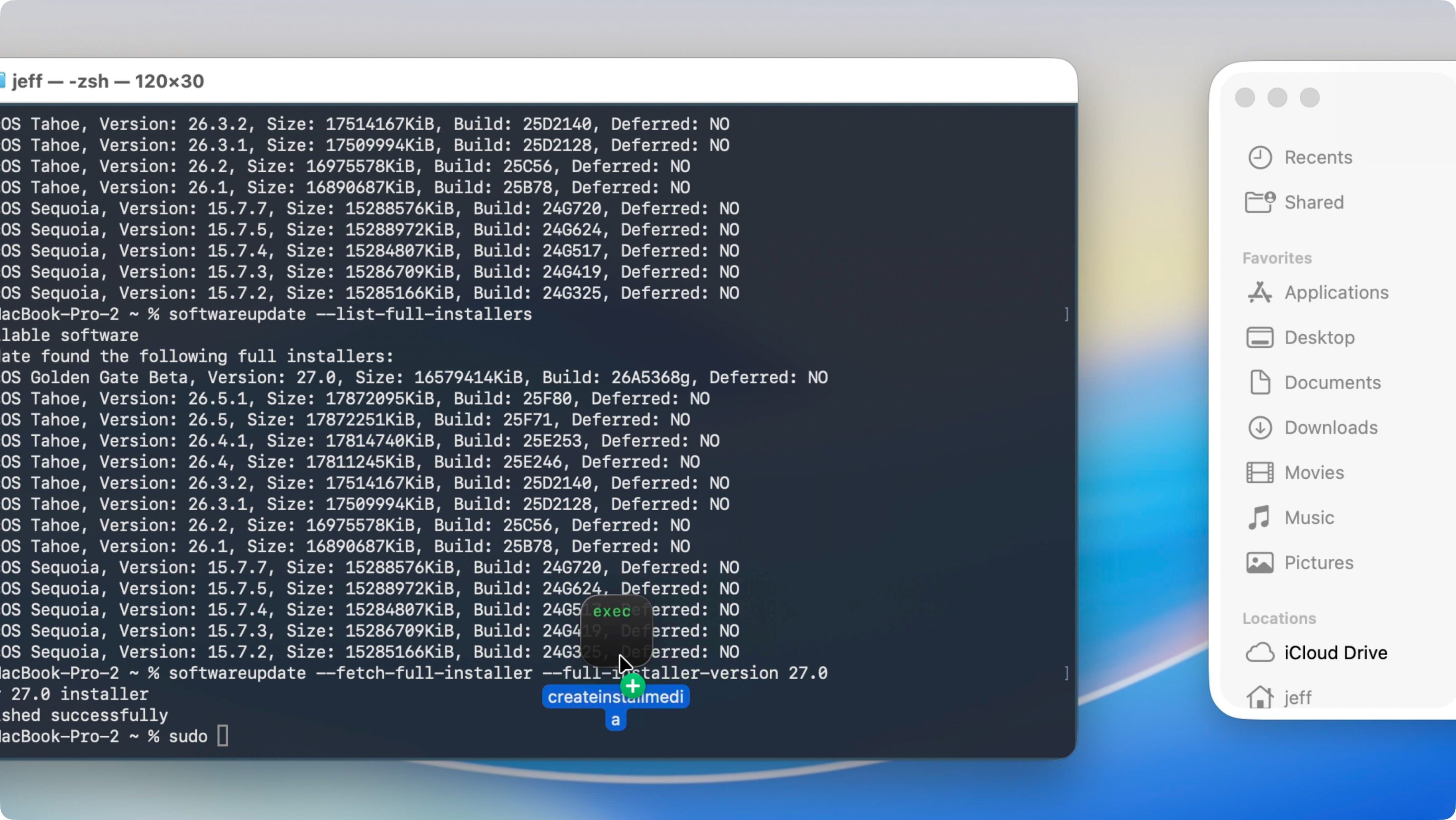
You can download the macOS Golden Gate installer in several ways, but I prefer utilizing Terminal’s softwareupdate command. To do so, open a new Terminal window and do the following:

Step 1: Step 10: Copy and paste the following command in the Terminal:

softwareupdate --list-full-installers

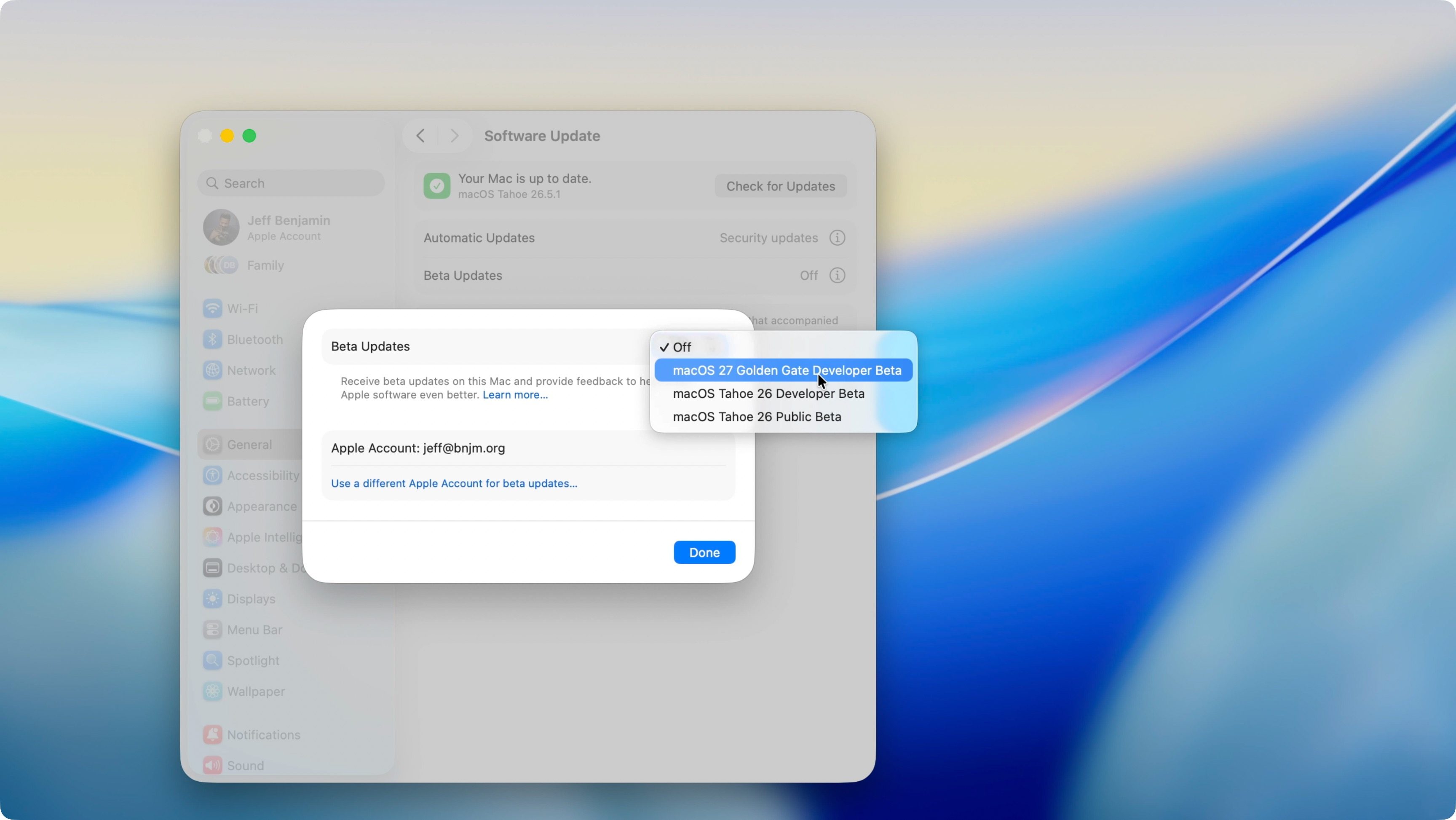
Note: if the macOS Golden Gate version you wish to download is a beta, you’ll need to enable Beta Updates in SettingsGeneralSoftware Updates before running the Terminal command above.
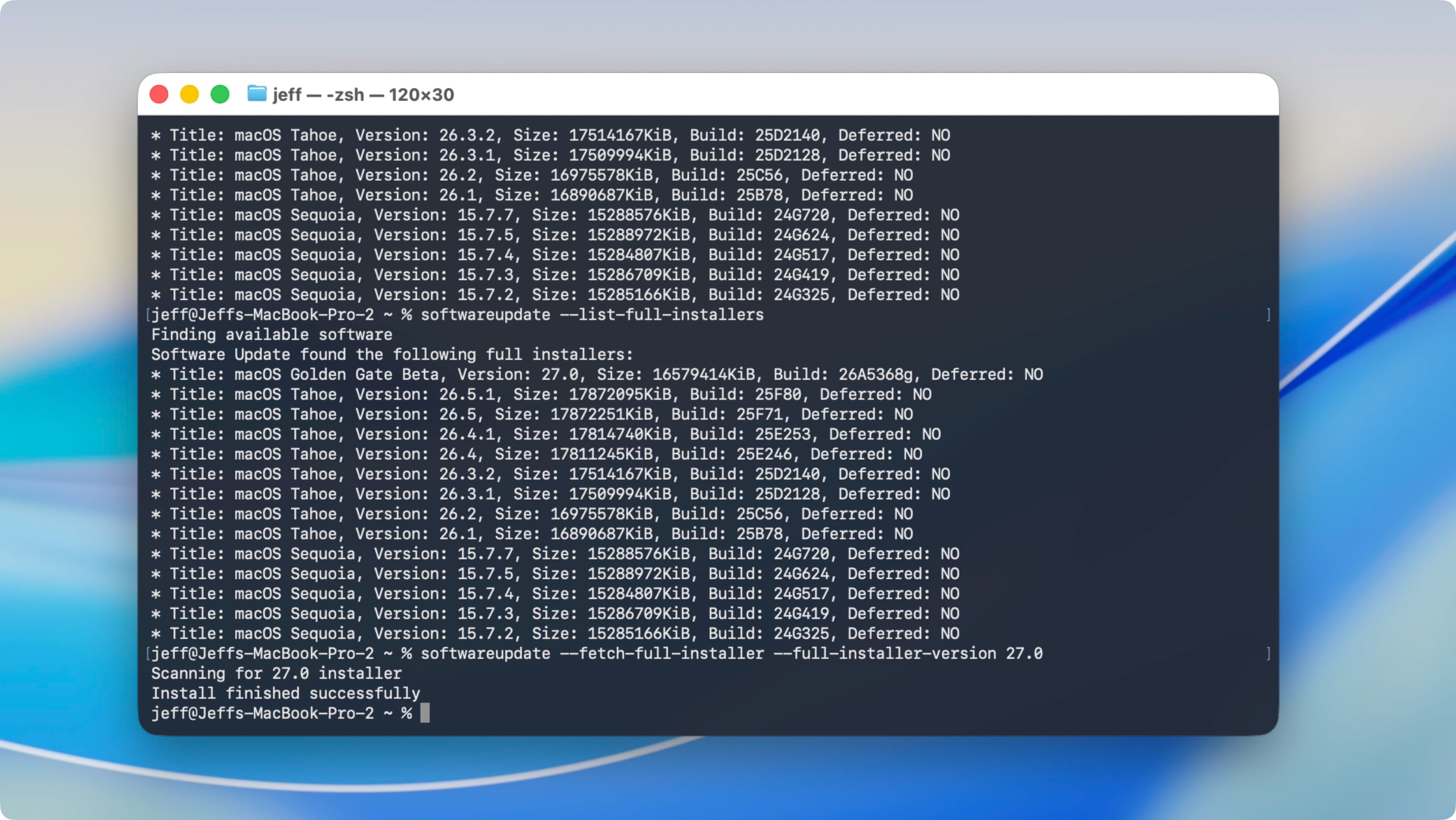
Step 2: Copy and paste the next command in Terminal. Be sure to replace the version number with the desired version found via Step 1. After pasting the command, press Return on your Mac’s keyboard. The macOS Golden Gate download will commence and save the installer to your Mac’s Application folder as Install macOS Golden Gate. For the beta version, it’ll say “Install macOS Golden Gate Beta.”

softwareupdate --fetch-full-installer --full-installer-version 27.0

Create the macOS Golden Gate USB installer

Step 3: Navigate to FinderApplications, and right-click on Install macOS Golden Gate beta → Show Package Contents. Then open Contents → Resources.

Step 4: In the Terminal window, type sudo followed by a space.

Step 5: Drag and drop createinstallmedia from the Resources folder referenced directly into the Terminal window, and then type --volume followed by a space.

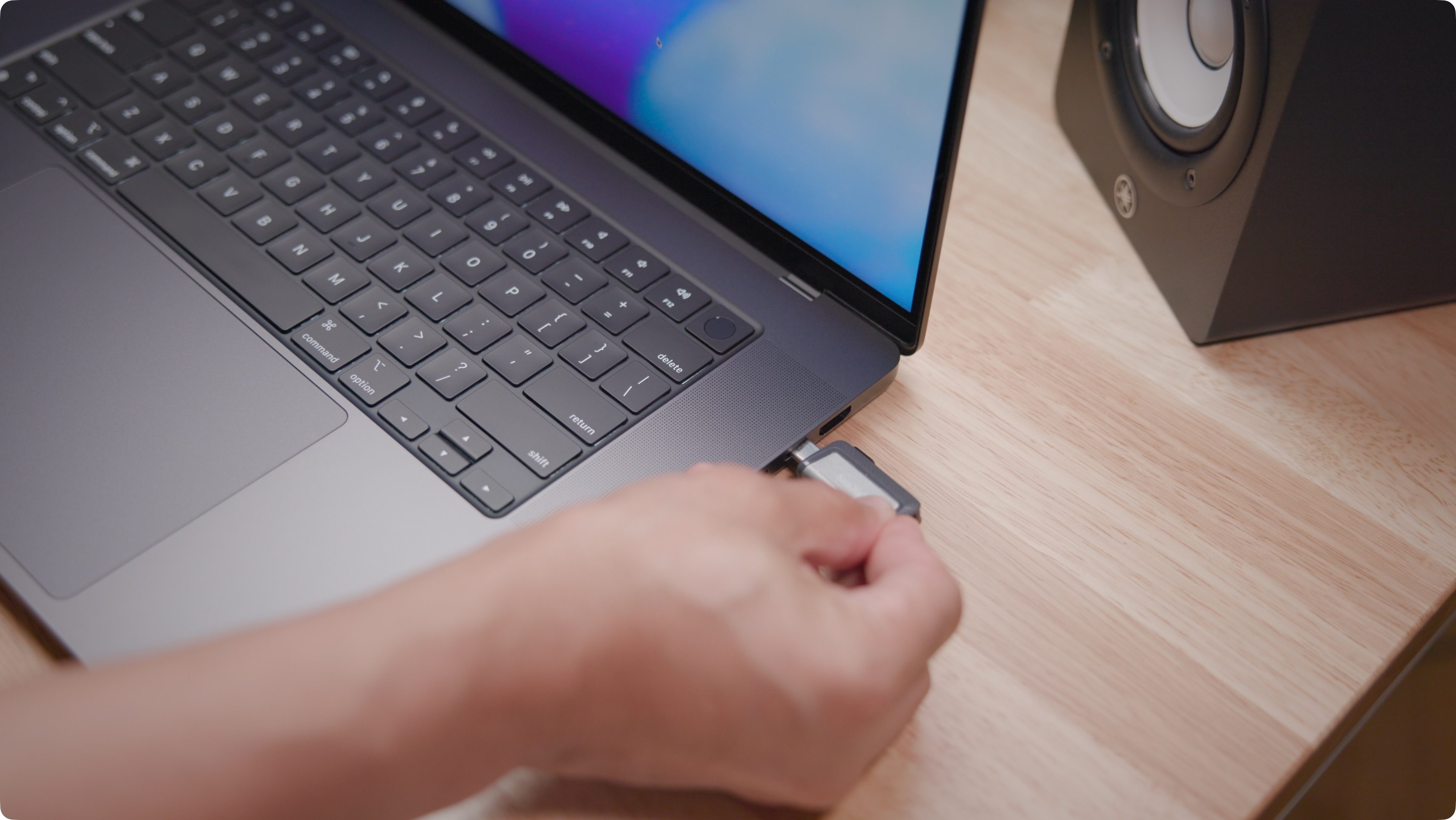
Step 6: Connect your USB Drive to your Mac and open it in Finder. Make sure that nothing on it is needed. If there’s existing data on the drive you need, back it up first, because the next steps will completely erase its contents.

Note: APFS-formatted drives can’t be used to create USB installers. If your USB Drive is APFS-formatted, open ApplicationsUtilitiesDisk Utility, select the drive, and click Erase. For format, choose Mac OS Extended (Journaled), then click Erase.

Step 7: Open FinderGoGo To Folder… then type /Volumes and press return on your keyboard to explore all connected volumes.

Step 8: Identify the USB drive that you connected in step 6. Double-check that you select the correct USB drive; otherwise, you risk deleting the contents of the wrong drive. Once identified, drag and drop the USB drive volume into the Terminal window.
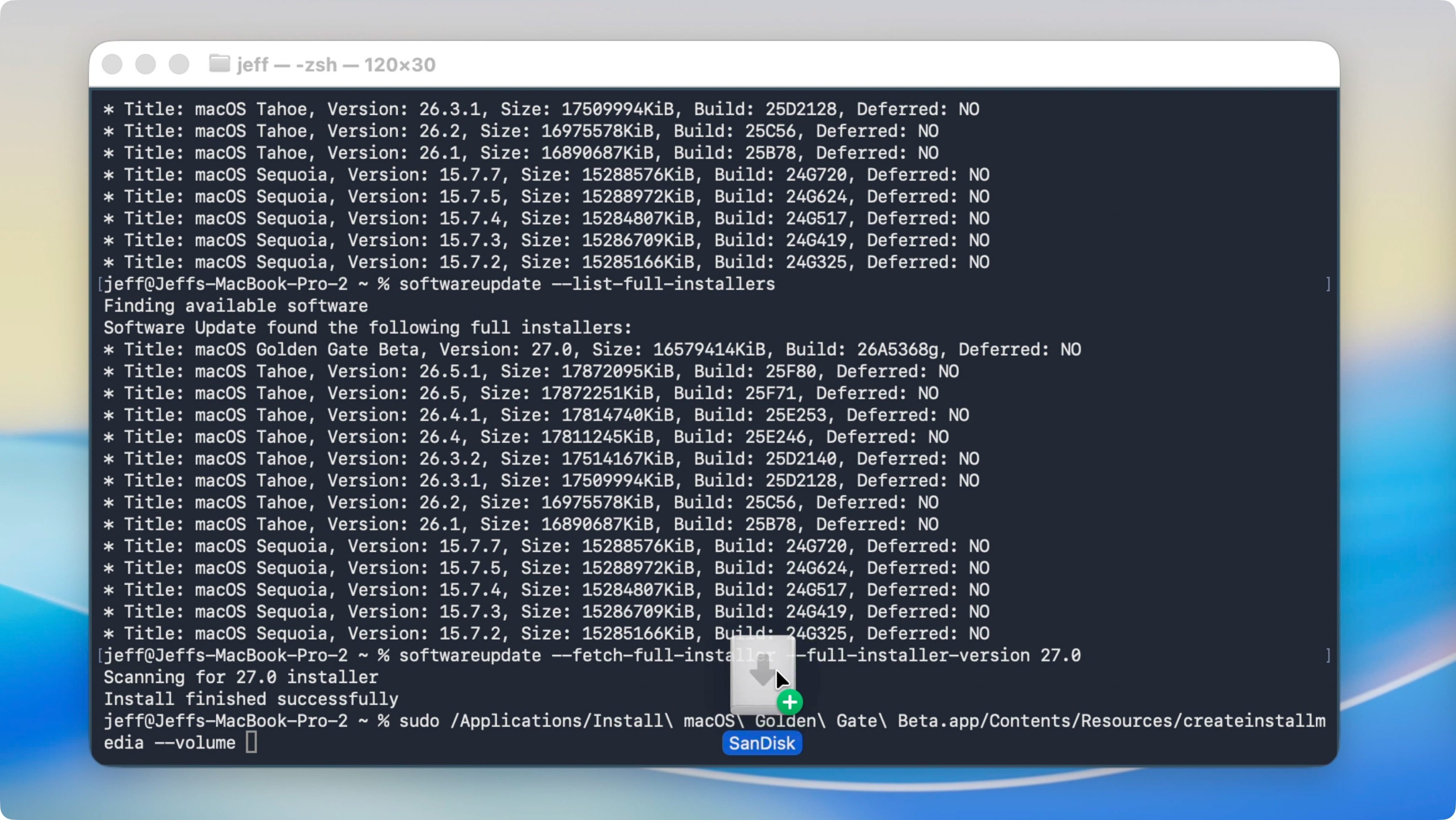
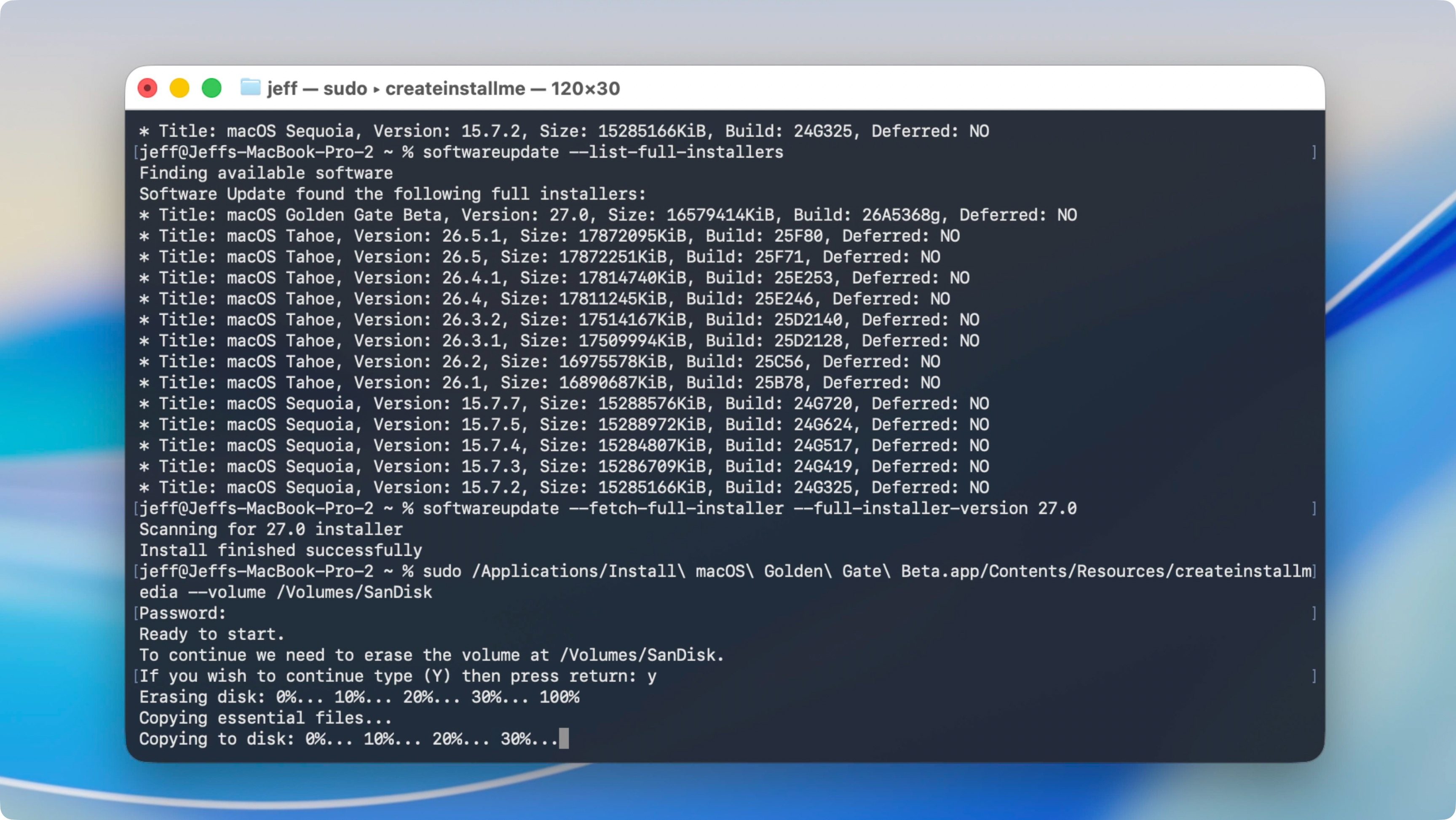
Step 9: Press Return on your Mac’s keyboard to process the Terminal command. When prompted, enter your administrator password, then press Return on your Mac’s keyboard again. When prompted, type a “y,” and press Return on your Mac’s keyboard yet again.

Note: If you haven’t already provided security permission, Terminal may ask for access to files on the removable volume (USB drive). If so, click OK to give Terminal access to the drive.

Step 10: The installation process will begin by purging the contents of the connected USB drive. Thereafter, it will copy the required installer files to it. This process takes a few minutes to complete, so please wait patiently.

After the installation process completes, you may eject the disk and keep it handy for when needed.

9to5Mac’s Take

Creating a macOS Golden Gate USB installer disk can save you a lot of time if you ever plan to install macOS Golden Gate across multiple Macs. It also comes in handy when dealing with slower internet connections, so you don’t have to redownload the installer during a fresh install.

This tutorial works for the macOS Golden Gate final version and the macOS Golden Gate beta. If you’re planning on installing the beta version of Golden Gate, I’d recommend installing it on a separate APFS volume and keeping your macOS Tahoe installation. By doing this, you can evaluate the macOS Golden Gate beta without fully committing to a potentially unstable beta release on your main Mac install volume.

What are your thoughts on the macOS Golden Gate beta? Are you planning on installing the beta, or are you waiting for the final release later this year? Sound off in the comments with your thoughts.


Add 9to5Mac as a preferred source on Google Add 9to5Mac as a preferred source on Google

FTC: We use income earning auto affiliate links. More.