惯性聚合 高效追踪和阅读你感兴趣的博客、新闻、科技资讯
阅读原文 在惯性聚合中打开

推荐订阅源

freeCodeCamp Programming Tutorials: Python, JavaScript, Git & More
腾讯CDC
cs.AI updates on arXiv.org
L
LINUX DO - 热门话题
D
Darknet – Hacking Tools, Hacker News & Cyber Security
Project Zero
Project Zero
V
Vulnerabilities – Threatpost
Cisco Talos Blog
Cisco Talos Blog
P
Palo Alto Networks Blog
C
Cisco Blogs
A
Arctic Wolf
月光博客
月光博客
The GitHub Blog
The GitHub Blog
T
The Blog of Author Tim Ferriss
量子位
小众软件
小众软件
Latest news
Latest news
OSCHINA 社区最新新闻
OSCHINA 社区最新新闻
Microsoft Security Blog
T
The Exploit Database - CXSecurity.com
Security Latest
Security Latest
N
Netflix TechBlog - Medium
K
Kaspersky official blog
人人都是产品经理
人人都是产品经理
Cyber Security Advisories - MS-ISAC
博客园_首页
Y
Y Combinator Blog
P
Proofpoint News Feed
H
Hackread – Cybersecurity News, Data Breaches, AI and More
M
MIT News - Artificial intelligence
T
Threat Research - Cisco Blogs
S
Schneier on Security
D
Docker
Scott Helme
Scott Helme
MyScale Blog
MyScale Blog
Spread Privacy
Spread Privacy
cs.CL updates on arXiv.org
Threat Intelligence Blog | Flashpoint
GbyAI
GbyAI
有赞技术团队
有赞技术团队
Google DeepMind News
The Hacker News
The Hacker News
H
Help Net Security
Simon Willison's Weblog
J
Java Code Geeks
C
Cyber Attacks, Cyber Crime and Cyber Security
T
Tenable Blog
B
Blog
Know Your Adversary
Know Your Adversary
IT之家
IT之家

Jenkins - 标签 - cywhat's blog

Jenkins端口修改之后没有生效 Jenkins添加html报告并发送到邮箱 Jenkins报错 Bash:newman:command Not Found ERROR: Re-run SonarScanner using the -X switch to enable full debug logging. Jenkins启动报错原因分析 newman生成好看的html报告 Centos7.7安装并配置jenkins+python+allure发送定制化报告
Jenkins插件无法安装解决
cywhat · 2022-11-15 · via Jenkins - 标签 - cywhat's blog

   约 364 字  预计阅读 1 分钟    次阅读     条评论

目录

1、问题

1
jenkins各种改源地址都不行,都无法安装更新插件

2、可行方案

1
2
3
4
5
6
7
8
9
1、更改源地址(http://mirror.esuni.jp/jenkins/updates/update-center.json)

2、更改配置
    a. vim jenkins/updetes/default.json
    
    b.把:"http://www.google.com/" 改成 "http://www.baidu.com/"
    把:"https://updates.jenkins.io/download 全部替换成 "http://mirrors.tuna.tsinghua.edu.cn/jenkins"

3、添加跳过SSL证书检查的插件【强烈推荐】,详情查看步骤3

3、问题解决

1
2
3
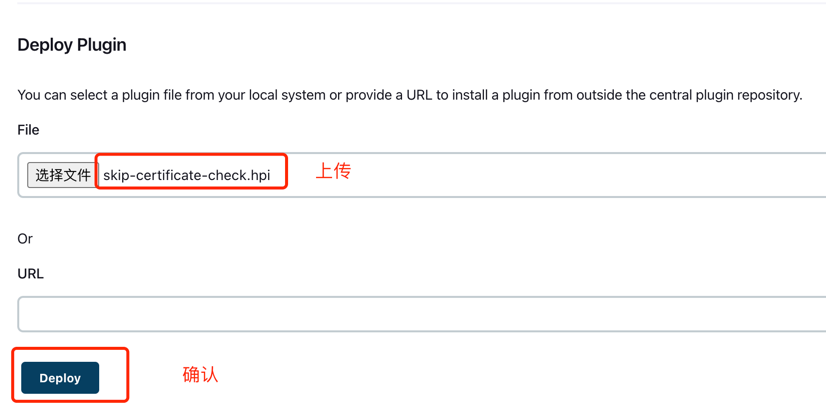
1、下载安装`skip-certificate-check`插件,该插件为跳过SSL证书检查插件

2、打开jenkins安装插件 Jenkins—>系统管理—>插件管理->高级-上传下载的插件->重启jenkins

/img/img61.png

关注一下再走吧

公众号 小程序

赞赏支持

微信打赏 支付宝打赏