惯性聚合 高效追踪和阅读你感兴趣的博客、新闻、科技资讯
阅读原文 在惯性聚合中打开

推荐订阅源

T
The Exploit Database - CXSecurity.com
A
Arctic Wolf
K
Kaspersky official blog
T
Threat Research - Cisco Blogs
PCI Perspectives
PCI Perspectives
www.infosecurity-magazine.com
P
Privacy International News Feed
K
KPMG report finds enterprise disconnect between AI and its ROI | CIO
U
Unit 42
cs.CL updates on arXiv.org
Simon Willison's Weblog
P
Privacy & Cybersecurity Law Blog
O
OpenAI News
量子位
奇客Solidot–传递最新科技情报
奇客Solidot–传递最新科技情报
C
Cisco Blogs
AWS News Blog
AWS News Blog
Vercel News
Vercel News
Microsoft Security Blog
Threat Intelligence Blog | Flashpoint
美团技术团队
T
Threatpost
S
Schneier on Security
Cyber Security Advisories - MS-ISAC
C
Cyber Attacks, Cyber Crime and Cyber Security
Last Week in AI
Last Week in AI
C
CERT Recently Published Vulnerability Notes
Blog — PlanetScale
Blog — PlanetScale
C
Cybersecurity and Infrastructure Security Agency CISA
F
Full Disclosure
博客园_首页
N
Netflix TechBlog - Medium
Security Latest
Security Latest
有赞技术团队
有赞技术团队
Google DeepMind News
钛媒体:引领未来商业与生活新知
钛媒体:引领未来商业与生活新知
The Register - Security
Application and Cybersecurity Blog
Recent Announcements
博客园 - Franky
P
Palo Alto Networks Blog
Project Zero
Project Zero
CTFtime.org: upcoming CTF events
H
Help Net Security
Hacker News: Ask HN
Hacker News: Ask HN
Cisco Talos Blog
Cisco Talos Blog
H
Heimdal Security Blog
The Hacker News
The Hacker News
博客园 - 【当耐特】
GbyAI
GbyAI

Jenkins - 标签 - cywhat's blog

Jenkins端口修改之后没有生效 Jenkins添加html报告并发送到邮箱 Jenkins插件无法安装解决 Jenkins报错 Bash:newman:command Not Found ERROR: Re-run SonarScanner using the -X switch to enable full debug logging. Jenkins启动报错原因分析 Centos7.7安装并配置jenkins+python+allure发送定制化报告
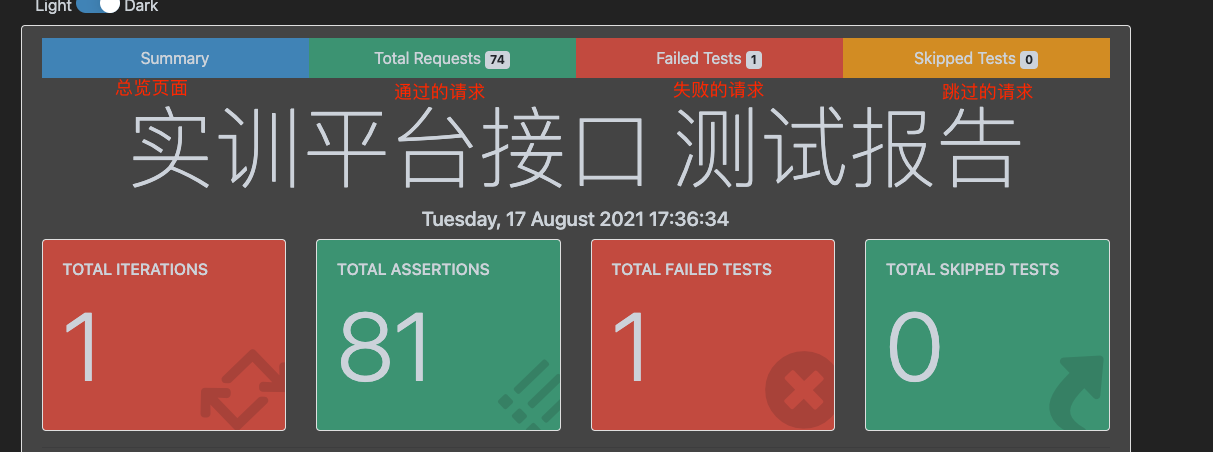
newman生成好看的html报告
cywhat · 2021-08-18 · via Jenkins - 标签 - cywhat's blog

   约 234 字  预计阅读 1 分钟    次阅读     条评论

目录

PS:运行newman需要node 版本大于10

1.安装newman

2.安装普通html报告插件(建议安装)

1
npm install -g newman-reporter-html

3.安装美化html插件

1
npm install -g newman-reporter-htmlextra

4.newman命令详解

1
2
3
4
5
6
7
8
newman run  SX.postman_collection.json -e environment.json -r htmlextra,cli --reporter-htmlextra-title "实训平台接口 测试报告" --reporter-htmlextra-browserTitle "实训平台接口报告" --reporter-htmlextra-export Bapi.html
#参数解释:
run 后面跟接口脚本json格式的文件
-e 后面添加环境变量
-r 指定生成的报告格式
--reporter-htmlextra-title 指定生成的报告title
--reporter-htmlextra-browserTitle 指定生成的浏览器title
--reporter-htmlextra-export 指定生成的html文件名和路径

/img/img6.png

关注一下再走吧

公众号 小程序

赞赏支持

微信打赏 支付宝打赏