









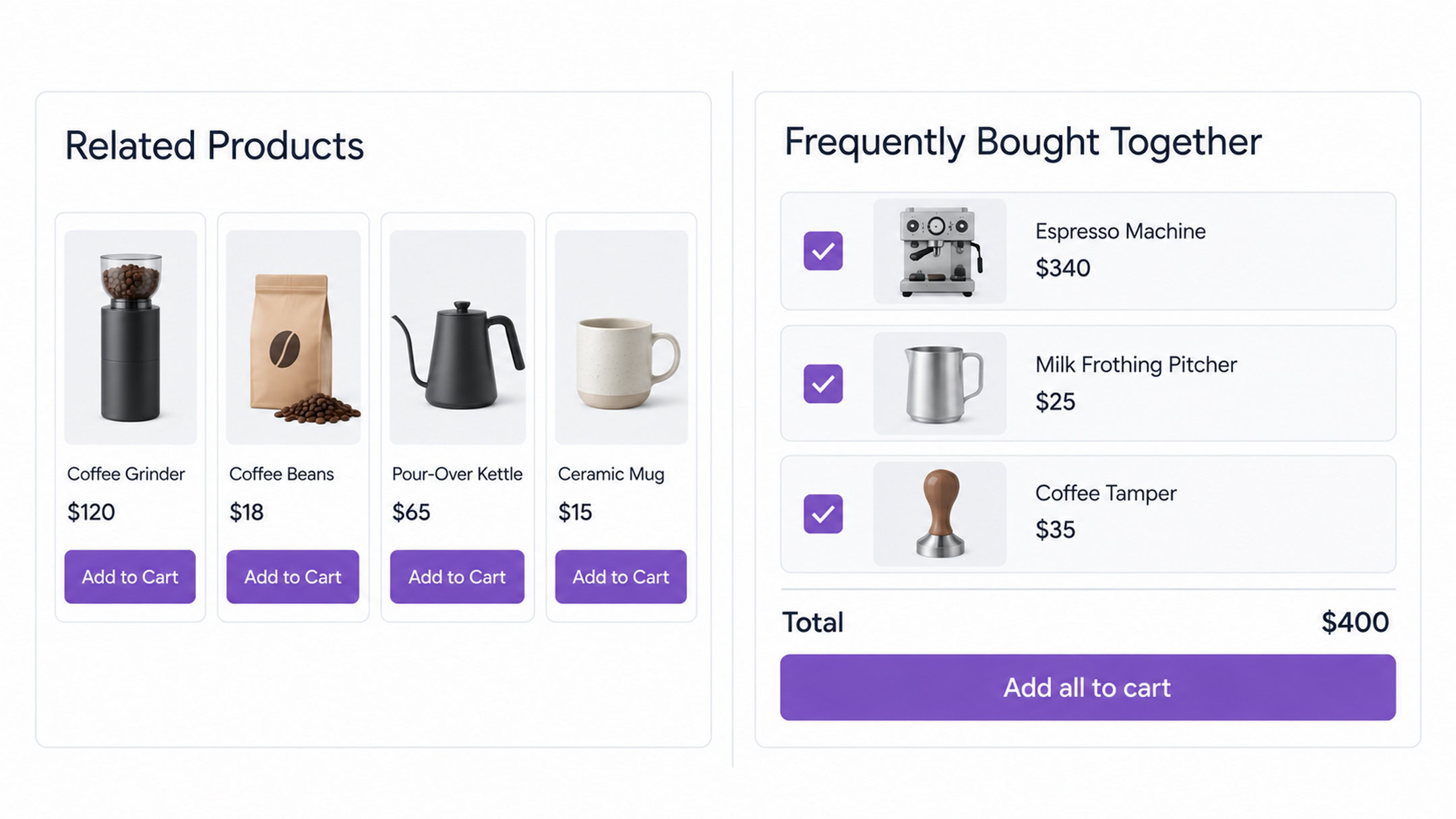
Amazon’s frequently bought together box is why shoppers recognize the format on sight. Three products, three checkboxes, a running total, one button.
WooCommerce ships with nothing like it. It has related products, upsells and cross-sells, and none of those three produce a bundle.
The gap is worth pricing before we fix it. If your store takes 400 orders a month and one shopper in twelve adds a $20 companion, that’s around $660 a month from traffic you already paid for.
Table Of Contents
Frequently bought together is a group of complementary products shown on a product page, each with its own checkbox, a combined total and a single button that adds the whole set to the cart at once.
The pairings can come from your own choices, or from a recommendation system that analyzes which products customers buy in the same order.
Three things already in WooCommerce get confused with it:
Frequently bought together is a cross-sell in spirit. What separates it is timing and format.
It sits on the product page rather than the cart. And it’s presented as a bundle the shopper accepts in one action, rather than a row of thumbnails they click through one at a time.
The timing does most of the work.
Someone reading a product page is still building their idea of what they need. Someone on the cart page has finished deciding and is heading for checkout, which is a much harder moment to add to.
No. There’s no native frequently bought together in WooCommerce.
Related products is the closest thing, and it differs in two ways that matter.
First, it’s algorithmic. WooCommerce picks what appears from shared categories and tags rather than letting you decide.
Second, it has no bundle interface. No checkboxes, no combined total, no single add-to-cart button.
Related products aren’t based on your store’s co-purchase history. Two items can appear together because they share a tag, even if no customer has ever bought them in the same order.
So getting real frequently bought together WooCommerce functionality means installing a plugin. Here’s how that works in practice.
We’re using CartFlows for the walkthrough because the widget is in its free plugin, so you can follow along without spending anything, and its settings map cleanly onto what the other plugins offer. The general shape holds whichever one you pick.
Go to Plugins > Add New, search for CartFlows, then install and activate.
One thing that catches people out: the settings don’t live in a separate admin menu. They appear inside each individual product. And you don’t need an account or a license for manual pairing, which only becomes relevant in steps 7 and 8.
Go to Products, open the product you want the bundle on, scroll to the Product data box and click the Frequently Bought Together tab. Turn on Enable Widget in the top right, and the product list and settings appear.
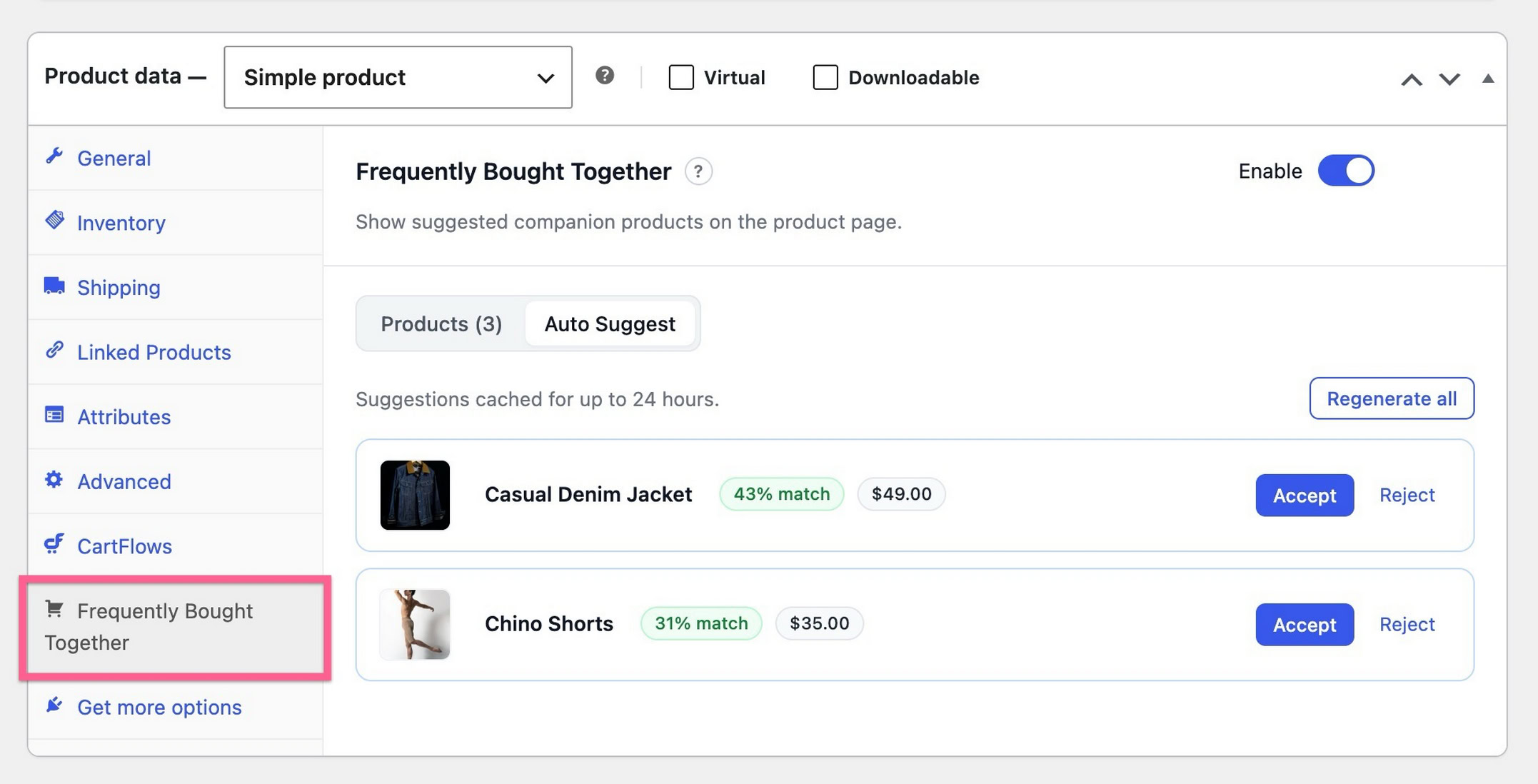
Set expectations here: this is configured per product, with no way to switch it on catalog-wide.
That’s deliberate, since companions that suit one product rarely suit another. But it does mean a 200-product store is a real time commitment if you’re pairing by hand.
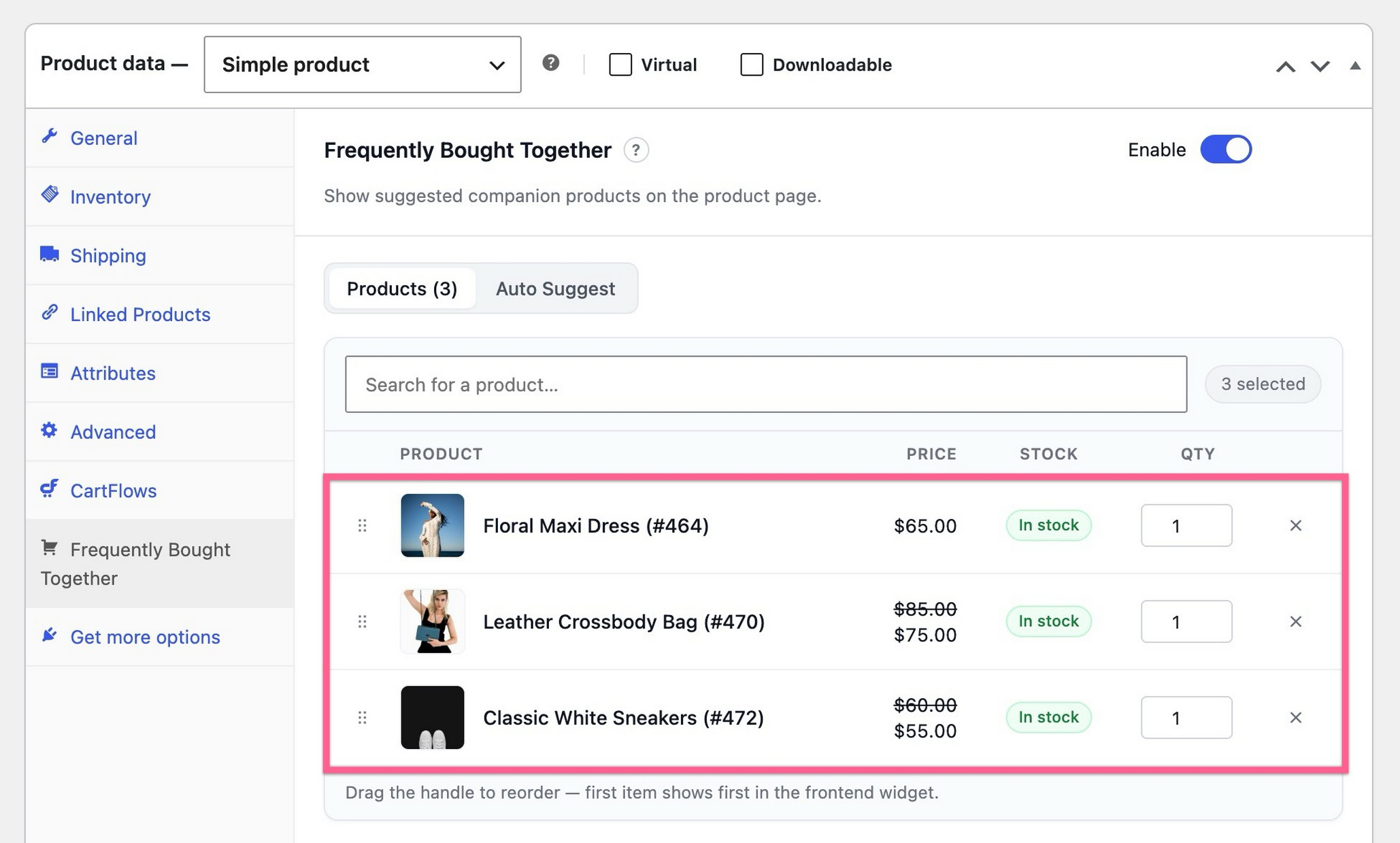
Search for each product you want offered alongside the main one. Each appears as a row with its image, name, price and stock status.
Drag the handle on the left to reorder. The first row is the first companion shoppers see.
Only three companions display at first, with a Show more link revealing the rest. Use that as a hint. Two or three reads as a bundle. Ten reads as a catalog page, and shoppers skim past it.
Pick companions that solve a problem the main product creates. A camera needs a memory card. An espresso machine needs a tamper. That logic converts better than pairing two things that merely sell well.
Add products separately decides what happens after the click. Leave it on and each product enters the cart as its own line item, removable independently. Turn it off and the companions stay tied to the main product, so removing the main product removes them too.
Tying them together suits genuine accessories that are useless alone, like a fitted case.
For most stores, leaving them separate is safer. A shopper who feels trapped by a bundle tends to abandon the whole cart rather than untangle it.
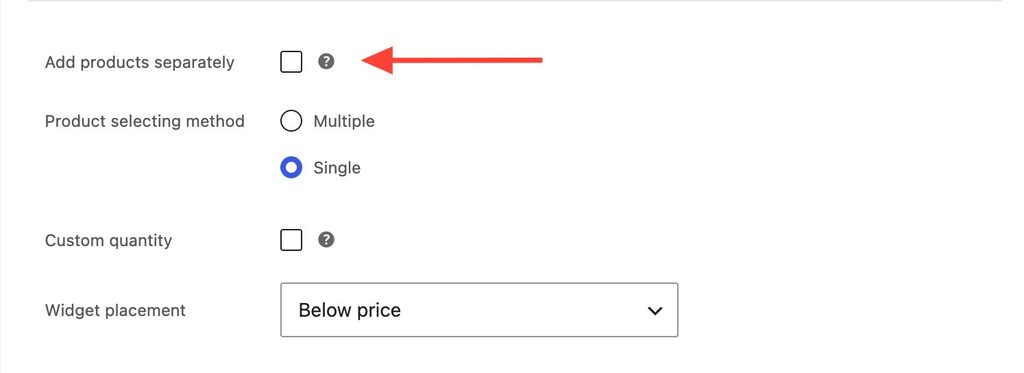
Product selecting method offers two options. Multiple lets shoppers tick as many companions as they want, which is right when the companions add up. Single limits them to one at a time, which suits stores where the companions are alternatives rather than additions, like choosing one of three lens filters.
Custom quantity adds a quantity box to each row, with a starting number you set.
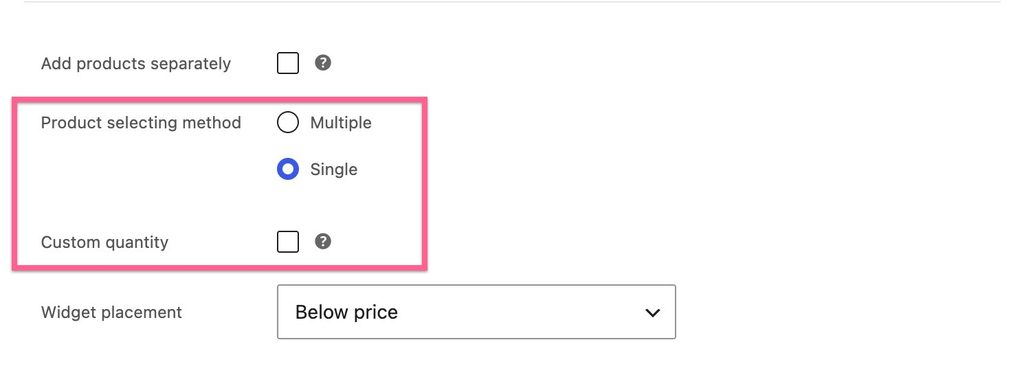
Four positions are available: After Add-to-Cart button, Below title, Below price, or Below summary.
After the add-to-cart button is the safe default. By that point the shopper has seen the price and the description, so the bundle reads as an addition rather than an interruption.
Placing it above the price competes with the main product for attention, which is rarely what you want.
The result depends on how your theme builds product pages, and two options can land in the same spot. Check the front end rather than trusting the label. Then click Update to save.
Here’s the part nobody warns you about. Choosing companion products sounds easy until you’re staring at your catalog.
A camera and a memory card is obvious. But is it the 64GB card or the 128GB? Does the tripod actually sell alongside it, or does it just feel like it should?
Most store owners guess. And a guess that’s wrong doesn’t fail loudly. The box just quietly gets ignored.
Your order history already holds the evidence. Every order is a record of what a real customer decided to buy in the same trip.
The problem is that nobody has time to read it. A store with 50 products has 1,225 possible pairs, and checking each one by hand isn’t work anyone actually does.
Auto Suggest does that reading for you. Open the Auto Suggest tab and click Generate suggestions.
It counts how often products genuinely appear in the same order, then returns a ranked list with a match badge on each row. You’re picking from evidence rather than instinct.
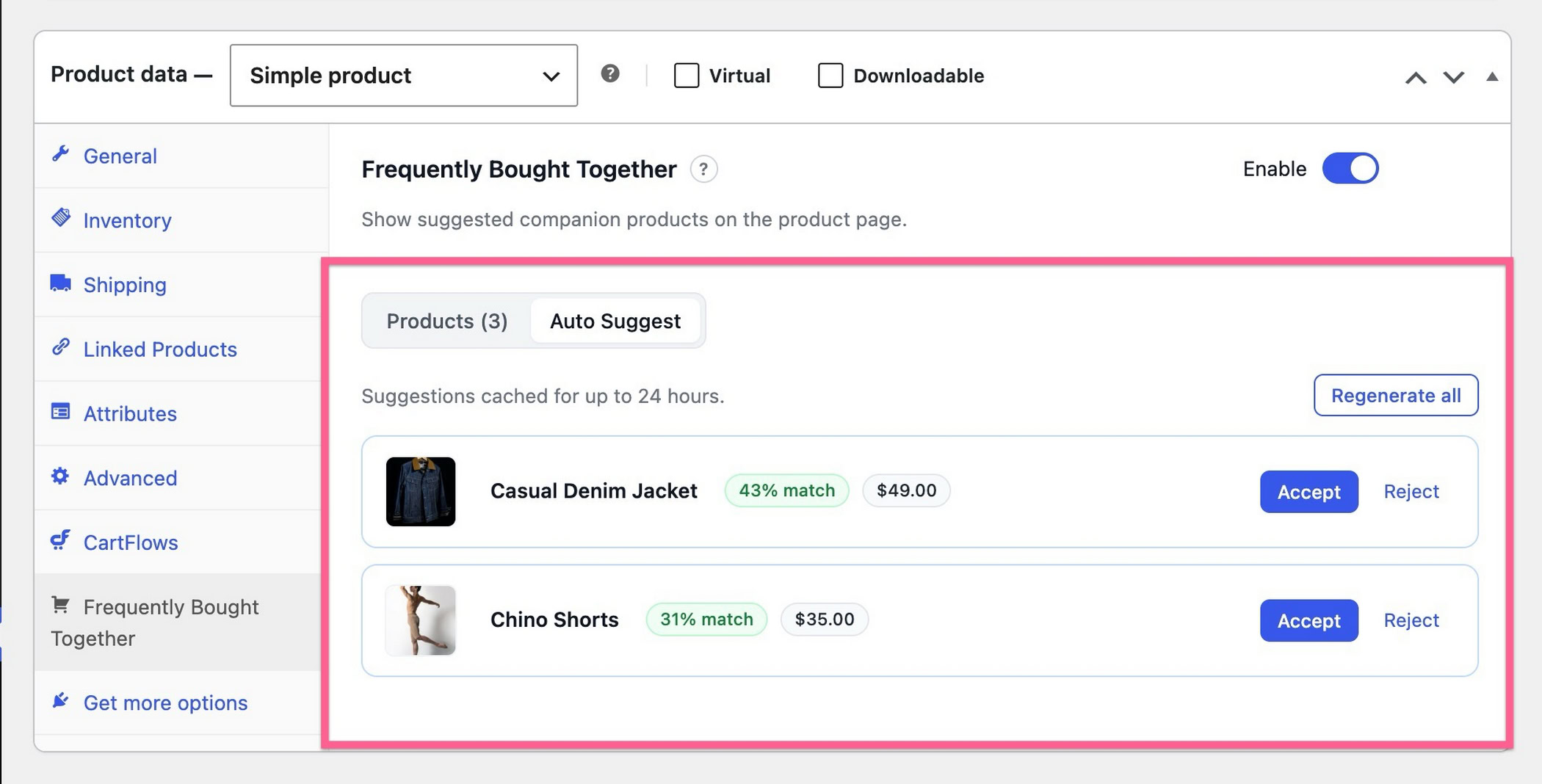
Three things to understand before you rely on it:
Suggestions are cached for up to 24 hours, and Regenerate all fetches a fresh batch sooner.
Auto Suggest sits in the CartFlows Pro plan, so you’ll need Pro rather than Starter, plus an activated license and a connected CartFlows account. Until all three are in place the tab shows a prompt instead.
Everything in steps 3 through 6 works in the free plugin with none of that.
On privacy, which comes up often: the buying-pattern analysis runs on your own site against your own database.
Only product details leave, meaning names, descriptions, SKU, price, categories, tags and attributes. No customer information and no order data. That’s in the CartFlows documentation if you want the detail.
One thing worth knowing about the timing. Auto Suggest gets better as your store accumulates orders, because there’s more co-purchase data to read.
A store that starts today will have more co-purchase data to work from in three months than a store that starts three months from now with the same catalog.
Your store is already accumulating that data. Auto Suggest turns it into product recommendations.
Worth the upgrade? Ask yourself one thing: could you confidently name the right companion for every product in your catalog right now? If yes, the free widget does everything you need. If you’d be guessing on most of them, that’s the gap Pro closes, and it closes it with your own sales data rather than someone’s opinion. See what Auto Suggest does.
Check the front end before calling it done. Bundle boxes break on narrow screens more than anything else on a product page, usually because long product names wrap badly or the running total gets pushed below the fold where nobody sees it.
Test the out-of-stock case too. In CartFlows an unavailable companion appears greyed out with a badge and can’t be selected, and a variable companion with no purchasable variations is dropped entirely.
Not every plugin handles this the same way, so test it whichever one you pick. A bundle offering something unbuyable costs you the sale you already had.
Your normal add-to-cart button stays exactly where it is throughout. The bundle sits alongside it with its own button.
All five WordPress frequently bought together plugins below are built for WooCommerce, though their features and compatibility vary.
Features and pricing were checked against each vendor’s own documentation, and WordPress.org listing data where applicable.
| Plugin | Price | Free tier | Pairing | Discounts | Best for |
|---|---|---|---|---|---|
| CartFlows | Free; paid from $99/yr, Pro $199/yr | Yes, manual widget | Manual, automatic in Pro | No | Pairing from real sales data |
| WPC Frequently Bought Together for WooCommerce | Free; premium available | Yes | Manual | Yes, per item | Free bundle discounts |
| YITH Frequently Bought Together for WooCommerce | Free; $79.99/yr premium | Limited | Manual, auto by tag in premium | Premium only | Existing YITH users |
| UpsellWP | From $75/yr, 1 site | Lite, includes FBT | Manual plus targeting rules | Yes | Large catalogs |
| Bought Together | Annual, via marketplace | No | Manual | Yes | Official marketplace |
Already running CartFlows? Use the widget you already have, along with the 200,000 or more stores already running the plugin. Manual pairing costs nothing, and if you’re on Pro, Auto Suggest is the only option here that pairs from your real sales data instead of guessing from categories.
Nine steps makes it sound like a project. It isn’t. Here’s a full bundle built from scratch, Auto Suggest included, in about a minute.
Don’t want to pay anything? Four of the five have a free version. Go with WPC if discounts matter to you. Of the five here, it’s the only one that lets you set a different discount on each product in the bundle, so you can knock 10% off one item and a flat amount off another.
Got a few hundred products? UpsellWP will save you the most time. You can add a bundle to a whole category, tag or SKU in one go, instead of opening every product and setting it up by hand.
Want to buy through WooCommerce itself? Bought Together covers the basics and you’ll find it on the official marketplace. It’s a much smaller plugin than the rest though, running on a couple of hundred stores, against 10,000 or more for WPC and 8,000 or more for YITH.
Whichever you choose, start with five products, not fifty. Pick the five where the companion is obvious, then measure whether bundle orders carry a higher average than single-product orders after a few weeks.
Expand from what worked. Configuring 200 products before you know whether your shoppers respond to bundles is how this becomes a wasted weekend.
Does WooCommerce Have Frequently Bought Together?
No. WooCommerce includes related products, upsells and cross-sells, but none of them produce a bundle box with checkboxes, a combined total and a single add-to-cart button. You need a plugin for that.
What’s the Difference Between Frequently Bought Together and Cross-Selling?
Frequently bought together is one specific format of cross-sell. It appears on the product page as a bundle the shopper accepts in one action.
Cross-sells more broadly can appear anywhere, including cart and checkout, and are usually shown as a list of individual products to click through separately.
Is There a Free WooCommerce Frequently Bought Together Plugin?
Yes, several. WPC Frequently Bought Together is free on WordPress.org with per-item discount control. CartFlows includes the manual widget in its free plugin. UpsellWP’s free Lite version includes its Frequently Bought Together campaign.
YITH has a free version as well, though a more limited one.
Can You Manually Choose Which Products Appear Together?
Yes, with every plugin in the table above. Manual pairing is the default in all of them, and only CartFlows also derives pairings from actual order history.
Does Frequently Bought Together Work With Variable Products?
It depends on the plugin. CartFlows supports variable products in its free version. WPC and YITH both treat that as premium. Support for grouped and external products varies, so check the documentation if your catalog leans on either.
Can AI Choose Frequently Bought Together Products for You?
Yes, but check what the AI is reading. CartFlows Auto Suggest analyzes your own order history to find genuine co-purchases.
Tools that suggest from tags and categories are pattern-matching your catalog structure, not your customers. Both can be described as automated recommendations, but only one is looking at what people actually bought.
Which WooCommerce Plugin Is Closest to Amazon’s Bundle Box?
CartFlows, on the mechanics that matter. It shows the main product locked as the first row, a checkbox per companion, a running total that updates as boxes are ticked, and one button for the set.
That’s the Amazon pattern. It’s also the only one in the table deriving pairings from real purchase data rather than catalog relationships.
How Much Can Frequently Bought Together Increase Average Order Value?
There’s no honest universal number, and any guide quoting one is guessing.
Run it on your own figures instead. At 400 orders a month and a $20 companion, every percentage point of take rate is about $80. Whether you land at 3% or 15% depends on how genuinely the companion belongs with the main product.

Abhijeet Kaldate is the co-founder and CRO of Brainstorm Force. With a keen eye for detail and a knack for getting things done, Abhijeet oversees the company's operations, managing key areas such as HR, marketing, design and finance.
Disclosure: This blog may contain affiliate links. If you make a purchase through one of these links, we may receive a small commission. Read disclosure. Rest assured that we only recommend products that we have personally used and believe will add value to our readers. Thanks for your support!
Join 1,587,020 Subscribers
Get exclusive access to new tips, articles, guides, updates, and more.
此内容由惯性聚合(RSS阅读器)自动聚合整理,仅供阅读参考。 原文来自 — 版权归原作者所有。