






对于国内的网站,我们无法控制网友评论的规范,所以一般我们的做法就是禁止评论。在对于WordPress程序中,如何实现禁止评论呢?我们可能看到有一些插件可以禁止,或者有主题自带禁止的。在这里,我们整理几个可以自定义设置禁止WordPress评论的方法。
1、系统设置
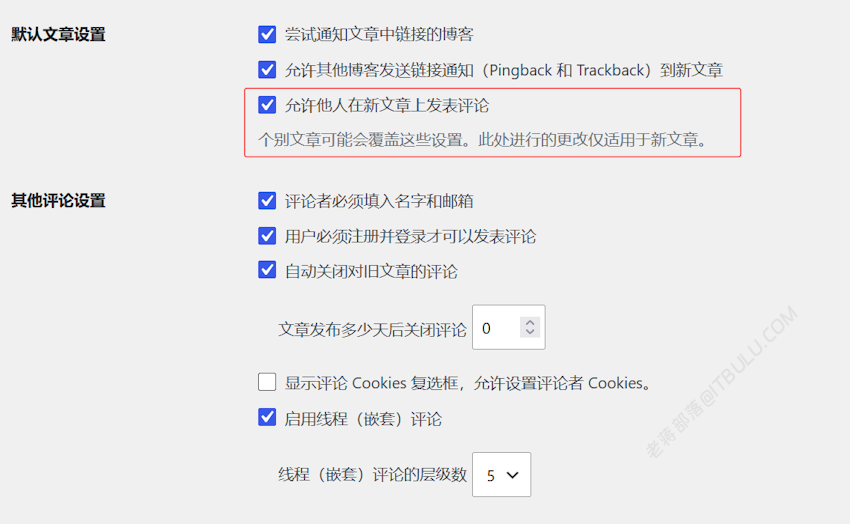
在设置-讨论选项中,禁止对于新帖子的评论。当然我们也可以禁止注册。
2、用代码全站禁止
在LESEO插件中,老蒋也有设置支持一键禁止评论,这里如果我们不用这些插件,可以用到代码替换。
/**
 * Disable WordPress comments completely.
 * Add to your child theme's functions.php or a custom snippet.
 */

// Close comments and pingbacks on the front end for all post types.
function wpc_disable_comments_status() {
	return false;
}
add_filter( 'comments_open', 'wpc_disable_comments_status', 20, 2 );
add_filter( 'pings_open', 'wpc_disable_comments_status', 20, 2 );

// Hide existing comments so none display publicly.
function wpc_hide_existing_comments( $comments ) {
	return array();
}
add_filter( 'comments_array', 'wpc_hide_existing_comments', 10, 2 );

// Remove comment support from every post type in the admin.
function wpc_disable_comments_post_types_support() {
	$post_types = get_post_types();
	foreach ( $post_types as $post_type ) {
		if ( post_type_supports( $post_type, 'comments' ) ) {
			remove_post_type_support( $post_type, 'comments' );
			remove_post_type_support( $post_type, 'trackbacks' );
		}
	}
}
add_action( 'admin_init', 'wpc_disable_comments_post_types_support' );

// Remove the Comments item from the admin menu.
function wpc_remove_comments_admin_menu() {
	remove_menu_page( 'edit-comments.php' );
}
add_action( 'admin_menu', 'wpc_remove_comments_admin_menu' );

// Remove Comments from the admin bar at the top of the screen.
function wpc_remove_comments_admin_bar( $wp_admin_bar ) {
	$wp_admin_bar->remove_node( 'comments' );
}
add_action( 'admin_bar_menu', 'wpc_remove_comments_admin_bar', 999 );

// Redirect anyone who tries to reach the comments admin page.
function wpc_redirect_comments_admin_page() {
	global $pagenow;
	if ( 'edit-comments.php' === $pagenow ) {
		wp_safe_redirect( admin_url() );
		exit;
	}
}
add_action( 'admin_init', 'wpc_redirect_comments_admin_page' );

// Remove the Comments widget from the dashboard.
function wpc_remove_comments_dashboard_widget() {
	remove_meta_box( 'dashboard_recent_comments', 'dashboard', 'normal' );
}
add_action( 'admin_init', 'wpc_remove_comments_dashboard_widget' );
添加到对应主题下面的 Functions.php 中实现禁止评论。
3、删除评论栏目
这里我们可以设置移除评论表单。
/**
 * Remove the comments column from post and page list tables.
 */
function wpc_remove_comments_column( $columns ) {
	unset( $columns['comments'] );
	return $columns;
}
add_filter( 'manage_posts_columns', 'wpc_remove_comments_column' );
add_filter( 'manage_pages_columns', 'wpc_remove_comments_column' );
这样,我们就可以通过这3个方式禁止评论。
原创文章,转载请注明出处:https://www.itbulu.com/disable-wpcomment.html