









Tackle your summer to-do list and get a jump on next semester with help from Google AI tools.

Your browser does not support the audio element.
Listen to article
[[duration]] minutes
This content is generated by Google AI. Generative AI is experimental
Summer’s arrived in the Northern Hemisphere. That means it’s prime time for beach trips, backyard barbecues, and afternoons at the pool. And if you’re a college student, it’s also the perfect season for getting ahead of your to-do list.
Need to find a fall internship, study for admissions exams, master a new skill, or prep for the school year ahead? Here are 12 ways Google’s AI tools can help you get things done with less stress — so you can spend more time enjoying your summer.
Apply for a fall internship.
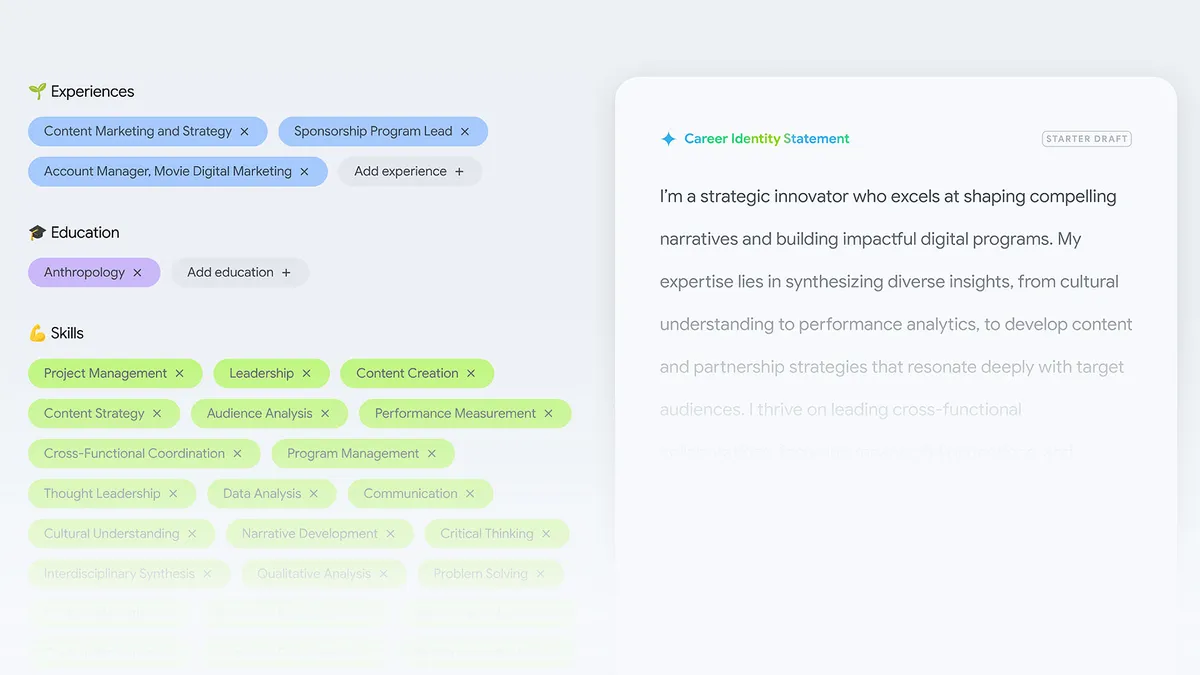
1. Not sure where to start your internship search? Brainstorm options with Career Dreamer, an AI-powered tool that helps you explore possible job opportunities. Input your experiences, skills, and interests, and find potential career paths tailored to your background.
2. Build a dashboard to track internship opportunities — and application deadlines — using Canvas in AI Mode. Simply open AI Mode in Search and turn on the Canvas tool to open a dedicated workspace. Then try a conversational prompt, like: “Help me build a dashboard to track fall internships in NYC focused on marketing and communications in fashion. Include details on deadlines and application requirements.”
3. Workshop your resume and cover letter with Gemini Notebook, an AI-powered research partner. Create a notebook for your internship search. Then upload all your career clutter — old projects, positive feedback, resumes, and more. Gemini Notebook can help you fine-tune your application materials, identify key strengths, and turn your background into a coherent narrative to pitch to employers.
4. Prep for upcoming interviews by rehearsing with Gemini Live. You can use this feature to have a natural, free-flowing conversation out loud — just like you would in an interview. Practice answering common interview questions, and ask Gemini for real-time feedback on your delivery, pacing, and tone. It’s like having an interview coach in your pocket.
Try new things.
5. Explore a hobby, pick up a creative project, or master a new skill with YouTube Learning. YouTube’s educational library is packed with top-tier instructional content. And on select videos, you’ll see an “Ask” button that lets you dive even deeper. Tap it to find out what a video covers, generate a summary of its key points, or even create a brief quiz on its contents — all without leaving the video.
6. When you need help picking up a new skill — like crafting the perfect cup of matcha — consider Search Live your very own expert adviser. Just open the Google app (Android and iOS) and tap the Live icon under the search bar. Then point your camera at the equipment in your matcha set and ask what each tool is used for. You can also get quick advice on which ingredients you can substitute if you’re looking for low-sugar or dairy-free alternatives for a matcha latte.
7. Get instant feedback on your sports form with Gemini video analysis. Let’s say you’ve taken up pickleball over the summer. Record a quick clip of yourself hitting a few shots, and ask Gemini how you can improve. It will break down your paddle angle, stance, and follow-through, helping you understand what to adjust.
8. Use Lens in the Google app to dive deeper into your interests, whether you’re expanding your plant collection or exploring local history. Maybe you see a cool plant, but you’re not sure what it’s called or how to take care of it. Snap a photo with Lens, and add “how much sunlight does this need” to learn more. You can do the same with unique landmarks in your area. Take a picture with Lens and ask “what inspired this design?”
9. Maintain healthy digital habits with Android’s built-in screen time tools. When you’re in the zone of learning something new, it’s easy to lose track of time and stare at your screen for hours. So set take a break reminders or a bedtime schedule to keep your days balanced. That way, you can stay refreshed and ready for your summer internship, vacation, or whatever else the season has in store.
Study smarter.
10. Applying to grad school? Use study notebooks in Gemini to prep for standardized tests, like the GRE (available in Gemini later this summer). After assessing your knowledge gaps with a diagnostic quiz, Gemini will keep you on track with bite-sized lessons and progress checks.
11. AI Mode in Search can help you create custom study guides for summer courses, using the Canvas tool. Just select Canvas from the plus (+) menu and ask AI Mode something like “make a study guide for Impressionism, include key periods, and highlight the main artworks.” You’ll get a comprehensive study guide, complete with relevant links and images. Then, you can ask follow-up questions, upload your notes to add more context, and either share a link to the guide with your classmates or export it to Google Docs.
12. Turn your notes into a podcast with Gemini Notebook. Let’s say you’re planning to apply to law school this fall. Upload your LSAT study materials into a notebook. Then use the Audio Overview feature to create a podcast between two AI hosts discussing your notes. You can listen to your custom podcast while riding the subway or walking to your internship. And you can even interrupt the hosts with questions if you don’t understand something.
13. Organize last semester’s notes by creating a dedicated Gemini notebook for each class you took. Upload everything: whiteboard photos, lecture videos, problem sets, class notes — you name it. Gemini can transform your files into whatever format helps you learn best, like a study guide, practice quiz, infographic, or interactive visualization. And when you want to review your notes, try explaining the concept out loud using Gemini Live. It’ll spot the gaps in your knowledge, asking follow-up questions to make sure you still understand the material.