


惯性聚合 高效追踪和阅读你感兴趣的博客、新闻、科技资讯
阅读原文 在惯性聚合中打开

推荐订阅源

A
About on SuperTechFans
Y
Y Combinator Blog
钛媒体:引领未来商业与生活新知
钛媒体:引领未来商业与生活新知
Microsoft Security Blog
aimingoo的专栏
aimingoo的专栏
I
InfoQ
C
Check Point Blog
IT之家
IT之家
MyScale Blog
MyScale Blog
Apple Machine Learning Research
Vercel News
Vercel News
Last Week in AI
Last Week in AI
GbyAI
GbyAI
P
Proofpoint News Feed
量子位
Stack Overflow Blog
Stack Overflow Blog
Microsoft Azure Blog
月光博客
月光博客
阮一峰的网络日志
阮一峰的网络日志
人人都是产品经理
人人都是产品经理
B
Blog
T
The Blog of Author Tim Ferriss
H
Help Net Security
云风的 BLOG
云风的 BLOG

Tags from textgen

Release v4.9 · oobabooga/textgen Release v4.8 · oobabooga/textgen Release v4.7.2 · oobabooga/textgen Release v4.7.1 · oobabooga/textgen Release v4.7 · oobabooga/textgen Release v4.6.2 · oobabooga/textgen Release v4.6.1 · oobabooga/textgen Release v4.6 · oobabooga/textgen Release v4.5.2 · oobabooga/textgen
Release v4.7.3 · oobabooga/textgen
oobabooga · 2026-05-03 · via Tags from textgen

Changes

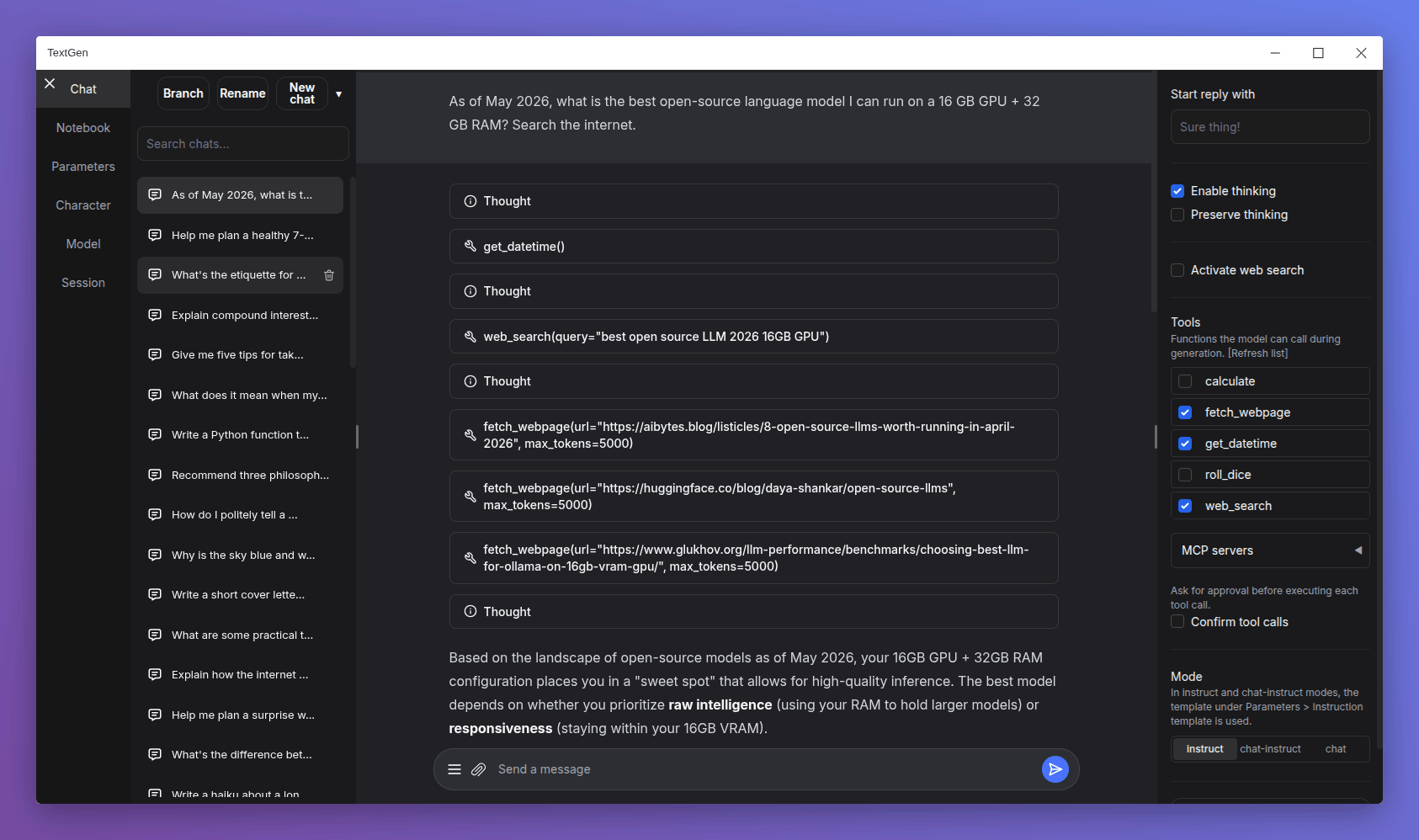
  • Native desktop app: Portable builds now bundle Electron and open as a native window. Run textgen / textgen.bat instead of the previous start scripts. Pass --listen or --nowebui to skip the window and run the server directly.
  • Major UI overhaul:
    • Replace Noto Sans with Inter as the default font.
    • Replace emoji refresh/save/delete buttons with Lucide SVG icons.
    • Turn the chat mode selector (chat / chat-instruct / instruct) into a 3-button segmented control.
    • Redesign the chat input as a single rounded card with a circular accent-colored send button.
    • Use a flat underline for the active tab indicator.
    • Replace the sidebar toggle buttons with 3px hairline handles on desktop.
  • Tensor parallelism for llama.cpp: New --split-mode flag (replacing --row-split) with a tensor option that can make multi-GPU inference 60%+ faster. On the ik_llama.cpp backend, tensor and row fall back to graph.
  • Replace DuckDuckGo HTML scraping in the web search tool with the ddgs library, which is more robust against DuckDuckGo's bot blocking.
  • Add support for standalone .jinja/.jinja2 instruction template files in the UI, in addition to the existing .yaml format (#7517).

Bug fixes

  • Fix Stop button being ignored during tool call approval, and not interrupting between tool turns in multi-turn tool loops.
  • Fix race condition in the ExLlamaV3 backend that could affect concurrent API requests.
  • Fix extension settings not saving for extensions inside user_data/extensions (#7525).

Dependency updates

Portable builds

TextGen is now a desktop app for local LLMs. Download, unzip, double-click.

Note

NVIDIA GPU: If nvidia-smi reports CUDA Version >= 13.1, use the cuda13.1 build. Otherwise, use cuda12.4.

ik_llama.cpp is a llama.cpp fork with new quant types. If unsure, use the llama.cpp column.

Windows

GPU/Platform llama.cpp ik_llama.cpp
NVIDIA (CUDA 12.4) Download (891 MB) Download (1.23 GB)
NVIDIA (CUDA 13.1) Download (816 MB) Download (1.33 GB)
AMD/Intel (Vulkan) Download (336 MB)
AMD (ROCm 7.2) Download (604 MB)
CPU only Download (318 MB) Download (334 MB)

Linux

GPU/Platform llama.cpp ik_llama.cpp
NVIDIA (CUDA 12.4) Download (848 MB) Download (1.20 GB)
NVIDIA (CUDA 13.1) Download (803 MB) Download (1.32 GB)
AMD/Intel (Vulkan) Download (324 MB)
AMD (ROCm 7.2) Download (395 MB)
CPU only Download (306 MB) Download (334 MB)

macOS

Architecture llama.cpp
Apple Silicon (arm64) Download (271 MB)
Intel (x86_64) Download (283 MB)

Updating a portable install:

  1. Download and extract the latest version.
  2. Replace the user_data folder with the one in your existing install. All your settings and models will be moved.

Starting with 4.0, you can also move user_data one folder up, next to the install folder. It will be detected automatically, making updates easier:

textgen-4.6/
textgen-4.7/
user_data/    <-- shared by both installs