








最近又在瞎逛 各位大佬 的Blog,又发现一些有 趣的项目 和 插件 完善我的小Blog,分享给大家。
[quote color="success"]首先,感谢 有趣云邮 佬的开源,插件下载链接在 Blog ,大家跳转的时候可以预览插件样式。 :@(献花)[/quote]
[tabs]
[item title="插件样貌 ::(太开心) "]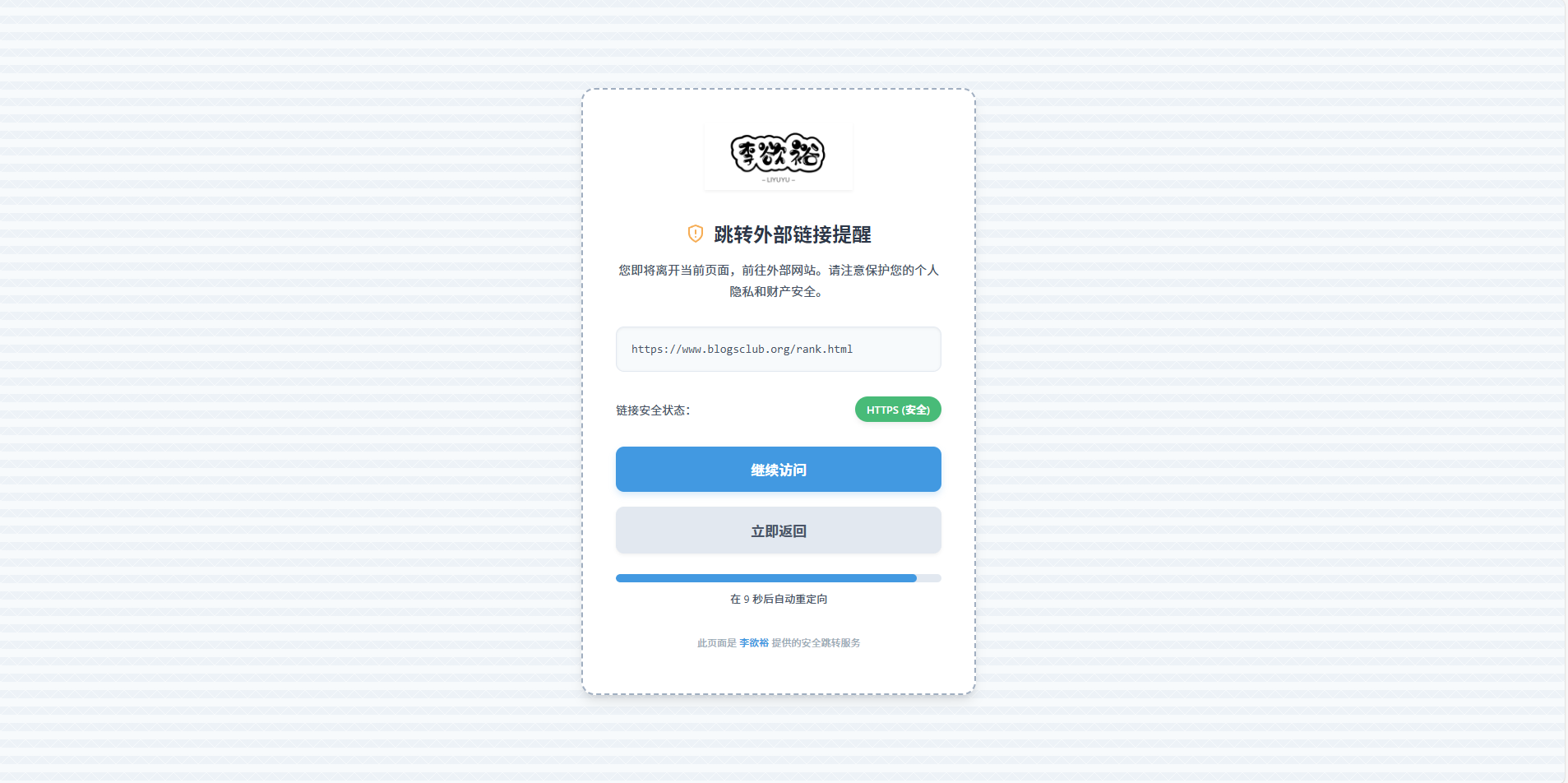 [/item]
[item title="插件后台 ::(呵呵) "]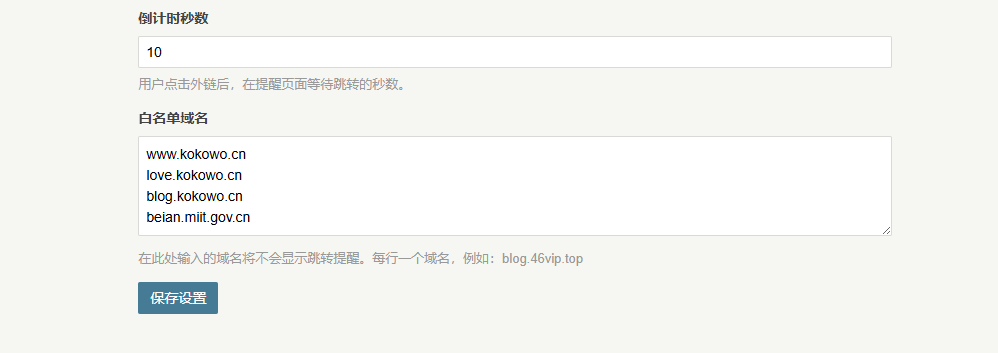 [/item]
[/tabs]
在插件后台还可以设置 跳转白名单 ,和 跳转时长 ,使用起来也非常方便, 安装方法 具体可以参考,佬的插件说明。
[quote color="warning"]实现还是要感谢 老孙佬 ,这是 佬的Blog ,里面还分享了很多关于Typecho的 插件和知识 。 :@(献黄瓜) [/quote]
原来佬是在 文章的附件 选项页加入 批量插入 所有附件的按钮,而我在我的blog上打死都实现不了,索性就换成了 一键删除 ,有点而偷梁换柱的感觉了哈。嘿嘿 :@(赞一个)
这个扩展还能 自动识别图片与普通文件 ,实现图片预览功能,效果如下
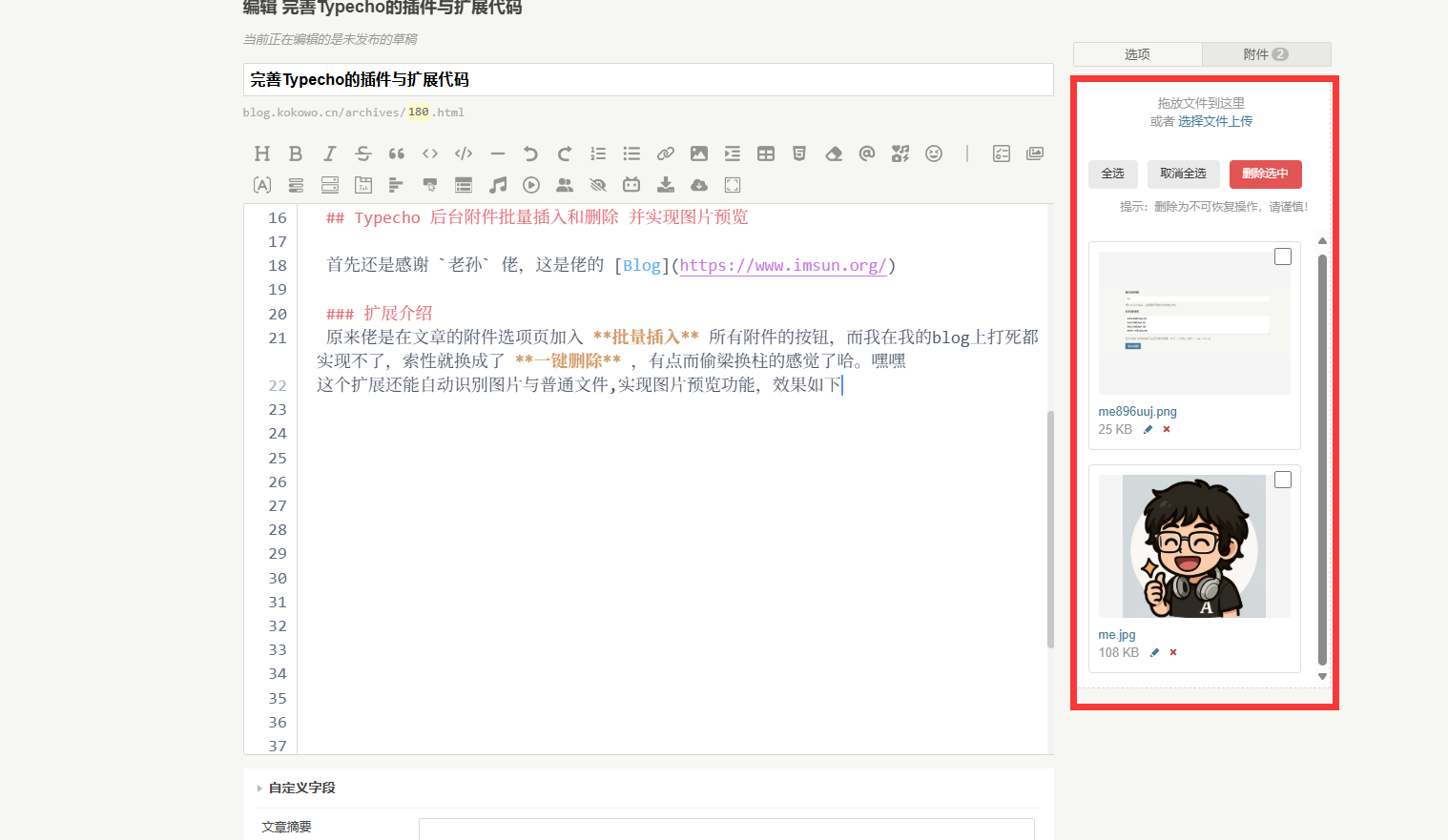
这是佬原来的 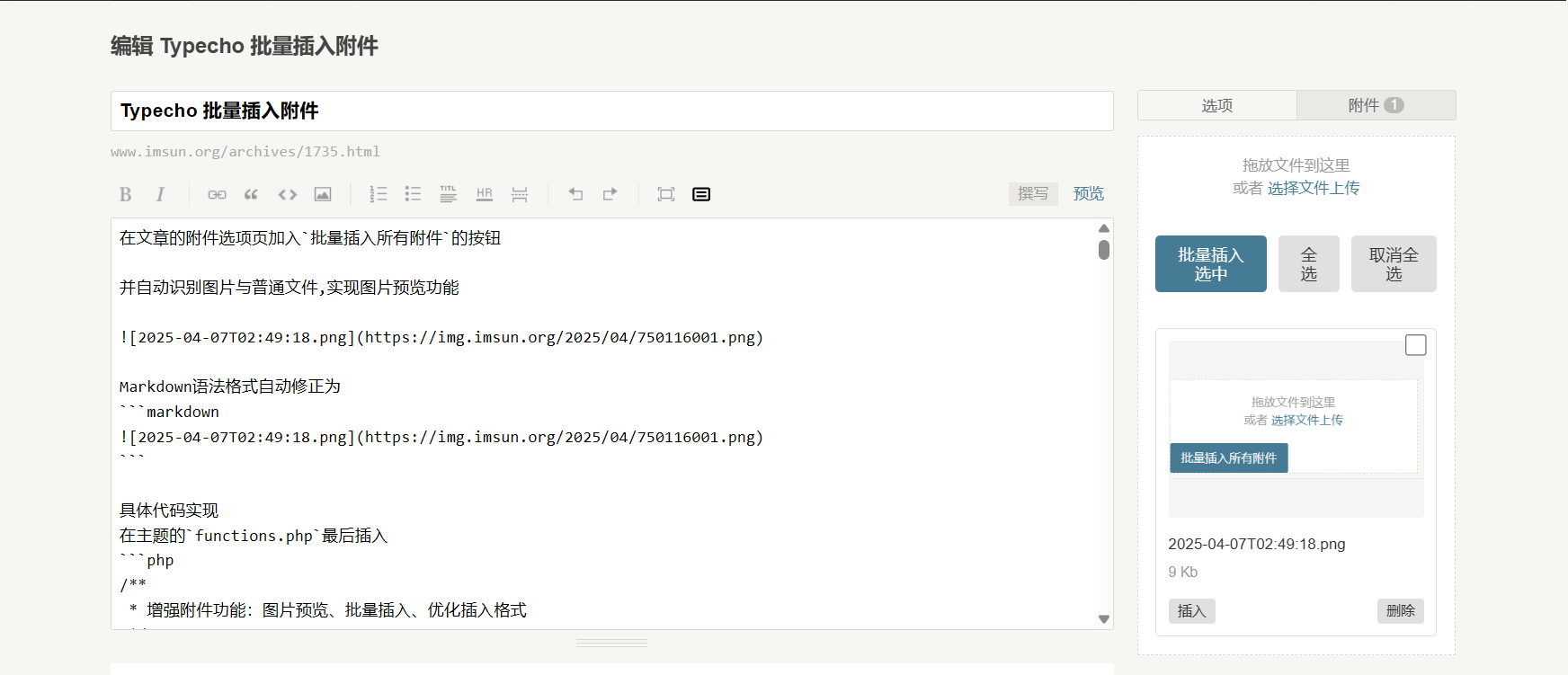
在插入文章以后Markdown语法格式自动修正为
具体的 使用 和 实现代码
在主题的 functions.php 最后插入,这个是我修改过的一键删除版本,原版本亲在佬的blog自行下载
/**
* Typecho后台附件增强:图片预览、一键删除、保留官方删除按钮与逻辑
* @author Li YuYu and jkjoy
* @date 2025-8-12
*/
Typecho_Plugin::factory('admin/write-post.php')->bottom = array('AttachmentHelper', 'addEnhancedFeatures');
Typecho_Plugin::factory('admin/write-page.php')->bottom = array('AttachmentHelper', 'addEnhancedFeatures');
class AttachmentHelper {
public static function addEnhancedFeatures() {
?>
<style>
#file-list{display:grid;grid-template-columns:repeat(auto-fill,minmax(200px,1fr));gap:15px;padding:15px;list-style:none;margin:0;}
#file-list li{position:relative;border:1px solid #e0e0e0;border-radius:4px;padding:10px;background:#fff;transition:all .3s ease;list-style:none;margin:0;}
#file-list li:hover{box-shadow:0 2px 8px rgba(0,0,0,.1);}
#file-list li.loading{opacity:.6;pointer-events:none;}
.att-enhanced-thumb{position:relative;width:100%;height:150px;margin-bottom:8px;background:#f5f5f5;overflow:hidden;border-radius:3px;display:flex;align-items:center;justify-content:center;}
.att-enhanced-thumb img{width:100%;height:100%;object-fit:contain;display:block;}
.att-enhanced-thumb .file-icon{display:flex;align-items:center;justify-content:center;width:100%;height:100%;font-size:40px;color:#999;}
.att-enhanced-checkbox{position:absolute;top:6px;right:6px;z-index:2;width:18px;height:18px;cursor:pointer;}
.batch-actions{margin:15px;display:flex;gap:10px;align-items:center;flex-wrap:wrap;}
.btn-batch{padding:8px 14px;border-radius:4px;border:none;cursor:pointer;transition:all .2s ease;font-size:12px;display:inline-flex;align-items:center;justify-content:center;}
.btn-batch.secondary{background:#eaeaea;color:#333;}
.btn-batch.secondary:hover{background:#ddd;}
.btn-batch.danger{background:#e25555;color:#fff;}
.btn-batch.danger:hover{background:#c94747;}
.batch-note{font-size:12px;color:#999;margin-left:auto;}
</style>
<script>
$(function() {
if (!$('#file-list').length) return;
// —— 工具:插入到编辑器光标处(单个插入用)
function insertAtCursor($ta, text) {
var ta = $ta.get(0); if (!ta) return;
var s = ta.selectionStart, e = ta.selectionEnd, v = $ta.val();
if (typeof s === 'number' && typeof e === 'number') {
$ta.val(v.slice(0, s) + text + v.slice(e));
ta.selectionStart = ta.selectionEnd = s + text.length;
} else { $ta.val(v + text); }
$ta.focus();
}
window.Typecho = window.Typecho || {};
Typecho.insertFileToEditor = function(title, url, isImage) {
var $textarea = $('#text');
var md = (isImage ? '' : '[' + (title||'') + '](' + url + ')') + '\n';
insertAtCursor($textarea, md);
};
function filenameFromUrl(url){var u=(url||'').split('?')[0].split('#')[0];return u.substring(u.lastIndexOf('/')+1)||url||'';}
function isImageUrl(url){var ext=(url||'').split('?')[0].split('#')[0].split('.').pop().toLowerCase();return ['png','jpg','jpeg','gif','webp','bmp','svg','avif'].indexOf(ext)>-1;}
// —— 增强文件列表:加缩略图 & 复选框
function enhanceFileList() {
$('#file-list li').each(function() {
var $li = $(this);
if ($li.hasClass('att-enhanced')) return;
$li.addClass('att-enhanced');
if ($li.find('.att-enhanced-checkbox').length === 0) {
$li.prepend('<input type="checkbox" class="att-enhanced-checkbox" />');
}
var url = $li.data('url') || $li.find('a.insert').attr('href') || $li.find('a[href]').attr('href') || '';
if (!$li.data('url') && url) $li.attr('data-url', url);
var title = ($li.find('a.insert').text().trim() || filenameFromUrl(url));
var isImg = ($li.data('image') == 1) || isImageUrl(url);
if ($li.find('.att-enhanced-thumb').length === 0) {
var $thumb = $('<div class="att-enhanced-thumb"></div>');
if (isImg && url) {
var $img = $('<img />').attr('src', url).attr('alt', title);
$img.on('error', function(){ $(this).replaceWith('<div class="file-icon">🖼️</div>'); });
$thumb.append($img);
} else {
$thumb.append('<div class="file-icon">📄</div>');
}
$li.find('.insert').before($thumb);
}
});
}
// —— 批量操作条
if (!$('.batch-actions').length) {
var $bar = $('<div class="batch-actions"></div>')
.append('<button type="button" class="btn-batch secondary" id="select-all">全选</button>')
.append('<button type="button" class="btn-batch secondary" id="unselect-all">取消全选</button>')
.append('<button type="button" class="btn-batch danger" id="batch-delete">删除选中</button>')
.append('<span class="batch-note">提示:删除为不可恢复操作,请谨慎!</span>');
$('#file-list').before($bar);
}
// 全选 / 取消全选
$(document).on('click', '#select-all', function(e){ e.preventDefault(); $('#file-list .att-enhanced-checkbox').prop('checked', true); });
$(document).on('click', '#unselect-all', function(e){ e.preventDefault(); $('#file-list .att-enhanced-checkbox').prop('checked', false); });
$(document).on('click', '.att-enhanced-checkbox', function(e){ e.stopPropagation(); });
// —— 批量删除:只弹一次确认;临时屏蔽逐条确认;触发原生删除按钮;完成后自动刷新
$(document).off('click', '#batch-delete').on('click', '#batch-delete', function(e){
e.preventDefault(); e.stopPropagation();
var $checked = $('#file-list li').has('.att-enhanced-checkbox:checked');
var total = $checked.length;
if (!total) { alert('请先选择要删除的附件'); return; }
if (!confirm('确认全部删除吗?此操作不可恢复!')) return;
var $btn = $(this).prop('disabled', true).text('删除中...');
var idx = 0;
// 暂存并覆盖 window.confirm —— 让逐条删除里的 confirm 自动通过
var _origConfirm = window.confirm;
window.confirm = function(){ return true; };
function finish() {
window.confirm = _origConfirm; // 恢复 confirm
$btn.prop('disabled', false).text('删除选中');
setTimeout(function(){ location.reload(); }, 400); // 刷新以同步计数与列表
}
function next() {
if (idx >= total) return finish();
var $li = $($checked.get(idx++));
// 常见删除按钮选择器:按你的后台可能是 a.delete / .delete a / title="删除" / 含 delete 的链接
var $del = $li.find('a.delete, .delete a, a[title="删除"], a[href*="delete"]');
if ($del.length) {
try {
$li.addClass('loading');
$del.get(0).click(); // 触发原生删除逻辑(含 token/权限/正确 method)
} catch (err) { /* 忽略单个失败,继续下一个 */ }
}
setTimeout(next, 350); // 给后端一点处理时间再删下一条
}
next();
});
// 单个插入
$(document).on('click', 'a.insert, .btn-insert', function(e) {
e.preventDefault(); e.stopPropagation();
var $li = $(this).closest('li');
var url = $li.data('url') || $li.find('a.insert').attr('href') || $li.find('a[href]').attr('href') || '';
var title = ($li.find('a.insert').text().trim() || filenameFromUrl(url));
var isImg = ($li.data('image') == 1) || isImageUrl(url);
Typecho.insertFileToEditor(title, url, isImg);
});
// 上传完成后增强
var originalUploadComplete = Typecho.uploadComplete;
Typecho.uploadComplete = function(att) {
setTimeout(enhanceFileList, 200);
if (typeof originalUploadComplete === 'function') originalUploadComplete(att);
};
enhanceFileList();
});
</script>
<?php
}
}此内容由惯性聚合(RSS阅读器)自动聚合整理,仅供阅读参考。 原文来自 — 版权归原作者所有。