

惯性聚合 高效追踪和阅读你感兴趣的博客、新闻、科技资讯
阅读原文 在惯性聚合中打开

推荐订阅源

P
Privacy & Cybersecurity Law Blog
人人都是产品经理
人人都是产品经理
The Cloudflare Blog
B
Blog RSS Feed
罗磊的独立博客
V
V2EX
V
Visual Studio Blog
博客园 - 叶小钗
W
WeLiveSecurity
小众软件
小众软件
K
Kaspersky official blog
美团技术团队
雷峰网
雷峰网
阮一峰的网络日志
阮一峰的网络日志
Martin Fowler
Martin Fowler
Recorded Future
Recorded Future
Project Zero
Project Zero
Hugging Face - Blog
Hugging Face - Blog
Engineering at Meta
Engineering at Meta
Security Latest
Security Latest
Microsoft Azure Blog
V
Vulnerabilities – Threatpost
月光博客
月光博客
博客园 - 三生石上(FineUI控件)
Help Net Security
Help Net Security
博客园 - Franky
OSCHINA 社区最新新闻
OSCHINA 社区最新新闻
F
Fortinet All Blogs
Threat Intelligence Blog | Flashpoint
Forbes - Security
Forbes - Security
M
MIT News - Artificial intelligence
H
Hacker News: Front Page
大猫的无限游戏
大猫的无限游戏
Vercel News
Vercel News
Spread Privacy
Spread Privacy
The Register - Security
H
Hackread – Cybersecurity News, Data Breaches, AI and More
量子位
Google Online Security Blog
PCI Perspectives
PCI Perspectives
The Last Watchdog
The Last Watchdog
AI
AI
N
News | PayPal Newsroom
D
DataBreaches.Net
Cloudbric
Cloudbric
freeCodeCamp Programming Tutorials: Python, JavaScript, Git & More
博客园 - 司徒正美
cs.AI updates on arXiv.org
钛媒体:引领未来商业与生活新知
钛媒体:引领未来商业与生活新知
T
Tailwind CSS Blog

辰渊尘站

道歉信:关于 713 解锁视频中伪回锁内容的说明与反思 - 辰渊尘站 713解锁节来辣!小米17全系,k90pm又能解bl了 - 辰渊尘站 服务器面板迁移:从宝塔到 1Panel - 辰渊尘站 Subconverter 太臃肿?PHP 版轻量化替代来了! - 辰渊尘站 Astro框架Fuwari主题侧边栏添加Umami访问统计 为Fuwari框架适配友链状态显示 免费领取网易云音乐7天会员 小米MiMo Token Plan免费送辣! Astro框架Fuwari主题实现仿hexo-abbrlink功能 观《鬼灭之刃:无限城篇 第一章 猗窝座再袭》首映有感 山东泰安泰山游记:煌煌泰山景,谦谦君子风 安知鱼主题:修复背景图修改引发的深色模式可读性问题 安知鱼主题实现友链状态前端显示 我敲!优选DNS牛大了 安知鱼主题侧边栏添加无聊湾 从零开始使用Hexo框架搭建属于你的博客(一)环境准备篇 记录下Hexo博客从本地构建迁移到Netlify,AI API Key 泄露问题与解决方案记录 云服务器宝塔部署Twikoo博客评论系统 手把手教你在Linux系统下部署MCSManager并搭建一个MC服务器 为你的Twikoo添加酷安表情包 记录一次博客评论迁移过程 记一次花嫁联名借记卡申领过程 为使用anzhiyu主题的博客加上十年之约进度条 有关建站一个月以来的一点点感想和后续计划 这可能是iOS自签的版本答案,二合一LiveContainer教程来辣! iOS侧载新选择!SideStore+LiveContainer,纯净无广,无限安装软件!!! 从零开始使用Hexo框架搭建属于你的博客(零)准备篇 Arch Linux+Hyprland从安装到使用只需这一篇(保姆级喂饭超全教程) - 辰渊尘站 恭喜你找到了本站的第一篇文档 - 辰渊尘站
为你anzhiyu主题的Twikoo评论系统恢复预览按钮
辰渊尘 · 2025-10-08 · via 辰渊尘站
WARNING

修改前必读:

  • 本帖基于 Anzhiyu主题 进行修改方案编写,因此请读者优先掌握 Anzhiyu主题官方文档 的内容后再来进行魔改。
  • 由于修改内容过多,以及可能会导致意料之外的事情,推荐使用 Github 配合 VSCode 进行修改,方便随时备份恢复

前言#

Twikoo原生界面自带 预览 按钮控件,但anzhiyu主题为了美化,重构了样式,简化掉了 预览 按钮,本篇文章教你如何把它加回来

修改部分#

覆盖样式#

修改 source\css\custom.css 文件

/* 恢复 Twikoo 预览按钮显示 */

#twikoo .tk-comments .el-button.tk-preview {

display: inline-flex !important;

visibility: visible !important;

opacity: 1 !important;

pointer-events: auto !important;

}

#twikoo .tk-comments .el-button.tk-preview:hover {

opacity: 0.85 !important;

}

#twikoo .tk-comments .el-button.tk-preview {

position: absolute;

top: -40px;

right: 107px;

opacity: 0.3;

}

#twikoo .tk-comments .el-button--primary {

color: var(--anzhiyu-card-bg);

box-shadow: var(--anzhiyu-shadow-black);

width: 6.25rem;

position: absolute;

top: -41px;

right: 0px;

height: 32px;

margin-left: 0.5rem !important;

border-color: var(--anzhiyu-fontcolor);

border-radius: 12px;

transition: 0.3s;

}

#twikoo .tk-comments .tk-meta-input {

position: relative;

margin-top: 8px;

width: calc(100% - 165px);

}

启用样式文件#

修改 _config.anzhiyu.yml 文件

inject:

head:

- <link rel="stylesheet" href="/css/custom.css">
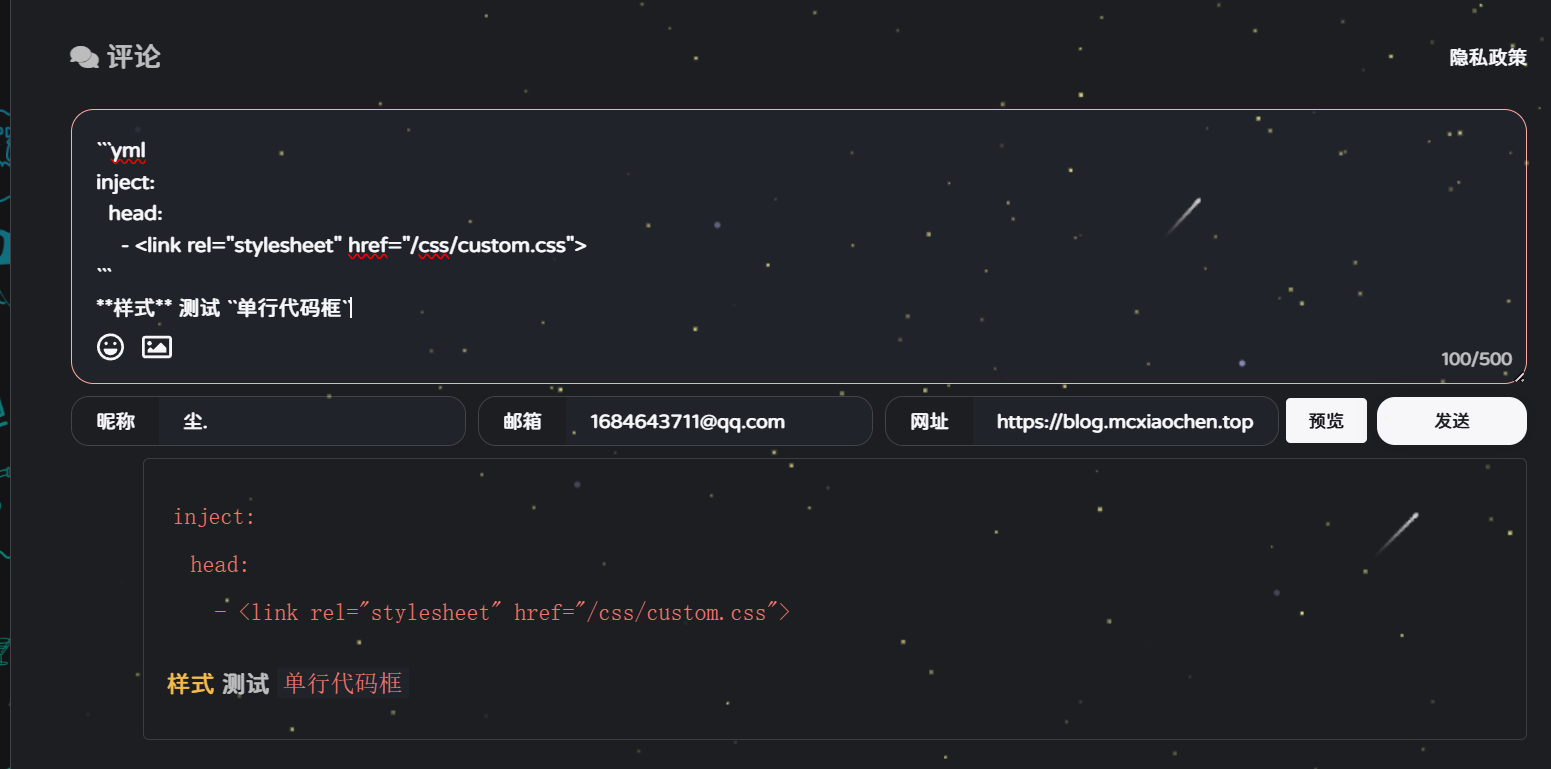
大功告成#

最终效果