


惯性聚合 高效追踪和阅读你感兴趣的博客、新闻、科技资讯
阅读原文 在惯性聚合中打开

推荐订阅源

cs.AI updates on arXiv.org
WordPress大学
WordPress大学
宝玉的分享
宝玉的分享
人人都是产品经理
人人都是产品经理
博客园 - 聂微东
IT之家
IT之家
V
V2EX
Jina AI
Jina AI
V
Visual Studio Blog
有赞技术团队
有赞技术团队
博客园 - 司徒正美
博客园 - 叶小钗
The Cloudflare Blog
cs.CV updates on arXiv.org
小众软件
小众软件
奇客Solidot–传递最新科技情报
奇客Solidot–传递最新科技情报
博客园 - 三生石上(FineUI控件)
OSCHINA 社区最新新闻
OSCHINA 社区最新新闻
Google DeepMind News
钛媒体:引领未来商业与生活新知
钛媒体:引领未来商业与生活新知
腾讯CDC
Google Online Security Blog
博客园 - 【当耐特】
Apple Machine Learning Research
K
KPMG report finds enterprise disconnect between AI and its ROI | CIO
N
News and Events Feed by Topic
N
News and Events Feed by Topic
The Last Watchdog
The Last Watchdog
W
WeLiveSecurity
月光博客
月光博客
Security Archives - TechRepublic
Webroot Blog
Webroot Blog
SecWiki News
SecWiki News
博客园_首页
罗磊的独立博客
量子位
Latest news
Latest news
I
Intezer
V
Vulnerabilities – Threatpost
A
Arctic Wolf
Last Week in AI
Last Week in AI
Recent Commits to openclaw:main
S
SegmentFault 最新的问题
S
Security Affairs
阮一峰的网络日志
阮一峰的网络日志
让小产品的独立变现更简单 - ezindie.com
酷 壳 – CoolShell
酷 壳 – CoolShell
P
Palo Alto Networks Blog
C
CXSECURITY Database RSS Feed - CXSecurity.com
N
News | PayPal Newsroom

辰渊尘站

713解锁节来辣!小米17全系,k90pm又能解bl了 - 辰渊尘站 服务器面板迁移:从宝塔到 1Panel - 辰渊尘站 Subconverter 太臃肿?PHP 版轻量化替代来了! - 辰渊尘站 Astro框架Fuwari主题侧边栏添加Umami访问统计 为Fuwari框架适配友链状态显示 免费领取网易云音乐7天会员 小米MiMo Token Plan免费送辣! Astro框架Fuwari主题实现仿hexo-abbrlink功能 观《鬼灭之刃:无限城篇 第一章 猗窝座再袭》首映有感 为你anzhiyu主题的Twikoo评论系统恢复预览按钮 山东泰安泰山游记:煌煌泰山景,谦谦君子风 安知鱼主题:修复背景图修改引发的深色模式可读性问题 安知鱼主题实现友链状态前端显示 我敲!优选DNS牛大了 安知鱼主题侧边栏添加无聊湾 从零开始使用Hexo框架搭建属于你的博客(一)环境准备篇 记录下Hexo博客从本地构建迁移到Netlify,AI API Key 泄露问题与解决方案记录 云服务器宝塔部署Twikoo博客评论系统 手把手教你在Linux系统下部署MCSManager并搭建一个MC服务器 为你的Twikoo添加酷安表情包 记录一次博客评论迁移过程 记一次花嫁联名借记卡申领过程 有关建站一个月以来的一点点感想和后续计划 这可能是iOS自签的版本答案,二合一LiveContainer教程来辣! iOS侧载新选择!SideStore+LiveContainer,纯净无广,无限安装软件!!! 从零开始使用Hexo框架搭建属于你的博客(零)准备篇 Arch Linux+Hyprland从安装到使用只需这一篇(保姆级喂饭超全教程) - 辰渊尘站 恭喜你找到了本站的第一篇文档 - 辰渊尘站
为使用anzhiyu主题的博客加上十年之约进度条
辰渊尘 · 2025-08-18 · via 辰渊尘站

前言#

我从选择anzhiyu主题后大多搭建教程都是看的 Mo佬这篇文章,查找资料的同时自然少不了 偷窥(观摩)大佬的站点。其中他个人页的十年之约进度条可让我眼馋很久,如今博客稳定下来了,我自然要把它 (借鉴)过来。

查找资料#

秉持着能 {% kbd Ctrl %} + {% kbd C %} {% kbd V %} 就决不手搓的原则,我开始网上冲浪。经过一翻寻找,找到了 GB大佬 的这篇文章:

开始缝合#

如今万事具备只欠动手了,我啪的一下很快就照着教程改完了,然后不出意外自然就要出意外了,三连运行hexo服务后???擦,这咋全是报错,我人傻了,丢给ai也没找到有用的线索,于是开始学pug语法,经过1小时的学习后我找到了问题所在——

anzhiyu>layout>includes>page>about.pug进度函数 这一步,少了一行script.,导致函数被误认为模板语法,加上之后三连运行,果然一切顺利!

修bug#

主要就是缺少了script.,加上就没问题了,以下是修改后的代码,可以正常运行

代码已经缩进好了,搜索第一行直接粘贴即可

!= page.content

// ✅ 添加 Tenyear 模块

if tenyear

.author-content#tenyear

.create-site-post.author-content-item.single

.author-content-item-tips= tenyear.tips

.author-content-item-title= tenyear.title

p= tenyear.text

.tenyear-timeline

.progress

.past-time

.percentage-label

.time-labels

.start-time#tenyear-start-time= new Date(tenyear.start).toLocaleDateString()

.end-time#tenyear-end-time= new Date(tenyear.end).toLocaleDateString()

script.

// ✅ 十年之约进度函数

function updateTenYearProgress() {

let progressElement = document.querySelector(".progress");

let pastTimeElement = document.querySelector(".past-time");

let percentageLabelElement = document.querySelector(".percentage-label");

let startTimeElement = document.getElementById("tenyear-start-time");

let endTimeElement = document.getElementById("tenyear-end-time");

if (!startTimeElement || !endTimeElement) return;

let startTime = new Date(startTimeElement.textContent).getTime();

let endTime = new Date(endTimeElement.textContent).getTime();

const currentTime = new Date().getTime();

const progress = ((currentTime - startTime) / (endTime - startTime) * 100);

const progressPercentage = Math.min(progress, 100) + "%";

pastTimeElement.style.setProperty("--past-time-percentage", progress + "%");

progressElement.style.setProperty("--progress-percentage", progressPercentage);

if (progress > 5) {

percentageLabelElement.textContent = `${progress.toFixed(0)}%`;

percentageLabelElement.style.left = `calc(${progress}% - 35px)`;

}

percentageLabelElement.style.visibility = "visible";

}

if (document.getElementById("tenyear")) {

updateTenYearProgress();

}

最后效果#

{% note info flat %}我建站时间过短,导致进度文本还显示不出来,实际上是有进度文字的 {% endnote %}
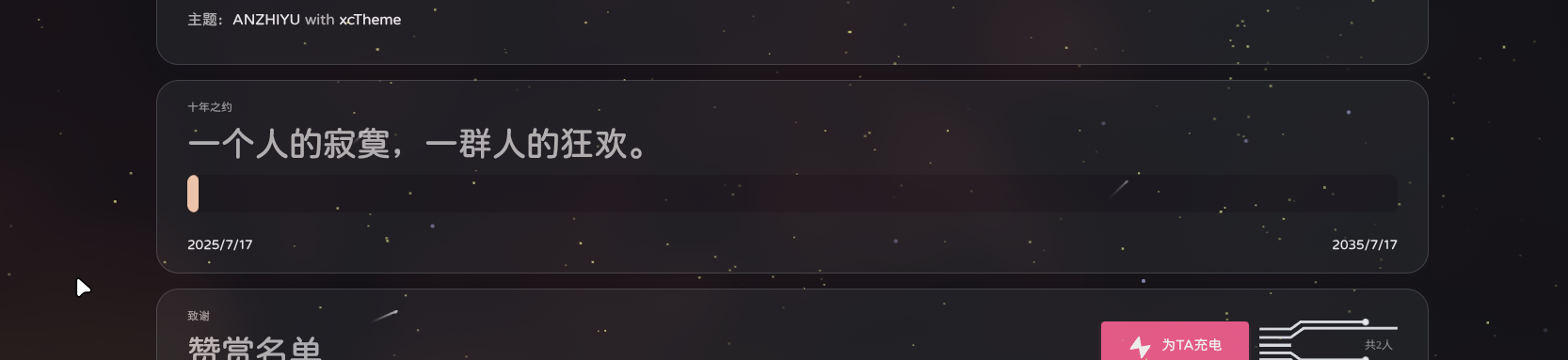
成品图

参考资料(排名不分先后)#