惯性聚合 高效追踪和阅读你感兴趣的博客、新闻、科技资讯
阅读原文 在惯性聚合中打开

推荐订阅源

H
Help Net Security
Scott Helme
Scott Helme
爱范儿
爱范儿
WordPress大学
WordPress大学
博客园 - 三生石上(FineUI控件)
阮一峰的网络日志
阮一峰的网络日志
博客园 - Franky
V
V2EX
腾讯CDC
博客园_首页
博客园 - 司徒正美
酷 壳 – CoolShell
酷 壳 – CoolShell
T
Tailwind CSS Blog
freeCodeCamp Programming Tutorials: Python, JavaScript, Git & More
OSCHINA 社区最新新闻
OSCHINA 社区最新新闻
小众软件
小众软件
J
Java Code Geeks
大猫的无限游戏
大猫的无限游戏
月光博客
月光博客
Microsoft Azure Blog
B
Blog
雷峰网
雷峰网
Stack Overflow Blog
Stack Overflow Blog
IT之家
IT之家
罗磊的独立博客
Recorded Future
Recorded Future
博客园 - 聂微东
O
OpenAI News
S
Secure Thoughts
Hacker News: Ask HN
Hacker News: Ask HN
S
Schneier on Security
Hacker News - Newest:
Hacker News - Newest: "LLM"
Y
Y Combinator Blog
C
Cyber Attacks, Cyber Crime and Cyber Security
Project Zero
Project Zero
宝玉的分享
宝玉的分享
K
Kaspersky official blog
N
Netflix TechBlog - Medium
T
The Exploit Database - CXSecurity.com
Google Online Security Blog
cs.CL updates on arXiv.org
cs.CV updates on arXiv.org
Webroot Blog
Webroot Blog
云风的 BLOG
云风的 BLOG
Simon Willison's Weblog
C
Check Point Blog
D
Darknet – Hacking Tools, Hacker News & Cyber Security
L
LINUX DO - 热门话题
美团技术团队
L
Lohrmann on Cybersecurity

Compliance Solutions for Websites, Apps and Organizations | iubenda

AI can build your website. It can't manage your consent. | iubenda Browser signals and machine-readable consent: what they are and what the EU’s Digital Omnibus could change California Consumer Privacy Act (CCPA): Complete Guide How to increase your cookie banner opt-in rates: 5 mistakes to fix today | iubenda DPO Newsletter: Global Data Protection & Privacy News (issue #153) Why your consent management setup is a marketing performance question Everything you need to know about GDPR The redesigned cookie banner and configurator What nobody tells you about handing over the company you built European marketers are betting on retention. Privacy could be the edge they’re not using yet. The 5 best alternatives to Didomi in 2026: Pros, cons, pricing, and comparison Looking back on 15 years: what iubenda's founder would tell his 2011 self | iubenda The best cookie policy generator in 2026 DPO Newsletter: Global Data Protection & Privacy News (issue #152) | iubenda What publishers should expect from the EU’s Digital Omnibus proposal Uncertainty is the biggest blocker to AI adoption in marketing | iubenda Everything AI app builders need to know about vibecoding and privacy compliance | iubenda Introducing 1-Click Embedding for Google Tag Manager The Essential Small Business Terms and Conditions Template: What You Need to Know Terms of Use Template | iubenda IAB Europe Raises Concerns Over GDPR Procedural Regulation Draft Report | iubenda Learn from HelloFresh's Costly Mistake: Ensure Compliance with iubenda | iubenda Understanding the Spanish DPA Guide on Audience Measurement Cookies | iubenda The Austrian Data Protection Authority's FAQs on Cookies and Privacy | iubenda DPO Newsletter: Global Data Protection & Privacy News (issue #127) | iubenda Microsoft Ensuring European Data Stays Within the EU Cloud Boundary | iubenda Businesses Beware: ICO’s Record £14.3m in Fines for Data Misuse in 2023 Understanding the Risks and Responsibilities of Model-as-a-Service Companies in AI Development Facebook's New “Link History” Feature: A Blend of Convenience and Surveillance? | iubenda OpenAI’s Strategic Move in the EU: Aligning with Data Privacy Regulations TikTok Faces Lawsuit Over Tracking Non-Users What’s the Digital Markets Act (DMA) and how will it affect you? | iubenda Simplifying Cookie Consent: The European Commission's Approach | iubenda Google Settles Landmark Privacy Lawsuit for $5 Billion | iubenda Navigate GDPR Compliance with Confidence: Lessons from Recent Fines in Italy Simplifying the Commission's New Reporting Template for Digital Market Gatekeepers | iubenda Understanding the GDPR Complaint Against X (Twitter) for Illegal MicroTargeting | iubenda Spanish Media Giants Take On Meta in a Groundbreaking $600 Million Lawsuit | iubenda DPO Newsletter: Data Protection & Privacy News (issue #126) | iubenda Belgian DPA Mandates Cookie Banner Changes for Major Media Websites | iubenda UK's Top Websites Warned by ICO to Revise Cookie Practices | iubenda Understanding the European Union's Data Act | iubenda Google Announces Consent Mode v2 – here’s what it means for your business and advertising Noyb Challenges EU Commission Over Controversial Ad Campaign | iubenda OECD Updates AI Definition: A Step Forward in Shaping EU’s AI Law Firefox To Introduce Simplified Global Privacy Control Berlin Court Cracks Down on LinkedIn’s Privacy Violations The YouTube Ad Blocker Controversy: A Test of the ePrivacy Directive? | iubenda DPO Newsletter: Data Protection & Privacy News (issue #125) Facebook and Instagram Subscription: Meta adds a paywall | iubenda GDPR Violation: Lack of Transparency in Data Processing via Google Fonts Amazon Introduces AWS European Sovereign Cloud to Address EU Regulations | iubenda Texas New Data Privacy Law TDPSA: Everything you need to know How to Make Money with a Website Without Selling Anything Oregon Consumer Privacy Act: Overview | iubenda Google’s Move to Disable Third-Party Cookies: What Advertisers Need to Know IMY Fines H&M for GDPR Violations: A Closer Look EU Commission Requests Information from X Under Digital Services Act: What You Need to Know | iubenda Understanding California’s “Delete Act” and Data Broker Regulations TCF v 2.2 Initial Layer (Banner) Requirements | iubenda Grindr Faces €5.8 Million Fine: A Reminder on the Importance of GDPR Compliance | iubenda Newly Enacted Iowa Consumer Data Protection Act (ICDPA) | iubenda The Witch’s Brew of Privacy: A Halloween Tale of Compliance and Consequences IAB TCF 2.2 – What you need to do DPO Newsletter: Data Protection & Privacy News (issue #124) Blog Ideas That Make Money: How To Make Money From Your Blog + Examples | iubenda Maximize your Growth with Online Presence Management | iubenda Meta's New Pivot in Europe: To Pay or Not to Pay for an Ad-Free Experience? | iubenda Consumer Reports Launches Free ‘Permission Slip’ App to Protect Your Data | iubenda DAZN’s Access Request Saga Personal Brand Logo: How to Stand Out in a Crowded Marketplace UK-US Data Bridge: A New Era for Secure Data Transfers 7 Ways How to Promote Affiliate Links Effectively (And Boost Commissions) | iubenda Mastering LinkedIn Personal Branding: A Guide to More Opportunities Meta's New Approach: Pay for Your Privacy? | iubenda No Return, No Refund Policy Template & Guide GDPR in the US: a GDPR Checklist for US Companies Crafting a Niche with Branding and Identity Design | iubenda The Online Safety Bill: A Leap Towards a Safer Digital United Kingdom Understanding Google's $93m Settlement over Consumer Location Data Accusations | iubenda CCPA vs CPRA: Key Differences You Need to Know | iubenda How To Use Ecommerce Retargeting to Grow Your Business | iubenda PECR: Everything you need to know | iubenda How Mobile Apps Illegally Share Your Personal Data: A Deep Dive | iubenda Legal Spotlight: Privacy Concerns Surrounding OpenAI’s ChatGPT and Microsoft’s Involvement Legal Scrutiny Looms Over Transatlantic Data Deal: French MEP Takes Action Understanding the Digital Markets Act: A Comprehensive Guide Block AI Crawlers: Here’s How To Stop Your Site From Being Used for AI Training (OpenAI and Google Bard Irish Regulator Slaps $368M Fine on TikTok DPO Newsletter: Data Protection & Privacy News (issue #123) | iubenda The Privacy Pitfalls of Vehicle Data Collection: What You Need to Know | iubenda Twitter customer’s data on the menu for xAI models Update: Revised Swiss Privacy Law Takes Effect Fitbit and the GDPR Hurdle: What You Need to Know About Your Data Privacy | iubenda Terms of Service Template for your site | iubenda Senators Urge FTC to Investigate YouTube and Google for Violating Children's Privacy: What You Need to Google AdSense Requirements: Here's What You Need to Know | iubenda Users can’t opt out from marketing emails: FTC fines Experian $650,000 | iubenda DPO Newsletter: Data Protection & Privacy News (issue #122) | iubenda 7 Ways Business Process Automation Can Increase Your Profits
LinkedIn Carousel Ads: How to Maximize Reach and Engagement | iubenda
Carla Gonzalez Cidoncha · 2023-03-02 · via Compliance Solutions for Websites, Apps and Organizations | iubenda

LinkedIn is an excellent platform for businesses looking to reach and engage with a professional audience. One of the best ways to achieve this is by using LinkedIn Carousel Ads.

LinkedIn carousels are one of the most engaging types of posts on socials (we’ve tested it ourselves on iubenda’s LinkedIn page), and using them in your ads can really improve your strategy.

In this article, we’ll discuss what LinkedIn Carousel Ads are, how to create them, the specs needed and some best practices for a successful campaign.

At a glance

  • What are LinkedIn carousel ads?
  • How to create a LinkedIn carousel post
  • What are the specs for LinkedIn Carousel Ad?
  • What are the best practices for carousel ads on LinkedIn?

What are LinkedIn Carousel Ads?

LinkedIn Carousel Ads are a type of sponsored content that allows businesses to showcase multiple images within a single ad.

Introduced in 2018, carousel ads can be especially useful for B2B companies, because they allow you to present a story, showcase a product line, or convey a lot of information in just one post.

Moreover, LinkedIn carousels provide marketers with additional metrics – such as impressions and click for each card – that can help them further refine their strategy.

Their format is also a boost for engagement: according to LinkedIn, carousel ads can drive up to 10 times more clicks compared to static sponsored content.
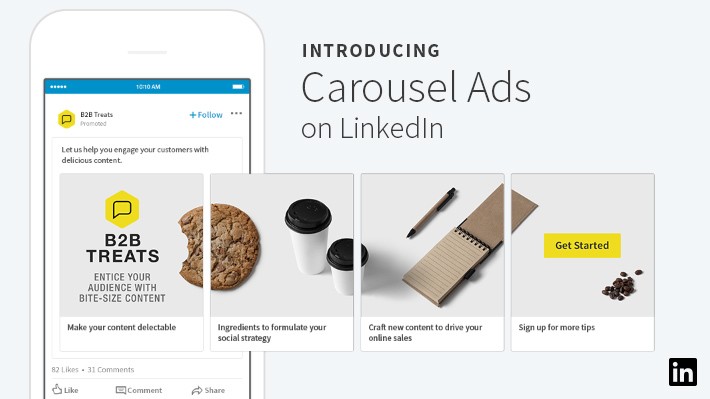
linkedin carousel ads
Image credit: LinkedIn

📌 How to create a LinkedIn Carousel Ad

Here are the steps to follow to create a LinkedIn carousel post for your ad campaign.

Before we start, remember that to create a carousel ad you need:

  • Campaign Manager access or higher on the ad account.
  • A LinkedIn Page or Showcase Page associated with your ad account.
  • Super admin, content admin, or Sponsored Content access on the LinkedIn Page.

Step 1: Access LinkedIn Campaign Manager

  • Navigate to LinkedIn Campaign Manager.
  • Log in to your LinkedIn account associated with the business for which you want to run the ad.
  • Select the correct ad account if you have access to multiple.

Step 2: Choose or create a campaign

  • Click on “Create Campaign” to start a new campaign or select an existing campaign where you want to add the Carousel Ad.
  • Choose your advertising objective. LinkedIn has a few objectives available, such as Brand awareness, Website visits, Engagement, Website conversions, Lead generation.
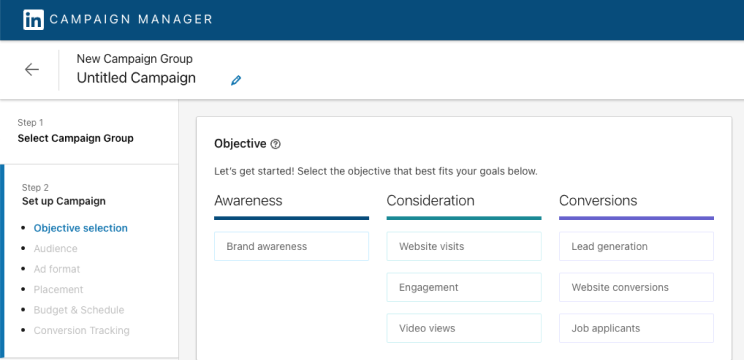
linkedin carousel ads - campaign manager
Image credit: LinkedIn
  • Define your target audience.
  • Complete the Budget, Schedule and Bid section. LinkedIn automatically selects the best bidding method for your carousel campaigns based on your objective, but you can change that manually. Here you can also add Conversion Tracking: it’s optional, but definitely useful.

Step 3: Create an ad

  • Once your campaign is set up, you’ll be directed to the “Create Ad” section.
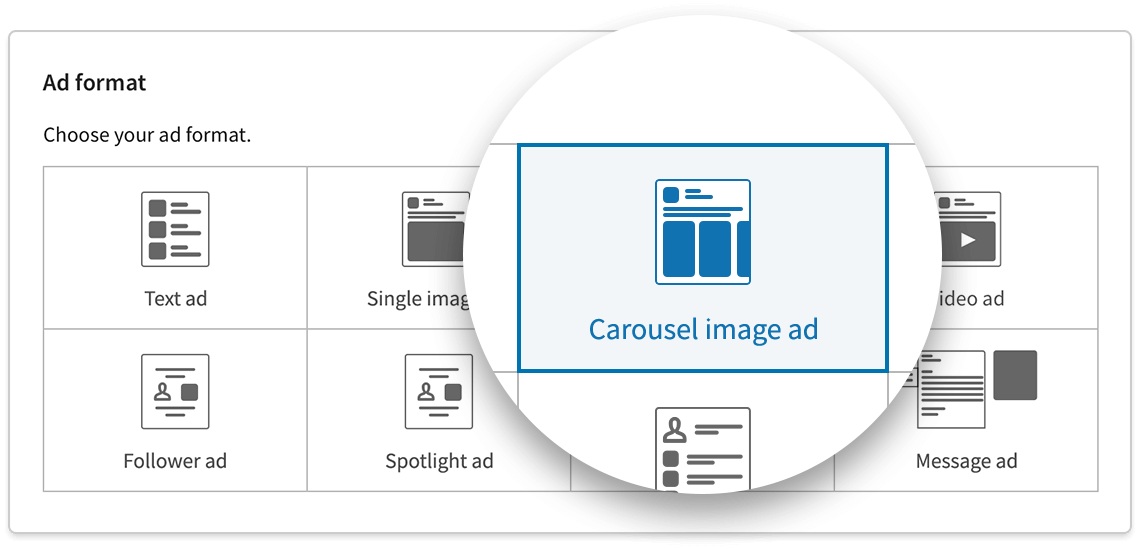
  • Select the “Carousel Ad” format.
LinkedIn carousels
Image credit: LinkedIn

Step 4: LinkedIn Ad content

  • Give your ad a name. This is for internal use, so choose something descriptive.
  • Write a text introduction that appears above the carousel. This could be a question, a statement, or a call to action.
  • Select the appropriate call-to-action button like “Learn More,” “Contact Us,” etc.

Step 5: Upload carousel cards

  • Upload the carousel images: you can upload a minimum of 2 cards and a maximum of 10.
  • Add a headline, a description, and a destination URL. This is the URL you want people to go to when they click on each specific card.

👉 For LinkedIn carousel ads specs, jump to the next paragraph

Step 6: Additional Options

  • Card Order: By default, cards will appear in the order you uploaded them. You can drag to rearrange.
  • URL Tracking: You can add URL parameters for tracking the ad performance.
  • Check how your ad appears on both mobile and desktop to ensure that everything looks right.

Step 7: Review & Submit

  • Once you’ve filled in all necessary fields and are satisfied with the preview, click “Next” to review all the settings and content.
  • Confirm all the details are correct.
  • Click on “Submit” or “Launch” to activate your Carousel Ad.

📌 Linkedin carousel ads specs

If you’re about to launch your LinkedIn ad campaign, remember that you need to follow the platform’s specifications.

More specifically:

  • The name of your ad shouldn’t be over 255 characters.
  • The introductory text shouldn’t be over 255 characters, but don’t use up to 150 characters if you want to avoid truncation on some devices.
  • Use a minimum of two cards and a maximum of ten cards for your carousel.
  • Each card should be:
    • Maximum 10 MB.
    • The maximum LinkedIn ad image size is 4320x 4320px.
    • The recommended individual image spec is 1080 x 1080px with a 1:1 aspect ratio.
  • The headline text for each image card is a maximum of two lines before being truncated.
  • The destination URL must have the “http://” “or https://” prefix, and you may use up to 2,000 characters for the destination link.
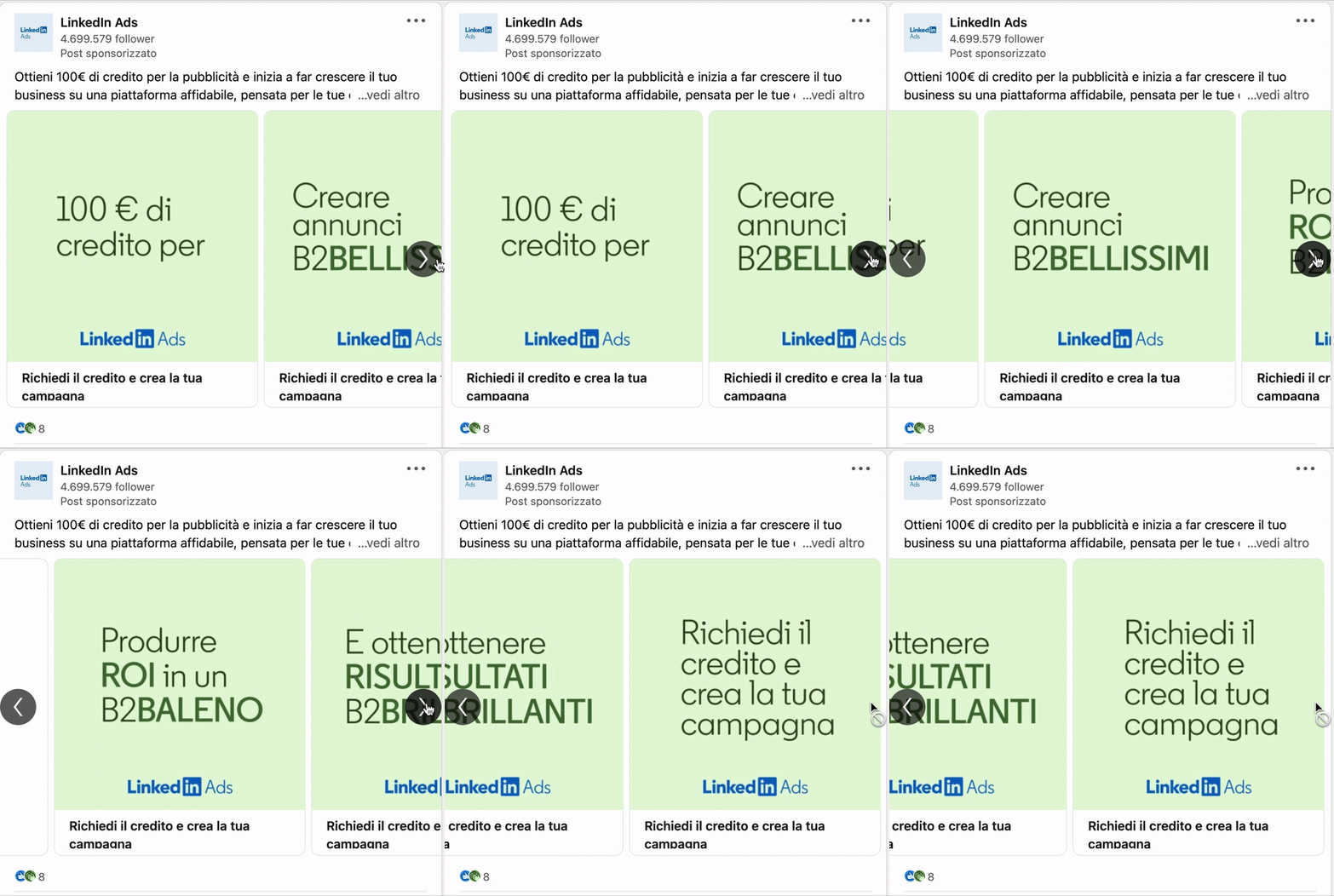
linkedin carousel ad example
Image credit: LinkedIn Ads

📌 What are the best practices for carousel ads on LinkedIn?

Besides following LinkedIn’s specs, there are a few more tips that can help you with maximizing reach and engagement.

Needless to say, your ad should capture your audience’s attention and encourages them to interact with the ad, but how do you do that?

First of all, focus on storytelling. One of the best features of LinkedIn’s carousels is that they allow you to tell a story in a way that is engaging for your audience. This visual storytelling is way more appealing than a static ad. So use these cards to tell a story about your business.

Then make sure you have strong visuals: as LinkedIn suggests, feature graphics, people, and dynamic text to draw your audience in. Don’t forget to also include a strong call-to-action, to prompt users to engage with your ad.

Lastly, A/B test your ads.

  • You can start with fewer cards, and then add more if you see encouraging results.
  • You can change the order of your cards, and optimize based on the performance.
  • You can tweak your copy, and see which one performs better.

Remember: if you’re using targeted advertising on LinkedIn, you need to disclose it in your privacy policy!


It’s both a legal and a third-party requirement!

LinkedIn specifically states that you are “responsible for legal compliance for any personal data they provide to LinkedIn” and this includes the data you may be collecting through your ads.

If you don’t have one, you can create yours in just a few minutes with iubenda!

  1. Scan your site with our Site Scanner.
  2. Add the relevant clauses in a few clicks and generate your policy.
  3. Embed on your site!

About us

iubenda

Attorney-level solutions to make your websites and apps compliant with the law across multiple countries and legislations.

www.iubenda.com