惯性聚合 高效追踪和阅读你感兴趣的博客、新闻、科技资讯
阅读原文 在惯性聚合中打开

推荐订阅源

Google DeepMind News
C
Check Point Blog
J
Java Code Geeks
腾讯CDC
Martin Fowler
Martin Fowler
MongoDB | Blog
MongoDB | Blog
H
Hackread – Cybersecurity News, Data Breaches, AI and More
博客园 - 三生石上(FineUI控件)
Apple Machine Learning Research
大猫的无限游戏
大猫的无限游戏
Engineering at Meta
Engineering at Meta
罗磊的独立博客
Last Week in AI
Last Week in AI
B
Blog
IT之家
IT之家
S
SegmentFault 最新的问题
D
DataBreaches.Net
Cyber Security Advisories - MS-ISAC
GbyAI
GbyAI
博客园 - 聂微东
U
Unit 42
有赞技术团队
有赞技术团队
Y
Y Combinator Blog
MyScale Blog
MyScale Blog

Runpod Blog.

New Runpod datacenter now live: AP-IN-1 Track GPU spend across your team with Cost Centers The GPU supply supercycle is here. Here’s what AI builders need to know. Community Spotlight: One-click AI image and video generation on Runpod with SwarmUI | Runpod Blog Community Spotlight: LoRA Pilot Data Prep to Inference Introducing the Runpod Assistant: Manage Your Cloud GPU Resources with Natural Language OpenAI's Parameter Golf: Train the Best Language Model That Fits in 16MB on Runpod LLM inference optimization: techniques that actually reduce latency and cost Pruna P-Video and Vidu Q3 public endpoints now available on Runpod Runpod brand spelling guide Quickstart - Runpod Documentation The AI market looks nothing like the narrative Training StyleGAN3 with Vision-Aided GAN on Runpod KoboldAI – The Other Roleplay Front End, And Why You May Want to Use It How to Connect Cursor to LLM Pods on Runpod for Seamless AI Dev Community Spotlight: How AnonAI Scaled Its Private Chatbot Platform with Runpod Prompt Scheduling with Disco Diffusion on Runpod Runpod's Latest Innovation: Dockerless CLI for Streamlined AI Development Run Your Own AI from Your iPhone Using Runpod Introducing Flash: Run GPU workloads on Runpod Serverless: No Docker required Use Claude Code with your own model on Runpod: No Anthropic account required Avoid Errors by Selecting the Proper Resources for Your Pod What hackers built on Runpod at TreeHacks 2026 Easily Back Up and Restore Your Pod with Cloud Sync + Backblaze B2 The Complete Guide to GPU Requirements for LLM Fine-Tuning AI Guides, Tutorials & GPU Infrastructure Insights | Runpod Your first Claude Code project within Runpod: a complete setup guide 10 billion Serverless requests and counting Building for resilience: Runpod’s response to the AWS us-east-1 outage How to Connect Google Colab to Runpod
Configurable Endpoints for Deploying Large Language Models
Brendan McKeag · 2024-04-15 · via Runpod Blog.

Configurable Endpoints for Deploying Large Language Models

Runpod introduces Configurable Templates, a powerful feature that allows users to easily deploy and run any large language model.

With this feature, users can provide the Hugging Face model name and customize various template parameters to create tailored endpoints for their specific needs.

Why Use Configurable Templates?

Configurable Templates offer several benefits to users:

  1. Flexibility: Users can deploy any large language model available on Hugging Face, giving them the freedom to choose the model that best suits their requirements.
  2. Customization: By modifying template parameters, users can fine-tune the endpoint's behavior and performance to align with their specific use case.
  3. Efficiency: The streamlined deployment process saves time and effort, allowing users to quickly set up and start using their desired language model.

Deploying a Large Language Model with Configurable Templates

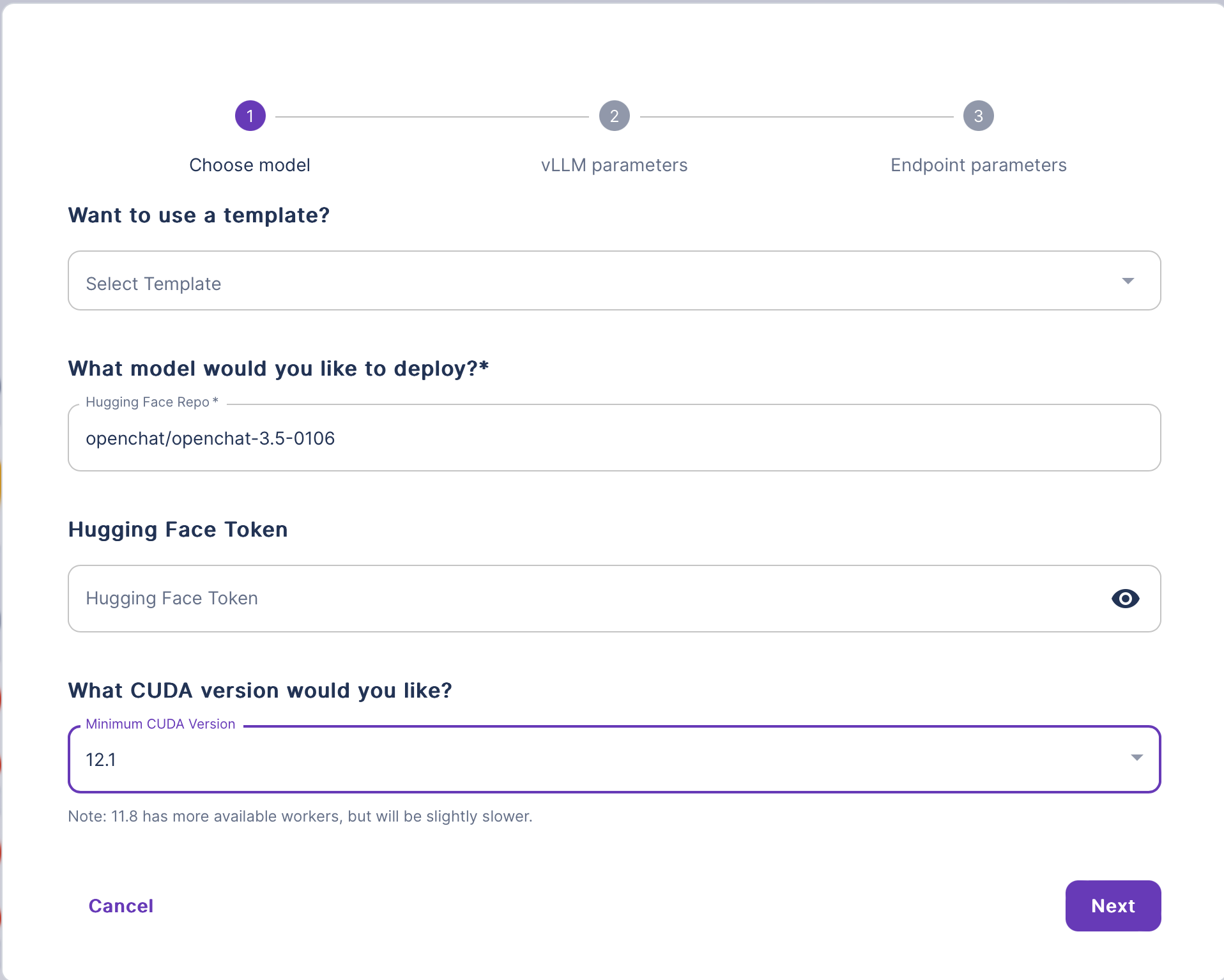
Runpod configurable endpoint wizard with Hugging Face repo openchat/openchat-3.5-0106 and CUDA 12.1 selected

Follow these steps to deploy a large language model using Configurable Templates:

  1. Navigate to the Explore section and select vLLM to deploy any large language model.
  2. In the vLLM deploy wizard, provide the following information:
    • (Optional) Enter a template name.
    • Enter the name of your Hugging Face LLM model.
    • (Optional) Enter your Hugging Face token.
    • Select the desired CUDA version.
  3. Click Next and review the configurations on the vLLM Parameters page.
  4. Click Next again to proceed to the Endpoint Parameters page:
    • Prioritize your Worker Configuration by selecting the order of GPUs you want your Workers to use.
    • Specify the number of Active, Max, and GPU Workers.
    • Configure additional Container settings:
      • Provide the desired Container Disk size.
      • Review and modify the Environment Variables if necessary.
  5. Click Deploy to start the deployment process.

Once the deployment is complete, your LLM will be accessible via an Endpoint. You can interact with your model using the provided API.

💡

Runpod supports any model architecture that can run on vLLM with configurable templates.

By integrating vLLM into the Configurable Templates feature, Runpod simplifies the process of deploying and running large language models. Users can focus on selecting their desired model and customizing the template parameters, while vLLM takes care of the low-level details of model loading, hardware configuration, and execution.

Start up a vLLM Pod

Author profile: Brendan McKeag

The Chips Got Faster. The Stack Didn't.

The Chips Got Faster. The Stack Didn't.

Explore why faster chips have shifted the bottleneck to AI infrastructure, and what that means for teams running production workloads.

All

Multi-Instance GPUs on Runpod: Stop Paying for Compute You Don't Need

Multi-Instance GPUs on Runpod: Stop Paying for Compute You Don't Need

With MIG, we can partition RTX 6000 Pro cards into isolated 24 GB instances. Here's when it makes sense for your workloads.

All

OpenAI Parameter Golf: what 1,100 researchers built in six weeks

OpenAI Parameter Golf: what 1,100 researchers built in six weeks

How 1,100 researchers beat OpenAI's own baseline with 16 megabytes and 10 minutes.

All

Build what’s next.

Build, train, and scale AI workloads on Runpod with cloud GPUs, Serverless, and Clusters.