

惯性聚合 高效追踪和阅读你感兴趣的博客、新闻、科技资讯
阅读原文 在惯性聚合中打开

推荐订阅源

小众软件
小众软件
博客园_首页
M
MIT News - Artificial intelligence
雷峰网
雷峰网
GbyAI
GbyAI
博客园 - 叶小钗
Cyber Security Advisories - MS-ISAC
OSCHINA 社区最新新闻
OSCHINA 社区最新新闻
V
V2EX
S
SegmentFault 最新的问题
H
Help Net Security
Apple Machine Learning Research
H
Hackread – Cybersecurity News, Data Breaches, AI and More
博客园 - 【当耐特】
V
Visual Studio Blog
月光博客
月光博客
G
Google Developers Blog
freeCodeCamp Programming Tutorials: Python, JavaScript, Git & More
腾讯CDC
云风的 BLOG
云风的 BLOG
美团技术团队
Microsoft Azure Blog
A
About on SuperTechFans
有赞技术团队
有赞技术团队

Runpod Blog.

New Runpod datacenter now live: AP-IN-1 Track GPU spend across your team with Cost Centers The GPU supply supercycle is here. Here’s what AI builders need to know. Community Spotlight: One-click AI image and video generation on Runpod with SwarmUI | Runpod Blog Community Spotlight: LoRA Pilot Data Prep to Inference Introducing the Runpod Assistant: Manage Your Cloud GPU Resources with Natural Language OpenAI's Parameter Golf: Train the Best Language Model That Fits in 16MB on Runpod LLM inference optimization: techniques that actually reduce latency and cost Pruna P-Video and Vidu Q3 public endpoints now available on Runpod Runpod brand spelling guide Quickstart - Runpod Documentation The AI market looks nothing like the narrative Training StyleGAN3 with Vision-Aided GAN on Runpod KoboldAI – The Other Roleplay Front End, And Why You May Want to Use It How to Connect Cursor to LLM Pods on Runpod for Seamless AI Dev Community Spotlight: How AnonAI Scaled Its Private Chatbot Platform with Runpod Prompt Scheduling with Disco Diffusion on Runpod Runpod's Latest Innovation: Dockerless CLI for Streamlined AI Development Run Your Own AI from Your iPhone Using Runpod Introducing Flash: Run GPU workloads on Runpod Serverless: No Docker required Use Claude Code with your own model on Runpod: No Anthropic account required Avoid Errors by Selecting the Proper Resources for Your Pod What hackers built on Runpod at TreeHacks 2026 Easily Back Up and Restore Your Pod with Cloud Sync + Backblaze B2 The Complete Guide to GPU Requirements for LLM Fine-Tuning AI Guides, Tutorials & GPU Infrastructure Insights | Runpod Your first Claude Code project within Runpod: a complete setup guide 10 billion Serverless requests and counting Building for resilience: Runpod’s response to the AWS us-east-1 outage How to Connect Google Colab to Runpod
Serverless | Migrating and Deploying Cog Images on Runpod...
Justin Merrell · 2023-10-12 · via Runpod Blog.

>_ docker build --tag user/repo:tag --build-arg COG_REPO=user --build-arg COG_MODEL=model_name --build-arg COG_VERSION=model_version .

>_ docker push user/repo:tag

Switching cloud platforms or migrating existing models can often feel like a Herculean task, especially when it necessitates additional developmental efforts. This guide aims to simplify this process for individuals who have deployed models via replicate.com or utilized the Cog framework. Through a few straightforward steps, you'll learn how to establish a Runpod serverless worker from an existing Replicate image. This tutorial presumes you are operating within a Linux terminal environment and have Docker installed on your system. For demonstration purposes, we'll be transitioning the lucataco/hotshot-xl model to a Runpod serverless endpoint.

Step 1: Clone and Navigate to the cog-worker Repository
Begin by cloning the cog-worker repository and then navigate to the root folder of the repository:


The cog-worker repository contains essential scripts and configuration files required for the migration.

Step 2: Identify Model Information
Identify the username, model name, and version you wish to use from Replicate.

Required model information extracted from https://replicate.com/lucataco/hotshot-xl/versions

Required model information extracted from https://replicate.com/lucataco/hotshot-xl/versions

Step 3: Build and Push Docker Image
Build the Docker image by providing the necessary arguments for your model. Once your Docker image is built, push it to a container repository such as DockerHub:

The --tag option allows you to specify a name and tag for your image, while the --build-arg options provide the necessary information for building the image.

Step 4: Create and Deploy a Serverless Endpoint on Runpod
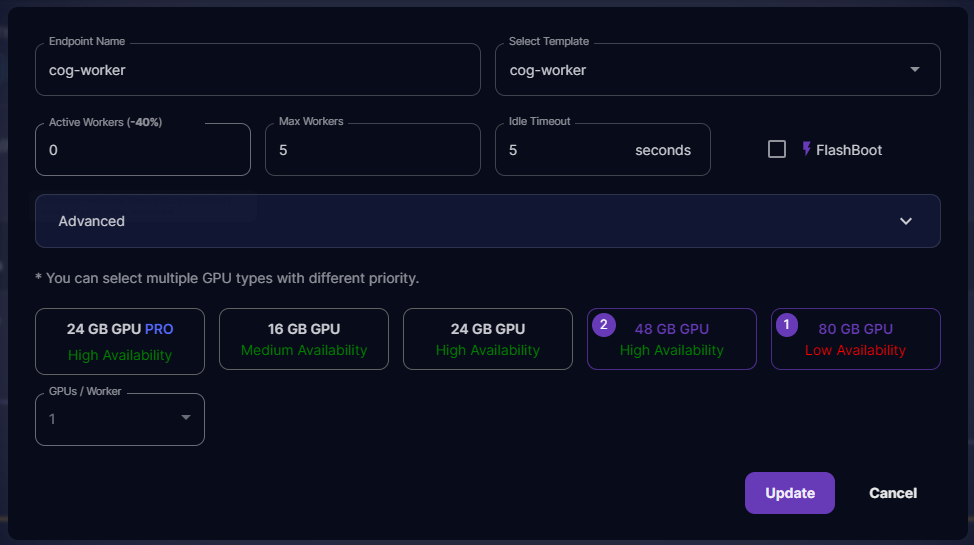
Open Runpod and initiate the creation of a serverless endpoint template. Once the template is set up, deploy the endpoint. This will now allow you to send requests to your new endpoint.
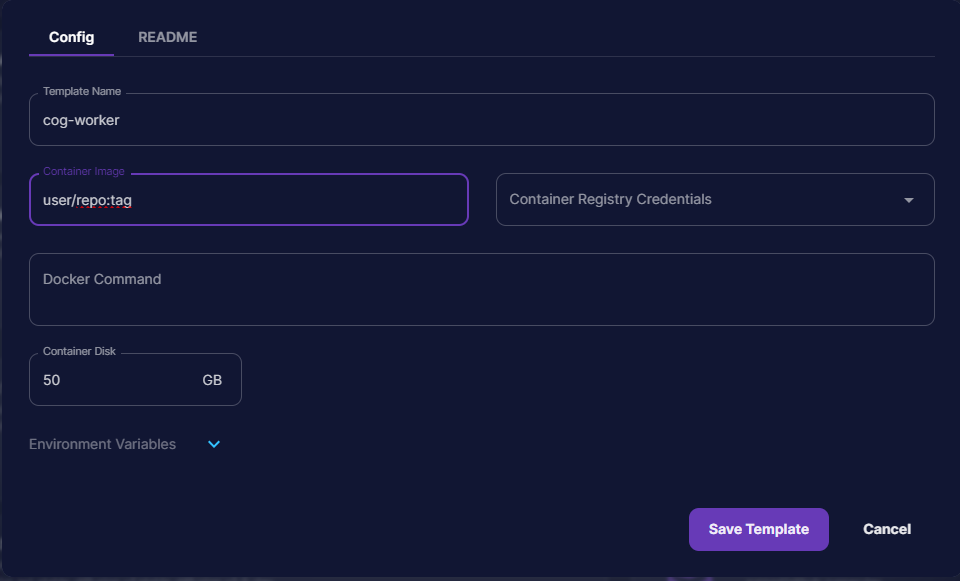
Runpod template config form for cog-worker with container image, Docker command, and disk size fields

Runpod serverless endpoint settings for cog-worker with worker counts and prioritized GPU selection

Your Runpod serverless endpoint is now ready to handle requests! Depending on the specifics of your application, you may need to modify the handler file before building, especially if you intend to upload images to object storage, for instance.

The next step, of course, is to now test your API with ReqBin. Every package has their own parameters to pass to the API, but generally the overarching structure of the request is the same no matter what. Check out this article if you need to learn how to send a request through Reqbin to your serverless worker to see if it's ready for prime time. You also may want to check out our previous article on Serverless APIs which includes an example using cURL at the bottom.

By following this streamlined process, transitioning from Replicate to a Runpod serverless endpoint is made significantly less daunting, enabling a smoother migration and deployment of your Cog image.

Author profile: Justin Merrell