





简介
现在微服务的主流部署方式是用k8s,而微服务又是出了名的开发调试困难,这家名为ambassador的公司(他们也开发了知名的同名网关项目firmwarefirmwareambassador,现在改名叫emissary-ingress了),开发了这个叫Telepresence的工具,可以帮助开发者更方便的进行k8s环境下的应用开发,它能让你的本机直接访问到k8s集群内的服务,也可以将集群内的请求流量劫持到本机进行处理,这样就不需要在开发调试中反复进行构建镜像,推送镜像,部署服务的流程了,直接在本地一站式完成,比较方便。
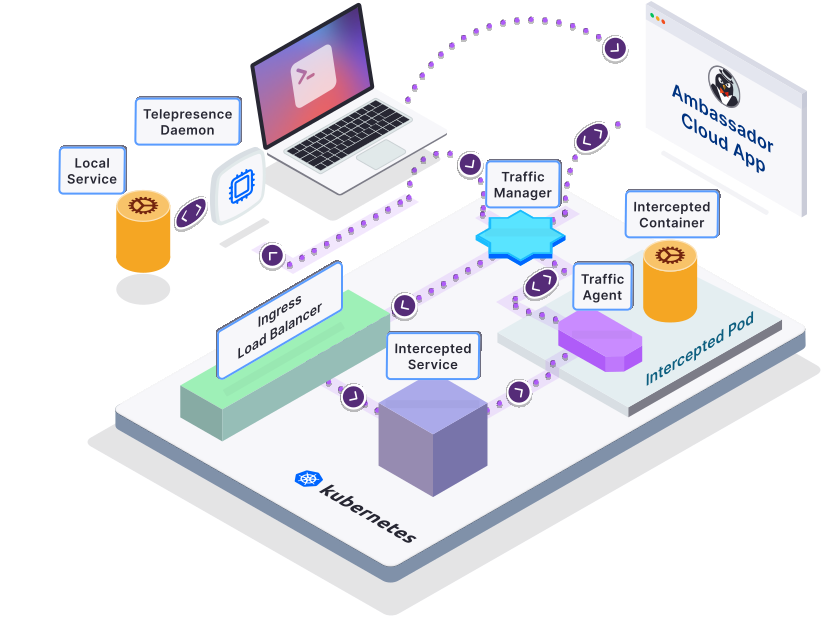
安装
参考安装文档
主要分为两部分:
本机部分(安装teleprecense命令工具):
Linux直接安装二进制
# 1. Download the latest binary (~50 MB):
sudo curl -fL https://app.getambassador.io/download/tel2/linux/amd64/latest/telepresence -o /usr/local/bin/telepresence

# 2. Make the binary executable:
sudo chmod a+x /usr/local/bin/telepresence
MacOS用homebrew安装。
# Intel Macs

# Install via brew:
brew install datawire/blackbird/telepresence

# OR install manually:
# 1. Download the latest binary (~60 MB):
sudo curl -fL https://app.getambassador.io/download/tel2/darwin/amd64/latest/telepresence -o /usr/local/bin/telepresence

# 2. Make the binary executable:
sudo chmod a+x /usr/local/bin/telepresence

# Apple silicon Macs

# Install via brew:
brew install datawire/blackbird/telepresence-arm64

# OR Install manually:
# 1. Download the latest binary (~60 MB):
sudo curl -fL https://app.getambassador.io/download/tel2/darwin/arm64/latest/telepresence -o /usr/local/bin/telepresence

# 2. Make the binary executable:
sudo chmod a+x /usr/local/bin/telepresence
k8s集群部分(安装tranffic manager):
需要先安装helm,然后执行
telepresence helm install
连接集群
安装完成后,需要使用下面的命令来连接到k8s集群。
telepresence connect
如果运行上面的命令之后,检查状态或使用功能时存在问题,可能是集群的namespace太多造成的,可以使用下面的参数来控制要连接哪些namespace,用逗号分隔。这样通常能够解决问题。
telepresence connect --mapped-namespaces namespace-a,namespace-b
连上之后可以使用如下命令检查状态
telepresence status
使用如下命令测试是否能正确访问集群内服务,如果返回401就是成功了。
curl -ik https://kubernetes.default
访问集群内的服务
接下来可以直接通过k8s的namespace和service作为域名访问集群内的service了,本地应用调试时的依赖服务配置文件也可以改成这样的地址,这样可以直连开发环境的数据库和其他服务,方便本地开发。
比如:
curl http://my-service.my-namespace:8080
劫持集群内的服务流量到本机
对于某些线上服务的疑难杂症,可以直接把发给他的流量劫持到本机,这样就能在本机直接边改代码边在集群中进行e2e的调试。目前这个功能有一定局限性,同一个service同时只能劫持一个端口。
开启劫持:
telepresence intercept my-service --port 8080:8080 -n my-namespace
开启之后,你就可以启动本地的服务,来接收来自集群中的流量了。
列出服务的劫持状态:
telepresence list -n my-namespace
调试完了别忘了卸载服务的劫持状态:
telepresence uninstall --agent my-service -n my-namespace
把集群的其他服务请求流量恢复到指向集群里的pod。
也可以用telepresence leave <intercept-name>来关闭劫持状态,这个intercept-name需要在list命令下找到对应的名字,但这种方式在服务有多个端口提供服务并劫持其中一个端口时,在关闭之后会造成其他端口仍不可用的状态,所以用上面uninstall的命令会比较好一些。
关闭集群连接
使用如下命令关闭到集群的连接,将本地的网络恢复原状:
telepresence quit
其他高级功能请参考文档说明。