








A concise multiplatform language developed by JetBrains
Kotlin Multiplatform Releases Toolchain
Kotlin Toolchain 0.12: Multiplatform Library Publishing, Wasm Apps, and More
Kotlin Toolchain 0.12.0 is out. This release brings some long-awaited features: multiplatform libraries publication, a preview of Wasm application support, Compose Hot Reload from the command line, and more.
Read on for the details, and check the release notes for the full list of changes and bug fixes.
Additionally, klibs.io now uses the Kotlin Toolchain in production. A real backend and not a sample, it’s built on JDK 21, Spring Boot 4 (with Spring AI), PostgreSQL, and OpenSearch. We’ve converted nine convention plugins to Kotlin Toolchain templates, and two Gradle plugins with no built-in equivalent: Jib and Git Properties, which we’ve implemented as local Kotlin Toolchain plugins. Check out the sources yourself.
To get support for Kotlin Toolchain’s latest features, use IntelliJ IDEA 2026.2.1 (or newer). Make sure the latest version of the Kotlin Toolchain plugin is installed.
Kotlin Multiplatform libraries publication
Library publishing arrived in preview in 0.11, but only for JVM libraries. Starting with 0.12, multiplatform libraries work too, with exactly the same configuration:
product:
  type: lib
  platforms: [jvm, android, iosArm64, iosSimulatorArm64, wasmJs]

settings:
  publishing:
    enabled: true
    group: org.example
    version: 1.0.0
The Kotlin Toolchain publishes everything your users need to depend on your library from any of its targets: the common API, one artifact per platform, the sources, and the module publication metadata that lets build tools pick the right pieces automatically.
Cinterop bindings are supported as well. They are published both commonized and per platform, so your users get the same C API you compiled against without setting up interop themselves. The result is consumable from Gradle projects like any other multiplatform library.
For more details, see the documentation.
Note: Resources of Compose Multiplatform libraries are not part of the publication yet. Follow KTC-5698 for progress.
Better compliance with Maven Central quotas
Because of the new quotas on Maven Central publications that Sonatype will soon enforce, we made a few notable changes to reduce the number of files published by default:
- Checksums of signature files (
.asc.sha1) are not necessary and are no longer published. - Only the
.md5and.sha1checksums are published by default now. If you need to continue publishing the.sha256and.sha512checksums, usesettings.publishing.checksums: [md5, sha1, sha256, sha512].
Wasm application support
wasm-js/app modules can now be built into a ready-to-use web application.
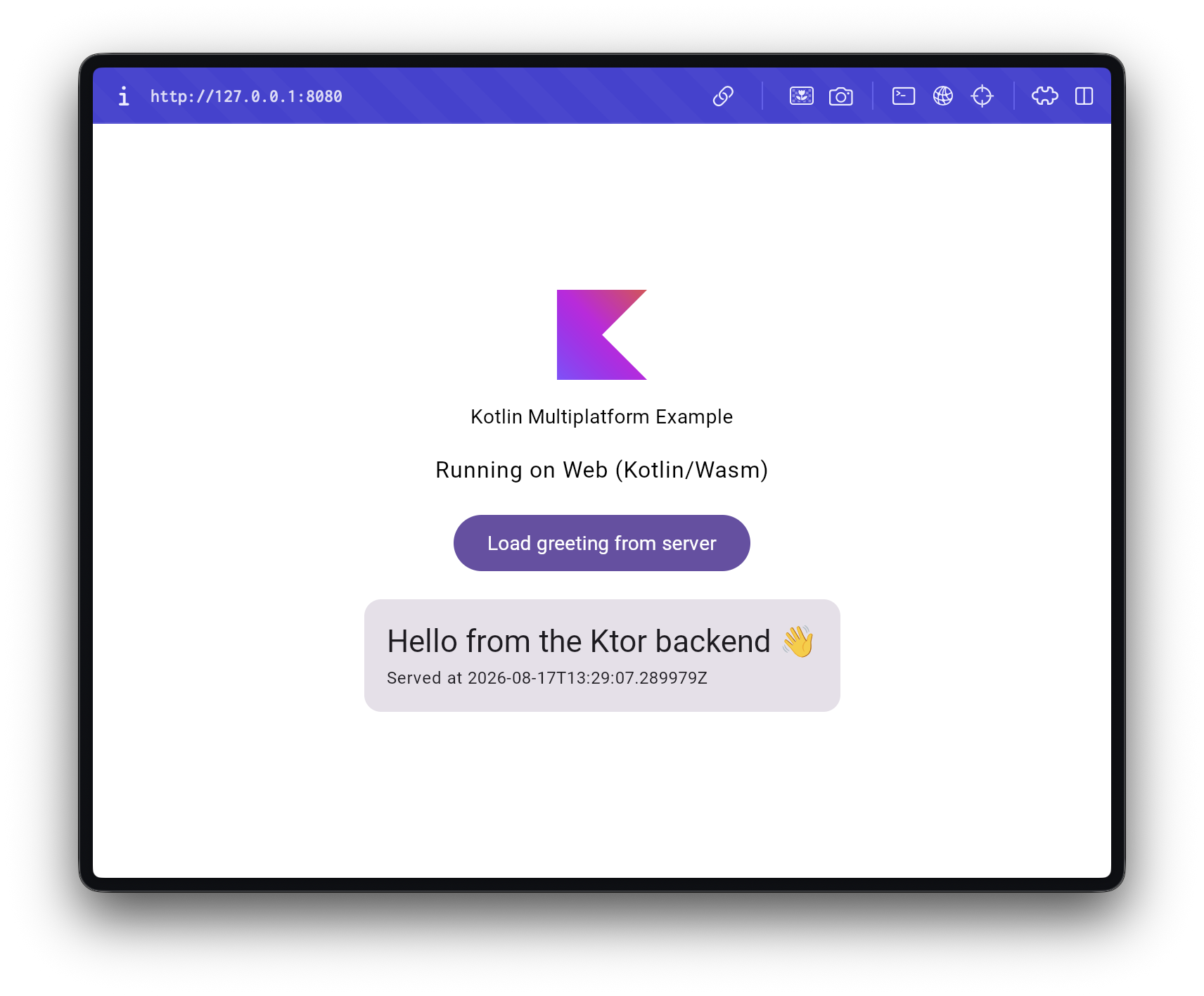
Among the supported features are:
- Running Wasm apps with the
kotlin runcommand. - Customizing
index.htmland other resources. - Fetching transitive npm dependencies from Kotlin Multiplatform libraries.
More information on working with Wasm web applications is available in the documentation.
Terminal UI improvements
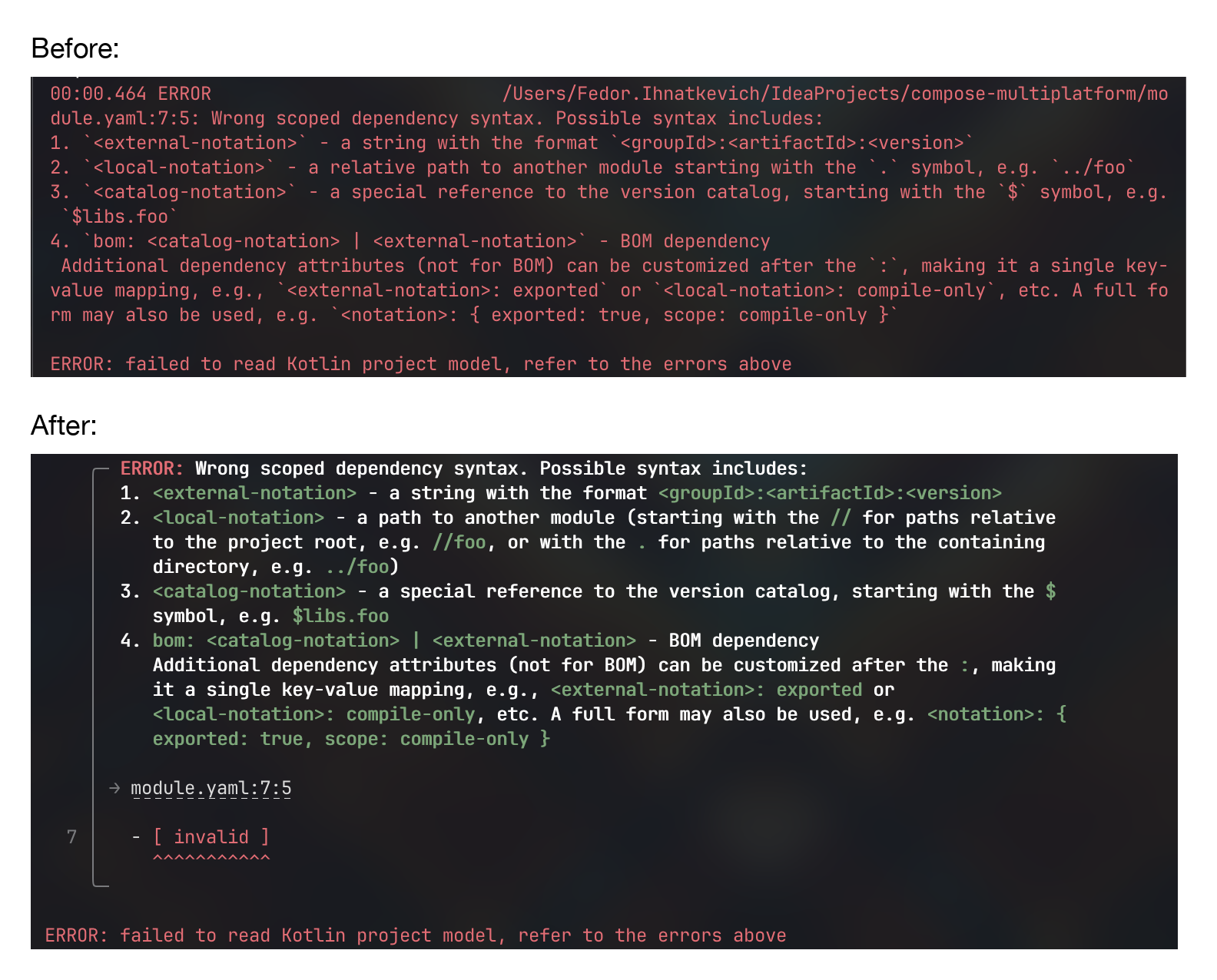
We are actively working to make the output of the kotlin command less verbose and more user-friendly.
Diagnostics
For example, here are some of the recent diagnostics improvements:
Tests in the status widget
Running tests are now visible in the status widget under the respective tasks and their suites. There are also short test execution statistics visible during the run.
There are more things to iron out, but we’ll get there.
IDE improvements
Compose preview support
Android modules and kmp/lib modules that have Android as one of their targets now support the Compose preview feature, powered by the androidx.compose.ui.tooling.preview.Preview annotation and the Android plugin.
Better support for Compose resources
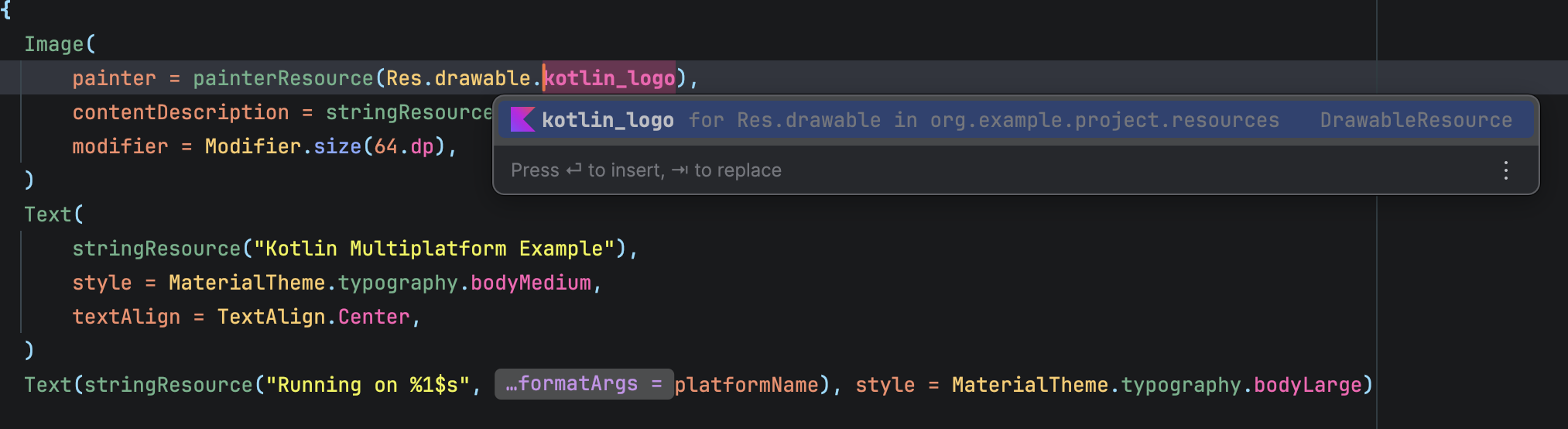
The IDE now correctly recognizes Compose resources, updates Res classes on the fly, provides navigation, completion, and refactorings that update both XMLs and your code.
Android tooling improvements
Adding to the Compose preview support mentioned above, we have also brought support for more of the Android features you are accustomed to, such as:
- Android Lint
- Live Edit
- Layout Inspector
- Resources (
Rclass) navigation and completion
iOS improvements
Starting with IntelliJ IDEA 2026.2.1, the experience of working with iOS applications should be closer to what you’re used to in Gradle projects.
The run configuration now lets you pick a device, configure Xcode options, and choose a debug/release configuration mode.

We’ve also fixed a few issues with Kotlin/Swift interoperability, which should be more stable now.
Inlay hints with coordinates of catalog dependencies
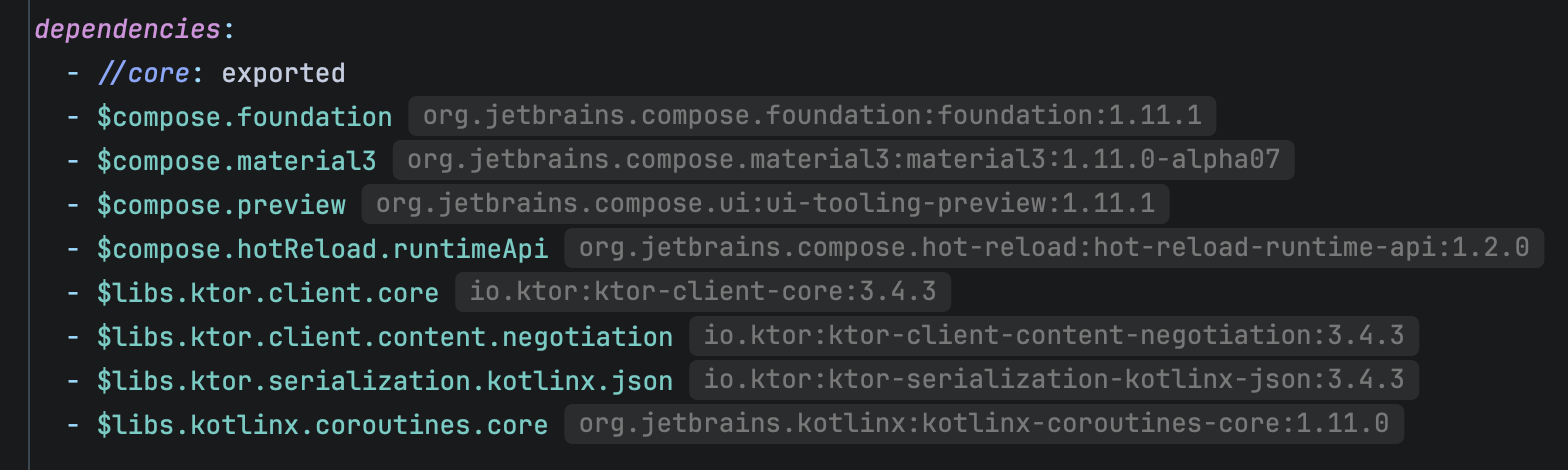
Catalog dependencies in module files and templates now have an inlay hint next to them displaying coordinates that each entry points to.
Better Compose Hot Reload support
We now properly support Compose Hot Reload from the command line using the kotlin run --compose-hot-reload-mode command.
General improvements
- The very first reload is now much faster and the build should consume fewer resources.
- The Restart the application action from the DevTools menu is now supported.
Compose Hot Reload MCP
We now support an MCP server for agents to interact with applications running with Compose Hot Reload.
To get started, add the following snippet in your mcp.json:
{
    "mcpServers": {
        "Compose Hot Reload": {
            "command": "./kotlin",
            "args": [
                "compose-hot-reload-mcp-server"
            ]
        }
    }
}
With this, agents can interact with, reload, restart, and view window snapshots, and dump the tree of composables. Read more about these capabilities here.
Other improvements
New recommended local dependency format using the // prefix
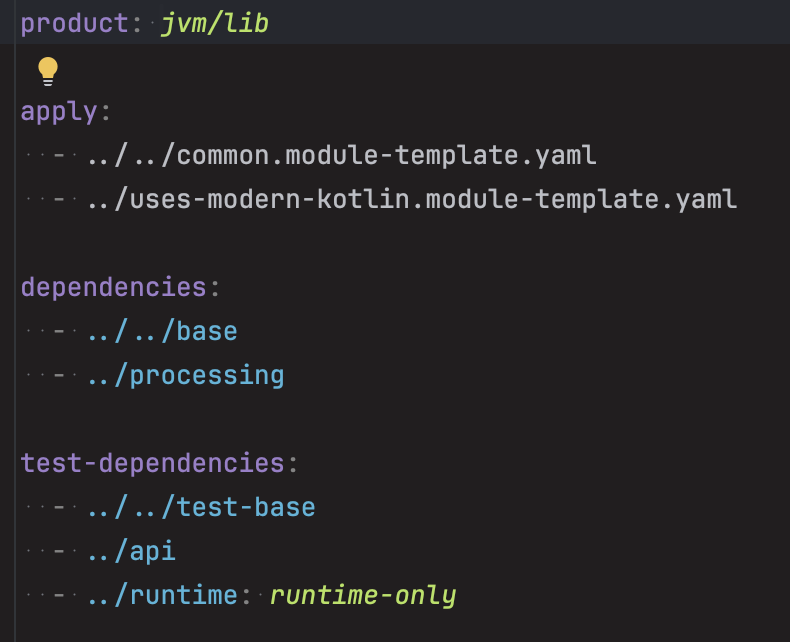
Previously, the only way to define local module dependencies was to use relative paths starting with the . (dot) symbol. This approach had several problems. For example, moving a module from one directory level to another required changing all the dependency paths, such as from../../foo to ../foo. And having a multitude of ../ in deeply nested directory structures generally made paths hard to read.
The new recommended way to define local module dependencies is to use project-root-relative paths starting with the // prefix. You might be familiar with this syntax from tools like Bazel. The // prefix represents the project root directory and can be used not only in the dependencies block but in any place that expects a path as well, for example, apply.
Before:
After:
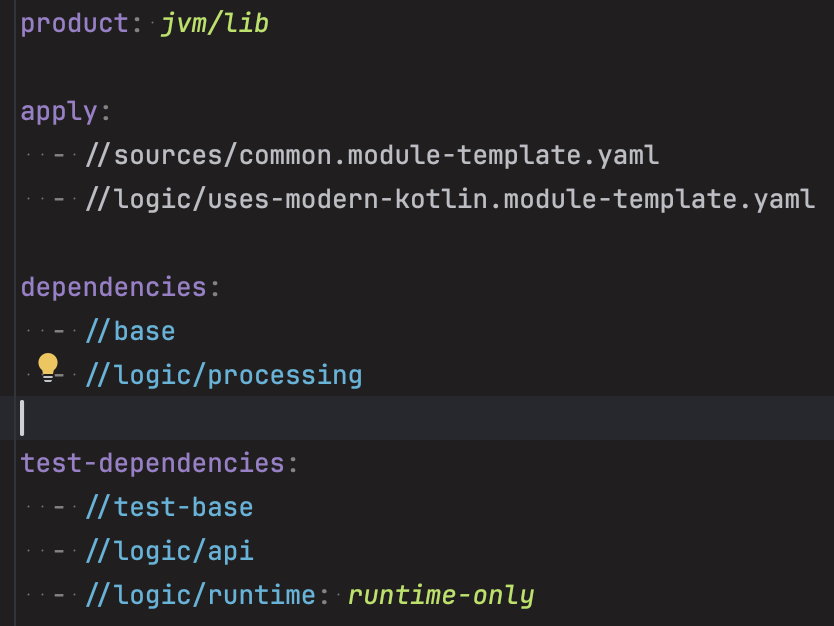
The old relative-paths approach still works for now.
This is a step toward allowing multiple modules with the same directory name.
Raised minimum JDK and Kotlin versions
Until now, the minimum JDK version supported by the Kotlin Toolchain was not clearly documented anywhere, and the build would just fail in different places if you used a JDK that was too old. There is now a clear diagnostic and a clear minimum: only JDK 17 and higher are supported to compile your code. You can still use settings.jvm.release to set a lower target if your code should be runnable on lower JREs.
The minimum Kotlin compiler version was raised from 2.1.10 to 2.2.20. This allows simplifying our code, and is in line with the new security support policy for the Kotlin standard library.
Updated default versions
We’ve also updated some of the default versions for built-in toolchains and frameworks:
- Kotlin 2.4.10
- JDK 25
- JUnit Platform 6.1.3
- KSP 2.3.11
- Ktor 3.5.2
- Spring Boot 4.1.0
- DataFrame 1.0.0-rc01
- Kotlinx.rpc 0.10.3
Try Kotlin Toolchain 0.12.0
To get started with the Kotlin Toolchain, check out our Getting started guide. Take a look at some examples, follow the tutorial, or read the comprehensive user guide, depending on your learning style.
To update an existing project, use the kotlin update command.
Share your feedback
The Kotlin Toolchain is still in Alpha and under active development. You can provide feedback about your experience by joining the discussion in the #kotlin-toolchain Slack channel (get invite: https://kotl.in/slack) or by sharing your suggestions and ideas in a YouTrack issue. Your input and use cases help shape the future of the Kotlin Toolchain!
Subscribe to Kotlin Blog updates