





Understand why you should minimize URL redirects, wherever possible, and identify the best practices to set up URL redirects.
Overview
In our audit documentation, we touched upon the fact that redirects can significantly affect your website’s performance.
In this article, we’ll explain in detail about how to optimally set up redirects for your website.
Redirection Best Practices
In general, try to avoid redirects as much as possible.
If, however, you cannot avoid them for whatever reason, GTmetrix always recommends URLs be redirected on the server-side as they are fast, cacheable, and can be implemented universally.
To this end, follow these best practices to ensure optimal use of redirects:
1) Favour Server-side (web-server or application), vs Client-side (HTML, or JavaScript) redirects
When dealing with server-side redirects, we recommend that they be executed via web server configuration as they are often faster than application-level configuration.
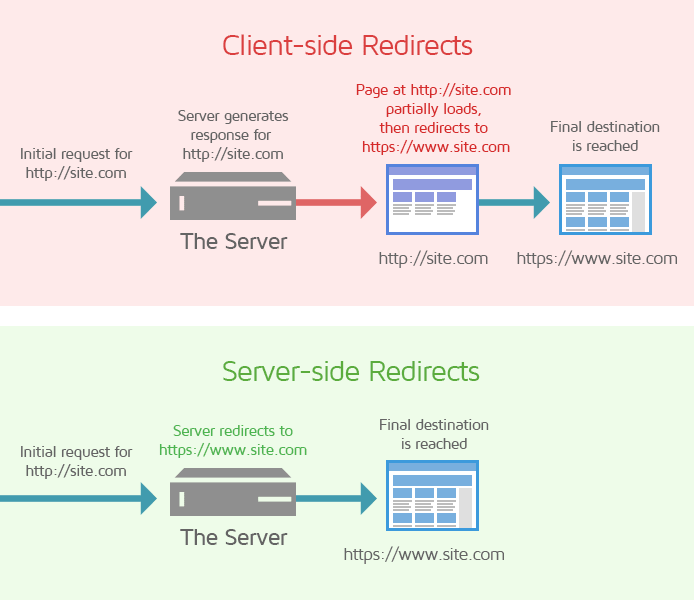
Server-side redirects happen immediately and help visitors reach their final destination sooner.
However, if the application itself is fast and optimized for performance, application-level redirects can be executed.
2) Say no to client-side redirects
Avoid client-side redirects, as much as possible, as they are slower, non-cacheable and may not be supported by browsers by default.
3) Avoid landing page redirects/Minimize redirect chains
Wherever possible, avoid landing page redirects; especially, the practice of executing separate, individual redirects for reasons such as protocol change, adding www, mobile-specific page, geo-location, and subdomain.
Always redirect to the preferred version of the URL, especially, when redirects are dynamically generated. This helps eliminate unnecessary redirects.

An example of an optimal redirect, going directly from http:// to https://www
For instance, if a website has both site.com and www.site.com, set up the redirect to directly forward from http://site.com to the preferred https version of the new URL (in this case https://www.site.com). This helps you skip an intermediate step in the redirect chain.
As a general rule of thumb, try and limit the number of redirects to 1, wherever possible.
4) Periodically review your redirects
Review the redirects in place from time to time to ensure that old and irrelevant redirects are removed.
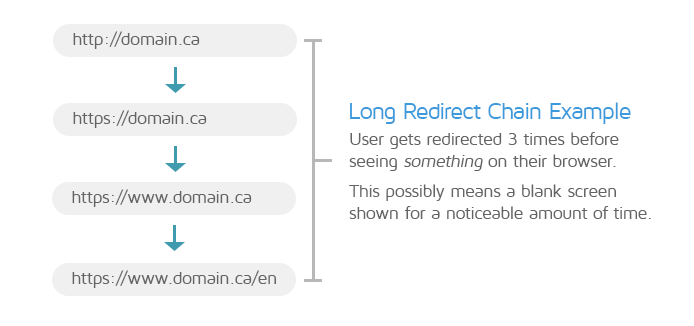
An example of a long redirect chain.
Similarly, remove temporary redirects if not needed anymore.
Remember that combining multiple redirects into a single redirect is the most effective way to improve web performance.
A brief note on HTTP Strict Transport Security (HSTS)
HSTS is a response header that commands the browser to only load the HTTPS version of a website, ignoring any attempt to load the unencrypted HTTP version.
Here are a few key reasons why your website should be HSTS-enabled:
- It provides an extra layer of security to prevent data-theft and phishing attacks. It also eliminates an unnecessary step in the redirect chain to improve web performance.
- It’s supported by most modern browsers and references a pre-load list to verify that websites are HSTS-enabled.
However, be aware of possible HSTS downsides, such as:
- If you have legacy configurations that are not equipped for HTTPS, they will break.
- Only use the includeSubDomains directive when all subdomains are properly set up for HTTPS with the required SSL/TLS certificates.
- Inclusion in the preload list cannot be easily undone.
- To prevent the delayed removal of your website from the preload list, do not include the preload directive by default.
Learn more about HSTS and the preload list here.
Setting up redirects
The following are some basic guidelines for optimally executing redirects on various server types :
For Apache
To setup URL redirects, you’ll need to edit the .htaccess file as it allows overwriting of the central configuration at the directory level. We recommend that you create a backup of the original .htaccess file before you modify it.
Note that .htaccess files may be hidden, so make sure that any ‘Show hidden files’ options are enabled.
Refer to this article for comprehensive details on redirection using .htaccess files.
For NGINX
In NGINX, redirects are handled using a .conf file, namely the nginx.conf file, located in the /etc/nginx/ directory.
To execute NGINX redirects, follow the instructions in this article and modify the code as necessary.
For IIS
For the Microsoft IIS Server, follow the instructions in this Microsoft document to set up URL redirects for your website.
Summary
Avoiding multiple page redirects is one of the most important audits to optimize as redirects, by their very nature, can affect web performance and cause a poor page experience for your users.
Always try and avoid redirects as much as possible; however, remember that they may be unavoidable in many cases as site functionality may depend on them.
If you must execute redirects, follow some of the best practices – such as executing them server-side, combining multiple redirects into one, minimizing redirect chains, and periodically reviewing your redirects to remove unwanted redirects.
Depending on your web server, follow the appropriate instructions to optimally set up redirects for your site and then test your page using GTmetrix to see how much they improve your web performance!
Keep your site’s performance at the top of your mind
Get more On-Demand Tests, Monitored Slots and Advanced Analysis Options, along with Hourly Testing, with a GTmetrix PRO plan.
Other features include: Priority queue access, Mobile Testing, Remote Location Monitoring (including Premium Locations), and more!