


惯性聚合 高效追踪和阅读你感兴趣的博客、新闻、科技资讯
阅读原文 在惯性聚合中打开

推荐订阅源

L
LangChain Blog
The GitHub Blog
The GitHub Blog
Recent Announcements
MyScale Blog
MyScale Blog
P
Proofpoint News Feed
S
Security @ Cisco Blogs
N
News and Events Feed by Topic
H
Hacker News: Front Page
Attack and Defense Labs
S
Secure Thoughts
Microsoft Security Blog
N
Netflix TechBlog - Medium
U
Unit 42
Stack Overflow Blog
Stack Overflow Blog
T
Threat Research - Cisco Blogs
Google Online Security Blog
Spread Privacy
Spread Privacy
Threat Intelligence Blog | Flashpoint
Exploit-DB.com RSS Feed
L
LINUX DO - 热门话题
T
Tenable Blog
博客园 - 叶小钗
D
DataBreaches.Net
freeCodeCamp Programming Tutorials: Python, JavaScript, Git & More
博客园_首页
人人都是产品经理
人人都是产品经理
aimingoo的专栏
aimingoo的专栏
C
Check Point Blog
博客园 - 三生石上(FineUI控件)
量子位
P
Proofpoint News Feed
H
Help Net Security
Blog — PlanetScale
Blog — PlanetScale
宝玉的分享
宝玉的分享
Recorded Future
Recorded Future
The Register - Security
F
Fortinet All Blogs
Engineering at Meta
Engineering at Meta
钛媒体:引领未来商业与生活新知
钛媒体:引领未来商业与生活新知
Last Week in AI
Last Week in AI
S
Schneier on Security
V
Vulnerabilities – Threatpost
雷峰网
雷峰网
Microsoft Azure Blog
G
GRAHAM CLULEY
G
Google Developers Blog
月光博客
月光博客
V
V2EX
T
Troy Hunt's Blog
A
Arctic Wolf

智朋的个人博客

Anki 笔记读取器 使用 PyQt 制作简易软件简明笔记 制作 Anki 插件简明笔记 LaTeX 图片背景 eso-pic 宏包 残余应力 Excel 操作指南 Word 操作指南 Mermaid 甘特图 QHUMaster 使用指南 QHUMaster 使用指南
文件树目录
coffeelize 一个工程师的存档点 · 2024-06-16 · via 智朋的个人博客

文件树目录

发表于 更新于 本文字数: 344 阅读时长 ≈ 1 分钟

新建文本文件,将以下两种方式中的任意一种粘贴到文本中,并保存为 bat 格式双击运行即可

1
2
3
4
5
6
echo off & color 0A
echo 当前目录:"%cd%" >fileTree.txt
tree /f >>fileTree.txt
echo 目录树已生成,按任意键查看。
pause>nul
start fileTree.txt
1
tree /f > tree_output.txt
  • 如果只想输出文件夹信息,加 /a 参数
  • 如果想输出文件夹下的文件名,加 /f 参数

或者不新建文件,在文件夹中,按住 Shift 右键,在此处打开 powershell,然后粘贴代码 tree /f > tree_output.txt 即可
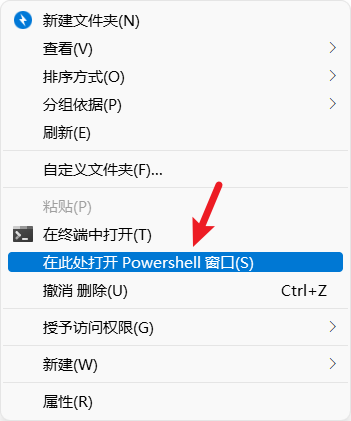
image.png

在当前文件夹搜索栏左侧的路径下,直接敲入 CMD,回车即可