惯性聚合 高效追踪和阅读你感兴趣的博客、新闻、科技资讯
阅读原文 在惯性聚合中打开

推荐订阅源

奇客Solidot–传递最新科技情报
奇客Solidot–传递最新科技情报
博客园_首页
大猫的无限游戏
大猫的无限游戏
让小产品的独立变现更简单 - ezindie.com
Apple Machine Learning Research
B
Blog
B
Blog RSS Feed
Cyber Security Advisories - MS-ISAC
P
Proofpoint News Feed
MyScale Blog
MyScale Blog
Engineering at Meta
Engineering at Meta
量子位
H
Hackread – Cybersecurity News, Data Breaches, AI and More
T
Tailwind CSS Blog
Stack Overflow Blog
Stack Overflow Blog
N
Netflix TechBlog - Medium
T
The Blog of Author Tim Ferriss
U
Unit 42
aimingoo的专栏
aimingoo的专栏
博客园 - 叶小钗
博客园 - 【当耐特】
云风的 BLOG
云风的 BLOG
博客园 - Franky
博客园 - 聂微东

Ittavern.com

Wimage - Hosting Open-Source Image Uploader with Podman and external S3 Storage Switching from Hugo to picopaper Encryption using SSH Keys with age in Linux ETag in nginx - Simple Resource Caching Sending nginx Logs to Loki with Grafana Alloy How to: Cisco ISE backup to SFTP repository with public key authentication Dummy IP & MAC Addresses for Documentation & Sanitization Deploying ISSO Commenting System for Static Content using Docker Generate a Vanity v3 Hidden Service Onion Address with mkp224o mtr - More Detailed Traceroute - Network Troubleshooting My Personal Backup Strategy - August 2024 iperf3 - User Authentication with Password and RSA Public Keypair Adding a trash can to Linux with trash-cli Bandwidth Measurement using netcat on Linux Getting started with rsync - Comprehensive Guide Cron Jobs on Linux - Comprehensive Guide with Examples SSH Server Hardening Guide v2 Port Knocking with knockd and Linux - Server Hardening Getting started with rclone - Data transmission Getting started with dig - DNS troubleshooting Getting started with Fail2Ban on Linux Getting started with netcat on Linux with examples URL explained - The Fundamentals Troubleshooting Asking The Right Questions Create tmux layouts using bash scripts Getting started with tcpdump - Ittavern.com Curl on Linux - Reference Guide Getting started with nmap scripts My Offsite Backup - March 2023 Getting started with iperf3 - Network Troubleshooting
ssh-audit Primer - Audit your SSH Server
2024-08-28 · via Ittavern.com

As the name already implies,ssh-audit helps you to audit SSH clients and servers. It is lightweight, open-source, supports both versions of SSH and is available for Linux and Windows.

In this article we'll use Linux on both sides.

The Basics

After installation, the basic syntax of an audit is ssh-audit DESTINATION. By default it uses the standard SSH port 22 - to change the port, simply add it to the destination DESTINATION:2222.
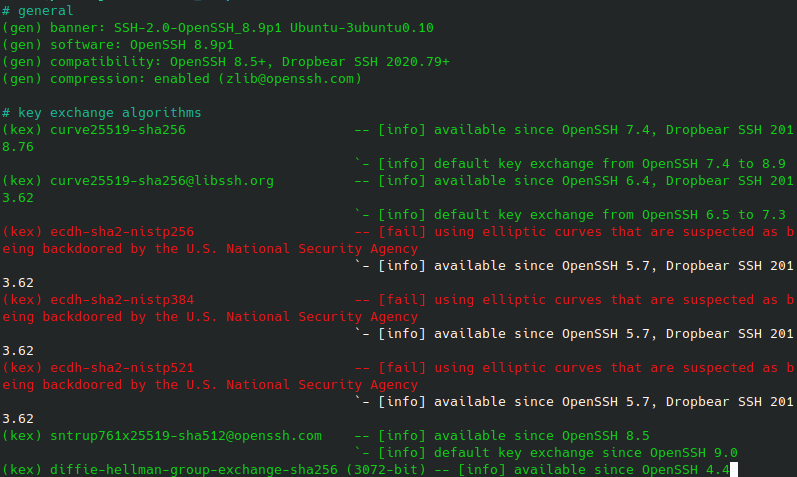
On the left, it starts with the referenced information, categorizes it with [info],[warn] and other labels and adds a short description on the right.

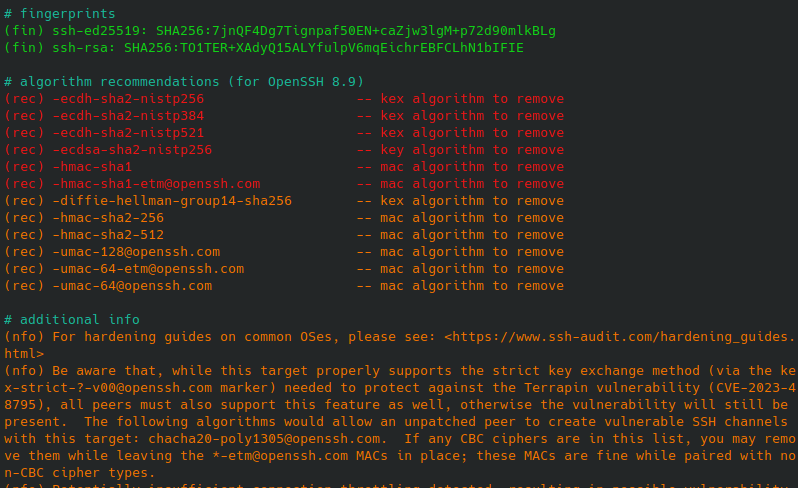
It has many sections - starting with various information about key, cipher and algorithms information and information about the fingerprint, recommendations and additional information at the end.
General options #

Force a certain SSH version:
-1, --ssh1
-2, --ssh2
Choose an Internet Protocol Version:
-4, --ipv4
-6, --ipv6
Removes the colors in the terminal:
-n, --no-colors
For a more detailed output:
-v, --verbose
-d, --debug
In particular, the debug option is useful if you need to troubleshoot a connection or want the raw data.

Batch Audit of multiple Servers

Especially in larger environments, it makes sense to work with the following options if you want to automate processes.

Target list of hosts from file #

Create a simple list of hosts:

cat ssh-servers.txt 
10.10.50.50:22
10.20.30.40:22

Now you can use the -T, --targets=<hosts.txt> options to run through the list of hosts:

ssh-audit -T ssh-servers.txt

There are some options that might be helpful:

Add a timeout in case a host is unavailable so the run can continue:
-t, --timeout=<secs>
Set the minimum output level for the logs:
-l, --level=<level> # (info|warn|fail)
Formatting the results in JSON:
-j, --json
This options removes a lot of formatting and empty lines which makes it easier to work with the results:
-b, --batch

Saving Results to file #

Simply redirect the results into a new file with >, append to a file with >> or pipe it to tee when you need to display the results at the same time.

ssh-audit -T ssh-servers.txt > ssh-servers-results.txt

Work with Policy Sets

You can create custom policy sets and test against them. This is helpful if you have a standard that you want to enforce and audit your environment against.

Let's say you already have a hardened SSH server that you want to use as a reference. Use -M, --make-policy=reference-policy-ssh.txt to create a reference policy set that you can use later.

ssh-audit -M reference-policy-ssh.txt 10.10.50.51

Wrote policy to reference-policy.txt.  Customize as necessary, then run a policy scan with -P option.

You then can use -P, --policy=reference-policy-ssh.txt to run the reference policy against another server:

ssh-audit -P reference-policy-ssh.txt 10.10.50.50

Host:   10.10.50.50
Policy: Custom Policy (based on 10.10.50.50 on 2024/08/28) (version 1)
Result: ✔ Passed

Deviations will be listed and you can make changes accordingly.

The policy file looks like thi:

 cat reference-policy-ssh.txt                                                                                                                         
# Custom policy based on 10.10.50.51 (created on 2024/08/28)                                                                                         
# The name of this policy (displayed in the output during scans).  Must be in quotes.                                                                       
name = "Custom Policy (based on 10.10.50.51 on 2024/08/28)"                                                                                            
# The version of this policy (displayed in the output during scans).  Not parsed, and may be any value, including strings.                                  
version = 1                                                                                                                                             
# When false, host keys, kex, ciphers, and MAC lists must match exactly.  When true, the target host may support a subset of the specified algorithms and/or
 algorithms may appear in a different order; this feature is useful for specifying a baseline and allowing some hosts the option to implement stricter contr
ols.
allow_algorithm_subset_and_reordering = false

{...}