



惯性聚合 高效追踪和阅读你感兴趣的博客、新闻、科技资讯
阅读原文 在惯性聚合中打开

推荐订阅源

S
SegmentFault 最新的问题
V
Visual Studio Blog
OSCHINA 社区最新新闻
OSCHINA 社区最新新闻
量子位
月光博客
月光博客
阮一峰的网络日志
阮一峰的网络日志
T
Tailwind CSS Blog
GbyAI
GbyAI
爱范儿
爱范儿
Y
Y Combinator Blog
宝玉的分享
宝玉的分享
有赞技术团队
有赞技术团队
罗磊的独立博客
Recent Announcements
博客园 - 司徒正美
M
MIT News - Artificial intelligence
小众软件
小众软件
freeCodeCamp Programming Tutorials: Python, JavaScript, Git & More
让小产品的独立变现更简单 - ezindie.com
B
Blog RSS Feed
A
About on SuperTechFans
Hugging Face - Blog
Hugging Face - Blog
Apple Machine Learning Research
雷峰网
雷峰网

Comments for TrueNAS – Open Enterprise Storage

How to Set Up and Install TrueNAS CORE Yes, You Can (Still) Virtualize TrueNAS TrueNAS enables Container Storage and Kubernetes | TrueNAS - Open Enterprise Storage TrueNAS 12.0-U2 is Released | TrueNAS - Open Enterprise Storage OpenZFS 2.0 Ships First on TrueNAS | TrueNAS - Open Enterprise Storage TrueNAS 12.0-U1 is Scheduled for early December | TrueNAS - Open Enterprise Storage iXsystems TrueNAS M60 Recognized as SDC Awards Storage Hardware Innovation of the Year Finalist | TrueNAS - TrueNAS 12.0 is Released! The TrueNAS Mini X and Mini X+ are here! Cross-Site Disaster Recovery with TrueNAS TrueNAS SCALE Release Plan | TrueNAS - Open Enterprise Storage iXsystems Unveils Industry's Fastest OpenZFS Storage System with Launch of TrueNAS M60 | TrueNAS - Open TrueNAS 12.0 BETA2 Showcases Performance Improvements | TrueNAS - Open Enterprise Storage Be One of the First to Test Drive TrueNAS 12.0 BETA | TrueNAS - Open Enterprise Storage TrueNAS is Multi-OS New-New TrueNAS Logo Unveiled | TrueNAS - Open Enterprise Storage Recession Proof Storage | FreeNAS 11.3-U3.1 Now Available - Issue #80 | TrueNAS - Open Enterprise Storage Open Source Infrastructure is Recession-Proof | TrueNAS - Open Enterprise Storage Understanding How OpenZFS Keeps Your Data Safe | TrueNAS - Open Enterprise Storage You Can Influence the TrueNAS CORE Roadmap! | TrueNAS - Open Enterprise Storage TrueNAS CORE is the new FreeNAS Setting Up Users, Permissions, and ACLs on FreeNAS | TrueNAS - Open Enterprise Storage TrueNAS Updates for VMware vSphere 7 | TrueNAS - Open Enterprise Storage How to Set Up Windows SMB Shares on FreeNAS | TrueNAS - Open Enterprise Storage FreeNAS and TrueNAS are Unifying Introducing the FreeNAS Mini E+ and All-Flash Minis | TrueNAS - Open Enterprise Storage Plex Permissions in FreeNAS 11.3 | TrueNAS - Open Enterprise Storage Latest TrueNAS and FreeNAS Release Delivers Wizards, Plugins, and Accelerated Replication | TrueNAS - Open How To Back Up Google Drive to FreeNAS | TrueNAS How To Enable Wireguard on FreeNAS 11.3 | TrueNAS - Open Enterprise Storage
Sync Files to Dropbox with TrueNAS or FreeNAS
iX Team · 2019-02-22 · via Comments for TrueNAS – Open Enterprise Storage

Dropbox is one of the most common file-sharing services around, with over 500 million registered users and 400 billion pieces of content. The platform makes it easy to upload content, share links to files, and has free and business versions so organizations can tailor how they wish to implement.
Syncing FreeNAS or TrueNAS with Dropbox has many advantages:

  • Organizations may have a particular dataset on their local NAS accessible via Dropbox for external partners, remote users, or those on a business trip.
  • Individuals or organizations using Dropbox as a business solution may have local backups of Dropbox files so Dropbox space can be freed up periodically, risk-free.
  • Developers using Dropbox for online assets can easily publish and archive deliverables by copying to a NAS share and letting the NAS handle the upload to Dropbox.
  • Users might want to use a Dropbox auto-update folder without having to install Dropbox on their computer or mobile device.

Step 1: Go to your Dropbox account, click on the three dots on the lower right-hand side, and choose Developers. Click Create apps to open the DBX platform and create an app. This process is needed to create a unique access token which FreeNAS and TrueNAS use to identify the account and files. 

Step 2: After the app is created, generate the key by clicking Generate access token. 
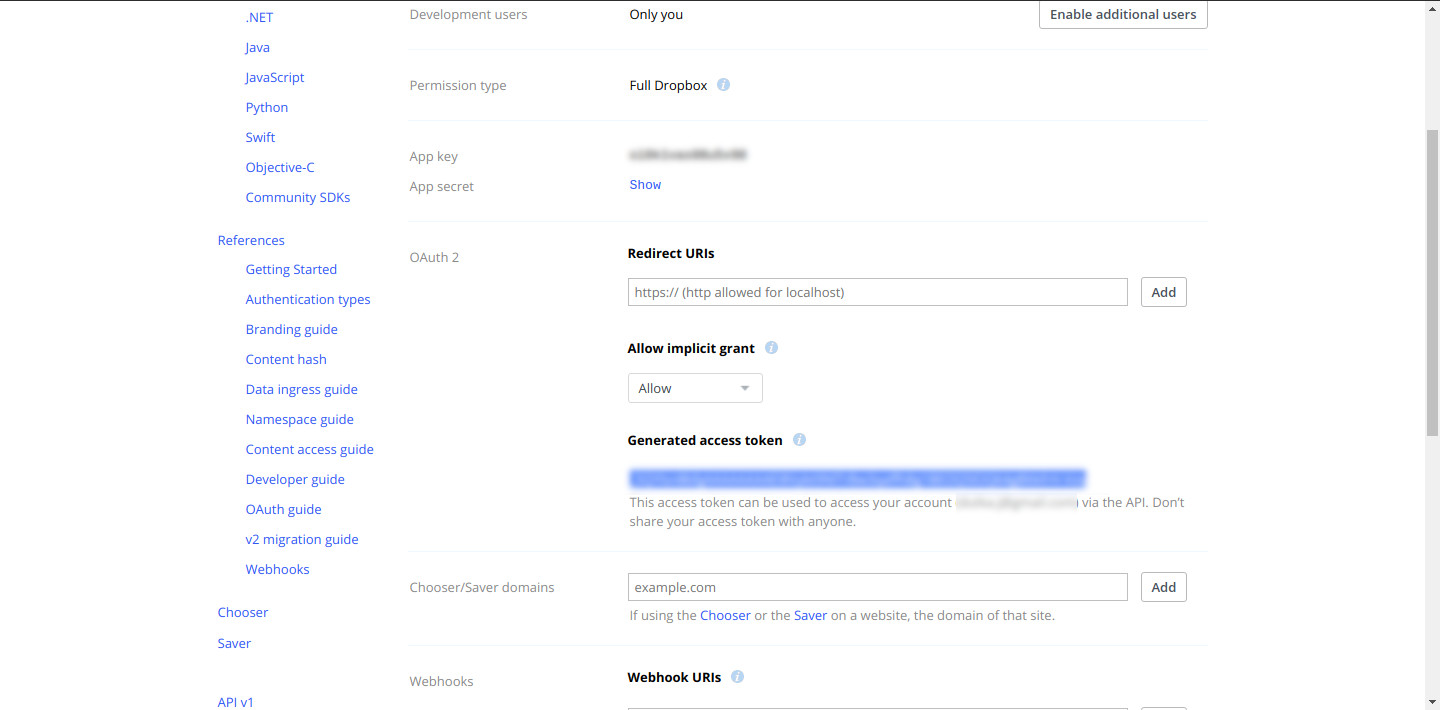
Generate access token wizard
Step 3: In the FreeNAS or TrueNAS web interface set up your Cloud Credentials under System ➡️ Cloud Credentials. Select Dropbox from the menu and copy in your access token.

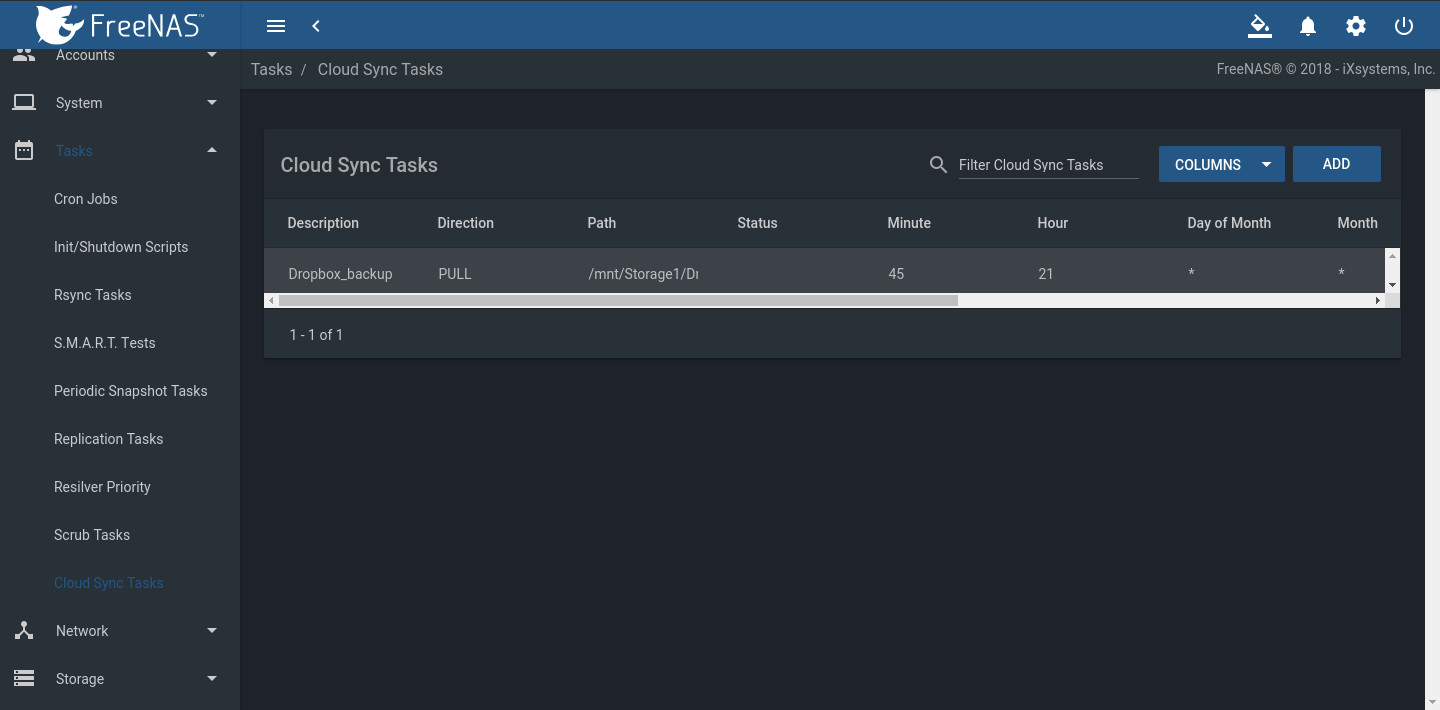
Step 4: Save, then go to the Tasks section. Under Cloud Sync Tasks, select your Dropbox account and schedule a sync task. Select the folder on the FreeNAS or TrueNAS system. This can be an existing dataset to sync to Dropbox or a new dataset to back up files in your Dropbox share.
Note: Set the kind of sync needed (Push or Pull) and how to transfer the content: Sync, Copy, or Move.
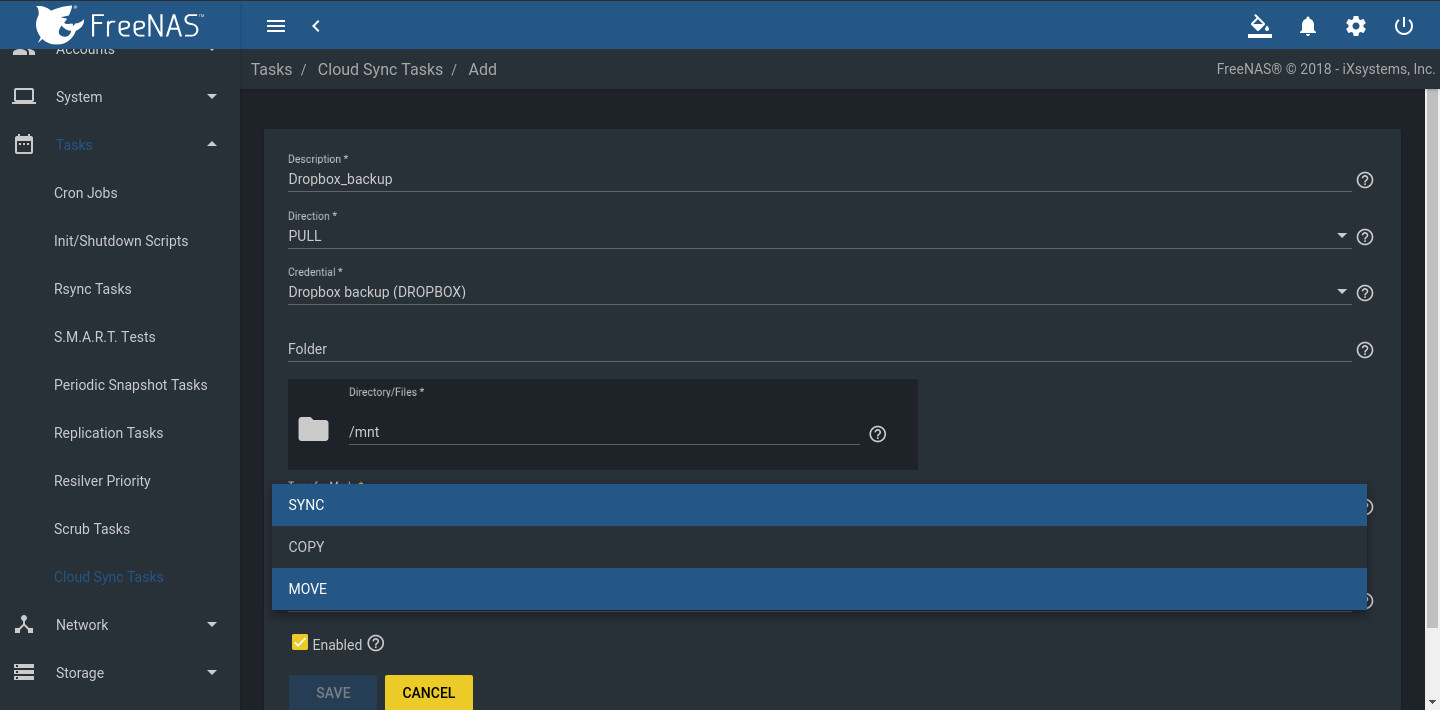
  • Sync copies any changes from the source system to the destination.
  • Copy copies new files. Files deleted on the host are not deleted on the destination.
  • Move copies files to the destination, then deletes them from the source after the transfer is complete.

Tasks section on FreeNAS Dashboard

Step 5: The Cloud Sync is ready to run at the set time. In the example, FreeNAS is the backup target for a Dropbox account, providing several good features:
  • A FreeNAS or TrueNAS likely has far more capacity than the Dropbox account.
  • Files are protected in case users delete them from the account accidentally.
  • Snapshots can protect files from malware.
  • The dataset can be shared over SMB, NFS, WebDAV, or AFP to a local network for faster access.

selecting Cloud Sync Tasks
Step 6: Check the files. In this example, the Cloud Sync pulled files from Dropbox to the FreeNAS dataset. Creating an SMB, NFS, or WebDAV share of the dataset makes it possible to see if the files are available.  If the transfer is set to push data from the FreeNAS or TrueNAS to Dropbox, log in to Dropbox to verify that the files uploaded correctly. 
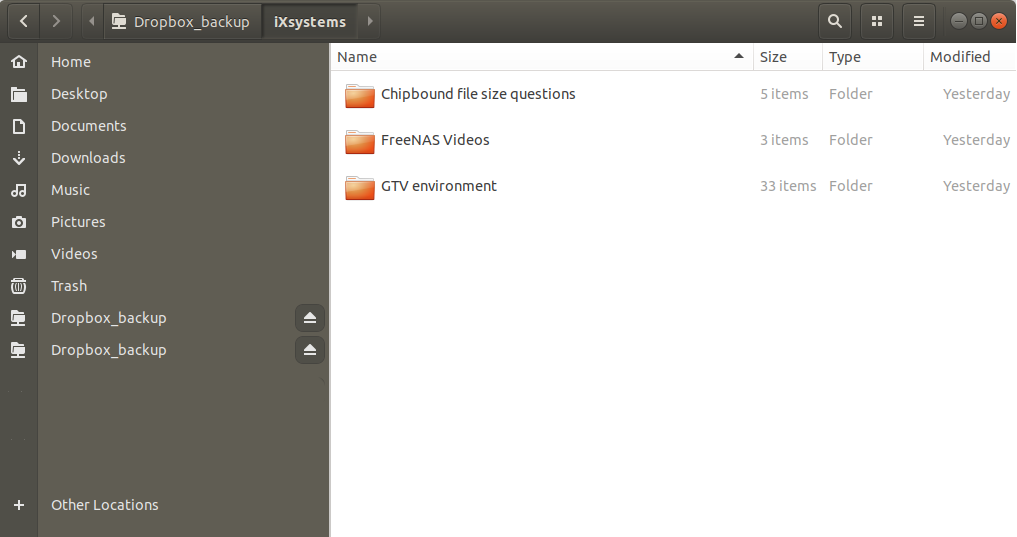
files uploaded