





惯性聚合 高效追踪和阅读你感兴趣的博客、新闻、科技资讯
阅读原文 在惯性聚合中打开

推荐订阅源

博客园 - 聂微东
GbyAI
GbyAI
S
SegmentFault 最新的问题
H
Hackread – Cybersecurity News, Data Breaches, AI and More
V
Visual Studio Blog
WordPress大学
WordPress大学
Hugging Face - Blog
Hugging Face - Blog
B
Blog
宝玉的分享
宝玉的分享
Last Week in AI
Last Week in AI
雷峰网
雷峰网
爱范儿
爱范儿
Vercel News
Vercel News
人人都是产品经理
人人都是产品经理
U
Unit 42
Microsoft Azure Blog
Microsoft Security Blog
Jina AI
Jina AI
P
Proofpoint News Feed
A
About on SuperTechFans
I
InfoQ
F
Fortinet All Blogs
L
LangChain Blog
T
Tailwind CSS Blog

Comments for J.D. Hodges

Open WebUI Web Search Not Working? It's Off By Default Apple CPU Comparison Chart: M1, M2, M3, M4, M5 Max Benchmarks (2026) | J.D. Hodges DisplayPort MST Monitors: Daisy Chainable Monitor List (2026) WAN Video Generation on Windows 11: Wan2GP Setup Guide with LoRA Excel: Copy Area and Paste Area Are Not the Same Size [SOLVED] "Claude Reached Its Tool-Use Limit" Fix: What It Means How do I cancel Great courses trial (or subscription) on Amazon? [ANSWER] - J.D. Hodges Is Temu's $1,000 Reward Claimed Screen Legit? What You Get Amazon Order History and Charges [SOLVED] - 2026 How to Enable Wake-on-LAN on Synology NAS | Quick Guide Data truncated for column 'status' at row 1 [SOLVED] - J.D. Hodges Corsair Galleon 100 SD Left Shift Caps Lock Fix: Firmware v1.4.75 Beta | J.D. Hodges Is the BCBS Settlement Payment Email Legit? (May 2026) How to Check Your Codex Usage on ChatGPT (Plus and Pro) Claude Handoff Prompt: How to Keep Context Across Sessions (2026) ThinkPad History: IBM 700C to Lenovo AI Workstations MacBook Neo Benchmarks: A18 Pro CPU vs M1 and M4 The BeBox: BeOS Hardware, Photos, and the Apple Deal That Wasn't Codex Sandbox Error on Ubuntu 24.04: The AppArmor Fix Claude Custom Instructions: Real Examples & Best Practices (2026)
Lenovo X220 (X230, X240) disassembly & SSD upgrade guide ...
J.D. H. · 2026-07-08 · via Comments for J.D. Hodges

Please find below photos showing Lenovo ThinkPad X220 disassembly and mSATA SSD upgrade. WiFi is also easily upgradeable (make sure to get whitelisted card or modified BIOS) Lastly, 2.5″ SSD is upgradeable without even opening up the case 😉

My preference to have an integrated SSD (using mSATA) as well as a drive in the 2.5″ bay. This allows for easy backups and some redundancy in the event of drive failure. It also allows for separation of programs (and boot device) from data (non-bootable) if desired.
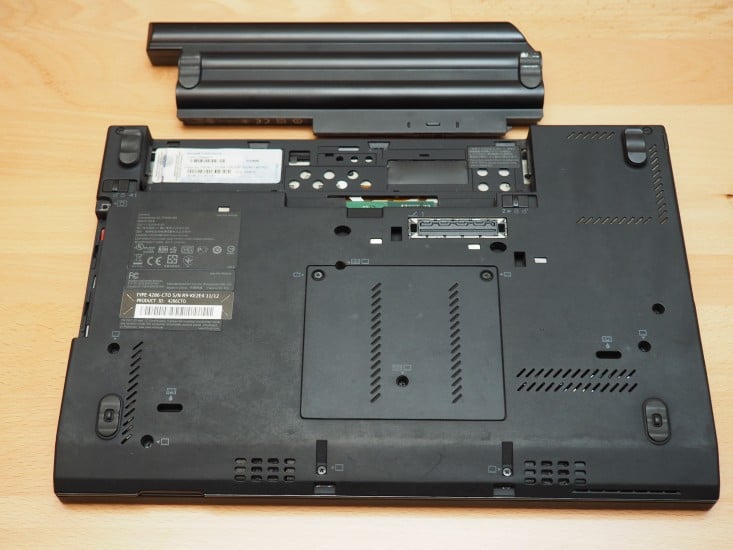
Disconnect power and remove battery before starting

Disconnect power and remove battery before starting

NOTE: The X230, and I believe the X240, are both basically identical to upgrade.

I hope the photos are helpful and I also recommend checking the service manual for disassembly instructions and diagrams 🙂

WIFI NOTE: currently (as of 2016/01/11) I do not recommend using the colored antenna cables for WiFi, rather just use the white (grey) and black as shown in the service manual or if your X220 shipped with three WiFi antennas, use the appropriate cables.

Top Search Terms:

  • x230 teardown (7)
  • x220 back panel (4)
  • lenovo x230 disassembly (3)
  • x220 teardown (2)
  • lenovo x22 disamble (1)
  • lenivo x220 teardown (1)
  • how to upgrade msata thinkpad x240 (1)
  • how ro disassemble a lenovo x230 (1)
  • dissasemblu thinkpad x230 (1)
  • disassembling thinkpad x220 (1)