



惯性聚合 高效追踪和阅读你感兴趣的博客、新闻、科技资讯
阅读原文 在惯性聚合中打开

推荐订阅源

SecWiki News
SecWiki News
H
Help Net Security
罗磊的独立博客
Stack Overflow Blog
Stack Overflow Blog
M
MIT News - Artificial intelligence
Jina AI
Jina AI
L
LangChain Blog
K
Kaspersky official blog
I
Intezer
Martin Fowler
Martin Fowler
爱范儿
爱范儿
AWS News Blog
AWS News Blog
The Hacker News
The Hacker News
Recorded Future
Recorded Future
人人都是产品经理
人人都是产品经理
H
Hackread – Cybersecurity News, Data Breaches, AI and More
C
CXSECURITY Database RSS Feed - CXSecurity.com
Spread Privacy
Spread Privacy
Simon Willison's Weblog
U
Unit 42
N
News and Events Feed by Topic
A
Arctic Wolf
G
GRAHAM CLULEY
Microsoft Azure Blog
博客园 - 聂微东
F
Fortinet All Blogs
C
Cisco Blogs
美团技术团队
Vercel News
Vercel News
K
KPMG report finds enterprise disconnect between AI and its ROI | CIO
H
Hacker News: Front Page
T
Tailwind CSS Blog
I
InfoQ
宝玉的分享
宝玉的分享
Google DeepMind News
博客园 - 司徒正美
P
Palo Alto Networks Blog
A
About on SuperTechFans
Threat Intelligence Blog | Flashpoint
云风的 BLOG
云风的 BLOG
TaoSecurity Blog
TaoSecurity Blog
Google Online Security Blog
Exploit-DB.com RSS Feed
P
Privacy & Cybersecurity Law Blog
H
Heimdal Security Blog
cs.CV updates on arXiv.org
Hacker News: Ask HN
Hacker News: Ask HN
O
OpenAI News
博客园 - Franky
Scott Helme
Scott Helme

J.D. Hodges

How to Set Up a SSH Connection in Claude Code Desktop How to Enable Wake-on-LAN on Synology NAS | Quick Guide Is the BCBS Settlement Payment Email Legit? (May 2026) How to Fix the VMware Workstation "mksSandbox" Crash (ISBRendererComm Error) - J.D. Hodges How to Check Codex Usage: CLI Status Line and Web Page How to Check Your Codex Usage on ChatGPT (Plus and Pro) MacBook Neo GPU vs Snapdragon X2, Radeon, Arc, RTX 5060 ThinkPad History: IBM 700C to Lenovo AI Workstations Codex /goal: How It Works, Setup, and What I Tested The BeBox: BeOS Hardware, Photos, and the Apple Deal That Wasn't Mother-In-Law Method for Claude Code Review (Honest Take) Best Laptop for Claude Code (2026) Best Way to Cook Corn on the Cob | Milk and Butter Boil Best Computer for ChatGPT (2026) | Laptops, Desktops, Budget Picks How to Use GPT-5.5 Today via Your Codex Subscription Remove McAfee WebAdvisor on Windows: Stop the Popup Codex Sandbox Error on Ubuntu 24.04: The AppArmor Fix WD19TBS Mouse Lag Fix: Dell Firmware Update Worked Claude Opus 4.6 vs 4.7 Max: WordPress Task Graded Claude Code Opus 4.7: Terminal + VS Code Upgrade Instructions Claude Code Rate exceeded. - J.D. Hodges Chuwi MiniBook X vs MacBook Neo: The $399 Laptop That Refuses to Throttle - J.D. Hodges Meta Muse Spark: The Honest Scorecard (3 Wins Out of 20) Who Reads This Blog? Traffic by OS - J.D. Hodges Can MacBook Neo Run Claude Code? $599 Benchmark Test Minisforum MS-01 Proxmox Review: 2 Months Off-Grid on Solar Claude vs ChatGPT vs Gemini for Coding: Real Benchmark Results Claude Code /buddy: How to Preview, Hatch, and Reroll Your Terminal Pet Claude code source code analysis - J.D. Hodges
Unable to Load Usage Limits in Claude? Use /usage
J.D. H. · 2026-04-30 · via J.D. Hodges

TL;DR: I went to claude.ai/settings/usage this morning to check my Claude Max (5x) plan limits and got a red error box: “Unable to load usage limits. Please try again later.” Anthropic’s status page banner read All Systems Operational, but Settings > Usage was still erroring for me at 7:44 AM Central. The workaround that did work: run /usage inside Claude Code. The session and weekly meters loaded immediately.
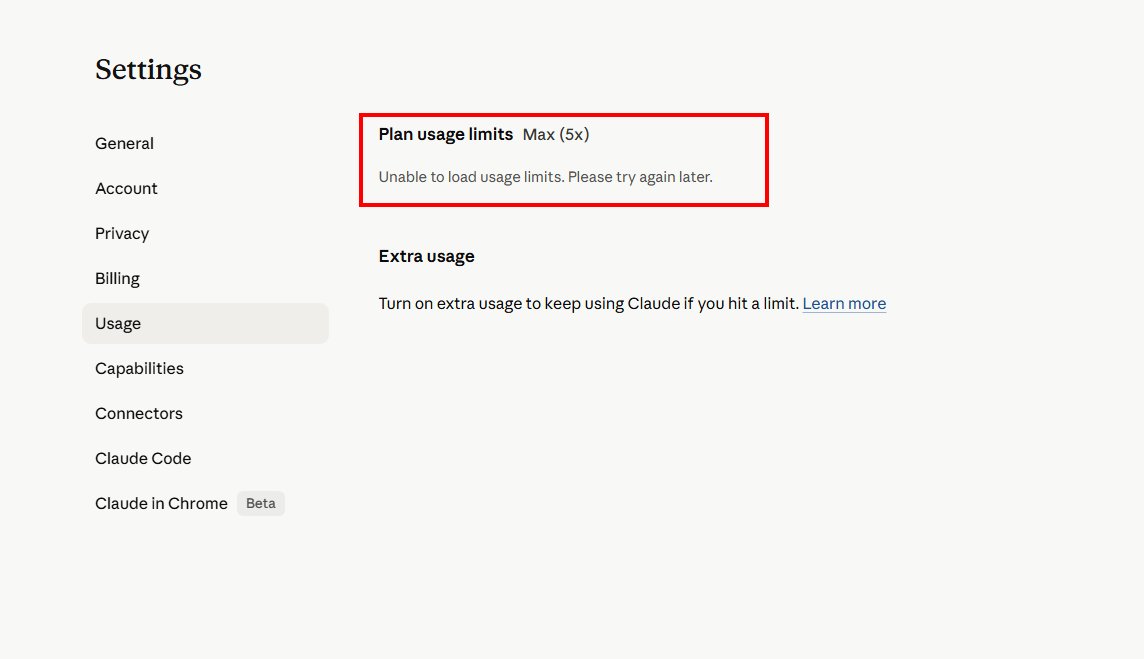
claude.ai Settings Usage page with red error box reading Unable to load usage limits Please try again later
claude.ai/settings/usage on the morning of April 30, 2026. The Plan usage limits Max (5x) header rendered, but the numbers under it did not.

What I Saw

I went to check how much of my weekly budget I had left before kicking off a long Claude Code session. The “Plan usage limits Max (5x)” header rendered fine. The numbers under it did not. In their place sat a red error card with one line: “Unable to load usage limits. Please try again later.”

I refreshed a couple of times. Same red box.

The Status Page Said “All Systems Operational”

Anthropic’s status page banner read All Systems Operational when I looked. Fair enough. Big fires get put out.
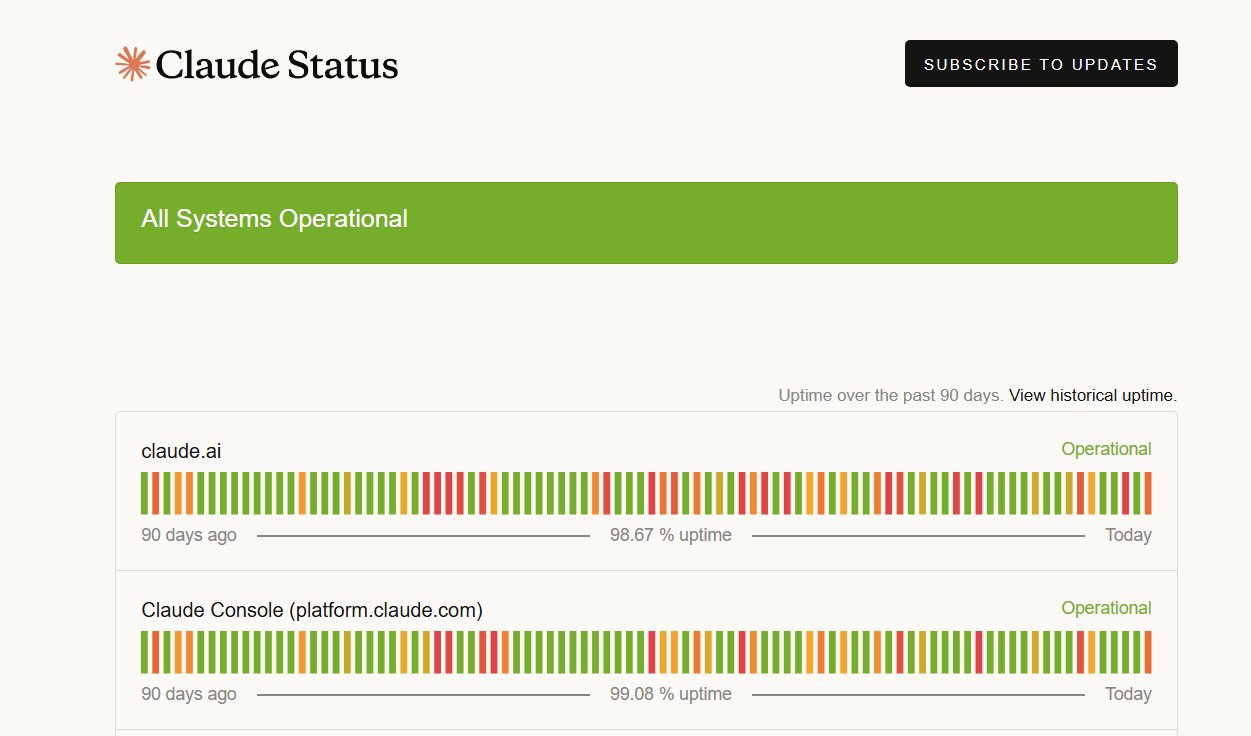
Claude Status page header reading All Systems Operational with claude.ai and Claude Console rows showing 98.67 and 99.08 percent uptime over 90 days
status.claude.com showed the green “All Systems Operational” banner when I checked, even though Settings > Usage was still failing for me.

But the same page, when I hovered the most recent bar in the timeline, surfaced a resolved incident from earlier this morning titled “claude.ai and API unavailable”. Investigating posted at 01:20 UTC. Resolved at 01:51 UTC. The incident page lists the affected services as claude.ai, Claude Console, the Claude API, Claude Code, Claude Cowork, and Claude for Government.
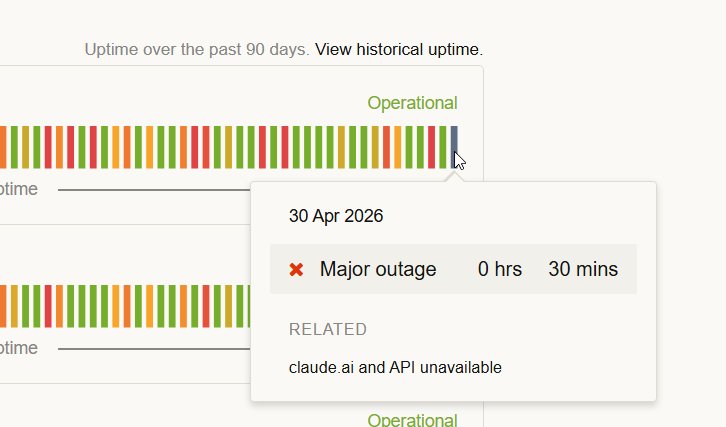
Claude Status timeline tooltip showing 30 Apr 2026 Major outage 0 hours 30 minutes related claude.ai and API unavailable
Hovering the most recent timeline bar surfaced the overnight 30-minute “Major outage” tagged “claude.ai and API unavailable”.

That outage closed about 11 hours before my screenshot. Settings > Usage was still erroring for me when I checked. Maybe your account is fine. Mine was not.

The Workaround: /usage in Claude Code

This is the part I needed at 7:44 AM. Open Claude Code in your terminal or IDE and type:

/usage

Claude Code rendered the usage panel immediately.
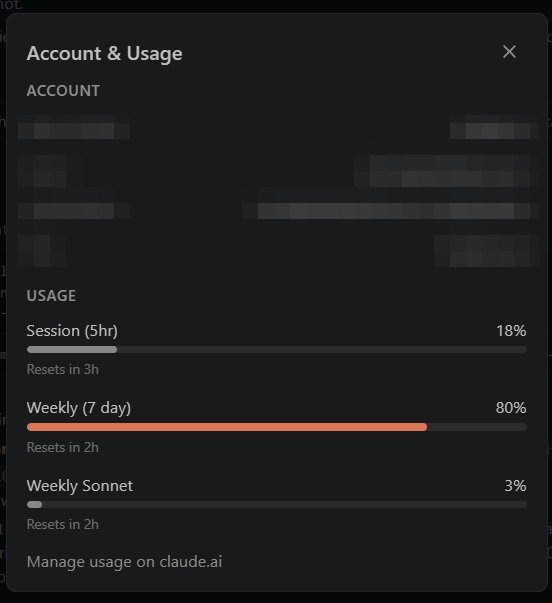
Claude Code slash usage panel showing Session 5hr at 18 percent resets in 3 hours, Weekly 7 day at 80 percent resets in 2 hours, and Weekly Sonnet at 3 percent
The /usage panel inside Claude Code, rendering my Max (5x) meters while the web Settings > Usage page was still erroring.

My screenshot showed Session (5hr) at 18% with 3 hours to reset, Weekly (7 day) at 80% with 2 hours, and Weekly Sonnet at 3%. The bottom of the panel has a “Manage usage on claude.ai” link for when the web view comes back.

Per the Claude Code commands reference, /usage shows session cost, plan usage limits, and activity stats. /cost and /stats are aliases for the same command, with /stats opening on the Stats tab. Same command, three names.

If you want to sanity-check your build, run claude --version from your terminal. Mine was 2.1.123 when I took the screenshot.

Why This Matters (At Least to Me)

When you are paying for a Max plan and trying to budget a heavy coding session against the weekly meter, “trust me, you have plenty left” is not a great answer. The /usage panel gives me a number I can plan around, even when Settings > Usage is broken.

Today, the web page threw the red box and Claude Code didn’t. I planned my morning around the 80% weekly reading and got back to work.

Bottom Line

If you see “Unable to load usage limits. Please try again later.” on claude.ai/settings/usage, run /usage inside Claude Code. /cost and /stats will get you to the same panel. Then go back to writing code.

For broader context on Claude’s usage limits in 2026, my earlier post Claude AI Usage Limits: What Changed and How to Make Them Last covers the bigger quota picture.

If you are also fighting rate-limit or tool-use errors, Claude Code Rate Exceeded and Claude Reached Tool Use Limit: The Fix might save you a few minutes.

If Settings > Usage is still showing the red error for you, drop a comment with the time and your plan tier. I will compare it against what I am seeing.

Sources and Further Reading


Accurate at time of writing. Something off? Drop a comment.