







Summary: I generate image-to-video (i2v) clips for a software project on a small consumer level GPU fleet: a flagship RTX 5090 and a cheap, always on RTX 4060. On a controlled raw render test the 5090 is about 5x faster per clip. But in a real overnight run where the two cards carried very different loads, their completion rates were only about 1.6x apart, and the 4060 finished a 74-clip batch in a reasonable 4.6 hours. Also, at the end of the article, a way to build a two-GPU or three-GPU render fleet that stays productive around the clock.
Last updated: July 25, 2026
The workload is short AI video clips: a still image goes in, a short animated clip (a few seconds in length) comes out, generated locally with WanGP image-to-video. A project can need hundreds of them, and they render in the background in a queue. Hardware (GPUs, RAM, etc.) is SO expensive now that I try to utilize ANY existing hardware that I have before even considering buying something new.
The flagship is an RTX 5090 (32 GB). It is fast, but I do not leave it running all night, mostly for power and heat reasons. So the fleet has a second node that never sleeps: a plain RTX 4060 (8 GB) in an always on mini box. Both machines run the same i2v model and settings, so the app treats either node’s output as interchangeable. The cache is keyed on the full render recipe (model, prompt, seed, dimensions, frame count, steps, sampler, LoRAs), so a clip rendered on the cheap card is a cache hit for the fast one today. The render client just tries a list of nodes in order and takes the first that answers, so work falls over to the always on card automatically when the flagship is off.
That is the whole design idea: the expensive card handles interactive and heavy design intensive work when it is on, and the cheap card quietly grinds the overnight and fall-back work the rest of the time.
NOTE: Likewise, if you are VRAM limited, rather than trying to load or swap multiple models (say both a ~6GB still generator and ~8GB video generator) on the SAME GPU with limited VRAM, spread the models out over multiple renderfleet GPUs.
Then a full batch ran across both (some clips on the 5090, then switching over to the 4060 when I powered off the 5090), and the throughput was somewhat unexpected:
Same clip type on both cards, in a controlled back-to-back test (1024×576, a light 41-frame / 4-step i2v clip, and a heavier 81-frame / 6-step clip with LoRAs):
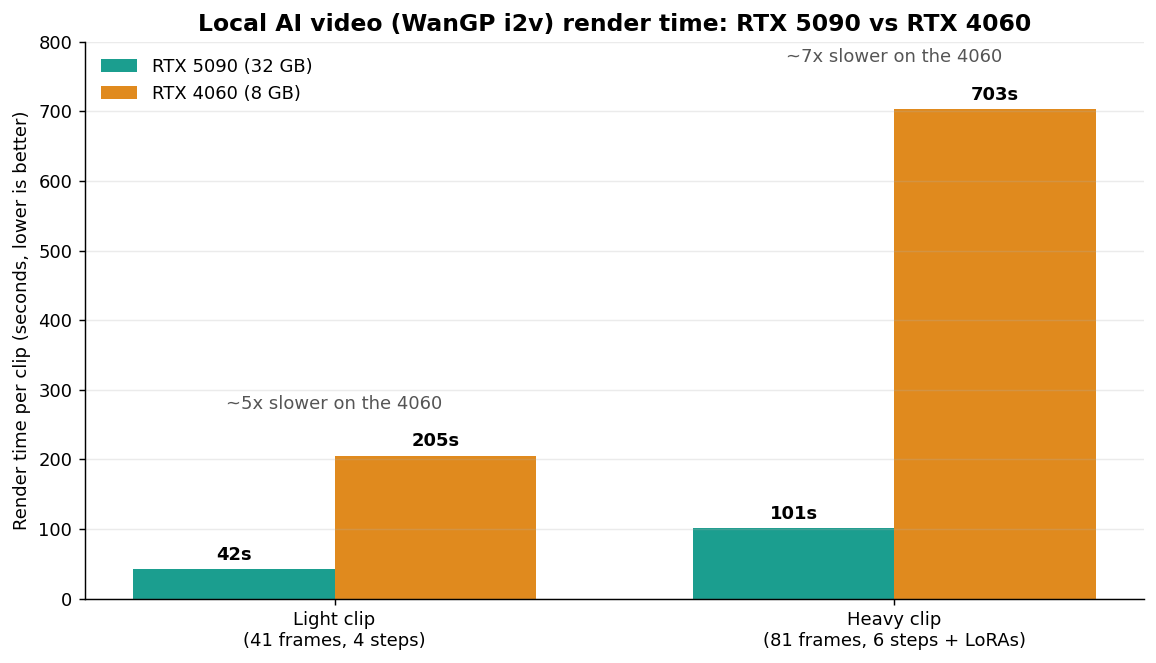
For the light WanGP configuration, the raw render times differed by about 4.9x (42 seconds versus 205 seconds), right where you would expect a 5090 to land against a 4060. On the heavier clip the gap widened to about 7x (101 seconds versus 703 seconds). No surprises there; that is the hardware.
I also frequently add in a cooldown period between clips b/c I generally prefer NOT to run my cards non-stop, so that cooldown applies equally to both the fast and the slow card which bring them a bit closer to parity.
The surprising part showed up in the overnight batch. This was an operations comparison, not an apples to apples benchmark: the 5090 was serving the batch AND live on-demand requests from the app at the same time, while the 4060 was dedicated to nothing but the batch. Under those unequal conditions:
| Overnight run (mixed load) | RTX 5090 (32 GB) | RTX 4060 (8 GB) |
|---|---|---|
| Observed completion rate | ~26 clips/hr | ~16 clips/hr |
| What it was doing | batch + live requests | batch only (dedicated) |
| 74-clip batch | n/a (interleaved) | 4.6 hours |
So the observed completion rate was about 1.6x higher on the 5090, not 5x.
The logs point to two factors.
The 4060 ran clean and uncontended. Dedicated to the batch, no competing work, no stalls. Just render (~205 seconds) plus about 19 seconds of pipeline overhead per clip, over and over. Seventy-four clips at ~224 seconds each is 4.6 hours, almost exactly what it took. A cheap card with the whole GPU to itself delivers close to its steady rate, and predictably.
The flagship was doing double duty. Its controlled raw render was 42 seconds, but its observed rate during the mixed run was closer to 138 seconds per clip, because it was juggling the batch and live requests together, plus a slow tail where a handful of clips ran well past the average. A flagship serving mixed traffic gives back a real chunk of its raw advantage to contention and tail latency. The always on card, precisely because it is a boring dedicated worker, does not.
Choosing cards for a similar fleet?
For light 1024 by 576 image to video jobs, an 8 GB card can be a practical always on worker in this setup. Mine is an RTX 4060, which is getting hard to buy new; the current generation equivalent is the RTX 5060 8 GB. For heavy clips or interactive use, an RTX 5090 32 GB is much faster. Compare both for current price, cooling, case clearance, and power requirements before buying.
The process is simple and it scales down to a spare PC in a closet:
I am adding a third machine to the fleet, an older Windows box with an RTX 3070, for stills only. I am reserving it for source-still generation rather than video (I have not set up the video path on it b/c I feel it would be too slow), which offloads that work from the video dedicated cards entirely. That is the nice thing about a first-reachable node list: you extend it by appending one line, and you can bring in cheaper or older cards for the specific sub-tasks they are still good at.
A cheap, dedicated, always on second GPU is worth more than its raw specs suggest, as long as the work you hand it is light and steady. It will not win a benchmark but it can complete unattended light batches predictably while the flagship is off, and for an indie developer fleet, that availability is often worth more than peak speed. Build around availability first and raw speed second and match each node to the weight of the job. 💪💪
Stuck on something with Claude, Claude Code, or an AI workflow? Send the question. I'll try to answer in a future post and link it here.
此内容由惯性聚合(RSS阅读器)自动聚合整理,仅供阅读参考。 原文来自 — 版权归原作者所有。