





Several admins and developers like automatically updating their servers with new builds as they become available. Commonly known as “CI/CD”, this process allows teams to iterate much faster and speed up product development.
Often, this is simply pulling from a repo and running a couple docker-compose commands, which is very easy to automate.
A bad way to do this is using a cron job that runs every 10 minutes to pull from the repository and execute any commands. While reasonably simple and secure, this can cause a large delay between code updates and the server task running.
An improvement is to connect the CI system to the hosting server. This allows the build system to automatically connect to the server using SSH to perform the update immediately, eliminating the lag from the cron-style solution.
There are potential drawbacks, however. It’s possible that the CI system could be compromised, and a credential to your server could be exposed.
Deploy user
On the server, create a new user called “deploy” who is a member of the group “docker”.
sudo useradd --create-home --user-group --shell /bin/bash --groups docker deploy

sudo usermod --lock deploy
This allows the user to update the docker config without having full root access on the server.
SSH key
On the server, change user to “deploy” and create a new ssh key:
sudo -i -u deploy
Create a new SSH key for that user:
ssh-keygen -t ed25519 -f ~/.ssh/id_ed25519 -C "deploy@server"
The key should not have a passphrase in this case.
Once complete, allow the user to access the server using its own credentials:
cat .ssh/id_ed25519.pub > .ssh/authorized_keys
Save the string that begins with ssh-ed25519... for the next step.
GitHub Keys & Secrets
Both the public and private keys will need to be added to the github repository.
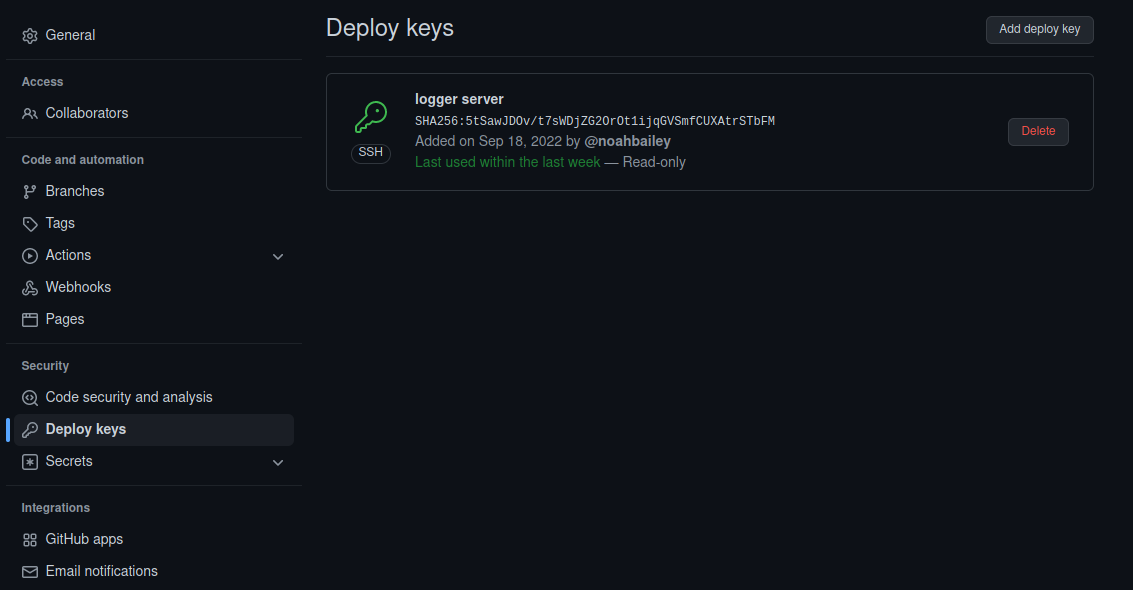
In your repo, go to the ‘Settings’ tab, and find the ‘Deploy keys’ tab on the left. Click “Add deploy key” and enter the content of .ssh/id_ed25519.pub into the box. It should begin with “ssh-ed25519”.
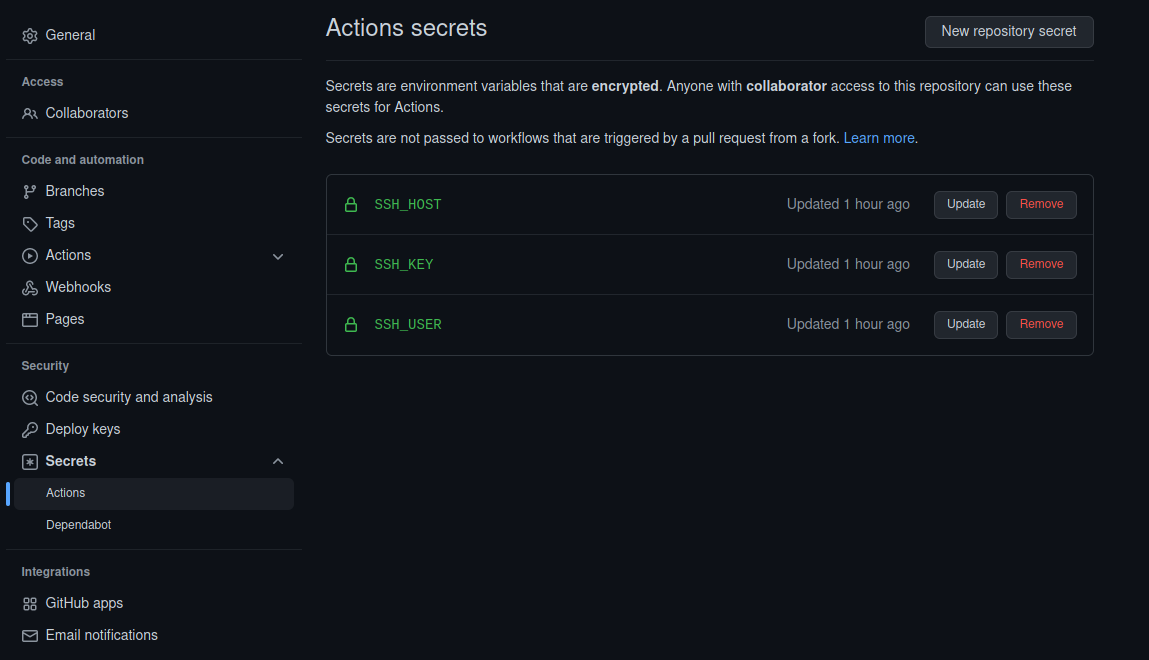
Next, click on ‘Secrets’ and ‘Actions’ on the left. Click “New repository secret”, and create three secrets:
-
With the name “
SSH_KEY”, enter the the contents of the file.ssh/id_ed25519into the Secret field. It should begin with the line, “-----BEGIN OPENSSH PRIVATE KEY-----”. -
With the name “
SSH_HOST”, add a secret containing the hostname or IP of your server. -
With the name “
SSH_USER”, add the user created earlier, “deploy”, that is used to push updates to our server.
GitHub Actions Workflow
Next, a workflow file is created in the github repository. The filepath must be .github/workflows/deploy.yml
If you already have workflows, make sure this one runs at the end, or whenever in the sequence is appropriate.
The file deploy.yml:
name: Remote update execution
on:
  push:
    branches:
      - main
jobs:
  build:
    name: Build
    runs-on: ubuntu-latest
    steps:
    - name: executing remote ssh commands using password
      uses: appleboy/ssh-action@master
      with:
        host: ${{ secrets.SSH_HOST }}
        username: ${{ secrets.SSH_USER }}
        key: ${{ secrets.SSH_KEY }}
        script: |
          bash /opt/git/my-repository/update.sh
Once connected, this will execute a script on the server, for example:
#!/bin/bash
cd /opt/git/my-repository
git pull
docker-compose pull && docker-compose up -d
This script updates its repository before pulling any changes to the docker images and recreating any containers.
On a push, this will execute the following sequence:
- GitHub executes a script within their system after receiving a commit
- A GitHub worker uses the
SSH_HOST,SSH_KEY, andSSH_USERvariables to connect to the server remotely - After successfully authenticating, the script on the server is executed,
- During execution, changes to the repository are pulled and the live system is updated.
Together, this has the effect of quickly updating the server immediately after a new commit is pushed to GitHub.
There are much more complex and sophisticated ways to perform the same operation, but this is relatively simple and easy to configure.