惯性聚合 高效追踪和阅读你感兴趣的博客、新闻、科技资讯
阅读原文 在惯性聚合中打开

推荐订阅源

月光博客
月光博客
小众软件
小众软件
爱范儿
爱范儿
Y
Y Combinator Blog
博客园 - Franky
美团技术团队
博客园 - 【当耐特】
The Cloudflare Blog
罗磊的独立博客
Hugging Face - Blog
Hugging Face - Blog
Jina AI
Jina AI
IT之家
IT之家
人人都是产品经理
人人都是产品经理
奇客Solidot–传递最新科技情报
奇客Solidot–传递最新科技情报
让小产品的独立变现更简单 - ezindie.com
大猫的无限游戏
大猫的无限游戏
Apple Machine Learning Research
博客园 - 聂微东
WordPress大学
WordPress大学
V
Visual Studio Blog
博客园_首页
阮一峰的网络日志
阮一峰的网络日志
OSCHINA 社区最新新闻
OSCHINA 社区最新新闻
有赞技术团队
有赞技术团队

Cloudflare changelogs | AI Crawl Control

Pay Per Crawl advanced configuration Introducing Redirects for AI Training · Changelog Tools to prepare your site for the agentic Internet · Changelog Advanced WAF customization for AI Crawl Control blocks · Changelog Analytics enhancements · Changelog New reference documentation · Changelog AI Crawl Control Read Only role now available · Changelog Pay Per Crawl (Private beta) - Discovery API, custom pricing, and advanced configuration · Changelog Crawler drilldowns with extended actions menu · Changelog New Robots.txt tab for tracking crawler compliance · Changelog Enhanced AI Crawl Control metrics with new drilldowns and filters · Changelog Enhanced crawler insights and custom 402 responses · Changelog Introducing Pay Per Crawl (private beta) · Changelog AI Crawl Control refresh · Changelog AI Crawl Control · Changelog
New AI Crawl Control Overview tab · Changelog
2025-12-18 · via Cloudflare changelogs | AI Crawl Control

The Overview tab is now the default view in AI Crawl Control. The previous default view with controls for individual AI crawlers is available in the Crawlers tab.

What's new

  • Executive summary — Monitor total requests, volume change, most common status code, most popular path, and high-volume activity
  • Operator grouping — Track crawlers by their operating companies (OpenAI, Microsoft, Google, ByteDance, Anthropic, Meta)
  • Customizable filters — Filter your snapshot by date range, crawler, operator, hostname, or path
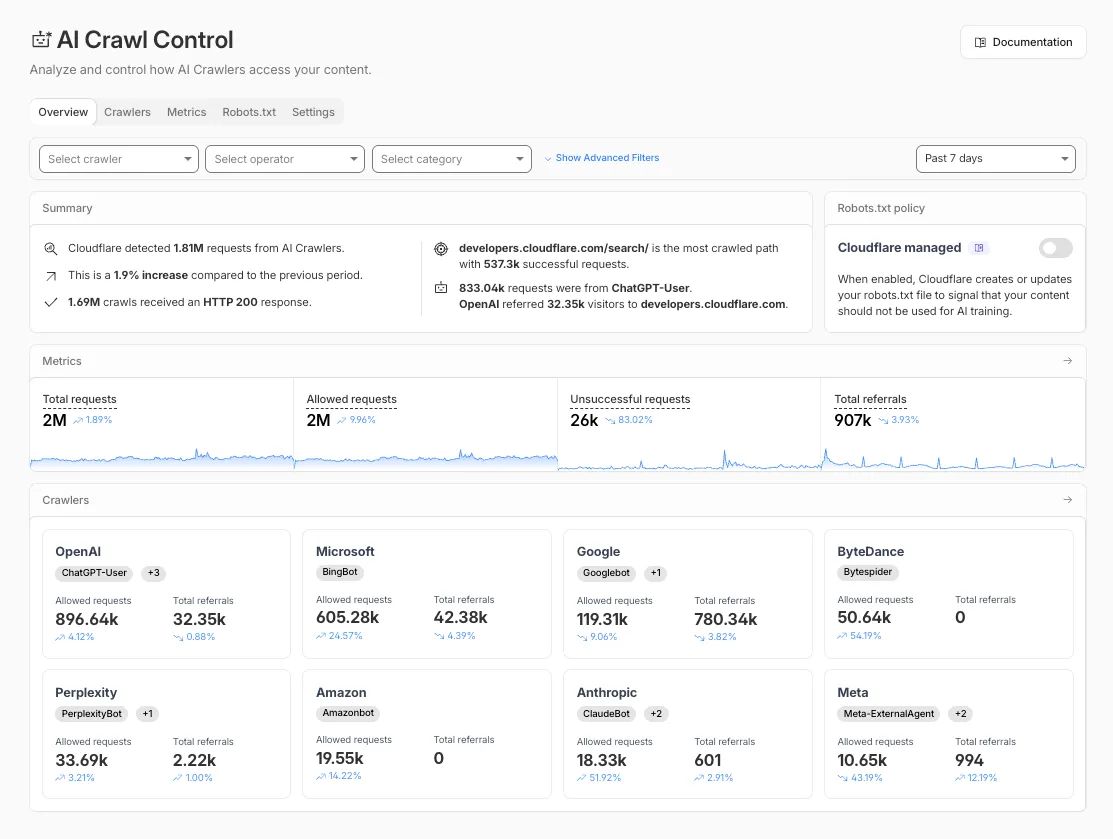
AI Crawl Control Overview tab showing executive summary, metrics, and crawler groups

Get started

  1. Log in to the Cloudflare dashboard and select your account and domain.
  2. Go to AI Crawl Control, where the Overview tab opens by default with your activity snapshot.
  3. Use filters to customize your view by date range, crawler, operator, hostname, or path.
  4. Navigate to the Crawlers tab to manage controls for individual crawlers.

Learn more about analyzing AI traffic and managing AI crawlers.



