惯性聚合 高效追踪和阅读你感兴趣的博客、新闻、科技资讯
阅读原文 在惯性聚合中打开

推荐订阅源

Recent Announcements
V
Visual Studio Blog
freeCodeCamp Programming Tutorials: Python, JavaScript, Git & More
云风的 BLOG
云风的 BLOG
Microsoft Security Blog
博客园 - 司徒正美
Y
Y Combinator Blog
Stack Overflow Blog
Stack Overflow Blog
雷峰网
雷峰网
小众软件
小众软件
GbyAI
GbyAI
OSCHINA 社区最新新闻
OSCHINA 社区最新新闻
aimingoo的专栏
aimingoo的专栏
MyScale Blog
MyScale Blog
让小产品的独立变现更简单 - ezindie.com
腾讯CDC
A
About on SuperTechFans
宝玉的分享
宝玉的分享
WordPress大学
WordPress大学
B
Blog RSS Feed
G
Google Developers Blog
量子位
Cyber Security Advisories - MS-ISAC
博客园 - 三生石上(FineUI控件)

Cloudflare changelogs | AI Crawl Control

Pay Per Crawl advanced configuration Introducing Redirects for AI Training · Changelog Tools to prepare your site for the agentic Internet · Changelog Advanced WAF customization for AI Crawl Control blocks · Changelog Analytics enhancements · Changelog New reference documentation · Changelog AI Crawl Control Read Only role now available · Changelog New AI Crawl Control Overview tab · Changelog Pay Per Crawl (Private beta) - Discovery API, custom pricing, and advanced configuration · Changelog New Robots.txt tab for tracking crawler compliance · Changelog Enhanced AI Crawl Control metrics with new drilldowns and filters · Changelog Enhanced crawler insights and custom 402 responses · Changelog Introducing Pay Per Crawl (private beta) · Changelog AI Crawl Control refresh · Changelog AI Crawl Control · Changelog
Crawler drilldowns with extended actions menu · Changelog
2025-11-10 · via Cloudflare changelogs | AI Crawl Control

AI Crawl Control now supports per-crawler drilldowns with an extended actions menu and status code analytics. Drill down into Metrics, Cloudflare Radar, and Security Analytics, or export crawler data for use in WAF custom rules, Redirect Rules, and robots.txt files.

What's new

Status code distribution chart

The Metrics tab includes a status code distribution chart showing HTTP response codes (2xx, 3xx, 4xx, 5xx) over time. Filter by individual crawler, category, operator, or time range to analyze how specific crawlers interact with your site.
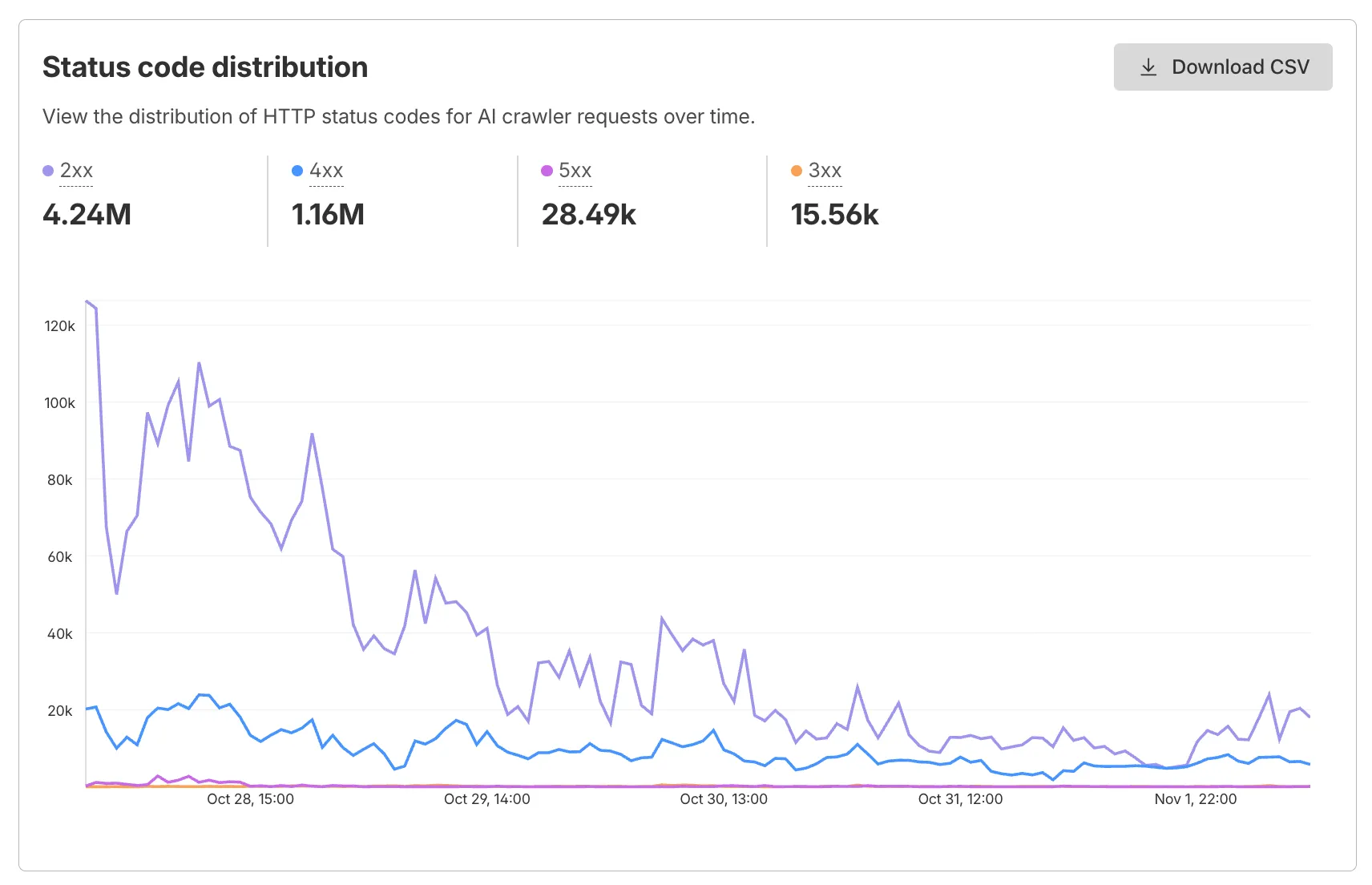
AI Crawl Control status code distribution chart

Each crawler row includes a three-dot menu with per-crawler actions:

  • View Metrics — Filter the AI Crawl Control Metrics page to the selected crawler.
  • View on Cloudflare Radar — Access verified crawler details on Cloudflare Radar.
  • Copy User Agent — Copy user agent strings for use in WAF custom rules, Redirect Rules, or robots.txt files.
  • View in Security Analytics — Filter Security Analytics by detection IDs (Bot Management customers).
  • Copy Detection ID — Copy detection IDs for use in WAF custom rules (Bot Management customers).
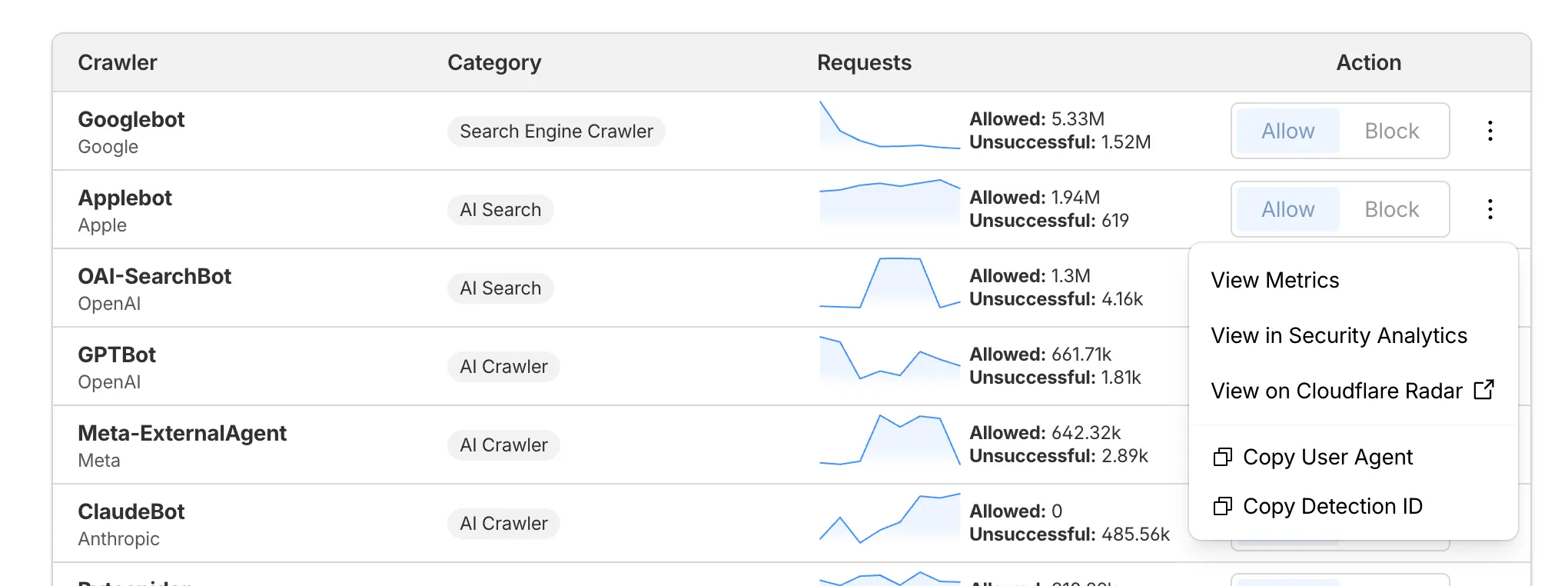
AI Crawl Control crawler actions menu

Get started

  1. Log in to the Cloudflare dashboard, and select your account and domain.
  2. Go to AI Crawl Control > Metrics to access the status code distribution chart.
  3. Go to AI Crawl Control > Crawlers and select the three-dot menu for any crawler to access per-crawler actions.
  4. Select multiple crawlers to use bulk copy buttons for user agents or detection IDs.

Learn more about AI Crawl Control.



