





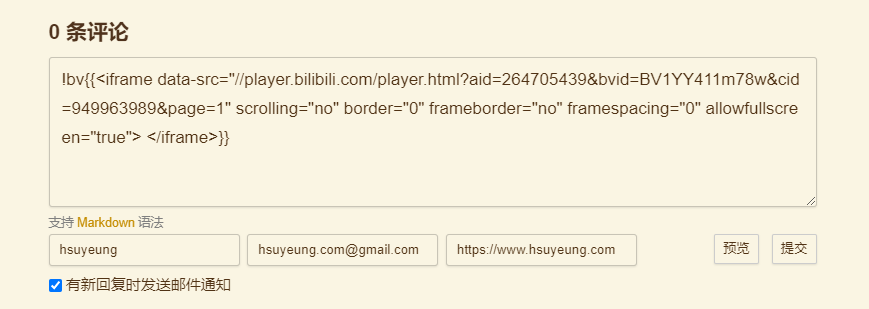
在评论时如果想要嵌入 iframe 视频,可以使用以下语法:
!bv{{这里替换成你想要分享的 iframe 代码}}
最终会被渲染为如下 HTML 代码:
<div class='bilibili-aspect-ratio'>
  你想要分享的 iframe 代码
</div>
为了大家访问页面时有更好的加载速度以及使用体验,网站对于带 src 属性的资源是支持了懒加载的,而通过 iframe 方式分享 B 站视频的时候,页面加载完成视频就会自动播放(手机上不会),使用懒加载就可以避免这个问题,使其出现在视窗里的时候才会加载具体的资源。使用懒加载的方式也很简单,只需要将链接里的 src 属性修改为 data-src 即可(以后预计会支持匹配 iframe 中的 src 然后自动替换成 data-src,这样就不需要用户自己手动操作了)。


iframe 分享代码实际上 B 站已经提供了,但是直接嵌入页面样式很难看,所以我们需要做的就是给 iframe 加上一点样式,使其自适应大小。
一开始是想的自己在写文章的时候自己手写 HTML 标签加上样式就好了,于是就有了如下的代码:
<div class='bilibili-aspect-ratio'>
  <iframe src="//player.bilibili.com/player.html?aid=904641287&bvid=BV1pP4y1i7Xh&cid=949961021&page=1"
        scrolling="no"
        border="0"
        frameborder="no"
        framespacing="0"
        allowfullscreen="true">
  </iframe>
</div>
CSS:
/* 哔哩哔哩视频适配 */
.bilibili-aspect-ratio {
  position: relative;
  width: 100%;
  height: 0;
  padding-bottom: 75%;
  margin: 3% auto;
  text-align: center;
}

.bilibili-aspect-ratio iframe {
  position: absolute;
  width: 100%;
  height: 100%;
  left: 0;
  top: 0;
}
但是后来愈发觉得麻烦,每次都要自己写 HTML 代码很烦,于是就想着扩展一下 marked.js 的语法,让我能简单的输入一些字符就能渲染出上面的那一串代码。这样不仅自己写文章时方便一些,别人评论留言的时候如果想要嵌入 iframe 视频也会略微简单一些。
实际上就是按照 Marked 文档 扩展了 marked 的语法。而 marked.js 的原理其实也很简单,就是通过大量的正则表达式来不断地匹配输入的文本,然后再按照匹配的规则渲染成对应的自定义的 HTML 代码。
文档给的例子已经很详细了,我们要做的无非就是写自己的正则,然后将匹配到的内容提取出来再渲染成前面提到的那段 HTML 代码即可。这里就不展开介绍了,直接放扩展代码。
const caret = /(^|[^\[])\^/g
const _iframeCode = /<iframe(([\s\S])*?)<\/iframe>/

function edit(regex, opt) {
  regex = typeof regex === 'string' ? regex : regex.source
  opt = opt || ''
  const obj = {
    replace: (name, val) => {
      val = val.source || val
      val = val.replace(caret, '$1')
      regex = regex.replace(name, val)
      return obj
    },
    getRegex: () => {
      return new RegExp(regex, opt)
    }
  }
  return obj
}

const bilibiliPlayer = {
  name: 'bilibiliPlayer',
  level: 'block',
  start(src) {
    return src.match(/!bv[^!bv\n]/)?.index
  },
  tokenizer(src, tokens) {
    let rule = /^!bv?\{\{\s*(iframeCode)?\s*\}\}/
    rule = edit(rule)
            .replace('iframeCode', _iframeCode)
            .getRegex()
    const match = rule.exec(src)
    if (match) {
      const token = {
        type: 'bilibiliPlayer',
        raw: match[0],
        text: match[0].trim(),
        iframeCode: match[1],
        tokens: []
      }
      this.lexer.inline(token.text, token.tokens)
      return token
    }
  },
  renderer(token) {
    return `
          <div class='bilibili-aspect-ratio'>${token.iframeCode}</div>
      `
  }
}

marked.use({extensions: [bilibiliPlayer]})
此内容由惯性聚合(RSS阅读器)自动聚合整理,仅供阅读参考。 原文来自 — 版权归原作者所有。