









在网页添加一些简单的切换动画一般使用 CSS3 的 animation 或者 transition 实现,而 Element.animate 是新的原生 Javascript Api,能使用 JS 快速为 Dom 添加动画。
为了增加网站的用户体验,在很多场景下一般可以为元素的切换添加一下转场动画。
最简单的方法,一般可以使用 CSS 的transition或者animation实现。当前也有很多 CSS 动画库,例如animate.css,它与wow.js搭配使用经常用于很多产品宣传首页。
当然我们也可以使用一些主流的 JS 动画库操作某些元素的单独动画,例如:Velocity、Anime.js等。或者更传统的Jquery也有提供.animate操作动画的方案。
而本文则介绍一下原生较新的 Javascript Api: Element.animate()
Element.animate()是Web Animations API提供的使用 Javascript 操作元素动画的解决方案。
Element.animate(keyframes, options)方法接收 2 个参数,第一个为keyframes,第二个为options。
keyframes:与 CSS3 的 keyframes 的概念是一致的,代表关键帧的集合。它可以接收一个关键帧数组,也可以简写成一个对象。它支持所有 CSS 动画支持的属性,另简写写法添加offset, float, easing等关键字 。具体写法请参考Keyframe Formats (MDN)或下文的案例使用。
options: 动画的相关配置。其接收delay, duration, easing, iterations等配置参数,可配置动画的延迟执行时间、执行持续时间、缓动曲线、执行次数等,其与 CSS 动画属性也保持一致,更多参数请参考KeyframeEffect (MDN)。
这个方法会返回一个Animation实例,通过这个实例我们可以对动画进行暂停、取消、读取执行状态等。或者通过.finished返回 Promise 来对执行完动画进行下一步操作。
因为该 API 较新,所以对传统的浏览器支持并不友好,所有 IE 浏览器都不支持。在Can I use上查询如下:
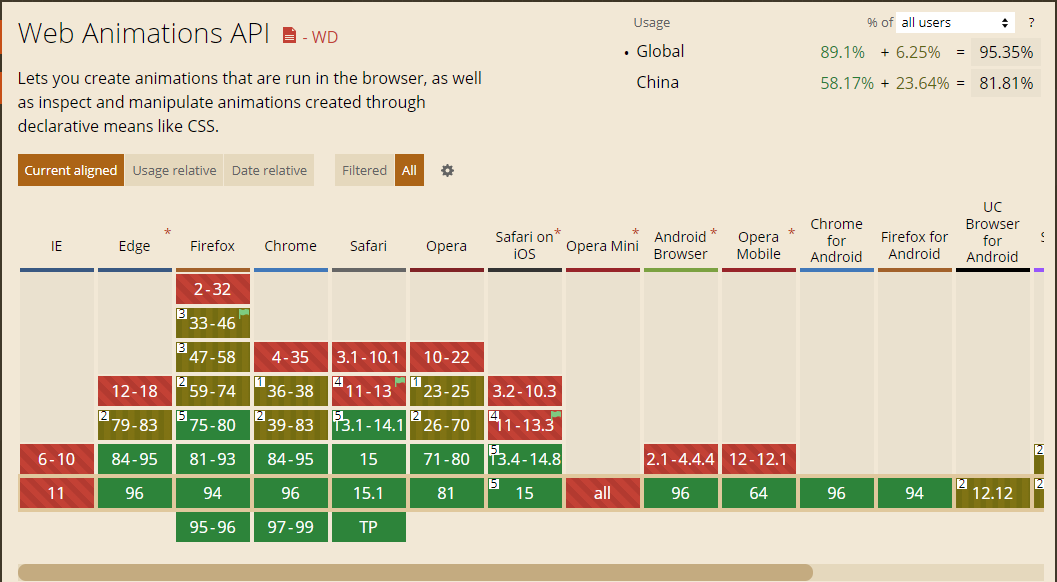
但是只要简单使用if (dom.animate) {}包裹即可向下兼容,对一些不支持的浏览器不执行动画就可以。
简单写了三种文字动画特效:
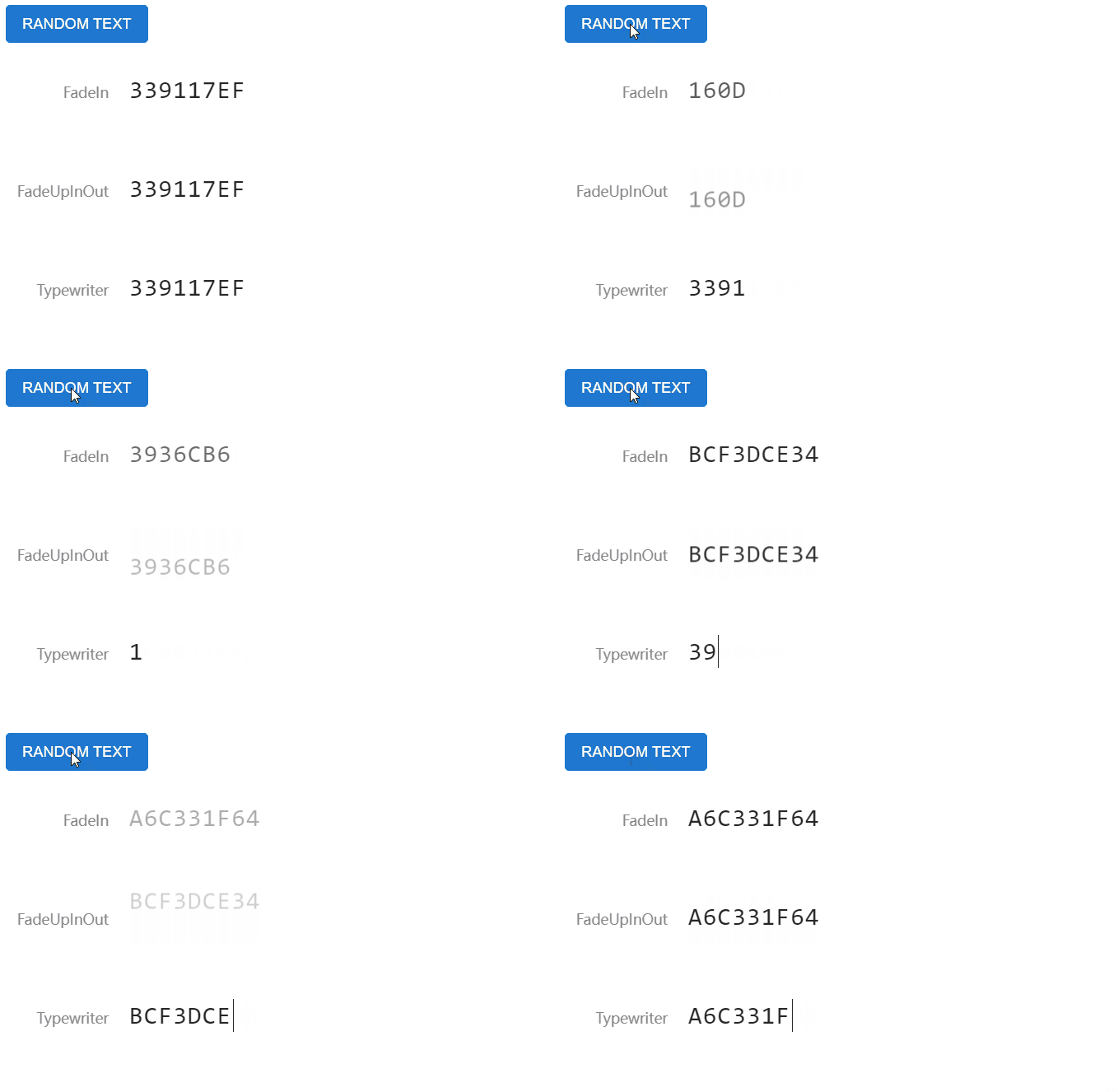
淡入淡出
Effect1和Effect2是更改opactity与translate属性实现的文字淡入淡出动画。
<div class="text-wrapper" id="Effect1"></div>
<div class="text-wrapper" id="Effect2"></div>
<script>
  // ...省略事件绑定等代码
  function animateEffect1(text) {
    const target = document.querySelector("#Effect1");
    target.innerText = text;
    // 使用对象简写写法opactiy from 0, to 1, 执行时间600ms
    target.animate({ opacity: [0, 1] }, 600);
  }
  async function animateEffect2(text) {
    const target = document.querySelector("#Effect2");
    // finished返回Promise,可等待文本淡出动画执行完再执行新文本淡入动画
    await target.animate(
      {
        opacity: [1, 0],
        transform: ["translateY(0)", "translateY(-20px)"],
      },
      300
    ).finished;
    target.innerText = text; // 当旧文本动画执行完再开始替换文本
    target.animate(
      {
        opacity: [0, 1],
        transform: ["translateY(20px)", "translateY(0)"],
      },
      300
    );
  }
</script>
打字机
Effect3实现了一个文字打字机特效,该特效需要确保文字是等宽字体,而且文本不能为多行文本。
<div class="text-wrapper" id="Effect3"></div>
<script>
  // ...省略事件绑定等代码
  async function animateEffect3(text) {
    const target = document.querySelector("#Effect3");
    const beforeWidth = target.offsetWidth; // 计算旧文本宽度
    const textBeforeLength = target.innerText.length; // 计算文本字数
    if (textBeforeLength > 0) {
      // 使用数组参数方式执行宽度减少阶跃动画
      await target.animate([{ width: `${beforeWidth}px` }, { width: 0 }], {
        duration: textBeforeLength * 100,
        easing: `steps(${textBeforeLength})`, // step是阶跃函数,表示动画按多少步执行完
      }).finished;
    }
    target.innerText = text; // 切换新文本
    const afterWidth = target.offsetWidth; // 计算新文本宽度
    const textAfterLength = target.innerText.length; // 计算文本字数
    target.animate([{ width: 0 }, { width: `${afterWidth}px` }], {
      duration: textAfterLength * 100,
      easing: `steps(${textAfterLength})`,
    });
  }
</script>easing属性中使用了steps阶跃函数,它表示动画需要按多少步执行完,每一步状态里面是属性是一致的,每步属性变化是跳跃的,没有过渡。这里使得文本每次减少一个字符的宽度,构造出打字机的效果。
以上文字特效的实现已上传到codepen,请参考此处: https://codepen.io/leon-kfd/pen/vYJbodr。
在使用 CSS 实现元素动画,一般通过添加类名、移出类名来实现。因为图片无法准确知道需要加载的时间,一般情况是监听图片的 load 事件回调进行判断,所以基本无法使用纯 CSS 来实现切换动画。
本次使用原生Element.animate()API 实现了一个简单的图片切换特效。
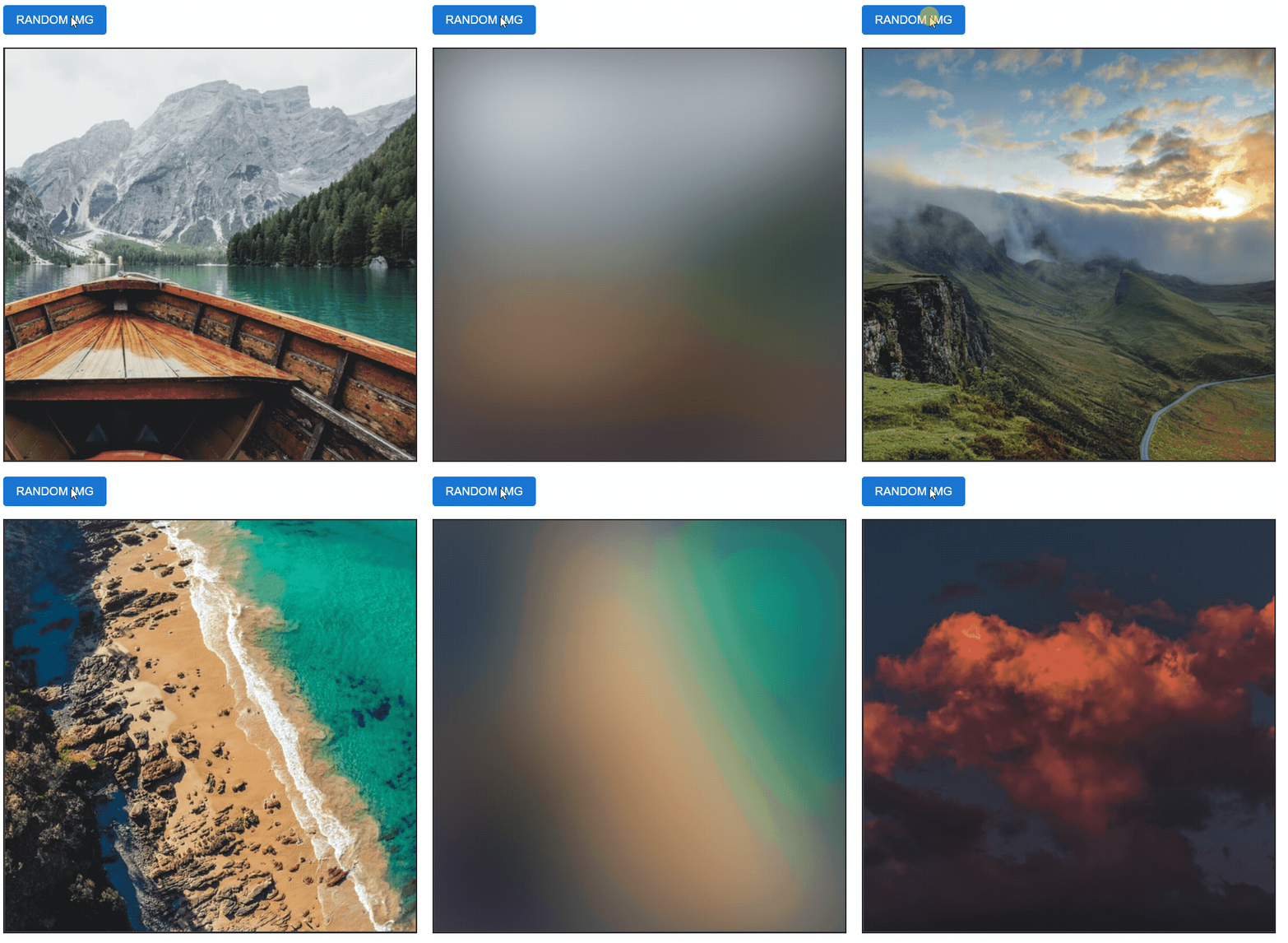
这个特效主要原理:
cancel(因为无法确保旧图片淡出动画执行完前新图片已经加载完成,需要Cancel掉旧动画防止重复执行)Demo 代码如下:
<button id="btn">Random Img</button>
<p class="img-wrapper">
  <img id="img" />
</p>

<script>
  let leaveAnimation = null; // 用于记录Animation对象
  btn.addEventListener("click", () => {
    randomPhoto();
  });

  async function randomPhoto(first) {
    const target = `https://source.unsplash.com/random/512x512/?nature,${+new Date()}`;
    img.src = target;
    // 切换图片路径后,执行图片淡出动画,此时新图片在后台加载
    if (!first) {
      try {
        leaveAnimation = img.animate(
          [
            { filter: "blur(20px)", tarnsform: "scale(1,1)" },
            { filter: "blur(60px)" },
          ],
          400
        );
        await leaveAnimation.finished;
        img.style.filter = "blur(60px)";
      } catch {
        console.log("Cancel animation");
      }
    }
  }

  img.addEventListener("load", async () => {
    img.style.opacity = 1; // 用于防止首次加载闪图
    if (leaveAnimation) leaveAnimation.cancel(); // cancel掉淡出动画,防止重复执行
    const changeAnimation = img.animate(
      [
        { filter: "blur(20px)", tarnsform: "scale(1,1)" },
        { filter: "blur(0)", tarnsform: "scale(1)" },
      ],
      400
    );
    await changeAnimation.finished;
    img.style.filter = "blur(0)"; // 等待动画执行完后更改最终状态
  });

  randomPhoto(true); // 页面加载立即执行一遍
</script>以上图片特效的实现已上传到codepen,请参考此处: https://codepen.io/leon-kfd/pen/ZEXYKLR。
Demo 中使用了 unsplash 的随机图片接口,
https://source.unsplash.com/random
另因当前Element.animate()仍属于实验特性,并不保证将来 api 会进行改动或添加新的特性。
此内容由惯性聚合(RSS阅读器)自动聚合整理,仅供阅读参考。 原文来自 — 版权归原作者所有。