


惯性聚合 高效追踪和阅读你感兴趣的博客、新闻、科技资讯
阅读原文 在惯性聚合中打开

推荐订阅源

宝玉的分享
宝玉的分享
博客园 - 【当耐特】
NISL@THU
NISL@THU
IT之家
IT之家
博客园 - 叶小钗
M
MIT News - Artificial intelligence
博客园_首页
Hugging Face - Blog
Hugging Face - Blog
量子位
The Register - Security
爱范儿
爱范儿
酷 壳 – CoolShell
酷 壳 – CoolShell
cs.AI updates on arXiv.org
S
Security Affairs
W
WeLiveSecurity
S
Security @ Cisco Blogs
Apple Machine Learning Research
V2EX - 技术
V2EX - 技术
The Last Watchdog
The Last Watchdog
Blog — PlanetScale
Blog — PlanetScale
美团技术团队
J
Java Code Geeks
P
Proofpoint News Feed
大猫的无限游戏
大猫的无限游戏
Vercel News
Vercel News
H
Hackread – Cybersecurity News, Data Breaches, AI and More
Last Week in AI
Last Week in AI
腾讯CDC
Cisco Talos Blog
Cisco Talos Blog
C
Check Point Blog
人人都是产品经理
人人都是产品经理
Forbes - Security
Forbes - Security
SecWiki News
SecWiki News
CTFtime.org: upcoming CTF events
钛媒体:引领未来商业与生活新知
钛媒体:引领未来商业与生活新知
B
Blog
S
Secure Thoughts
T
Threat Research - Cisco Blogs
P
Privacy & Cybersecurity Law Blog
N
News | PayPal Newsroom
The GitHub Blog
The GitHub Blog
Recorded Future
Recorded Future
Google DeepMind News
博客园 - 聂微东
V
Visual Studio Blog
L
LINUX DO - 最新话题
Recent Commits to openclaw:main
O
OpenAI News
Webroot Blog
Webroot Blog
Hacker News: Ask HN
Hacker News: Ask HN

虹墨空间站

浏览器直接访问正常,过了负载均衡就崩了?只因响应头里多了个空格 Claude Code 怎样快速消耗 token 去掉高德地图开屏广告 Windows 11 26H1 显示所有托盘图标 OpenClaw 安装与配置 盘点手里的电子产品传家宝 基于 7z 的 NAS 到网盘备份解决方案,支持增量、分卷、加密、压缩 卸载百度网盘智能看图 CDN 方式引入 Monaco Editor 在线工具 - 富文本转 Markdown 2025 年了,安卓平板上什么第三方九键输入法最好用? 鸿蒙 PC 编译运行 Electron 应用 bat 脚本打印输出彩色文字 Android 强制锁定屏幕旋转方向
解决 Claude Code 安装或更新后 claude.exe 无法运行、claude native binary not installed
iMaeGoo · 2026-04-20 · via 虹墨空间站

今天在 Windows 或 macOS 上安装或更新 Claude Code 后,运行 claude 命令却报错 claude native binary not installed(macOS)、程序 claude.exe 无法运行(Windows)。折腾了一番终于搞清楚了原因。

原因分析

Claude Code 自 2.1.113 版本开始改为分发二进制包,不再分发 JS 源码。

用 npm 安装 claude 时,它会通过 optionalDependencies 来安装不同平台的二进制包。

1
2
3
4
5
6
7
8
9
10
"optionalDependencies": {
"@anthropic-ai/claude-code-darwin-arm64": "2.1.114",
"@anthropic-ai/claude-code-darwin-x64": "2.1.114",
"@anthropic-ai/claude-code-linux-x64": "2.1.114",
"@anthropic-ai/claude-code-linux-arm64": "2.1.114",
"@anthropic-ai/claude-code-linux-x64-musl": "2.1.114",
"@anthropic-ai/claude-code-linux-arm64-musl": "2.1.114",
"@anthropic-ai/claude-code-win32-x64": "2.1.114",
"@anthropic-ai/claude-code-win32-arm64": "2.1.114"
},

然而 Windows 平台的二进制包有足足 234MB 大,国内常用的阿里 npm 镜像站(https://npmmirror.com)默认不会同步这种巨大的 npm 包,导致找不到该包。
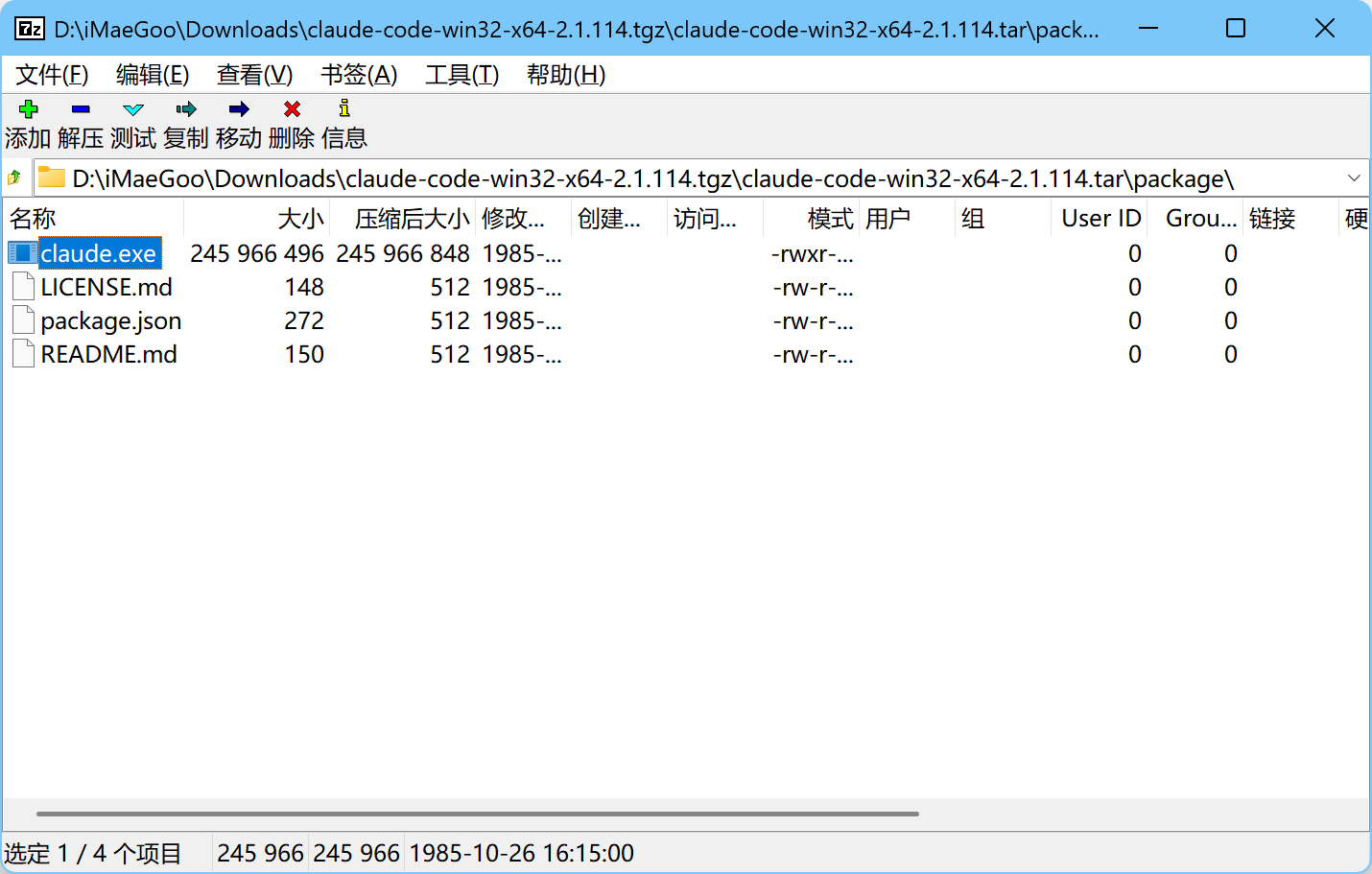
为什么阿里不同步巨型包?我猜跟 24 年的这次事件有关——《庆余年2》遭遇“开源”盗版,npm社区“被迫”暂停服务

又因为 optionalDependencies 是可选依赖,npm 在安装时不会报任何错误,看起来安装成功了,实则二进制文件根本没有装上。

解决方案

安装时指定强制从官方 npm 源下载即可:

1
npm install -g @anthropic-ai/claude-code --registry=https://registry.npmjs.org

或者不安装最新版,安装最后一个使用 js 的版本:

1
npm install -g @anthropic-ai/claude-code@2.1.112