惯性聚合 高效追踪和阅读你感兴趣的博客、新闻、科技资讯
阅读原文 在惯性聚合中打开

推荐订阅源

cs.CV updates on arXiv.org
云风的 BLOG
云风的 BLOG
aimingoo的专栏
aimingoo的专栏
Vercel News
Vercel News
T
The Blog of Author Tim Ferriss
F
Full Disclosure
A
About on SuperTechFans
C
Check Point Blog
让小产品的独立变现更简单 - ezindie.com
量子位
Know Your Adversary
Know Your Adversary
K
Kaspersky official blog
L
LINUX DO - 热门话题
Recorded Future
Recorded Future
C
Cisco Blogs
M
MIT News - Artificial intelligence
T
Tenable Blog
G
GRAHAM CLULEY
月光博客
月光博客
Recent Announcements
V
Visual Studio Blog
IT之家
IT之家
T
The Exploit Database - CXSecurity.com
The GitHub Blog
The GitHub Blog
T
Threat Research - Cisco Blogs
D
DataBreaches.Net
P
Privacy International News Feed
P
Proofpoint News Feed
I
Intezer
博客园 - 叶小钗
C
CXSECURITY Database RSS Feed - CXSecurity.com
The Hacker News
The Hacker News
Cyber Security Advisories - MS-ISAC
博客园 - Franky
SecWiki News
SecWiki News
宝玉的分享
宝玉的分享
P
Palo Alto Networks Blog
Last Week in AI
Last Week in AI
小众软件
小众软件
Hacker News - Newest:
Hacker News - Newest: "LLM"
O
OpenAI News
N
News and Events Feed by Topic
Microsoft Security Blog
Security Archives - TechRepublic
N
News and Events Feed by Topic
The Cloudflare Blog
Spread Privacy
Spread Privacy
酷 壳 – CoolShell
酷 壳 – CoolShell
Exploit-DB.com RSS Feed
B
Blog RSS Feed

虹墨空间站

浏览器直接访问正常,过了负载均衡就崩了?只因响应头里多了个空格 Claude Code 怎样快速消耗 token 去掉高德地图开屏广告 解决 Claude Code 安装或更新后 claude.exe 无法运行、claude native binary not installed Windows 11 26H1 显示所有托盘图标 OpenClaw 安装与配置 盘点手里的电子产品传家宝 基于 7z 的 NAS 到网盘备份解决方案,支持增量、分卷、加密、压缩 卸载百度网盘智能看图 CDN 方式引入 Monaco Editor 在线工具 - 富文本转 Markdown 2025 年了,安卓平板上什么第三方九键输入法最好用? 鸿蒙 PC 编译运行 Electron 应用 Android 强制锁定屏幕旋转方向
bat 脚本打印输出彩色文字
iMaeGoo · 2025-08-06 · via 虹墨空间站

要在 Windows 批处理脚本中打印彩色内容,通常的方式是 echo [32mHello World[0m,但这种方式需要输入特殊字符 ESC(ASCII 码为 27),我试过 Alt+027 的快捷键却怎么也打不出来这个字符,而且这种方式各个颜色的编码也很不好记,分享一种更简单的方法!

https://learn.microsoft.com/en-us/powershell/module/microsoft.powershell.utility/write-host

1
2
3
4
5
6
7
8
9
10
11
12
13
14
15
16
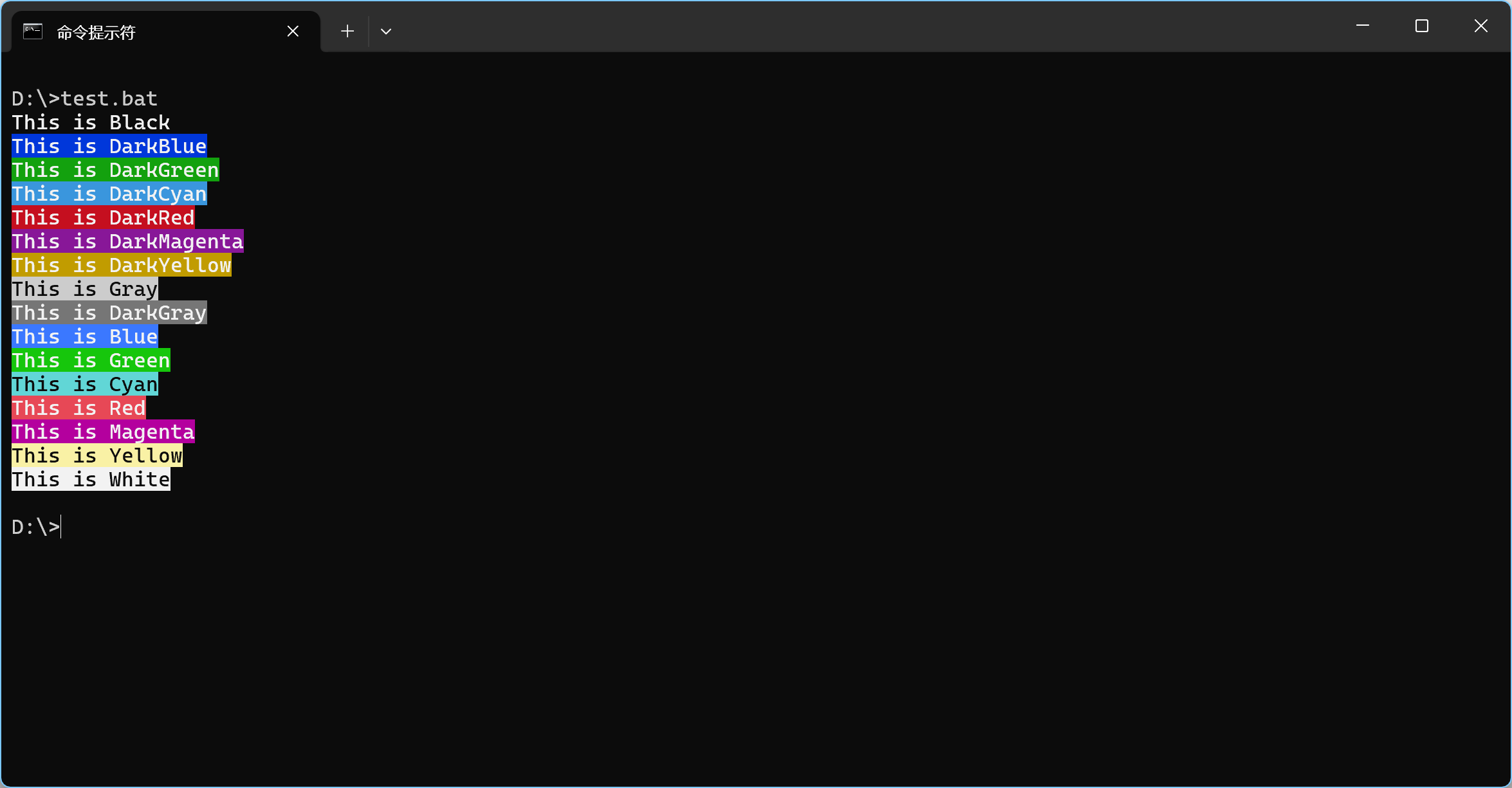
powershell -Command "Write-Host 'This is Black' -ForegroundColor White -BackgroundColor Black"
powershell -Command "Write-Host 'This is DarkBlue' -ForegroundColor White -BackgroundColor DarkBlue"
powershell -Command "Write-Host 'This is DarkGreen' -ForegroundColor White -BackgroundColor DarkGreen"
powershell -Command "Write-Host 'This is DarkCyan' -ForegroundColor White -BackgroundColor DarkCyan"
powershell -Command "Write-Host 'This is DarkRed' -ForegroundColor White -BackgroundColor DarkRed"
powershell -Command "Write-Host 'This is DarkMagenta' -ForegroundColor White -BackgroundColor DarkMagenta"
powershell -Command "Write-Host 'This is DarkYellow' -ForegroundColor White -BackgroundColor DarkYellow"
powershell -Command "Write-Host 'This is Gray' -ForegroundColor Black -BackgroundColor Gray"
powershell -Command "Write-Host 'This is DarkGray' -ForegroundColor White -BackgroundColor DarkGray"
powershell -Command "Write-Host 'This is Blue' -ForegroundColor White -BackgroundColor Blue"
powershell -Command "Write-Host 'This is Green' -ForegroundColor White -BackgroundColor Green"
powershell -Command "Write-Host 'This is Cyan' -ForegroundColor Black -BackgroundColor Cyan"
powershell -Command "Write-Host 'This is Red' -ForegroundColor White -BackgroundColor Red"
powershell -Command "Write-Host 'This is Magenta' -ForegroundColor White -BackgroundColor Magenta"
powershell -Command "Write-Host 'This is Yellow' -ForegroundColor Black -BackgroundColor Yellow"
powershell -Command "Write-Host 'This is White' -ForegroundColor Black -BackgroundColor White"

其中单引号内是打印的文字内容,ForegroundColor 参数传文字颜色,BackgroundColor 参数传背景颜色,直接传颜色名字,非常方便。

如果在批处理中使用,可以定义一个函数,调用起来更简洁。

1
2
3
4
5
6
7
8
9
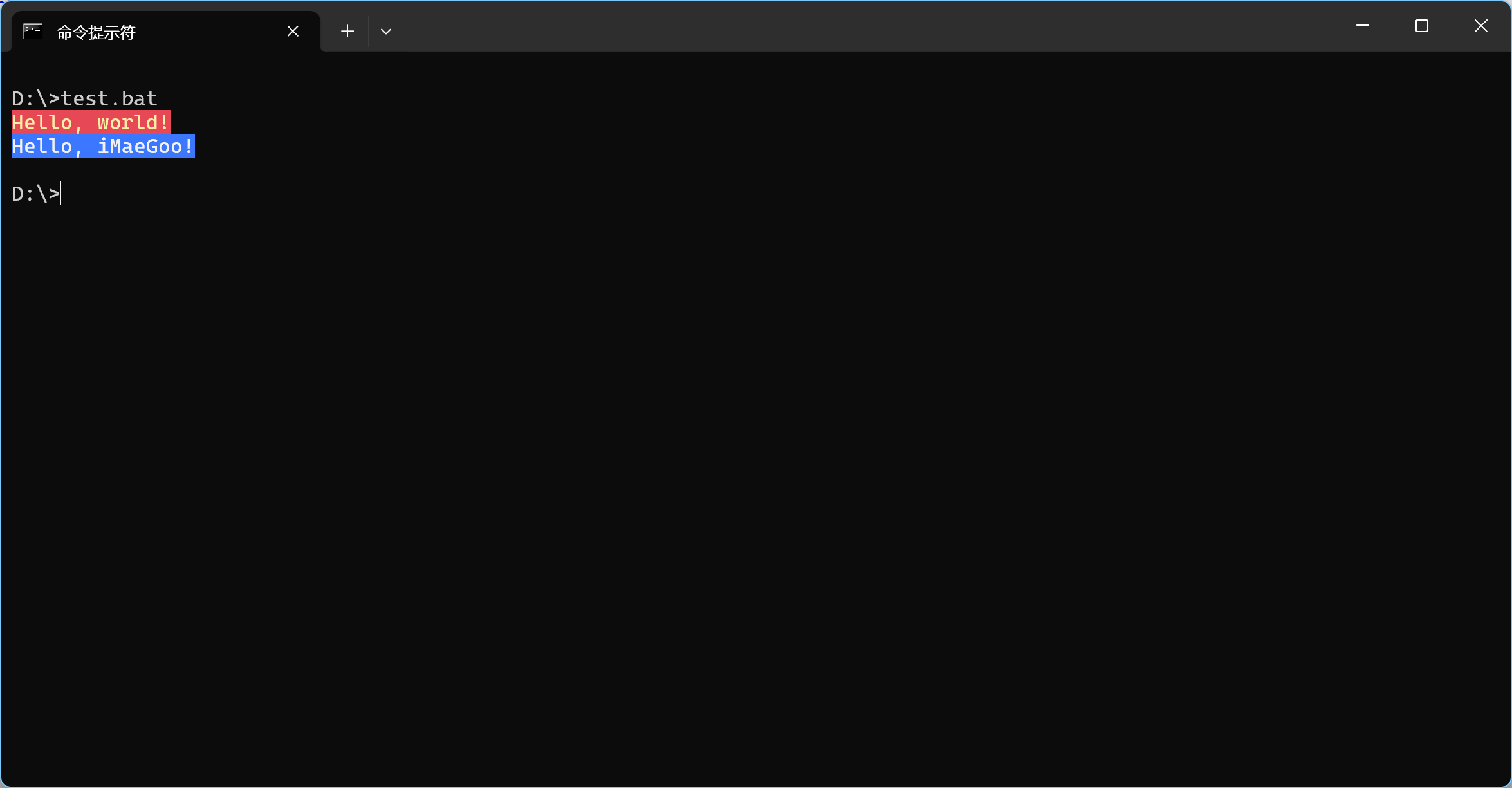
@echo off

call :print "Hello, world!" Yellow Red
call :print "Hello, iMaeGoo!" White Blue
exit /b 0

:print
powershell -Command "Write-Host '%1' -ForegroundColor %2 -BackgroundColor %3"
goto:eof

效果