惯性聚合 高效追踪和阅读你感兴趣的博客、新闻、科技资讯
阅读原文 在惯性聚合中打开

推荐订阅源

W
WeLiveSecurity
The GitHub Blog
The GitHub Blog
Engineering at Meta
Engineering at Meta
Microsoft Azure Blog
The Register - Security
Stack Overflow Blog
Stack Overflow Blog
博客园 - 三生石上(FineUI控件)
T
Threat Research - Cisco Blogs
S
SegmentFault 最新的问题
V2EX - 技术
V2EX - 技术
Hacker News: Ask HN
Hacker News: Ask HN
K
KPMG report finds enterprise disconnect between AI and its ROI | CIO
P
Proofpoint News Feed
J
Java Code Geeks
Microsoft Security Blog
M
MIT News - Artificial intelligence
AI
AI
cs.CL updates on arXiv.org
P
Proofpoint News Feed
Hacker News - Newest:
Hacker News - Newest: "LLM"
B
Blog
N
News and Events Feed by Topic
N
News | PayPal Newsroom
Google DeepMind News
酷 壳 – CoolShell
酷 壳 – CoolShell
freeCodeCamp Programming Tutorials: Python, JavaScript, Git & More
WordPress大学
WordPress大学
C
Cybersecurity and Infrastructure Security Agency CISA
Cyber Security Advisories - MS-ISAC
博客园 - 【当耐特】
U
Unit 42
腾讯CDC
Threat Intelligence Blog | Flashpoint
The Cloudflare Blog
H
Help Net Security
Recent Announcements
P
Privacy & Cybersecurity Law Blog
IT之家
IT之家
钛媒体:引领未来商业与生活新知
钛媒体:引领未来商业与生活新知
Security Archives - TechRepublic
L
LINUX DO - 热门话题
Martin Fowler
Martin Fowler
MongoDB | Blog
MongoDB | Blog
cs.CV updates on arXiv.org
H
Heimdal Security Blog
博客园 - 聂微东
S
Securelist
大猫的无限游戏
大猫的无限游戏
Cloudbric
Cloudbric
Cisco Talos Blog
Cisco Talos Blog

噜啦 - 浮动

浮动练习 淘宝轮播图 - 噜啦 浮动带来的问题以及解决方法 - 噜啦
浮动 - 噜啦
博主: 噜啦 · 2019-04-28 · via 噜啦 - 浮动

知识点

规律:div+css布局 margin、padding、float、positin 都和位置有关 把盒子摆放到合适的位置

float 浮动
解释:普通流:不使用定位、浮动等特殊CSS规则的时候,各种元素的自然排列规则
作用:做盒子的左右布局

演示

div布局
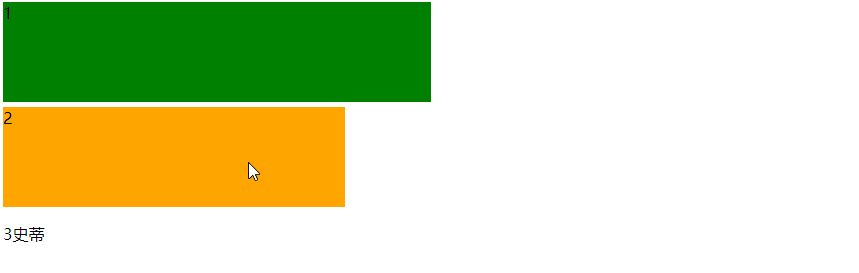
chrome_6tWYnBiWAm.png

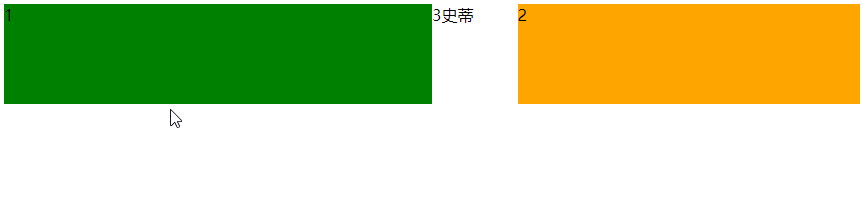
浮动布局
chrome_NrwNtqNOex.png

代码

<!DOCTYPE html>
<html>
    <head>
        <meta charset="utf-8">
        <title></title>
        
        <style type="text/css">
            .box{
                height: 100px;
                width: 50%;
                margin-bottom: 5px;
                background-color: green;
                /* 向左边浮动 */
                float: left;
            }
            .box2{
                width: 40%;
                height: 100px;
                background-color: orange;
                /* 向右边浮动 */
                float: right;
            }
        </style>
    </head>
    <body>
        <div class="box">1</div>
        <div class="box2">2</div>
        <!-- 需求:两个盒子左右布局 -->
        <!-- 浮动达到目标要求 -->
        <p>3史蒂芬孙</p>
    </body>
</html>

赞赏作者

如果觉得我的文章对你有用,请随意赞赏