



惯性聚合 高效追踪和阅读你感兴趣的博客、新闻、科技资讯
阅读原文 在惯性聚合中打开

推荐订阅源

博客园_首页
H
Help Net Security
腾讯CDC
宝玉的分享
宝玉的分享
H
Hackread – Cybersecurity News, Data Breaches, AI and More
L
LangChain Blog
爱范儿
爱范儿
T
The Blog of Author Tim Ferriss
J
Java Code Geeks
让小产品的独立变现更简单 - ezindie.com
MyScale Blog
MyScale Blog
Engineering at Meta
Engineering at Meta
N
Netflix TechBlog - Medium
D
Docker
V
V2EX
Last Week in AI
Last Week in AI
G
Google Developers Blog
IT之家
IT之家
C
Check Point Blog
钛媒体:引领未来商业与生活新知
钛媒体:引领未来商业与生活新知
人人都是产品经理
人人都是产品经理
博客园 - 叶小钗
奇客Solidot–传递最新科技情报
奇客Solidot–传递最新科技情报
博客园 - 聂微东

herrkaefer

"Vibe planning \u003e vibe coding" "Anything to Markdown" "Built anocus: anonymous commenting for static sites" "日记与小说 -- AI 续写小说欣赏" "Any-podcast: from newsletters to a podcast" "关于 Tools 和 Skills 的一点感想" "Realtime monitoring of ComEd hourly price" "Introducing SwiftEdgeTTS" "Thoughts on the philosophy of building AI-native apps" "jelly鼻屎" "等饭的人" "Use home assistant to motivate my kid to brush teeth" "Migrated Blog to Hugo and Cloudflare Pages" "Easy Aspen monitoring for Chicago parents" "Introducing HabitBuilder: A simple Telegram bot for habit tracking" "鼓捣" "Open folder or file with Sublime Text from Finder toolbar" "Python dev workflow on macOS" "Create new text file from Finder toolbar" "Uno reinvented for 3-year-old kids" "Uno变身儿童数字游戏" "自动转发Twitter到微博" "Handle annoying operations of objects in Realm DB" "Move Jekyll blog to Ubuntu VPS" "Introducing Mole" "Note taking without note taking app" "Deploy Python web application on Ubuntu server" "Setup Shadowsocks / VPN on Ubuntu Server" "Linode Notes - Basic Setup" "CLASS Style Adapted for Embedded Systems"
"Made MicPipe: a simple voice input tool using ChatGPT di...
"herrkaefer" · 2026-01-28 · via herrkaefer

image

GitHub repo: https://github.com/herrkaefer/micpipe

Voice input is getting popular again (thanks, vibe coding). I tried a few apps (spokenly, 闪电说, Typeless, etc.) and couldn’t decide. Then I realized: the voice dictation inside the ChatGPT web app is already really good. It’s fast, accurate, handles Chinese + English mixing very well.

So I had a thought:

Can I use that as a system-level “voice input method”, and use it for any app?

That thought turned into this little tool: MicPipe.

The idea / workflow is simple:

[You start recording] → MicPipe presses the dictation button in the ChatGPT chat box → [You stop recording] → it presses stop dictation → grabs the text → switches back to your original app → pastes the text.

This solves my problem of choosing.

A few notes:

One hotkey, two modes

My “original invention” 😆

  • Hold Fn to talk, release to finish and paste → Hold mode
  • Tap Fn to start, tap again to finish and paste → Toggle mode

I’ve seen many apps use two separate shortcuts for “hold to talk” and “toggle on/off”… it doesn’t have to.

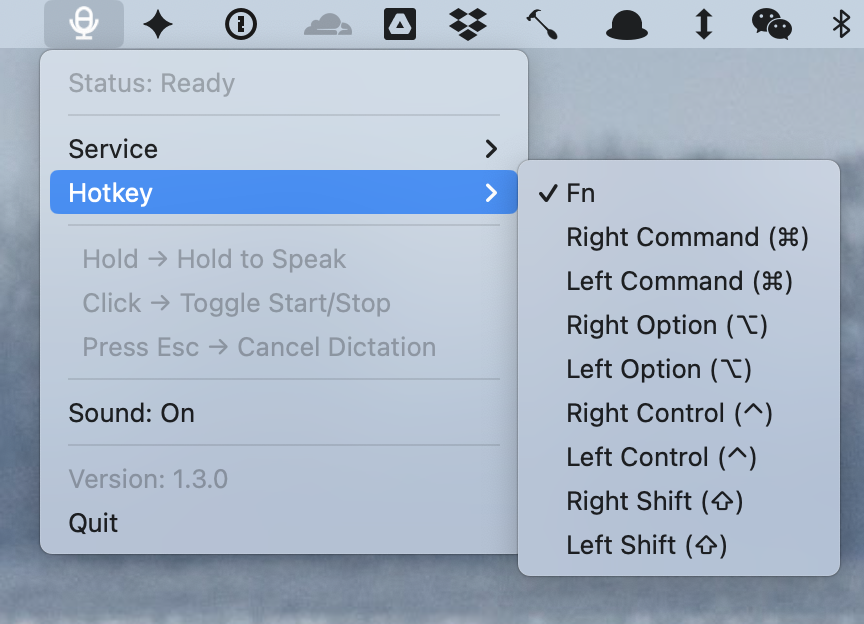
The hotkey is customizable:
image

ChatGPT & Gemini

Both are supported. But honestly, Gemini’s dictation quality isn’t as great as ChatGPT yet.
AI Pipe

image

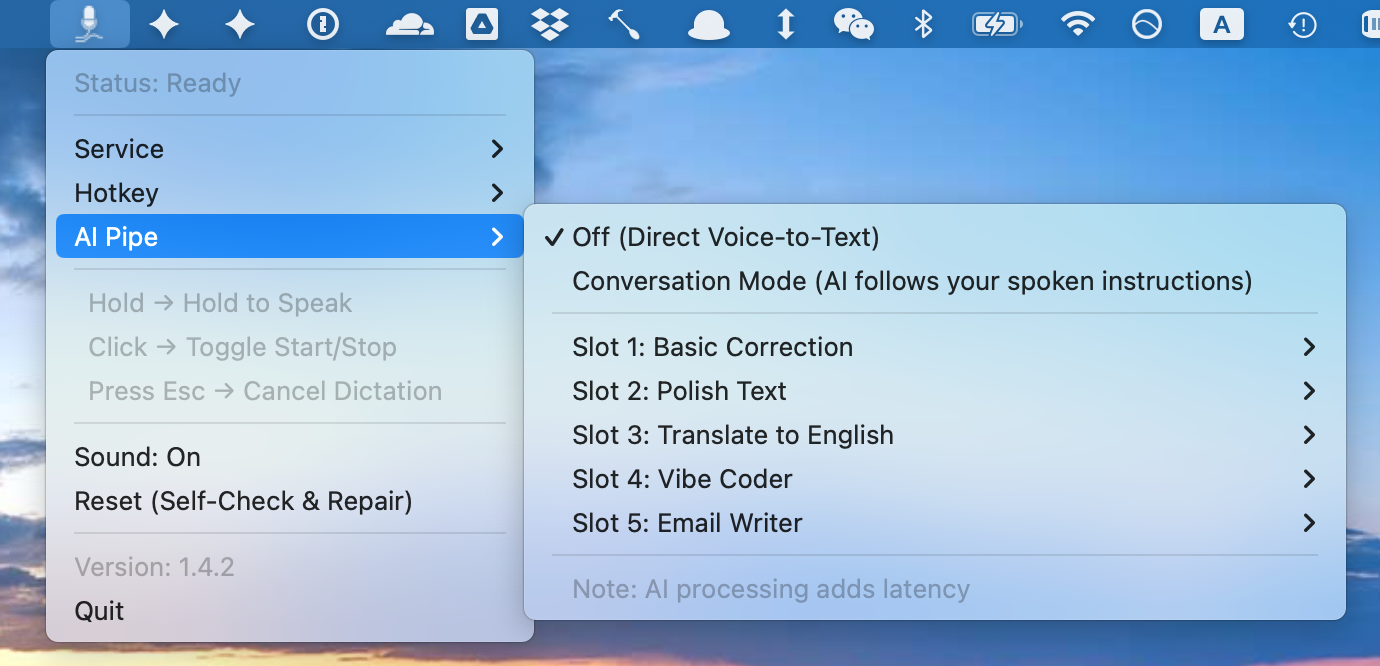
You can send the dictation result into a preset prompt, and then paste the processed output back into the original input box.

There are five preset prompt slots, all editable.

Examples:

  • Fix grammar / typos (Grammar Fix)
  • Rewrite in a more email-like tone (Email Writer)
  • Turn my messy requirements into cleaner “instructions for an AI to code” (Vibe Coder)

Of course, doing a second step makes it slower – This is expected. This can’t beat a cloud workflow that returns a combined result at once.

Not cross-platform

I tried:

  1. CDP (Chrome DevTools Protocol) — didn’t work. With CDP, ChatGPT couldn’t log in.
  2. Playwright — also no. In headless mode the microphone can’t be enabled.

So I used AppleScript.

MicPipe opens a “dedicated but minimal” Chrome window for the dictation flow. I place it outside the screen so it doesn’t bother me.

Stability still needs work. Star / PR / fork welcome.