



After changing to use ComEd’s hourly pricing, we have been paid more attention to the realtime electricity price before using some appliances like dryer and EV charger. I’ve added a chip on home assistant which call ComEd’s api every 10 min and display it and it’s very convenient. Yes ComEd provides APIs surprisingly.
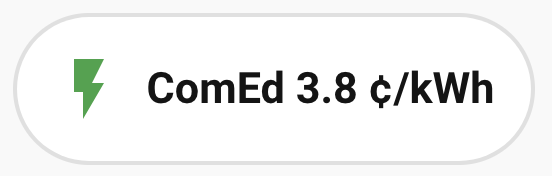
But not everyone has home assistant installed. Of course the straightforward method is to put a shortcut of this live price page on the home screen, and click it and wait for the page showing the prices. But this feels slow.
Or, we can use shortcuts (on iPhone). Shortcut can fetch the price and show a notification. You can also let Siri trigger it. Cool.
If you want to see a widget showing the prices for you, go with the wonderful Scriptable app. This app lets your run custom javascript scripts and show a widget.
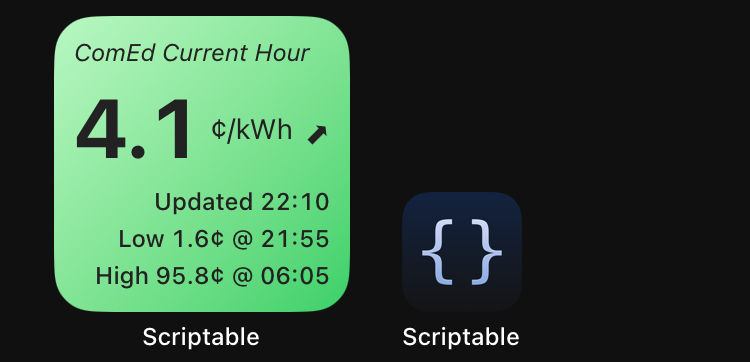
Below is the script for the widget. The background color changes based on the price range. You can modify the maxLowPrice and maxMediumPrice to your own preference.
/********************************************
 * ComEd Hourly Price Widget (Monospaced + Gradient BG)
 * - Curved trend arrow appended to price
 * - Today's low/high with time
 * - Unified font sizes for updated/low/high
 ********************************************/

const maxLowPrice = 8;
const maxMediumPrice = 14;

const API_CURRENT = "https://hourlypricing.comed.com/api?type=currenthouraverage";
const API_5MIN = "https://hourlypricing.comed.com/api?type=5minutefeed";

// ===== CURRENT PRICE =====
let dataCurrent = await new Request(API_CURRENT).loadJSON();
let currentItem = dataCurrent[0];

let millis = parseInt(currentItem.millisUTC);
let price = parseFloat(currentItem.price);

let date = new Date(millis);
let timeStr = date.toLocaleTimeString("en-US", {
  hour: "2-digit",
  minute: "2-digit",
  hour12: false,
});

// ===== 5-MIN FEED =====
let data5m = await new Request(API_5MIN).loadJSON();
let entries = data5m.map(x => ({
  ts: parseInt(x.millisUTC),
  price: parseFloat(x.price)
}));

// ===== 15-MIN TREND (using 3rd data point back) =====

// 5-minute feed: entries[0] = latest, entries[3] ≈ 15 minutes ago
let past15Entry = entries[3];   // 3 points back = 15 minutes
let past15Price = past15Entry ? past15Entry.price : price;

// Trend arrow using bold curved arrows
let diff = price - past15Price;

// Curved bold arrows
let trend = "→";
if (diff > 0.8) trend = "⬈";
else if (diff < -0.8) trend = "⬊";

// ===== 24-hr LOW / HIGH =====
let lowEntry = entries.reduce((a, b) => a.price < b.price ? a : b);
let highEntry = entries.reduce((a, b) => a.price > b.price ? a : b);

let lowTime = new Date(lowEntry.ts).toLocaleTimeString("en-US", {
  hour: "2-digit",
  minute: "2-digit",
  hour12: false,
});
let highTime = new Date(highEntry.ts).toLocaleTimeString("en-US", {
  hour: "2-digit",
  minute: "2-digit",
  hour12: false,
});

// ===== BACKGROUND GRADIENT =====
let gradient = new LinearGradient();
gradient.startPoint = new Point(0, 0);
gradient.endPoint = new Point(1, 1);

if (price < maxLowPrice) {
  gradient.colors = [new Color("#b8f7c2"), new Color("#38d169")];
} else if (price < maxMediumPrice) {
  gradient.colors = [new Color("#ffe29a"), new Color("#ff9f1c")];
} else {
  gradient.colors = [new Color("#ffb3c1"), new Color("#ff4d4d")];
}
gradient.locations = [0, 1];

let textColor = new Color("#222222");

// ===== BUILD WIDGET =====
let widget = new ListWidget();
widget.setPadding(10, 10, 10, 10);
widget.backgroundGradient = gradient;

// TITLE
let title = widget.addText("ComEd Current Hour");
title.textColor = textColor;
title.font = Font.italicSystemFont(12);
title.leftAlignText();

widget.addSpacer(6);

// PRICE + UNIT + ARROW
let row = widget.addStack();
row.centerAlignContent();

// Price number
let priceTxt = row.addText(`${price}`);
priceTxt.font = Font.boldMonospacedSystemFont(44);
priceTxt.textColor = textColor;
priceTxt.minimumScaleFactor = 0.6;

// Space
row.addSpacer(3);

// Unit
let unitTxt = row.addText("¢/kWh");
unitTxt.font = Font.regularMonospacedSystemFont(14);
unitTxt.textColor = textColor;

// Arrow
row.addSpacer(6);
let arrowTxt = row.addText(trend);
arrowTxt.font = Font.boldMonospacedSystemFont(20);
arrowTxt.textColor = textColor;

widget.addSpacer(4);

// UPDATED
let updatedTxt = widget.addText(`Updated ${timeStr}`);
updatedTxt.font = Font.mediumMonospacedSystemFont(12);
updatedTxt.textColor = textColor;
updatedTxt.rightAlignText();

widget.addSpacer(4);

// LOW / HIGH (same font size)
let lTxt = widget.addText(`Low ${lowEntry.price}¢ @ ${lowTime}`)
lTxt.font = Font.mediumMonospacedSystemFont(12);
lTxt.textColor = textColor;
lTxt.rightAlignText();

widget.addSpacer(4);

let hTxt = widget.addText(`High ${highEntry.price}¢ @ ${highTime}`);
hTxt.font = Font.mediumMonospacedSystemFont(12);
hTxt.textColor = textColor;
hTxt.rightAlignText();

widget.refreshAfterDate = new Date(Date.now() + 5 * 60 * 1000);

Script.setWidget(widget);
Script.complete();
App.close();
It’d better to put the widget in the Today widget so it seems to get refreshed more often. But the timing of refresh totally depends on iOS system. The solution is tapping the widget if you see the “updated” time is not very recent. The Scriptable app will be opened for the script to run but will automatically close after that, which takes half a second.
此内容由惯性聚合(RSS阅读器)自动聚合整理,仅供阅读参考。 原文来自 — 版权归原作者所有。