


惯性聚合 高效追踪和阅读你感兴趣的博客、新闻、科技资讯
阅读原文 在惯性聚合中打开

推荐订阅源

S
Security @ Cisco Blogs
H
Hacker News: Front Page
P
Privacy International News Feed
N
News and Events Feed by Topic
T
Threatpost
Simon Willison's Weblog
S
Schneier on Security
K
Kaspersky official blog
S
Secure Thoughts
V2EX - 技术
V2EX - 技术
Security Latest
Security Latest
钛媒体:引领未来商业与生活新知
钛媒体:引领未来商业与生活新知
www.infosecurity-magazine.com
C
CERT Recently Published Vulnerability Notes
L
Lohrmann on Cybersecurity
Jina AI
Jina AI
P
Proofpoint News Feed
AI
AI
雷峰网
雷峰网
T
Tailwind CSS Blog
Engineering at Meta
Engineering at Meta
cs.CL updates on arXiv.org
D
Darknet – Hacking Tools, Hacker News & Cyber Security
Recent Commits to openclaw:main
cs.AI updates on arXiv.org
博客园 - 叶小钗
Webroot Blog
Webroot Blog
Apple Machine Learning Research
SecWiki News
SecWiki News
罗磊的独立博客
N
Netflix TechBlog - Medium
Martin Fowler
Martin Fowler
Google DeepMind News
Cyberwarzone
Cyberwarzone
MongoDB | Blog
MongoDB | Blog
博客园 - Franky
Schneier on Security
The GitHub Blog
The GitHub Blog
S
Security Affairs
Blog — PlanetScale
Blog — PlanetScale
Last Week in AI
Last Week in AI
P
Proofpoint News Feed
月光博客
月光博客
D
Docker
OSCHINA 社区最新新闻
OSCHINA 社区最新新闻
S
Securelist
W
WeLiveSecurity
T
Troy Hunt's Blog
A
Arctic Wolf
博客园 - 司徒正美

KuangjuX(狂且)

提高 Directory Cache 性能 高速缓存技术(Cache) Chisel 学习笔记 随笔(一) 指令级并行技术 TLB MMU 笔记(基于 MIPS) Verilator 学习笔记 MIT-6.S081-mmap MIT-6.S081 Networking MIT-6.S081 Lazy Page Allocation MIT-6.S081 Copy on Write Fork MIT-6.S081 User Level Threads 2021年终总结 xv6-riscv中的KPTI机制 RISC -V N扩展 io_uring 阅读笔记 飞书Rust实习面试 Rust并发安全总结 Rust String 用法总结
在Ubuntu中升级Linux内核
KuangjuX · 2021-10-27 · via KuangjuX(狂且)

为了使用 Linux 中的 io_uring 特性,我将 Ubuntu 18.04 中的内核进行升级。

首先访问 Ubuntu内核网址 然后选择我们需要升级的 linux 内核版本,在这里我们选择最新的稳定的 linux 内核的版本,然后进入网页:,可以看到如下页面:
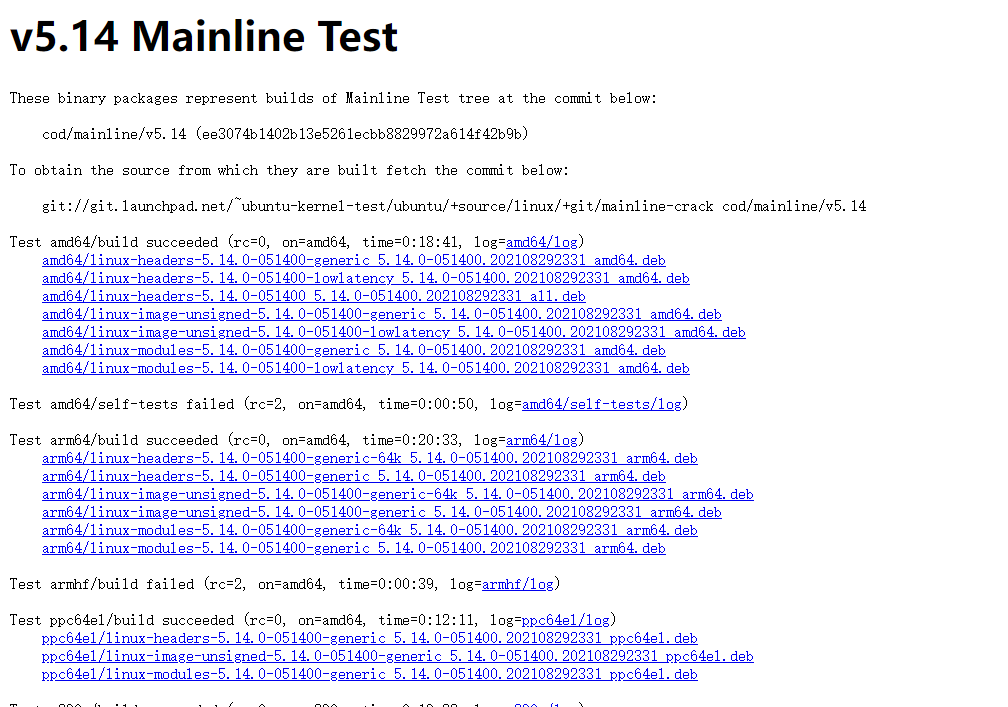
注意到 linux 内核分为通用版和低延迟版,这里我们选择通用版进行安装,执行一下命令:

1
2
3
4
wget https://kernel.ubuntu.com/~kernel-ppa/mainline/v5.14/amd64/linux-headers-5.14.0-051400-generic_5.14.0-051400.202108292331_amd64.deb
wget https://kernel.ubuntu.com/~kernel-ppa/mainline/v5.14/amd64/linux-headers-5.14.0-051400_5.14.0-051400.202108292331_all.deb
wget https://kernel.ubuntu.com/~kernel-ppa/mainline/v5.14/amd64/linux-image-unsigned-5.14.0-051400-generic_5.14.0-051400.202108292331_amd64.deb
wget https://kernel.ubuntu.com/~kernel-ppa/mainline/v5.14/amd64/linux-modules-5.14.0-051400-generic_5.14.0-051400.202108292331_amd64.deb

随后进入下载的目录,执行以下命令:

1
sudo dpkg -i *.deb

执行成功后重启:

1
reboot

当进入之后使用 uname -sr 查看内核版本,查看是否为安装的内核版本

Copyright Notice: All articles in this blog are licensed under CC BY-NC-SA 4.0 unless stating additionally.