











Every team runs on people who go above and beyond. The engineer who fixes the flaky test nobody else will touch. The reviewer who turns your merge request around in an hour. The teammate who finishes their certification. Or the community member who shows up release after release. Whether your team is a company, an open source project, or a community, GitLab had no built-in way to say "we see you." GitLab Achievements changes that.
An achievement is a custom badge you create once and award to people for their behavior. That might be a contribution, a milestone, or simply getting the most out of GitLab. Each one has a name, a description, and an avatar. Think "First merged MR", "Certified", or "Contributor of the month". Awarded achievements appear on the recipient's profile, alongside their contribution history.
There are two halves to the achievement. The achievement itself is a reusable template you define at the group level. Awarding that achievement to someone is a separate action, and it can carry an optional personal message. That message supports GitLab Flavored Markdown, so you can link straight to the merge request, issue, or event that earned it. The same "Contributor of the month" badge can then tell a different story every time you award it.
Recipients stay in control. An award doesn't appear on anyone's profile until they accept it using a link from an email notification. Recognition is offered, never forced onto someone's profile.
Achievements are generally available as of GitLab 19.2, across Free, Premium, and Ultimate, on GitLab.com, GitLab Self-Managed, and GitLab Dedicated.
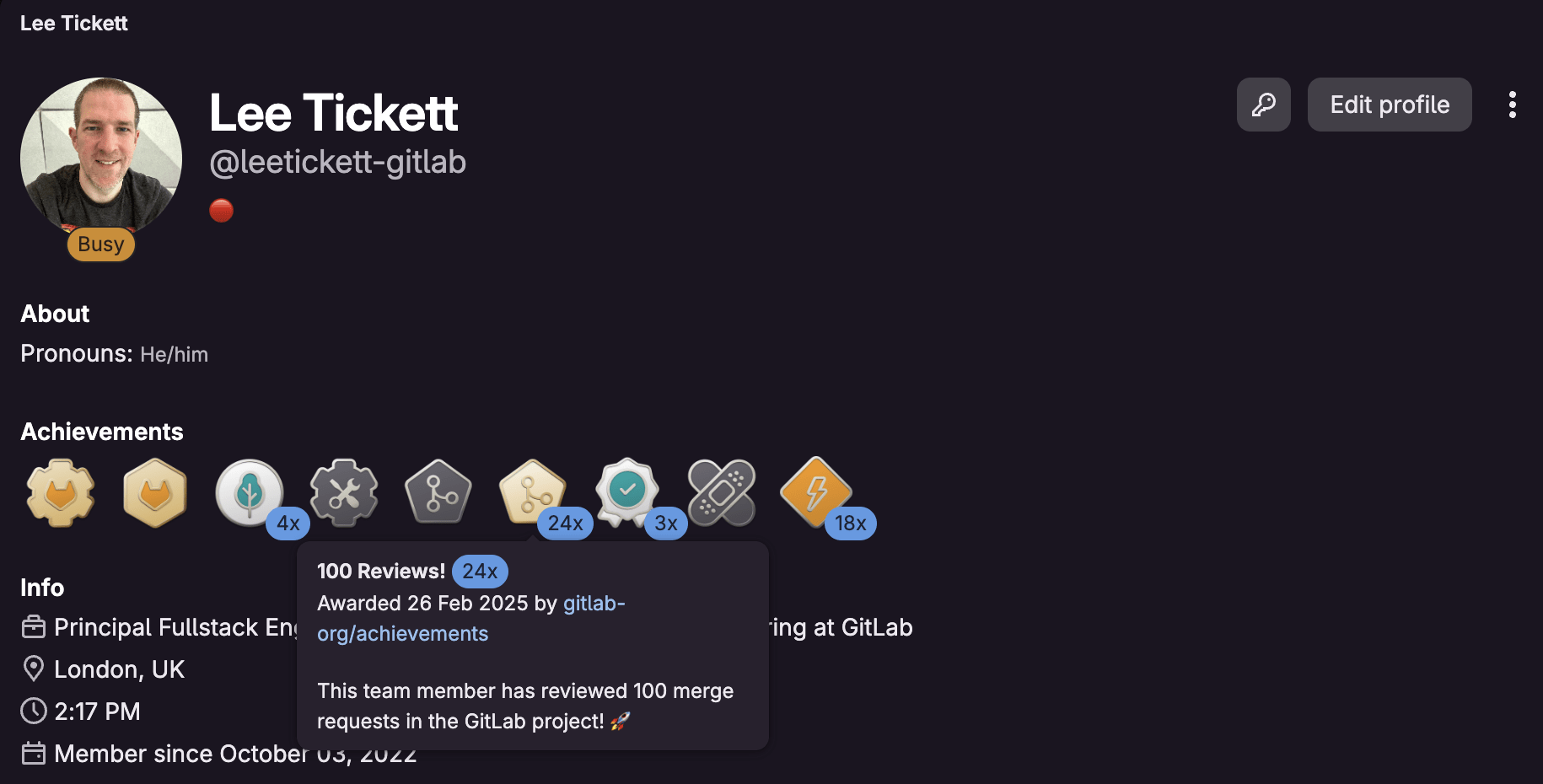
Recognition is one of the least expensive, most effective tools you have for retention, motivation, and belonging. A visible badge on a profile costs you a minute to award and gives the recipient something lasting. And "team" is broad: It might be your company, your open source project, or your wider community. The value depends entirely on who you are and what you're trying to reinforce.
Internal engineering and platform teams
This is where most teams will start. Reward the people who keep the wheels turning: your fastest reviewers, engineers who complete onboarding or earn a certification, members of a guild or chapter, or the ones who show up during an incident. A badge makes the effort that usually goes unnoticed visible to the whole organization.
Open source maintainers and community programs
This is our own story, and the reason we built the feature. Open source contributors are rarely paid so recognition is often the only reward on offer. It needs to be genuine and visible. Achievements give you a way to celebrate external contributors at scale: Award a "First contribution" badge automatically, or a "Notable contributor" badge each release. Contributors get something concrete to point to, and you get a consistent way to celebrate people behind it.
Here are five ways to use GitLab Achievements.
The use case that started it all: Badge your team and core contributors so your community knows who's who. When someone new lands in your project, a glance at profiles tells them who maintains it, who reviews it, and who will field questions. Add a "Hackathon winner" badge and you've turned a one-off event into lasting recognition. Recognition becomes something people can see, not something buried in a changelog.
We've since expanded our own use internally to recognise great reviews and fast turnarounds. This is the quiet lesson of achievements: You reinforce the behavior you reward. Badge thoughtful reviews, quick responses, or mentoring, and you signal to the whole team what good looks like. It costs nothing and it compounds.
Recognition isn't only for the people who build GitLab, it works just as well for the people getting the most out of it. Award a badge when someone earns a certification, finishes an enablement path, or adopts a capability your team has been trying to roll out. For customer success and platform teams, this turns dry adoption metrics into something people are proud of. Learning to use a tool well is a contribution, too.
Achievements come in three flavors:
Use them to mark the moments that matter, a first contribution, a 100th contribution, a hard problem finally solved.
This is where the personal message earns its keep. For a recurring award, attach a message linking to the exact merge request or issue that earned it, with a line on why. The badge stops being a generic sticker and becomes a record of a specific achievement.
Because achievements can be awarded multiple times and revoked, they suit time-boxed events. Run a hackathon and award a badge to every participant. Run a quarterly contribution drive and award a limited-edition achievement that only that cohort will ever hold. It's a lightweight way to give a campaign a lasting footprint.
The Achievements documentation covers creating, awarding, accepting, and revoking in full.
Everything is scriptable through the GraphQL API, so you can award in bulk or wire achievements into your own automation. Awarding a "First contribution" badge the moment someone's first merge request merges, for example.
Achievements didn't come from the core product team. The feature started as a gap that our team, Co-create and Community Engineering, and the wider community set out to fill, captured in Epic #9429. It's the "everyone can contribute" value in action: a feature that lets you recognize contributors was itself co-created by contributors.
Community contributor and Core Team member Niklas van Schrick was key to making it happen. There's a neat symmetry to that. A feature for recognizing contributors, delivered by a contributor, and now we get to recognize him for it. If you've ever wanted to shape GitLab itself, this is proof that you can! Start contributing here.
Getting Achievements to general availability fell to Mattias Michaux, who had just joined the company, and our team. The feature was part-built and had sat idle for a while, so his first job wasn't writing code, it was working out where the previous effort had got to, what was left to do, and how this corner of an enormous, unfamiliar codebase actually fitted together.
That's usually the slowest part of picking up someone else's half-finished work. This is where GitLab Duo and Orbit came in. Mapping the existing code, understanding what remained, and getting productive quickly. Doing all of that in the time we had simply wouldn't have been feasible without them.
The takeaway isn't about us. It's that these tools collapse the ramp-up cost of a large, unfamiliar codebase whether you're a new hire on your first week or a first-time contributor sending your first merge request. The barrier to contributing has never been lower.
Recognition works best when it's a habit, not an afterthought. So create your first achievement and award it to someone this week: a reviewer, a mentor, a first-time contributor.
Want to help build the next feature like this one? Start contributing to GitLab. And if you have a use case we haven't thought of, let us know in the Achievements epic.
此内容由惯性聚合(RSS阅读器)自动聚合整理,仅供阅读参考。 原文来自 — 版权归原作者所有。