惯性聚合 高效追踪和阅读你感兴趣的博客、新闻、科技资讯
阅读原文 在惯性聚合中打开

推荐订阅源

Google DeepMind News
D
Darknet – Hacking Tools, Hacker News & Cyber Security
博客园 - 【当耐特】
博客园_首页
博客园 - Franky
有赞技术团队
有赞技术团队
T
The Blog of Author Tim Ferriss
Recorded Future
Recorded Future
H
Hackread – Cybersecurity News, Data Breaches, AI and More
F
Fortinet All Blogs
Cyber Security Advisories - MS-ISAC
酷 壳 – CoolShell
酷 壳 – CoolShell
量子位
T
Tailwind CSS Blog
博客园 - 三生石上(FineUI控件)
M
MIT News - Artificial intelligence
D
Docker
H
Help Net Security
freeCodeCamp Programming Tutorials: Python, JavaScript, Git & More
GbyAI
GbyAI
S
SegmentFault 最新的问题
腾讯CDC
Latest news
Latest news
Exploit-DB.com RSS Feed
钛媒体:引领未来商业与生活新知
钛媒体:引领未来商业与生活新知
I
InfoQ
美团技术团队
C
Cybersecurity and Infrastructure Security Agency CISA
宝玉的分享
宝玉的分享
Hugging Face - Blog
Hugging Face - Blog
V
Visual Studio Blog
C
Cisco Blogs
Threat Intelligence Blog | Flashpoint
S
Schneier on Security
Spread Privacy
Spread Privacy
Recent Announcements
T
Threat Research - Cisco Blogs
F
Full Disclosure
T
Threatpost
T
Tenable Blog
AWS News Blog
AWS News Blog
Cloudbric
Cloudbric
The Last Watchdog
The Last Watchdog
B
Blog RSS Feed
W
WeLiveSecurity
I
Intezer
月光博客
月光博客
cs.CV updates on arXiv.org
L
Lohrmann on Cybersecurity
Hacker News - Newest:
Hacker News - Newest: "LLM"

不吐不快

KiCad 多版本文件转换器 今年的世界杯在哪下注? Layout工程师会是电子行业第一个消失的岗位吗 为什么马化腾这么缺钱 Vibe Coding了一个深圳高中地图网站 岗上有一棵树 OpenWrt 要你命三千版 KiCad-立创插件国内优化版 KiCad 10.0.0 发布了 最好用的内外网穿透-Cloudflare Tunnels PC电源改装直流稳压源升级加上语音控制 解决小狼毫输入法重启电脑需要手动部署的问题
乌龟自动喂食器再次升级
Harry · 2026-02-20 · via 不吐不快

去年我升级了乌龟的自动喂食器:乌龟自动喂食器2.0升级,基于 Arduino cloud 的 APP 来远程管理,就发现有时候连不上,控制按钮免费版也最多使用五个,还有不知道是不是 ESP8266 模块问题,连 Wi-Fi 有时也断。趁着春节假期,换 ESP32,远程也改用 Cloudflare workers 来控制。

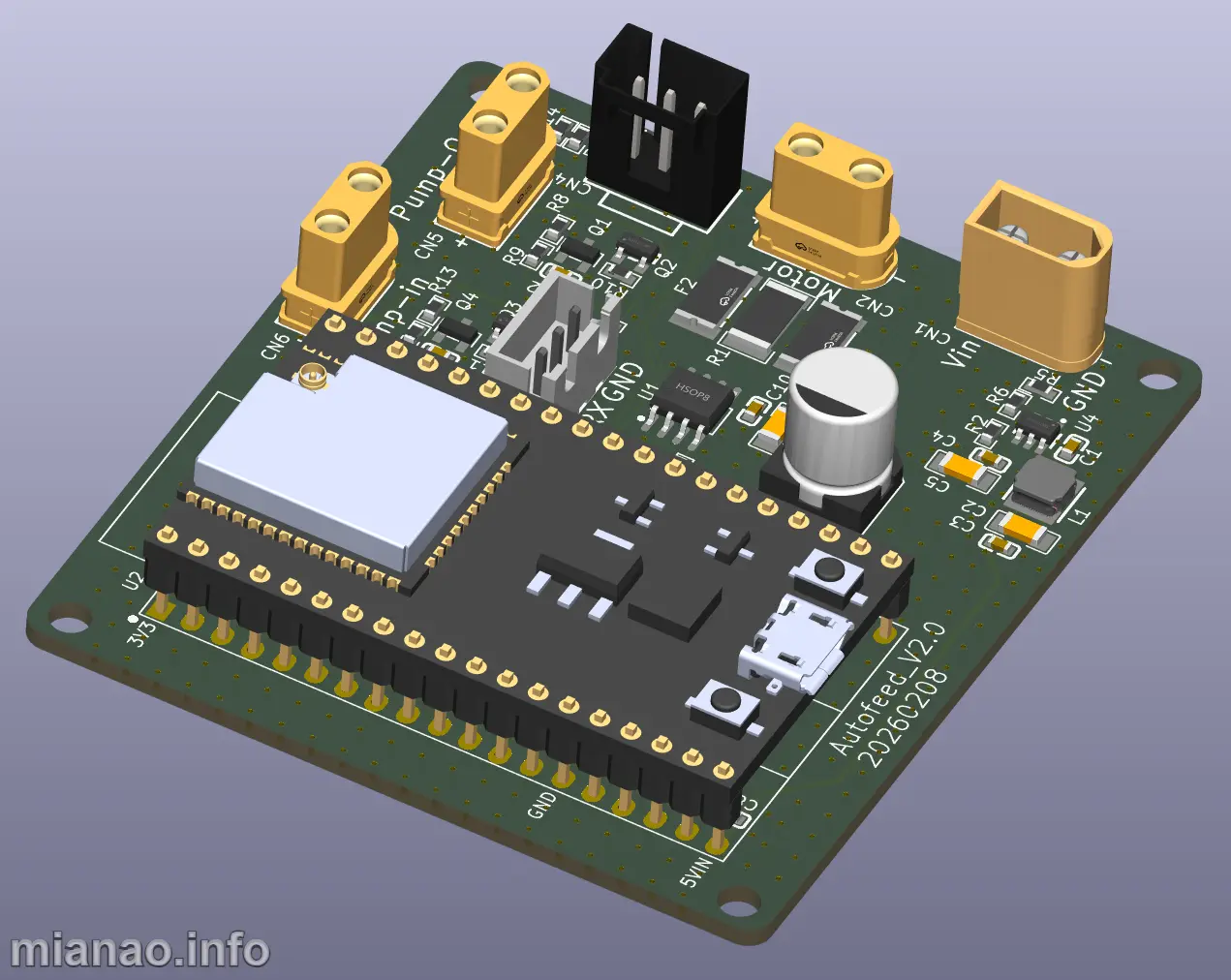
主控换成了 ESP32 开发板。这板我也不知道啥时候买的了。不用模块一个是因为省钱,一个是比较方便我升级和调试固件,直接拔出来连到电脑就好了,以前还得把连接线拔了拆整个板。
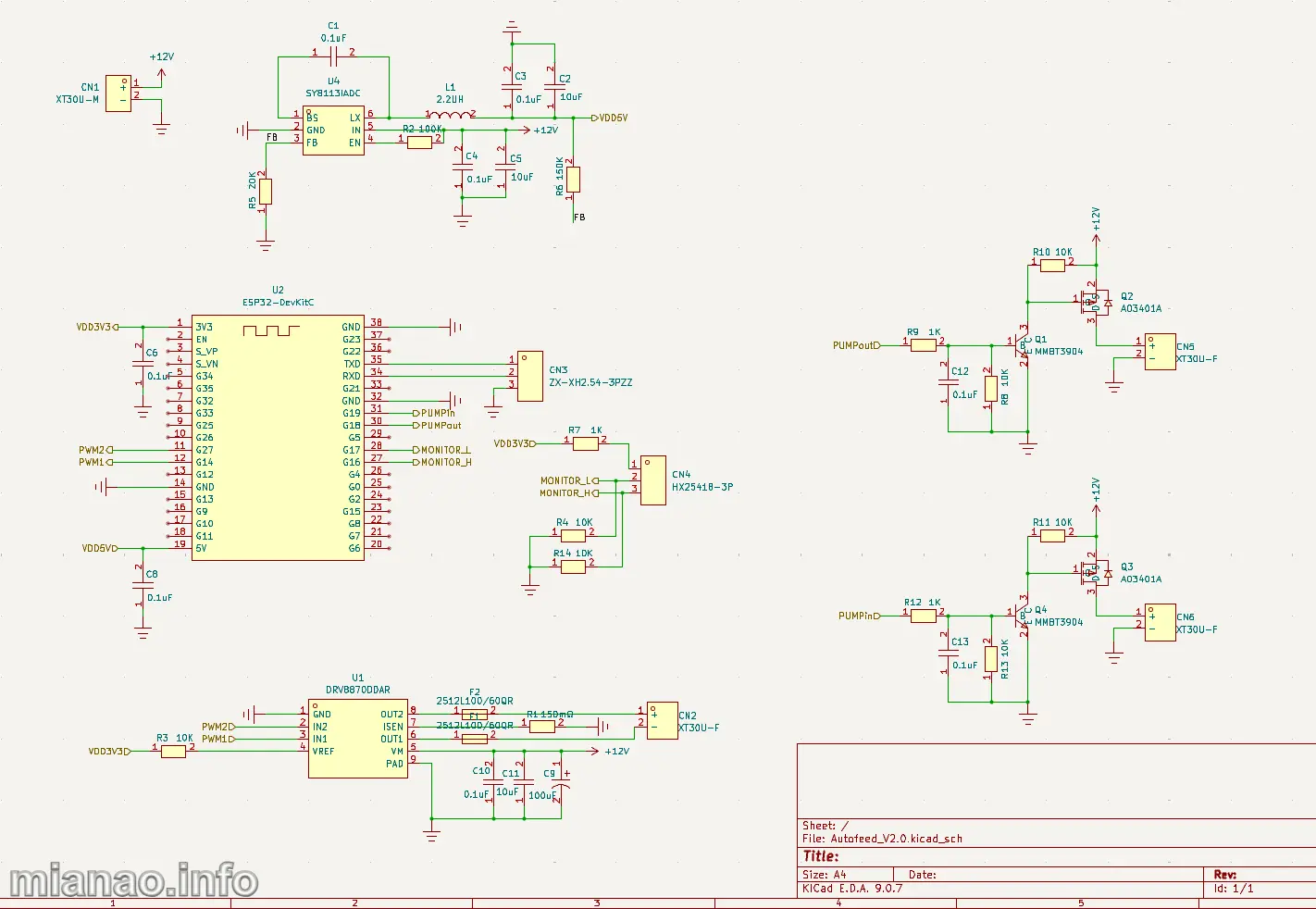
另外把继电器换成了 PMOS,水位监测,喂食电机驱动和之前一样。
sch_V2
电路设计我使用 KiCAD 9 了,3D 库也一起打包了。
Autofeed_V2

软件设计还是用的 Arduino 框架,通过 Cloudflare Workers 远程控制,使用免费的 MQTT 服务通信(HiveMQ),国内也可以选用 EMQX,同样有免费额度。

推荐一下 Google antigravity,opus 4.6,gemini 3.0 都有免费额度,今天已经有 gemini 3.1pro 了。
这种简单的软件设计很容易就搞定,bug 修复只要告诉 AI 详细信息,很快就修复了。

1
2
3
4
5
6
7
8
9
10
11
12
13
14
15
16
17
18
19
20
21
22
23
24
25
26
27
28
29
30
31
32
33
34
35
36
37
38
39
40
41
42
43
44
45
46
47
48
49
50
51
52
53
54
55
56
57
58
59
60
61
62
63
64
65
66
67
68
69
70
71
72
73
74
75
76
77
78
79
80
81
82
83
84
85
86
87
88
89
90
91
92
93
94
95
96
97
98
99
100
101
102
103
104
105
106
107
108
109
110
111
112
113
114
115
116
117
118
119
120
121
122
123
124
125
126
127
128
129
130
131
132
133
134
135
136
137
138
139
140
141
142
143
144
145
146
147
148
149
150
151
152
153
154
155
156
157
158
159
160
161
162
163
164
165
166
167
168
169
170
171
172
173
174
175
176
177
178
179
180
181
182
183
184
185
186
187
188
189
190
191
192
193
194
195
196
197
198
199
200
201
202
203
204
205
206
207
208
209
210
211
212
213
214
215
216
217
218
219
220
221
222
223
224
225
226
227
228
229
230
231
232
233
234
235
236
237
238
239
240
241
242
243
244
245
246
247
248
249
250
251
252
253
254
255
256
257
258
259
260
261
262
263
264
265
266
267
268
269
270
271
272
273
274
275
276
277
278
279
280
281
282
283
284
285
286
287
288
289
290
291
292
293
294
295
296
297
298
299
300
301
302
303
304
305
306
307
308
309
310
311
312
313
314
315
316
317
318
319
320
321
322
323
324
325
326
327
328
329
330
331
332
333
334
335
336
337
338
339
340
341
342
343
344
345
346
347
348
349
350
351
352
353
354
355
356
357
358
359
360
361
362
363
364
365
366
367
368
369
370
371
372
373
374
375
376
377
378
379
380
381
382
383
384
385
386
387
388
389
390
391
392
393
394
395
396
397
398
399
400
401
402
403
404
405
406
407
408
409
410
411
412
413
414
415
416
417
418
419
420
421
422
423
424
425
426
427
428
429
430
431
432
433
434
435
436
437
438
439
440
441
442
443
444
445
446
447
448
449
450
451
452
453
454
455
456
457
458
459
460
461
462
463
464
465
466
467
468
469
470
471
472
473
474
475
476
477
478
479
480
481
482
483
484
485
486
487
488
489
490
491
492
493
494
495
496
497
498
499
500
501
502
503
504
505
506
507
508
509
510
511
512
513
514
515
516
517
518
519
520
521
522
523
524
525
526
527
528
529
530
531
532
533
534
535
536
537
538
539
540
541
542
543
544
545
546
547
548
549
550
551
552
553
554
555
556
557
558
559
560
561
562
563
564
565
566
567
568
569
570
571
572
573
574
575
576
577
578
579
580
581
582
583
584
585
586
587
588
589
590
591
592
593
594
595
596
597
598
599
600
601
602
603
604
605
606
607
608
609
610
611
612
613
614
615
616
617
618
619
620
621
622
623
624
625
626
627
628
629
630
631
632


#include <ArduinoJson.h>
#include <Preferences.h>
#include <PubSubClient.h>
#include <WiFi.h>
#include <WiFiClientSecure.h>
#include <time.h>


#define MQTT_BROKER "xxx.hivemq.cloud"
#define MQTT_PORT 8883
#define MQTT_USER "name"
#define MQTT_PASS "password"
#define MQTT_CLIENT "autofeed-esp32"


#define TOPIC_CMD "autofeed/cmd"
#define TOPIC_STATUS "autofeed/status"


#define PWM1_PIN 14
#define PWM2_PIN 27
#define PUMP_IN_PIN 19
#define PUMP_OUT_PIN 18
#define WATER_LOW_PIN 17
#define WATER_HIGH_PIN 16


#define NTP_SERVER "pool.ntp.org"
#define GMT_OFFSET 28800
#define DST_OFFSET 0


WiFiClientSecure espClient;
PubSubClient mqtt(espClient);
Preferences prefs;


struct MotorConfig {
bool enabled;
int runSeconds;
int intervalDays;
String times[10];
int timeCount;
} motorCfg = {false, 30, 1, {}, 0};


struct PumpInConfig {
bool enabled;
} pumpInCfg = {false};


struct PumpOutConfig {
bool enabled;
int onSeconds;
int offSeconds;
} pumpOutCfg = {false, 30, 30};


bool motorRunning = false;
unsigned long motorStartTime = 0;

bool pumpInRunning = false;
unsigned long pumpInStartTime = 0;
bool pumpOutRunning = false;
unsigned long pumpOutCycleStart = 0;
bool pumpOutCycleState = false;

bool waterLow = false;
bool waterHigh = false;


unsigned long lastStatusReport = 0;
const unsigned long STATUS_INTERVAL = 10000;

unsigned long lastScheduleCheck = 0;
const unsigned long SCHEDULE_INTERVAL = 30000;

unsigned long lastMqttReconnect = 0;
const unsigned long MQTT_RECONNECT_INTERVAL = 5000;


bool scheduledToday[10] = {false};
int lastCheckedDay = -1;


void setupWiFi();
void setupMQTT();
void mqttCallback(char *topic, byte *payload, unsigned int length);
void reconnectMQTT();
void handleMotorSchedule();
void updateMotor();
void updatePumpIn();
void updatePumpOut();
void reportStatus();
void applyCommand(const char *json);
void saveConfig();
void loadConfig();
void stopMotor();
void startMotor();


void setup() {
Serial.begin(115200);
Serial.println("\n=== Autofeed 2.2 启动 ===");


pinMode(PWM1_PIN, OUTPUT);
pinMode(PWM2_PIN, OUTPUT);
pinMode(PUMP_IN_PIN, OUTPUT);
pinMode(PUMP_OUT_PIN, OUTPUT);
pinMode(WATER_LOW_PIN, INPUT);
pinMode(WATER_HIGH_PIN, INPUT);


digitalWrite(PWM1_PIN, LOW);
digitalWrite(PWM2_PIN, LOW);
digitalWrite(PUMP_IN_PIN, LOW);
digitalWrite(PUMP_OUT_PIN, LOW);


loadConfig();


setupWiFi();


configTime(GMT_OFFSET, DST_OFFSET, NTP_SERVER);
Serial.println("等待 NTP 时间同步...");
struct tm timeinfo;
int retries = 0;
while (!getLocalTime(&timeinfo) && retries < 20) {
delay(500);
Serial.print(".");
retries++;
}
if (retries < 20) {
Serial.println("\nNTP 同步成功!");
Serial.printf("当前时间: %04d-%02d-%02d %02d:%02d:%02d\n",
timeinfo.tm_year + 1900, timeinfo.tm_mon + 1,
timeinfo.tm_mday, timeinfo.tm_hour, timeinfo.tm_min,
timeinfo.tm_sec);
} else {
Serial.println("\nNTP 同步失败, 将持续重试");
}


setupMQTT();
}


void loop() {

if (WiFi.status() != WL_CONNECTED) {
Serial.println("WiFi 断开, 重新连接...");
WiFi.reconnect();
delay(5000);
return;
}


if (!mqtt.connected()) {
unsigned long now = millis();
if (now - lastMqttReconnect > MQTT_RECONNECT_INTERVAL) {
lastMqttReconnect = now;
reconnectMQTT();
}
}
mqtt.loop();


waterLow = digitalRead(WATER_LOW_PIN) == HIGH;
waterHigh = digitalRead(WATER_HIGH_PIN) == HIGH;


handleMotorSchedule();
updateMotor();
updatePumpIn();
updatePumpOut();


unsigned long now = millis();
if (now - lastStatusReport >= STATUS_INTERVAL) {
lastStatusReport = now;
reportStatus();
}
}


void setupWiFi() {
prefs.begin("wifi", true);
String ssid = prefs.getString("ssid", "");
String pass = prefs.getString("pass", "");
prefs.end();

if (ssid.length() > 0) {
Serial.printf("尝试连接已保存的 WiFi: %s\n", ssid.c_str());
WiFi.begin(ssid.c_str(), pass.c_str());

int timeout = 0;
while (WiFi.status() != WL_CONNECTED && timeout < 20) {
delay(500);
Serial.print(".");
timeout++;
}

if (WiFi.status() == WL_CONNECTED) {
Serial.printf("\nWiFi 已连接! IP: %s\n",
WiFi.localIP().toString().c_str());
return;
}
Serial.println("\n已保存的 WiFi 连接失败, 启动 SmartConfig...");
}


WiFi.mode(WIFI_STA);
WiFi.beginSmartConfig(SC_TYPE_ESPTOUCH_V2);
Serial.println("等待 SmartConfig 配网... (请使用 ESPTouch App)");

while (!WiFi.smartConfigDone()) {
delay(500);
Serial.print(".");
}
Serial.println("\nSmartConfig 配网完成!");


while (WiFi.status() != WL_CONNECTED) {
delay(500);
Serial.print(".");
}
Serial.printf("\nWiFi 已连接! IP: %s\n", WiFi.localIP().toString().c_str());


prefs.begin("wifi", false);
prefs.putString("ssid", WiFi.SSID());
prefs.putString("pass", WiFi.psk());
prefs.end();
Serial.println("WiFi 凭据已保存");
}


void setupMQTT() {
espClient.setInsecure();
mqtt.setServer(MQTT_BROKER, MQTT_PORT);
mqtt.setCallback(mqttCallback);
mqtt.setBufferSize(1024);
reconnectMQTT();
}

void reconnectMQTT() {
if (mqtt.connected())
return;

Serial.print("连接 MQTT...");
if (mqtt.connect(MQTT_CLIENT, MQTT_USER, MQTT_PASS)) {
Serial.println("成功!");
mqtt.subscribe(TOPIC_CMD);
Serial.printf("已订阅: %s\n", TOPIC_CMD);

reportStatus();
} else {
Serial.printf("失败, rc=%d\n", mqtt.state());
}
}


void mqttCallback(char *topic, byte *payload, unsigned int length) {
char json[1024];
if (length >= sizeof(json))
length = sizeof(json) - 1;
memcpy(json, payload, length);
json[length] = '\0';

Serial.printf("收到 [%s]: %s\n", topic, json);

if (String(topic) == TOPIC_CMD) {
applyCommand(json);
}
}


void applyCommand(const char *json) {
JsonDocument doc;
DeserializationError err = deserializeJson(doc, json);
if (err) {
Serial.printf("JSON 解析失败: %s\n", err.c_str());
return;
}


if (doc.containsKey("motor")) {
JsonObject motor = doc["motor"];
if (motor.containsKey("enabled")) {
motorCfg.enabled = motor["enabled"].as<bool>();
if (!motorCfg.enabled) {
stopMotor();
}
}
if (motor.containsKey("runSeconds")) {
motorCfg.runSeconds = motor["runSeconds"].as<int>();
}
if (motor.containsKey("schedule")) {
JsonObject schedule = motor["schedule"];
if (schedule.containsKey("intervalDays")) {
motorCfg.intervalDays = schedule["intervalDays"].as<int>();
if (motorCfg.intervalDays < 1)
motorCfg.intervalDays = 1;
}
if (schedule.containsKey("times")) {
JsonArray times = schedule["times"];
motorCfg.timeCount = 0;
for (int i = 0; i < times.size() && i < 10; i++) {
motorCfg.times[i] = times[i].as<String>();
motorCfg.timeCount++;
}

for (int i = 0; i < 10; i++) {
scheduledToday[i] = false;
}
}
}
}


if (doc.containsKey("pumpIn")) {
JsonObject pumpIn = doc["pumpIn"];
if (pumpIn.containsKey("enabled")) {
pumpInCfg.enabled = pumpIn["enabled"].as<bool>();
if (!pumpInCfg.enabled) {
digitalWrite(PUMP_IN_PIN, LOW);
pumpInRunning = false;
}
}
}


if (doc.containsKey("pumpOut")) {
JsonObject pumpOut = doc["pumpOut"];
if (pumpOut.containsKey("enabled")) {
pumpOutCfg.enabled = pumpOut["enabled"].as<bool>();
if (!pumpOutCfg.enabled) {
digitalWrite(PUMP_OUT_PIN, LOW);
pumpOutRunning = false;
} else {

pumpOutCycleStart = millis();
pumpOutCycleState = true;
digitalWrite(PUMP_OUT_PIN, HIGH);
pumpOutRunning = true;
}
}
if (pumpOut.containsKey("onSeconds")) {
pumpOutCfg.onSeconds = pumpOut["onSeconds"].as<int>();
}
if (pumpOut.containsKey("offSeconds")) {
pumpOutCfg.offSeconds = pumpOut["offSeconds"].as<int>();
}
}


saveConfig();
Serial.println("配置已更新并保存");


reportStatus();
}


void handleMotorSchedule() {
if (!motorCfg.enabled || motorCfg.timeCount == 0)
return;
if (motorRunning)
return;

unsigned long now = millis();
if (now - lastScheduleCheck < SCHEDULE_INTERVAL)
return;
lastScheduleCheck = now;

struct tm timeinfo;
if (!getLocalTime(&timeinfo))
return;

int today = timeinfo.tm_yday;


if (today != lastCheckedDay) {
lastCheckedDay = today;
for (int i = 0; i < 10; i++) {
scheduledToday[i] = false;
}
}


if (today % motorCfg.intervalDays != 0)
return;


char currentTime[6];
snprintf(currentTime, sizeof(currentTime), "%02d:%02d", timeinfo.tm_hour,
timeinfo.tm_min);

for (int i = 0; i < motorCfg.timeCount; i++) {
if (scheduledToday[i])
continue;

if (motorCfg.times[i] == String(currentTime)) {
Serial.printf("调度触发: %s\n", currentTime);
scheduledToday[i] = true;
startMotor();
break;
}
}
}


void startMotor() {
if (motorRunning)
return;
Serial.println("电机启动 (正转)");
digitalWrite(PWM1_PIN, HIGH);
digitalWrite(PWM2_PIN, LOW);
motorRunning = true;
motorStartTime = millis();
}

void stopMotor() {
Serial.println("电机停止");
digitalWrite(PWM1_PIN, LOW);
digitalWrite(PWM2_PIN, LOW);
motorRunning = false;
}

void updateMotor() {
if (!motorRunning)
return;

unsigned long elapsed = millis() - motorStartTime;
if (elapsed >= (unsigned long)motorCfg.runSeconds * 1000UL) {
stopMotor();
reportStatus();
}
}


void updatePumpIn() {
if (!pumpInCfg.enabled) {
if (pumpInRunning) {
digitalWrite(PUMP_IN_PIN, LOW);
pumpInRunning = false;
}
return;
}


if (waterHigh) {

if (pumpInRunning) {
Serial.println("水位已满, 进水泵停止");
digitalWrite(PUMP_IN_PIN, LOW);
pumpInRunning = false;
}
} else if (waterLow) {

if (!pumpInRunning) {
Serial.println("水位低, 进水泵启动");
digitalWrite(PUMP_IN_PIN, HIGH);
pumpInRunning = true;
pumpInStartTime = millis();
}
}


if (pumpInRunning) {
if (millis() - pumpInStartTime > 180000UL) {
Serial.println(
"!!! 警告: 进水超时(3分钟), 自动关闭并禁用[所有]水泵系统 !!!");


digitalWrite(PUMP_IN_PIN, LOW);
pumpInRunning = false;
pumpInCfg.enabled = false;


digitalWrite(PUMP_OUT_PIN, LOW);
pumpOutRunning = false;
pumpOutCfg.enabled = false;

saveConfig();
reportStatus();
}
}
}


void updatePumpOut() {
if (!pumpOutCfg.enabled) {
if (pumpOutRunning) {
digitalWrite(PUMP_OUT_PIN, LOW);
pumpOutRunning = false;
}
return;
}

unsigned long now = millis();
unsigned long elapsed = now - pumpOutCycleStart;

if (pumpOutCycleState) {

if (elapsed >= (unsigned long)pumpOutCfg.onSeconds * 1000UL) {

pumpOutCycleState = false;
pumpOutCycleStart = now;
digitalWrite(PUMP_OUT_PIN, LOW);
pumpOutRunning = false;
Serial.println("循环泵: 关闭");
}
} else {

if (elapsed >= (unsigned long)pumpOutCfg.offSeconds * 1000UL) {

pumpOutCycleState = true;
pumpOutCycleStart = now;
digitalWrite(PUMP_OUT_PIN, HIGH);
pumpOutRunning = true;
Serial.println("循环泵: 开启");
}
}
}


void reportStatus() {
if (!mqtt.connected())
return;

struct tm timeinfo;
char timeStr[30] = "N/A";
if (getLocalTime(&timeinfo)) {
strftime(timeStr, sizeof(timeStr), "%Y-%m-%dT%H:%M:%S+08:00", &timeinfo);
}

JsonDocument doc;

JsonObject motor = doc["motor"].to<JsonObject>();
motor["enabled"] = motorCfg.enabled;
motor["running"] = motorRunning;
motor["runSeconds"] = motorCfg.runSeconds;
JsonObject schedule = motor["schedule"].to<JsonObject>();
schedule["intervalDays"] = motorCfg.intervalDays;
JsonArray times = schedule["times"].to<JsonArray>();
for (int i = 0; i < motorCfg.timeCount; i++) {
times.add(motorCfg.times[i]);
}

JsonObject pumpIn = doc["pumpIn"].to<JsonObject>();
pumpIn["enabled"] = pumpInCfg.enabled;
pumpIn["running"] = pumpInRunning;

JsonObject pumpOut = doc["pumpOut"].to<JsonObject>();
pumpOut["enabled"] = pumpOutCfg.enabled;
pumpOut["running"] = pumpOutRunning;
pumpOut["onSeconds"] = pumpOutCfg.onSeconds;
pumpOut["offSeconds"] = pumpOutCfg.offSeconds;

doc["waterLow"] = waterLow;
doc["waterHigh"] = waterHigh;
doc["time"] = timeStr;
doc["wifi"] = (WiFi.status() == WL_CONNECTED);

char buf[512];
serializeJson(doc, buf, sizeof(buf));
mqtt.publish(TOPIC_STATUS, buf);
}


void saveConfig() {
prefs.begin("config", false);

prefs.putBool("mEnabled", motorCfg.enabled);
prefs.putInt("mRunSec", motorCfg.runSeconds);
prefs.putInt("mIntDays", motorCfg.intervalDays);
prefs.putInt("mTimeCnt", motorCfg.timeCount);
for (int i = 0; i < motorCfg.timeCount; i++) {
char key[8];
snprintf(key, sizeof(key), "mT%d", i);
prefs.putString(key, motorCfg.times[i]);
}

prefs.putBool("piEnabled", pumpInCfg.enabled);

prefs.putBool("poEnabled", pumpOutCfg.enabled);
prefs.putInt("poOnSec", pumpOutCfg.onSeconds);
prefs.putInt("poOffSec", pumpOutCfg.offSeconds);

prefs.end();
}

void loadConfig() {
prefs.begin("config", true);

motorCfg.enabled = prefs.getBool("mEnabled", false);
motorCfg.runSeconds = prefs.getInt("mRunSec", 30);
motorCfg.intervalDays = prefs.getInt("mIntDays", 1);
motorCfg.timeCount = prefs.getInt("mTimeCnt", 0);
for (int i = 0; i < motorCfg.timeCount && i < 10; i++) {
char key[8];
snprintf(key, sizeof(key), "mT%d", i);
motorCfg.times[i] = prefs.getString(key, "");
}

pumpInCfg.enabled = prefs.getBool("piEnabled", false);

pumpOutCfg.enabled = prefs.getBool("poEnabled", false);
pumpOutCfg.onSeconds = prefs.getInt("poOnSec", 30);
pumpOutCfg.offSeconds = prefs.getInt("poOffSec", 30);

prefs.end();
Serial.println("配置已从 Flash 加载");
}

1
2
3
4
5
6
7
8
9
10
11
12
13
14
15
16
17
18
19
20
21
22
23
24
25
26
27
28
29
30
31
32
33
34
35
36
37
38
39
40
41
42
43
44
45
46
47
48
49
50
51
52
53
54
55
56
57
58
59
60
61
62
63
64
65
66
67
68
69
70
71
72
73
74
75
76
77
78
79
80
81
82
83
84
85
86
87
88
89
90
91
92
93
94
95
96
97
98
99
100
101
102
103
104
105
106
107
108
109
110
111
112
113
114
115
116
117
118
119
120
121
122
123
124
125
126
127
128
129
130
131
132
133
134
135
136
137
138
139
140
141
142
143
144
145
146
147
148
149
150
151
152
153
154
155
156
157
158
159
160
161
162
163
164
165
166
167
168
169
170
171
172
173
174
175
176
177
178
179
180
181
182
183
184
185
186
187
188
189
190
191
192
193
194
195
196
197
198
199
200
201
202
203
204
205
206
207
208
209
210
211
212
213
214
215
216
217
218
219
220
221
222
223
224
225
226
227
228
229
230
231
232
233
234
235
236
237
238
239
240
241
242
243
244
245
246
247
248
249
250
251
252
253
254
255
256
257
258
259
260
261
262
263
264
265
266
267
268
269
270
271
272
273
274
275
276
277
278
279
280
281
282
283
284
285
286
287
288
289
290
291
292
293
294
295
296
297
298
299
300
301
302
303
304
305
306
307
308
309
310
311
312
313
314
315
316
317
318
319
320
321
322
323
324
325
326
327
328
329
330
331
332
333
334
335
336
337
338
339
340
341
342
343
344
345
346
347
348
349
350
351
352
353
354
355
356
357
358
359
360
361
362
363
364
365
366
367
368
369
370
371
372
373
374
375
376
377
378
379
380
381
382
383
384
385
386
387
388
389
390
391
392
393
394
395
396
397
398
399
400
401
402
403
404
405
406
407
408
409
410
411
412
413
414
415
416
417
418
419
420
421
422
423
424
425
426
427
428
429
430
431
432
433
434
435
436
437
438
439
440
441
442
443
444
445
446
447
448
449
450
451
452
453
454
455
456
457
458
459
460
461
462
463
464
465
466
467
468
469
470
471
472
473
474
475
476
477
478
479
480
481
482
483
484
485
486
487
488
489
490
491
492
493
494
495
496
497
498
499
500
501
502
503
504
505
506
507
508
509
510
511
512
513
514
515
516
517
518
519
520
521
522
523
524
525
526
527
528
529
530
531
532
533
534
535
536
537
538
539
540
541
542
543
544
545
546
547
548
549
550
551
552
553
554
555
556
557
558
559
560
561
562
563
564
565
566
567
568
569
570
571
572
573
574
575
576
577
578
579
580
581
582
583
584
585
586
587
588
589
590
591
592
593
594
595
596
597
598
599
600
601
602
603
604
605
606
607
608
609
610
611
612
613
614
615
616
617
618
619
620
621
622
623
624
625
626
627
628
629
630
631
632
633
634
635
636
637
638
639
640
641
642
643
644
645
646
647
648
649
650
651
652
653
654
655
656
657
658
659
660
661
662
663
664
665
666
667
668
669
670
671
672
673
674
675
676
677
678
679
680
681
682
683
684
685
686
687
688
689
690
691
692
693
694
695
696
697
698
699
700
701
702
703
704
705
706
707
708
709


export default {
async fetch(request) {
return new Response(HTML_CONTENT, {
headers: { 'Content-Type': 'text/html; charset=utf-8' },
});
},
};

const HTML_CONTENT = `<!DOCTYPE html>
<html lang="zh-CN">
<head>
<meta charset="UTF-8">
<meta name="viewport" content="width=device-width, initial-scale=1.0">
<link rel="icon" href="https://fav.farm/🐢" />
<title>Autofeed 控制面板</title>
<meta name="description" content="ESP32 远程控制面板">
<link rel="preconnect" href="https://googlefonts.mirrors.sjtug.sjtu.edu.cn">
<link href="https://googlefonts.mirrors.sjtug.sjtu.edu.cn/css2?family=Inter:wght@400;500;600;700&display=swap" rel="stylesheet">
<script src="https://unpkg.com/mqtt@5/dist/mqtt.min.js"></script>
<style>
:root {
--bg: #0f1117;
--surface: #1a1d27;
--surface2: #242836;
--border: #2e3348;
--text: #e4e6f0;
--text2: #8b8fa8;
--accent: #6c5ce7;
--accent-glow: rgba(108,92,231,0.3);
--green: #00b894;
--green-glow: rgba(0,184,148,0.3);
--red: #e17055;
--red-glow: rgba(225,112,85,0.3);
--blue: #0984e3;
--blue-glow: rgba(9,132,227,0.3);
--yellow: #fdcb6e;
--radius: 16px;
--radius-sm: 10px;
}

* { margin: 0; padding: 0; box-sizing: border-box; }

body {
font-family: 'Inter', -apple-system, sans-serif;
background: var(--bg);
color: var(--text);
min-height: 100vh;
padding: 20px;
}

.container {
max-width: 680px;
margin: 0 auto;
}

/* Header */
.header {
text-align: center;
padding: 30px 0 20px;
}
.header h1 {
font-size: 1.8rem;
font-weight: 700;
margin-bottom: 8px;
display: flex;
align-items: center;
justify-content: center;
gap: 8px;
}
.header h1 span {
background: linear-gradient(135deg, #6c5ce7, #a29bfe);
-webkit-background-clip: text;
-webkit-text-fill-color: transparent;
}
.status-badge {
display: inline-flex;
align-items: center;
gap: 6px;
padding: 6px 14px;
border-radius: 20px;
font-size: 0.8rem;
font-weight: 500;
background: var(--surface);
border: 1px solid var(--border);
transition: all 0.3s;
}
.status-badge.connected {
border-color: var(--green);
box-shadow: 0 0 12px var(--green-glow);
}
.status-badge.disconnected {
border-color: var(--red);
box-shadow: 0 0 12px var(--red-glow);
}
.status-dot {
width: 8px; height: 8px;
border-radius: 50%;
background: var(--red);
transition: background 0.3s;
}
.status-badge.connected .status-dot { background: var(--green); }

/* Cards */
.card {
background: var(--surface);
border: 1px solid var(--border);
border-radius: var(--radius);
padding: 24px;
margin-bottom: 16px;
transition: border-color 0.3s, box-shadow 0.3s;
}
.card:hover {
border-color: rgba(108,92,231,0.4);
box-shadow: 0 4px 24px rgba(0,0,0,0.3);
}
.card-header {
display: flex;
justify-content: space-between;
align-items: center;
margin-bottom: 18px;
}
.card-title {
display: flex;
align-items: center;
gap: 10px;
font-size: 1.05rem;
font-weight: 600;
}
.card-icon {
font-size: 1.3rem;
}
.running-badge {
font-size: 0.7rem;
padding: 3px 10px;
border-radius: 12px;
font-weight: 600;
background: var(--green-glow);
color: var(--green);
display: none;
}
.running-badge.active { display: inline-block; }

/* Toggle */
.toggle {
position: relative;
width: 52px; height: 28px;
cursor: pointer;
}
.toggle input { display: none; }
.toggle .slider {
position: absolute;
inset: 0;
background: var(--surface2);
border: 2px solid var(--border);
border-radius: 14px;
transition: all 0.3s;
}
.toggle .slider::before {
content: '';
position: absolute;
width: 20px; height: 20px;
left: 2px; top: 2px;
background: var(--text2);
border-radius: 50%;
transition: all 0.3s;
}
.toggle input:checked + .slider {
background: var(--accent);
border-color: var(--accent);
box-shadow: 0 0 12px var(--accent-glow);
}
.toggle input:checked + .slider::before {
transform: translateX(24px);
background: white;
}

/* Form controls */
.field-group {
display: grid;
grid-template-columns: 1fr 1fr;
gap: 12px;
margin-top: 14px;
}
.field {
display: flex;
flex-direction: column;
gap: 6px;
}
.field.full { grid-column: 1 / -1; }
.field label {
font-size: 0.78rem;
color: var(--text2);
font-weight: 500;
}
.field input, .field select {
background: var(--surface2);
border: 1px solid var(--border);
border-radius: var(--radius-sm);
padding: 10px 14px;
color: var(--text);
font-size: 0.9rem;
font-family: inherit;
outline: none;
transition: border-color 0.2s;
}
.field input:focus, .field select:focus {
border-color: var(--accent);
}
.field input[type="number"] {
-moz-appearance: textfield;
}

/* Time list */
.time-list {
display: flex;
flex-wrap: wrap;
gap: 8px;
margin-top: 8px;
}
.time-tag {
display: inline-flex;
align-items: center;
gap: 6px;
padding: 6px 12px;
background: var(--surface2);
border: 1px solid var(--border);
border-radius: 8px;
font-size: 0.85rem;
font-weight: 500;
}
.time-tag .remove {
cursor: pointer;
color: var(--red);
font-size: 1rem;
line-height: 1;
opacity: 0.7;
transition: opacity 0.2s;
}
.time-tag .remove:hover { opacity: 1; }

.add-time-row {
display: flex;
gap: 8px;
margin-top: 10px;
}
.add-time-row input {
flex: 1;
background: var(--surface2);
border: 1px solid var(--border);
border-radius: var(--radius-sm);
padding: 8px 12px;
color: var(--text);
font-family: inherit;
outline: none;
}
.btn-add {
background: var(--accent);
border: none;
border-radius: var(--radius-sm);
padding: 8px 16px;
color: white;
font-weight: 600;
cursor: pointer;
font-size: 0.85rem;
transition: opacity 0.2s;
}
.btn-add:hover { opacity: 0.85; }

/* Send button */
.btn-send {
width: 100%;
padding: 14px;
background: linear-gradient(135deg, #6c5ce7, #a29bfe);
border: none;
border-radius: var(--radius-sm);
color: white;
font-size: 1rem;
font-weight: 600;
font-family: inherit;
cursor: pointer;
margin-top: 20px;
transition: opacity 0.2s, transform 0.1s;
}
.btn-send:hover { opacity: 0.9; }
.btn-send:active { transform: scale(0.98); }

/* Status panel */
.status-grid {
display: grid;
grid-template-columns: 1fr 1fr;
gap: 10px;
}
.status-item {
background: var(--surface2);
border-radius: var(--radius-sm);
padding: 14px;
}
.status-item .label {
font-size: 0.75rem;
color: var(--text2);
margin-bottom: 4px;
}
.status-item .value {
font-size: 0.95rem;
font-weight: 600;
}
.status-item .value.on { color: var(--green); }
.status-item .value.off { color: var(--text2); }
.status-item .value.warn { color: var(--yellow); }
.status-item.full { grid-column: 1 / -1; }

/* Toast */
.toast {
position: fixed;
bottom: 30px;
left: 50%;
transform: translateX(-50%) translateY(100px);
background: var(--surface);
border: 1px solid var(--accent);
color: var(--text);
padding: 12px 24px;
border-radius: var(--radius-sm);
font-size: 0.85rem;
font-weight: 500;
box-shadow: 0 8px 32px rgba(0,0,0,0.4);
opacity: 0;
transition: all 0.3s;
z-index: 100;
}
.toast.show {
opacity: 1;
transform: translateX(-50%) translateY(0);
}

/* Responsive */
@media (max-width: 500px) {
body { padding: 12px; }
.header h1 { font-size: 1.5rem; }
.field-group { grid-template-columns: 1fr; }
.status-grid { grid-template-columns: 1fr; }
}
</style>
</head>
<body>
<div class="container">

<!-- Header -->
<div class="header">
<h1>🐢 <span>Autofeed 控制面板</span></h1>
<div class="status-badge disconnected" id="mqttBadge">
<span class="status-dot"></span>
<span id="mqttStatusText">未连接</span>
</div>
</div>

<!-- 电机控制 -->
<div class="card" id="motorCard">
<div class="card-header">
<div class="card-title">
<span class="card-icon">⚙️</span> 电机控制
<span class="running-badge" id="motorRunBadge">运行中</span>
</div>
<label class="toggle">
<input type="checkbox" id="motorEnabled">
<span class="slider"></span>
</label>
</div>
<div class="field-group">
<div class="field">
<label>每次运行时长 (秒)</label>
<input type="number" id="motorRunSeconds" value="30" min="1" max="3600">
</div>
<div class="field">
<label>间隔天数</label>
<select id="motorIntervalDays">
<option value="1">每天</option>
<option value="2">隔天 (每2天)</option>
<option value="3">每3天</option>
<option value="4">每4天</option>
<option value="5">每5天</option>
</select>
</div>
<div class="field full">
<label>定时启动时间</label>
<div class="time-list" id="timeList"></div>
<div class="add-time-row">
<input type="time" id="newTime" value="08:00">
<button class="btn-add" onclick="addTime()">添加</button>
</div>
</div>
</div>
</div>

<!-- 进水泵控制 -->
<div class="card">
<div class="card-header">
<div class="card-title">
<span class="card-icon">💧</span> 进水泵
<span class="running-badge" id="pumpInRunBadge">运行中</span>
</div>
<label class="toggle">
<input type="checkbox" id="pumpInEnabled">
<span class="slider"></span>
</label>
</div>
<p style="color:var(--text2);font-size:0.85rem;">开启后由水位传感器自动控制进水泵工作</p>
</div>

<!-- 循环泵控制 -->
<div class="card">
<div class="card-header">
<div class="card-title">
<span class="card-icon">🔄</span> 循环泵
<span class="running-badge" id="pumpOutRunBadge">运行中</span>
</div>
<label class="toggle">
<input type="checkbox" id="pumpOutEnabled">
<span class="slider"></span>
</label>
</div>
<div class="field-group">
<div class="field">
<label>开启时间 (秒)</label>
<input type="number" id="pumpOutOn" value="30" min="1" max="3600">
</div>
<div class="field">
<label>关闭时间 (秒)</label>
<input type="number" id="pumpOutOff" value="30" min="1" max="3600">
</div>
</div>
</div>

<!-- 发送按钮 -->
<button class="btn-send" onclick="sendCommand()">📡 发送配置</button>

<!-- 设备状态 -->
<div class="card" style="margin-top: 16px;">
<div class="card-header">
<div class="card-title">
<span class="card-icon">📊</span> 设备状态
</div>
</div>
<div class="status-grid">
<div class="status-item">
<div class="label">电机</div>
<div class="value off" id="stMotor">--</div>
</div>
<div class="status-item">
<div class="label">进水泵</div>
<div class="value off" id="stPumpIn">--</div>
</div>
<div class="status-item">
<div class="label">循环泵</div>
<div class="value off" id="stPumpOut">--</div>
</div>
<div class="status-item">
<div class="label">WiFi</div>
<div class="value off" id="stWifi">--</div>
</div>
<div class="status-item">
<div class="label">低水位报警</div>
<div class="value off" id="stWaterLow">--</div>
</div>
<div class="status-item">
<div class="label">水位已满</div>
<div class="value off" id="stWaterHigh">--</div>
</div>
<div class="status-item full">
<div class="label">设备时间</div>
<div class="value" id="stTime">--</div>
</div>
</div>
</div>

</div>

<!-- Toast -->
<div class="toast" id="toast"></div>

<script>
// ==================== HiveMQ 配置 (请填写) ====================
const MQTT_CONFIG = {
broker: 'wss://xxx.hivemq.cloud:8884/mqtt', // HiveMQ WebSocket 地址
username: 'name', // HiveMQ 项目中新建用户,用户名
password: 'password', // HiveMQ 密码
clientId: 'autofeed-web-' + Math.random().toString(16).slice(2, 8),
};

const TOPIC_CMD = 'autofeed/cmd';
const TOPIC_STATUS = 'autofeed/status';

// ==================== 全局状态 ====================
let client = null;
let scheduleTimes = [];
let lastInteraction = 0; // 上次用户操作时间

// ==================== MQTT 连接 ====================
function connectMQTT() {
const badge = document.getElementById('mqttBadge');
const statusText = document.getElementById('mqttStatusText');

statusText.textContent = '连接中...';

client = mqtt.connect(MQTT_CONFIG.broker, {
username: MQTT_CONFIG.username,
password: MQTT_CONFIG.password,
clientId: MQTT_CONFIG.clientId,
protocolVersion: 4,
clean: true,
reconnectPeriod: 5000,
});

client.on('connect', () => {
badge.className = 'status-badge connected';
statusText.textContent = '已连接';
client.subscribe(TOPIC_STATUS);
showToast('✅ MQTT 已连接');
});

client.on('error', (err) => {
badge.className = 'status-badge disconnected';
statusText.textContent = '连接失败';
console.error('MQTT error:', err);
});

client.on('offline', () => {
badge.className = 'status-badge disconnected';
statusText.textContent = '已断开';
});

client.on('reconnect', () => {
statusText.textContent = '重连中...';
});

client.on('message', (topic, message) => {
if (topic === TOPIC_STATUS) {
try {
const data = JSON.parse(message.toString());
updateStatusPanel(data);
} catch (e) {
console.error('Parse error:', e);
}
}
});
}

// ==================== 更新状态面板 ====================
function updateStatusPanel(data) {
setStatus('stMotor', data.motor?.running, data.motor?.enabled ? '已启用' : '已禁用');
setStatus('stPumpIn', data.pumpIn?.running, data.pumpIn?.enabled ? '已启用' : '已禁用');
setStatus('stPumpOut', data.pumpOut?.running, data.pumpOut?.enabled ? '已启用' : '已禁用');
setStatus('stWifi', data.wifi, '');
setStatusWarn('stWaterLow', data.waterLow);
setStatusWarn('stWaterHigh', data.waterHigh);

document.getElementById('stTime').textContent = data.time || '--';

// 更新运行徽章
toggleBadge('motorRunBadge', data.motor?.running);
toggleBadge('pumpInRunBadge', data.pumpIn?.running);
toggleBadge('pumpOutRunBadge', data.pumpOut?.running);

// 同步控制面板与设备状态 (如果用户最近没有操作)
if (Date.now() - lastInteraction > 30000) {
syncUI(data);
}
}

function setStatus(id, running, fallback) {
const el = document.getElementById(id);
if (running) {
el.textContent = '运行中';
el.className = 'value on';
} else {
el.textContent = fallback || '关闭';
el.className = 'value off';
}
}

function setStatusWarn(id, active) {
const el = document.getElementById(id);
if (active) {
el.textContent = '是';
el.className = 'value warn';
} else {
el.textContent = '否';
el.className = 'value off';
}
}

function toggleBadge(id, active) {
const el = document.getElementById(id);
el.className = active ? 'running-badge active' : 'running-badge';
}

// 将设备状态同步到 UI 控件
function syncUI(data) {
if (data.motor) {
document.getElementById('motorEnabled').checked = data.motor.enabled;
document.getElementById('motorRunSeconds').value = data.motor.runSeconds || 30;
if (data.motor.schedule) {
document.getElementById('motorIntervalDays').value = data.motor.schedule.intervalDays || 1;
if (data.motor.schedule.times) {
scheduleTimes = [...data.motor.schedule.times];
renderTimes();
}
}
}
if (data.pumpIn) {
document.getElementById('pumpInEnabled').checked = data.pumpIn.enabled;
}
if (data.pumpOut) {
document.getElementById('pumpOutEnabled').checked = data.pumpOut.enabled;
document.getElementById('pumpOutOn').value = data.pumpOut.onSeconds || 30;
document.getElementById('pumpOutOff').value = data.pumpOut.offSeconds || 30;
}
}

// ==================== 时间管理 ====================
function addTime() {
const input = document.getElementById('newTime');
const time = input.value;
if (!time) return;
const formatted = time.substring(0, 5); // "HH:MM"
if (scheduleTimes.includes(formatted)) {
showToast('⚠️ 该时间已存在');
return;
}
scheduleTimes.push(formatted);
scheduleTimes.sort();
renderTimes();
recordInteraction();
}

function removeTime(index) {
scheduleTimes.splice(index, 1);
renderTimes();
recordInteraction();
}

function renderTimes() {
const container = document.getElementById('timeList');
container.innerHTML = scheduleTimes.map((t, i) =>
'<span class="time-tag">' + t +
' <span class="remove" onclick="removeTime(' + i + ')">×</span></span>'
).join('');
}

// ==================== 发送命令 ====================
function sendCommand() {
if (!client || !client.connected) {
showToast('❌ MQTT 未连接');
return;
}

const cmd = {
motor: {
enabled: document.getElementById('motorEnabled').checked,
runSeconds: parseInt(document.getElementById('motorRunSeconds').value) || 30,
schedule: {
intervalDays: parseInt(document.getElementById('motorIntervalDays').value) || 1,
times: [...scheduleTimes],
},
},
pumpIn: {
enabled: document.getElementById('pumpInEnabled').checked,
},
pumpOut: {
enabled: document.getElementById('pumpOutEnabled').checked,
onSeconds: parseInt(document.getElementById('pumpOutOn').value) || 30,
offSeconds: parseInt(document.getElementById('pumpOutOff').value) || 30,
},
};

client.publish(TOPIC_CMD, JSON.stringify(cmd));
showToast('✅ 配置已发送');
}

// ==================== Toast ====================
function showToast(msg) {
const toast = document.getElementById('toast');
toast.textContent = msg;
toast.classList.add('show');
setTimeout(() => toast.classList.remove('show'), 2500);
}

// ==================== 交互检测 ====================
function recordInteraction() {
lastInteraction = Date.now();
console.log('User interaction detected, pausing sync for 30s');
}

function initInteractionListeners() {
document.querySelectorAll('input, select').forEach(el => {
el.addEventListener('input', recordInteraction);
el.addEventListener('change', recordInteraction);
});
}

// ==================== 初始化 ====================
renderTimes();
initInteractionListeners();
connectMQTT();
</script>
</body>
</html>`;

目前页面使用的是 Emoji 图标,可以根据喜好自行更换:
比如主标题图标 (第 352 行左右):
<h1>🐢 <span>Autofeed 2.2</span></h1>
可以将 🐢 换成其他 Emoji。

功能卡片图标:
电机控制: ⚙️ (第 363 行左右)
进水泵: 💧 (第 401 行左右)
循环泵: 🔄 (第 416 行左右)
设备状态: 📊 (第 443 行左右)

由于 Cloudflare Worker 是单文件部署,最简单的方法是使用 Emoji Favicon。所以我在 <head> 标签内添加一行代码作为网站的 Favicon:
<link rel="icon" href="https://fav.farm/🐢" />
注:fav.farm 是一个直接把 Emoji 变成图标的开源服务,也可以使用 Base64 图片代码

我使用的是 HiveMQ,国内的有 EMQX,设置都一样。
注册账号后新建一个 Cloud Clusters,可以获得 URL 了。再添加一个 credentials,设置用户名和密码,权限选择 publish and subscribe
免费版可以支持 100 个设备,流量 10G/month。发布者,订阅者都算设备,所以 worker 也算一台。