



惯性聚合 高效追踪和阅读你感兴趣的博客、新闻、科技资讯
阅读原文 在惯性聚合中打开

推荐订阅源

AWS News Blog
AWS News Blog
F
Fortinet All Blogs
T
The Blog of Author Tim Ferriss
让小产品的独立变现更简单 - ezindie.com
A
About on SuperTechFans
WordPress大学
WordPress大学
MongoDB | Blog
MongoDB | Blog
T
Tailwind CSS Blog
美团技术团队
P
Proofpoint News Feed
MyScale Blog
MyScale Blog
Cyber Security Advisories - MS-ISAC
Microsoft Security Blog
GbyAI
GbyAI
U
Unit 42
有赞技术团队
有赞技术团队
G
GRAHAM CLULEY
Scott Helme
Scott Helme
小众软件
小众软件
T
Threatpost
S
Securelist
SecWiki News
SecWiki News
Recent Announcements
L
LINUX DO - 最新话题
CTFtime.org: upcoming CTF events
罗磊的独立博客
Y
Y Combinator Blog
aimingoo的专栏
aimingoo的专栏
Security Latest
Security Latest
Threat Intelligence Blog | Flashpoint
AI
AI
Schneier on Security
博客园 - 叶小钗
The GitHub Blog
The GitHub Blog
Hacker News - Newest:
Hacker News - Newest: "LLM"
Google DeepMind News
M
MIT News - Artificial intelligence
B
Blog RSS Feed
酷 壳 – CoolShell
酷 壳 – CoolShell
爱范儿
爱范儿
S
Secure Thoughts
博客园 - 聂微东
The Hacker News
The Hacker News
Stack Overflow Blog
Stack Overflow Blog
Recent Commits to openclaw:main
Cloudbric
Cloudbric
V
V2EX
Attack and Defense Labs
宝玉的分享
宝玉的分享
Vercel News
Vercel News

Wulu's Blog

开放课程推荐 「面向所有人的 AI 提示词技巧」 2025 读书总结 树莓派5 优化与踩坑 树莓派安装 OpenWrt 及扩容教程 使用 Docker 在树莓派上安装 Moritx 下载工具 使用 Home Assistant 将米家设备接入 HomeKit 教程 Docker容器中的定时任务:使用Supercronic运行Python脚本 树莓派 | 欧路词典生词本 & 墨墨背单词 云同步教程 (eudic-maimemo-sync) 在 AI 时代,我为什么写博客? 记录 DIY 更换 CASIO G-SHOCK GBA-800 电池过程 2024 读书总结 使用 Audacity 制作立体音效果 使用 Audacity 进行音频降噪教程 Moonhack 2024: 缓解气候变化 谈谈 Follow 这款 RSS 阅读器 OpenAI Python API 新版本示例 使用HomeAssistant将米家设备接入到HomeKit AutoHotkey 脚本实现一键复制文本到 ChatGPT 提示模板 开放课程推荐 「面向开发者的 ChatGPT 提示词工程」 指定 Whisper 输出为简体中文 Api2d 国内可用的chatgpt api代理 利用chatgpt实现编程想法的实践-PyPower 树莓派安装docker版百度网盘 近期音乐分享 AI绘画 6PEN 人工智能艺术?
在 Antigravity 使用 VS Code 应用扩展商店
2025-11-20 · via Wulu's Blog

在 Antigravity 使用 VS Code 扩展

默认情况下,Antigravity 使用 Open VSX 作为扩展市场,因此许多在 Visual Studio Code 中可安装的扩展在 Antigravity 里可能搜不到。如果在从 VS Code 迁移过来,可能会很不习惯。

可以通过下面方式,让 Antigravity 能够使用 VS Code 的应用扩展商店:

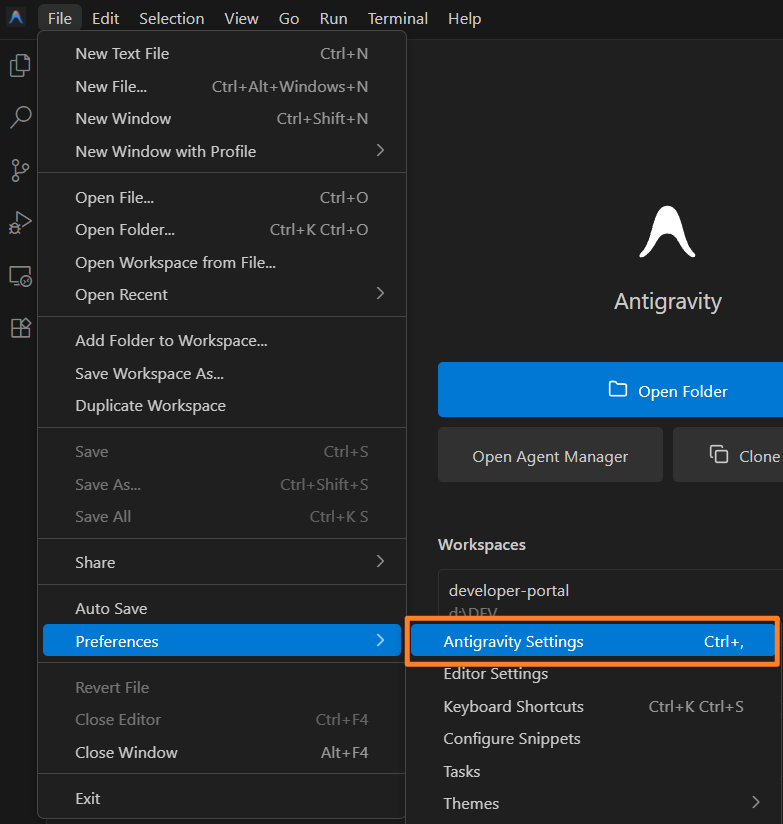
  1. 在 Antigravity 的菜单栏中的 “首选项” 中打开 “Antigravity Setting”。
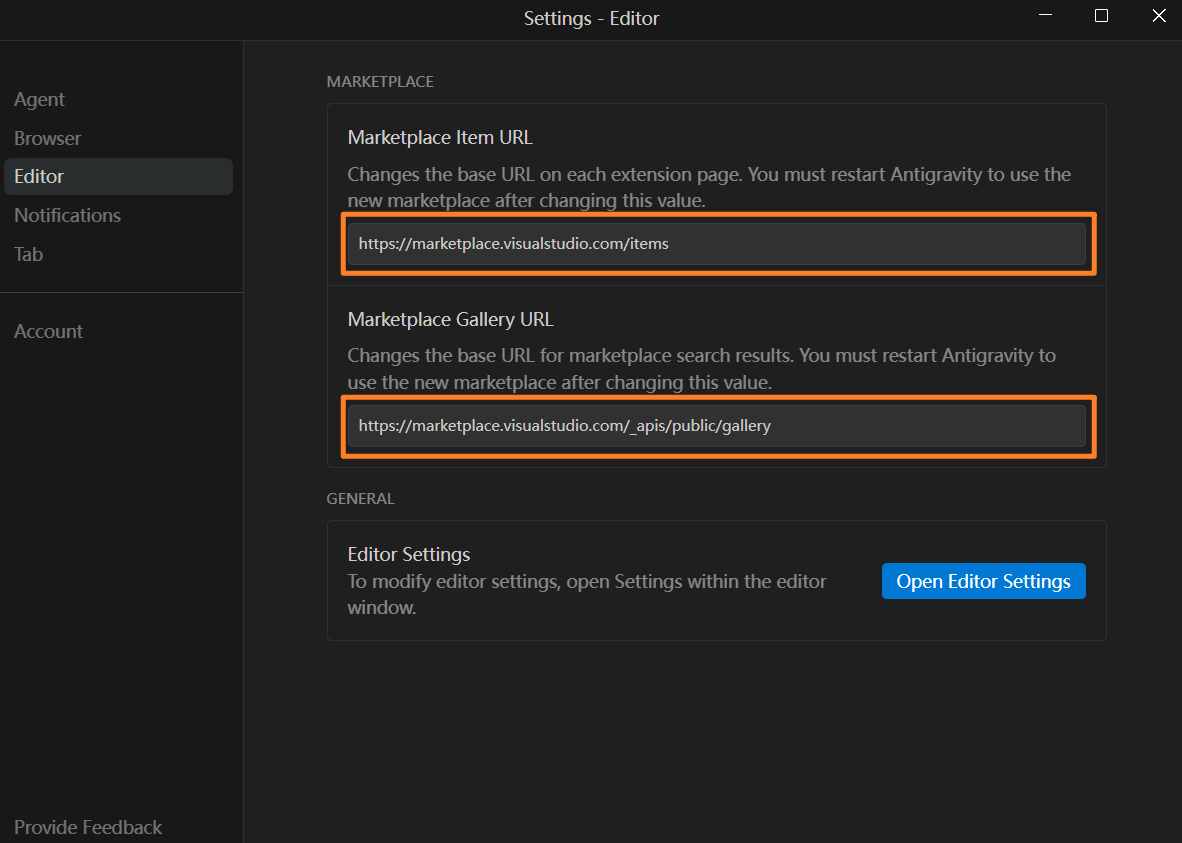
  2. 在设置中的 “Editor” 区域,设置以下参数:

    Marketplace Item URL

     https://marketplace.visualstudio.com/items

    Marketplace Gallery URL

    https://marketplace.visualstudio.com/_apis/public/gallery
  3. 重启 Antigravity 即可。

Some rights reserved

Except where otherwise noted, content on this page is licensed under a Creative Commons Attribution-NonCommercial-ShareAlike 4.0 International license.

Subscribe