
惯性聚合 高效追踪和阅读你感兴趣的博客、新闻、科技资讯
阅读原文 在惯性聚合中打开

推荐订阅源

J
Java Code Geeks
爱范儿
爱范儿
Attack and Defense Labs
量子位
The GitHub Blog
The GitHub Blog
Threat Intelligence Blog | Flashpoint
Scott Helme
Scott Helme
C
CXSECURITY Database RSS Feed - CXSecurity.com
博客园 - 叶小钗
C
Cybersecurity and Infrastructure Security Agency CISA
S
Securelist
S
Schneier on Security
C
Cisco Blogs
B
Blog RSS Feed
Cisco Talos Blog
Cisco Talos Blog
Last Week in AI
Last Week in AI
WordPress大学
WordPress大学
腾讯CDC
酷 壳 – CoolShell
酷 壳 – CoolShell
罗磊的独立博客
Y
Y Combinator Blog
Latest news
Latest news
T
Tailwind CSS Blog
Jina AI
Jina AI
宝玉的分享
宝玉的分享
人人都是产品经理
人人都是产品经理
C
CERT Recently Published Vulnerability Notes
D
Darknet – Hacking Tools, Hacker News & Cyber Security
L
Lohrmann on Cybersecurity
The Cloudflare Blog
freeCodeCamp Programming Tutorials: Python, JavaScript, Git & More
Microsoft Security Blog
H
Help Net Security
P
Palo Alto Networks Blog
V
V2EX
博客园_首页
D
Docker
T
Threat Research - Cisco Blogs
钛媒体:引领未来商业与生活新知
钛媒体:引领未来商业与生活新知
V
Vulnerabilities – Threatpost
月光博客
月光博客
D
DataBreaches.Net
Stack Overflow Blog
Stack Overflow Blog
让小产品的独立变现更简单 - ezindie.com
Know Your Adversary
Know Your Adversary
L
LangChain Blog
The Hacker News
The Hacker News
K
Kaspersky official blog
The Register - Security
NISL@THU
NISL@THU

高金的博客

人机协作逆向:用 AI + Frida 打通微信 4.1.8 macOS 数据库密钥提取 情绪价值与求真:如何平衡与应对? friend_tech 第一笔交易只能买 1 个key? friend_tech 套利到底有多卷 植物挖矿 浏览器环境检测 加密、编码相关知识汇总 使用tensorflow识别验证码 POW与反爬虫 appium 安卓无法点击搜索框解决办法 知乎直播弹幕抓取与解析 知乎直播套利分析 1000刀+的羊毛在等你 如何创建一个完全匿名的EOS、ETH账号 如何通过技术手段证明"我"没有去过武汉 XUNTA 季度报告 玩游戏不如CX,JUSTGAME邀请分析(内附元数据) 如何在conflux上部署合约 程序员找对象聚合平台-xunta.today EOS 1.8 bidname的漏洞分析
无公网ip,无服务器实现内网穿透
Gao JIn · 2023-09-16 · via 高金的博客

背景

家里有台服务器,想着能远程 ssh上去改改 bug 啥的,发现无公网 ip

网上搜了一堆方案,发现都挺麻烦,有的确实不需要公网 ip,但是他却要有一台有公网 ip的服务器…

实现.

本次实现要感谢这篇文章 使用Cloudfalre Tunnels实现内网穿透,同时突破80/443限制

他这篇主要讲的是80,443端口,那么同理 22 应该也没有问题

操作

  • 你需要注册一个域名,买一个最便宜的就行,一年 10rmb 的那种.
  • 打开Cloudfalre控制台,依次点击Access -> Tunnels(这边记得选 0 元的,需要你绑卡才能下一步,直接关掉,重新打开控制台发现不绑卡也开通了.)
  • 然后就是创建隧道了,可以参考官方文档 Set up a tunnel through the dashboard
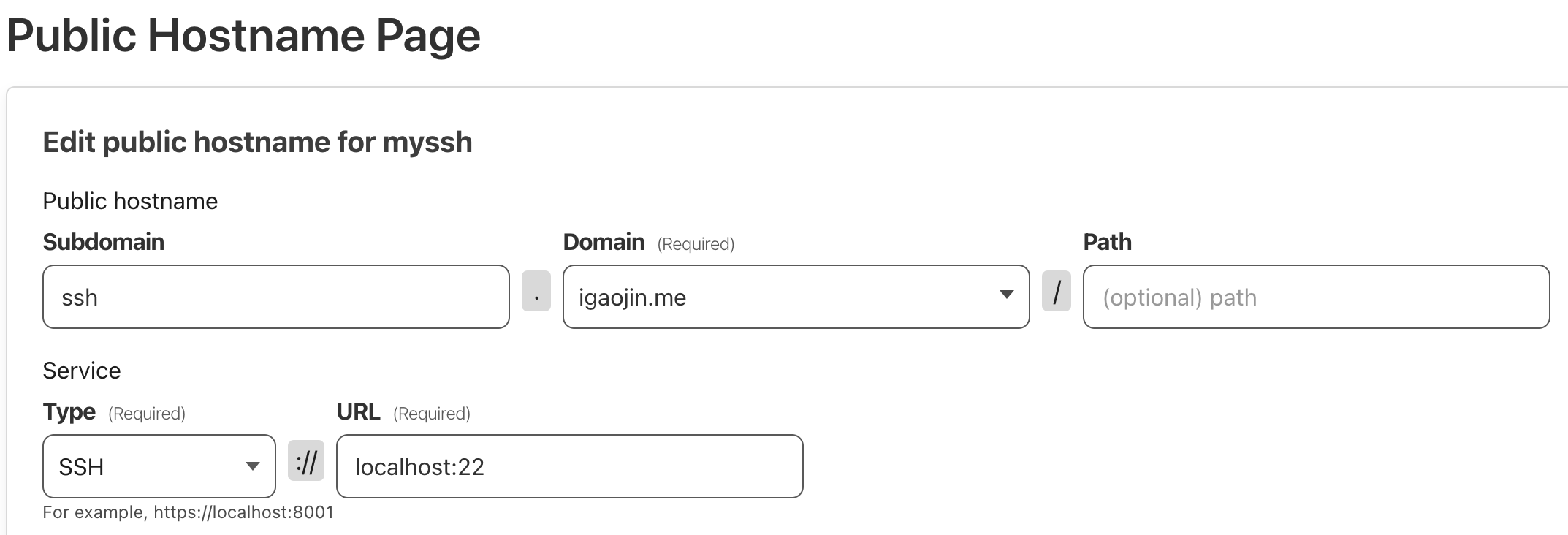
Subdomain选择你想要的前缀(随便写都可以)
domain选择你注册的域名
type记得选择 ssh
URL 选择localhost:22(如果你把自己 sshd端口改了,那这边写你改以后的.)

操作流程我复制一下

  • 下载 cloudflared 在客户端

  • 修改SSH configuration file:
    vim ~/.ssh/config

  • 新增下面的内容,把下面的ssh.example.com 替换成你的,比如我就应该替换成ssh.igaojin.me
    还需要注意的是 cloudflared的位置.记得where cloudflared看一下,如果不一致就替换成你的

    1
    2
    Host ssh.example.com
    ProxyCommand /usr/local/bin/cloudflared access ssh --hostname %h
  • ssh @ssh.example.com (最后可以直接 ssh 登录了.)


本文作者:高金
本文地址https://igaojin.me/2023/09/16/内网穿透/
版权声明:转载请注明出处!

推荐文章