

惯性聚合 高效追踪和阅读你感兴趣的博客、新闻、科技资讯
阅读原文 在惯性聚合中打开

推荐订阅源

V
V2EX
酷 壳 – CoolShell
酷 壳 – CoolShell
美团技术团队
有赞技术团队
有赞技术团队
Hugging Face - Blog
Hugging Face - Blog
罗磊的独立博客
S
SegmentFault 最新的问题
D
Docker
博客园 - 司徒正美
雷峰网
雷峰网
V
Visual Studio Blog
云风的 BLOG
云风的 BLOG
G
Google Developers Blog
The GitHub Blog
The GitHub Blog
A
About on SuperTechFans
让小产品的独立变现更简单 - ezindie.com
博客园 - Franky
月光博客
月光博客
Cyber Security Advisories - MS-ISAC
H
Hackread – Cybersecurity News, Data Breaches, AI and More
T
The Blog of Author Tim Ferriss
Google DeepMind News
MyScale Blog
MyScale Blog
MongoDB | Blog
MongoDB | Blog

vivaxy's Blog

SameSite Cookies 解读 - vivaxy's Blog VSCode Conventional Commits 插件 - vivaxy's Blog How Babel Is Built - vivaxy's Blog 一步一步解码 PNG 图片 - vivaxy's Blog Babel 的工程化实现 - vivaxy's Blog 浏览器图像转换手册 - vivaxy's Blog Decoding A PNG Image with JavaScript Step by Step Comprehensive Image Processing on Browsers Use npm Registry to Restric Installing Client Alfred 4 Workflow Open in VSCode Git Tag And Push Git Tag 基于 Custom Elements 的组件化开发 - vivaxy's Blog JavaScript PNG 图片编码和解码 - vivaxy's Blog 如何在多个模块中共享异步数据 - vivaxy's Blog JavaScript 函数式编程初窥 - vivaxy's Blog 用纯 CSS 实现弹窗 - vivaxy's Blog 在浏览器中使用 JavaScript 模块 - vivaxy's Blog Karabiner Elements Hyper 改键设置 - vivaxy's Blog Levenshtein 距离 - vivaxy's Blog Levenshtein 距离 - vivaxy's Blog
VSCode Conventional Commits Extension - vivaxy's Blog
vivaxy · 2020-04-29 · via vivaxy's Blog

VSCode Conventional Commits extension helps you to fill in commit messages according to Conventional Commits.
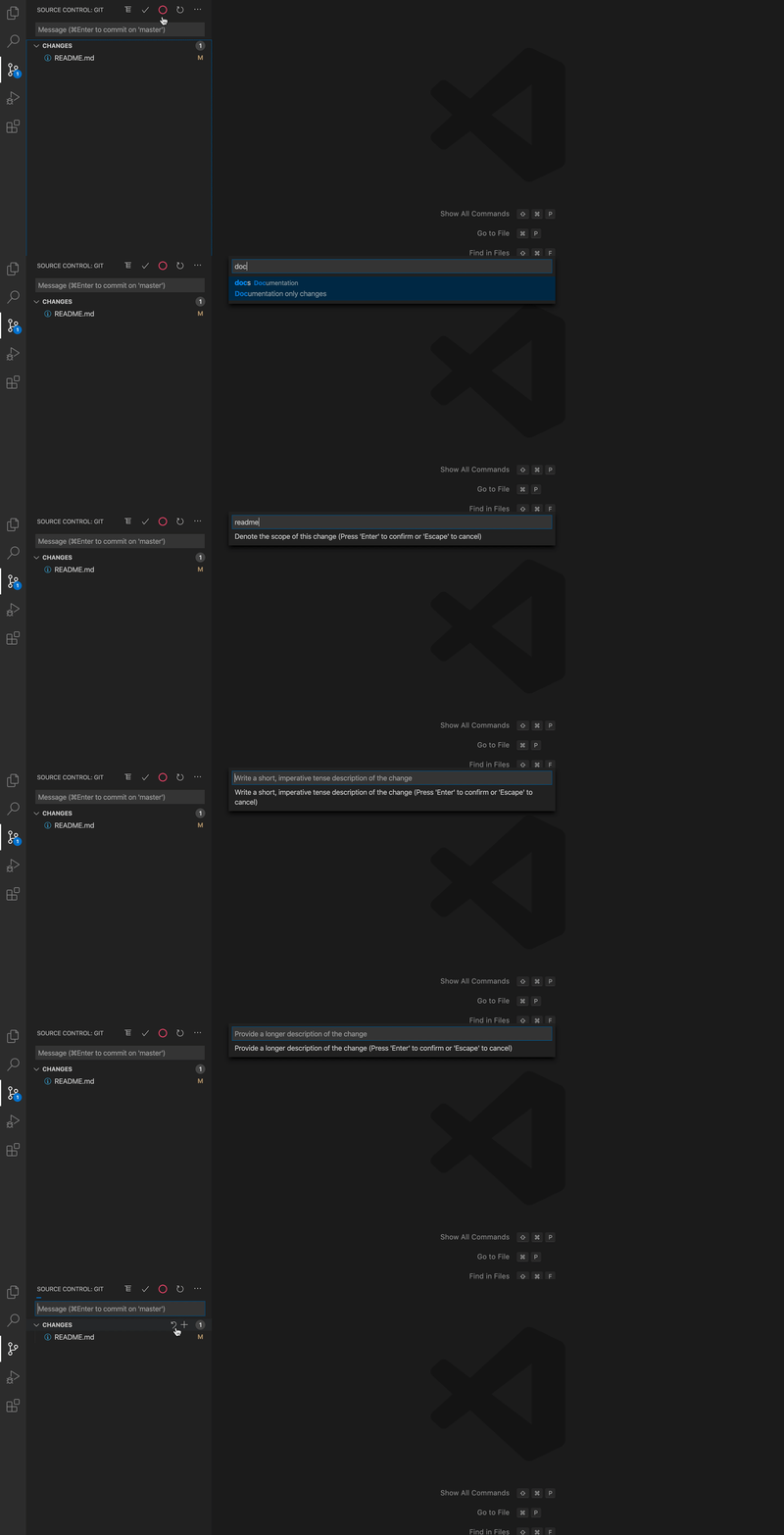
Features

  • Respect commitlint configs.
  • Support auto add and push (with the configutation of VSCode git extension, see detail in readme).
  • Support project level scope management.
  • Support Gitmoji.

Usage

Demo

You can access VSCode Conventional Commits in two ways:

  1. Command + Shift + P or Ctrl + Shift + P, enter Conventional Commits, and press Enter.
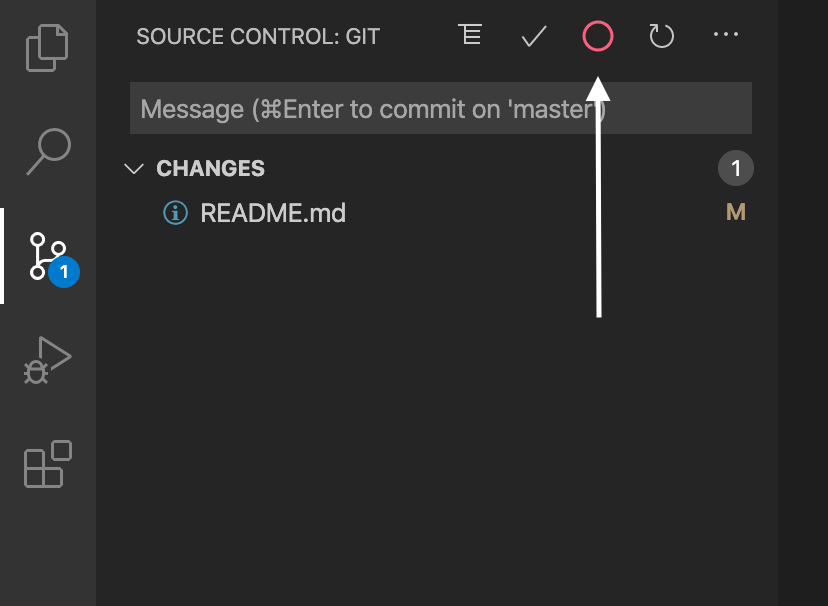
  2. Click the icon on the Source Control menu. See the image below.

Icon on the Source Control menu