
惯性聚合 高效追踪和阅读你感兴趣的博客、新闻、科技资讯
阅读原文 在惯性聚合中打开

推荐订阅源

腾讯CDC
Engineering at Meta
Engineering at Meta
Last Week in AI
Last Week in AI
V
Visual Studio Blog
Stack Overflow Blog
Stack Overflow Blog
A
About on SuperTechFans
博客园 - 司徒正美
D
DataBreaches.Net
有赞技术团队
有赞技术团队
T
The Blog of Author Tim Ferriss
MyScale Blog
MyScale Blog
I
InfoQ
Cyber Security Advisories - MS-ISAC
月光博客
月光博客
Google DeepMind News
Recent Announcements
小众软件
小众软件
G
Google Developers Blog
博客园 - 【当耐特】
U
Unit 42
美团技术团队
B
Blog
D
Docker
Blog — PlanetScale
Blog — PlanetScale

vivaxy's Blog

SameSite Cookies 解读 - vivaxy's Blog VSCode Conventional Commits 插件 - vivaxy's Blog VSCode Conventional Commits Extension - vivaxy's Blog How Babel Is Built - vivaxy's Blog 一步一步解码 PNG 图片 - vivaxy's Blog Babel 的工程化实现 - vivaxy's Blog 浏览器图像转换手册 - vivaxy's Blog Decoding A PNG Image with JavaScript Step by Step Comprehensive Image Processing on Browsers Use npm Registry to Restric Installing Client Git Tag And Push Git Tag 基于 Custom Elements 的组件化开发 - vivaxy's Blog JavaScript PNG 图片编码和解码 - vivaxy's Blog 如何在多个模块中共享异步数据 - vivaxy's Blog JavaScript 函数式编程初窥 - vivaxy's Blog 用纯 CSS 实现弹窗 - vivaxy's Blog 在浏览器中使用 JavaScript 模块 - vivaxy's Blog Karabiner Elements Hyper 改键设置 - vivaxy's Blog Levenshtein 距离 - vivaxy's Blog Levenshtein 距离 - vivaxy's Blog
Alfred 4 Workflow Open in VSCode
vivaxy · 2019-08-14 · via vivaxy's Blog
Alfred 4 Workflow Open in VSCode

Feature

Alfred 4 Workflow Open in VSCode

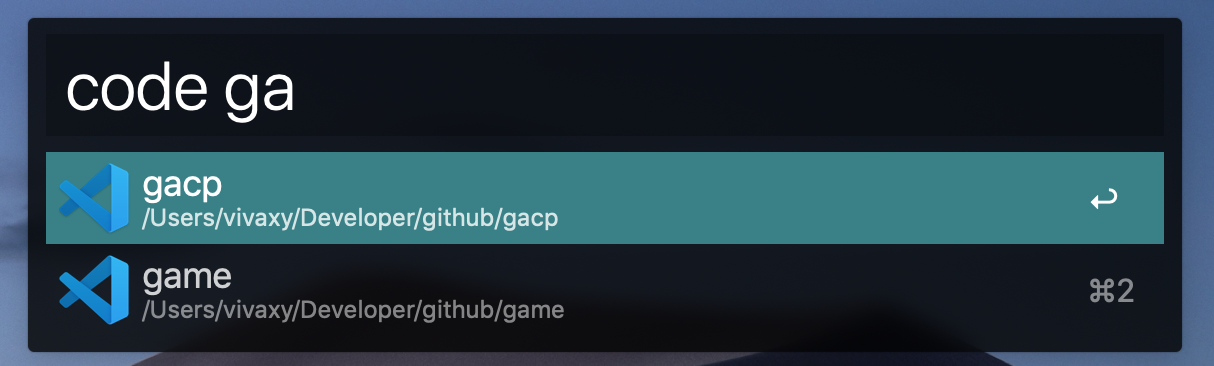
  • Search projects, press enter to open in VSCode.
  • Search projects, press command + enter to reveal in Finder.
  • Open in VSCode the folder, which selected in Finder.

Installation

  • npm i -g alfred-open-in-vscode
  • Open the workflow in Alfred.
  • Set workflow environment wds to your project base folders (split with ,). e.g. wds: /Users/vivaxy/Developers/github,/Users/vivaxy/Developers/gitlab. Workflow searches only first level folders, so make sure wds point to them. wds stands for working directories

Usage

Open Alfred.

  • Type code (with space) to search. Press enter to open the selected project in VSCode. Hold command and press enter to reveal in Finder.
  • Select a folder in Finder, type code (without space) and enter to open this folder in VSCode.

Reference