惯性聚合 高效追踪和阅读你感兴趣的博客、新闻、科技资讯
阅读原文 在惯性聚合中打开

推荐订阅源

量子位
S
Securelist
MyScale Blog
MyScale Blog
Jina AI
Jina AI
罗磊的独立博客
The Cloudflare Blog
美团技术团队
博客园 - 叶小钗
阮一峰的网络日志
阮一峰的网络日志
博客园 - 三生石上(FineUI控件)
月光博客
月光博客
雷峰网
雷峰网
小众软件
小众软件
aimingoo的专栏
aimingoo的专栏
大猫的无限游戏
大猫的无限游戏
博客园 - Franky
博客园 - 聂微东
Y
Y Combinator Blog
酷 壳 – CoolShell
酷 壳 – CoolShell
freeCodeCamp Programming Tutorials: Python, JavaScript, Git & More
MongoDB | Blog
MongoDB | Blog
T
Tailwind CSS Blog
Attack and Defense Labs
博客园_首页
Latest news
Latest news
Apple Machine Learning Research
Threat Intelligence Blog | Flashpoint
The Hacker News
The Hacker News
G
GRAHAM CLULEY
Simon Willison's Weblog
Exploit-DB.com RSS Feed
P
Proofpoint News Feed
CTFtime.org: upcoming CTF events
U
Unit 42
D
Docker
Webroot Blog
Webroot Blog
N
Netflix TechBlog - Medium
T
Tor Project blog
C
Cyber Attacks, Cyber Crime and Cyber Security
L
LINUX DO - 最新话题
cs.CV updates on arXiv.org
The Last Watchdog
The Last Watchdog
B
Blog
Recent Announcements
GbyAI
GbyAI
Microsoft Azure Blog
Security Latest
Security Latest
V2EX - 技术
V2EX - 技术
N
News | PayPal Newsroom
Microsoft Security Blog

博客园 - 三颗纽扣

windows下安装redmine-2.1 try-cache-finally 在线程被杀掉时还有作用吗? 使用InfoBright实现20-100亿条原始话单记录的检索 Hibernate乐观锁真的会抛出异常吗? 并非文学化编程,在VS环境下的折中方案 快速复制NuGet引用 语义版本规范 基础框架的基础组件 DotNet开发利器之MyEclipseShortcuts 通过 POI 获取图片在 Excel 表格中的位置 我们是原始生物 没有别的,只有天使 灯是用来照亮的,而不是引路的 戒了,过去完成时 我送给你们的,没有别的——只有天使。 Builder 链——另类一点的Builder模式 多线程JUnit单元测试:GroboUtils and ConTest 控制内存的使用之二:对象缓存 pool and cache 控制内存的使用
在 IIS 6 上架设 NuGet Server
三颗纽扣 · 2012-02-22 · via 博客园 - 三颗纽扣

原本以为是很容易的事情,因为在本机以及安装好了一个,下载上传都没什么问题,没想到服务器上是 IIS 6,这玩意问题一大堆,折腾了一个晚上。

NuGetServer 网站编译打包就不多说了,Google一下有很多教程,实际上就是从 NuGet Gally 下载 Nuget.Server 包编译一下就可以了。

但是问题也就在这里出现了,部署到 IIS 6 上以后,可以浏览到服务器上的包,但是 …… 下载和上传包都报 404 或者 501 等错误,参考这个文章 http://www.398588.com/Article/T5/98.aspx 配置MIME ,再参考这个文章 http://blogs.thesitedoctor.co.uk/tim/2011/09/02/Nuget+Server+On+IIS6+Returns+404+When+Downloading+Package+After+Upgrade.aspx 配置ISAPI都没有用,折腾了个把小时,几乎绝望了。

幸亏灵机一动,既然那哥们说问题是在升级 NuGetServer 后发生的,那么是不是改用较低的版本就可以了呢?从 NuGet Galley下载 NuGet.Server 1.5.20902.9026,再做一个站点,发布到服务器上,配置ISAPI,居然真的就OK了,下载,上传都搞定。泪牛满面啊。

摘录一下这哥们配置 ISAPI的方法,以备后用 (不过估计也没多少用了)

Nuget server on IIS6 returns 404 when downloading package after upgrade

2011年9月2日 8:03:30 (GMT Daylight Time, UTC+01:00)
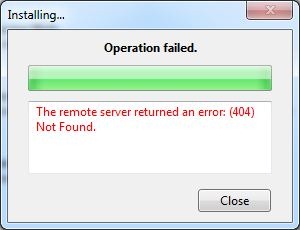
Nuget-Returns-404-Manager-ErrorWe updated our nuget server today and ran into a problem where regardless of package selected or whether it's through the nuget package manager or the nuget package explorer, the server returns 404 (File Not Found).
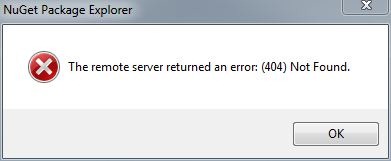
Nuget-Returns-404-Explorer-Error

What was odd about this was that the packages exist and the feed was valid:

Nuget-Returns-404-Manager

There are a couple of comments about this online e.g.: Codeplex Discussion 246387 but nothing helped.  It took a while to work out that it was caused by a slight change to the way the nuget server makes it's calls. Comparing the IIS logs between the old and new version of nuget server, the previous version of nuget server would redirect the user directly to the nupkg file:

2011-04-21 08:47:46 W3SVC1759424837 192.168.1.1 GET /Packages/TheSiteDoctor.2.0.235.68.nupkg - 80 - 192.168.1.2 Package-Installer/1.2.20325.9034+(Microsoft+Windows+NT+6.1.7601+Service+Pack+1) 200 0 0

On the new one however, it passes the various requests through a new MVC route "download":

2011-09-01 11:31:16 W3SVC1759424837 192.168.1.1 GET /download/TheSiteDoctor/2.0.235.68 - 80 - 192.168.1.2 Package-Installer/1.2.20325.9034+(Microsoft+Windows+NT+6.1.7601+Service+Pack+1) 404 0 3

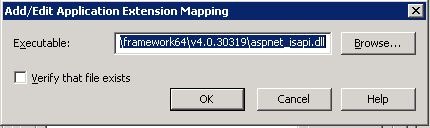
This is fine if your nuget server is running on IIS7, it will "just work". However if you're running IIS6 you'll need to make one additional change which is mapping all request through the aspnet_isapi.dll (a wildcard mapping). This is easy enough:

  1. 1. Open the site's properties in IIS6
  2. 2. Navigate to the "Home Directory" tab
  3. 3. Click the "Configuration" button:
    Nuget-Returns-404-Explorer-IIS
  4. This will then open the "Application Configuration" window:
    Nuget-Returns-404-Explorer-IIS-Configuration
  5. Now you'll need to add the aspnet_isapi.dll mapping, the path of this will depend on the whether you're running Windox 64bit or not:
    32bit Framework: c:\windows\microsoft.net\framework\v4.0.30319\aspnet_isapi.dll
    64bit Framework: c:\windows\microsoft.net\framework64\v4.0.30319\aspnet_isapi.dll
    Make sure you uncheck the "Verify that file exists" checkbox
    Nuget-Returns-404-Explorer-IIS-Wildcard

Et voila your packages should all be working again.