












AI coding agents (Claude Code, Cursor, Codex, and others built on skill packs such as GStack) are showing up in customer environments. They write code, install dependencies, automate browser tasks, and troubleshoot failures by trying alternative approaches. From the perspective of an endpoint behavioral engine, some of that activity is indistinguishable from typical activity seen on customer networks – or, in some cases, from actions that might be undertaken by an active adversary.
This blog examines real telemetry from the Sophos Endpoint behavioral engine on Windows to show where, and why, AI agents are triggering detection rules. The intent is not to call the activity malicious. It is to show that existing behavioral protections are working exactly as designed, and to illustrate the detection-engineering challenges ahead as agentic AI adoption accelerates.
The chart below shows the distribution of blocking rule hits over a seven-day period in June 2026, broken down by MITRE ATT&CK tactic and measured by unique machine count. Tactics related to Credential Access and Execution (respectively, the ninth and fourth tactic categories in the ATT&CK matrix) dominate. Note the presence of a non-ATT&CK bucket we call “Disrupt.”
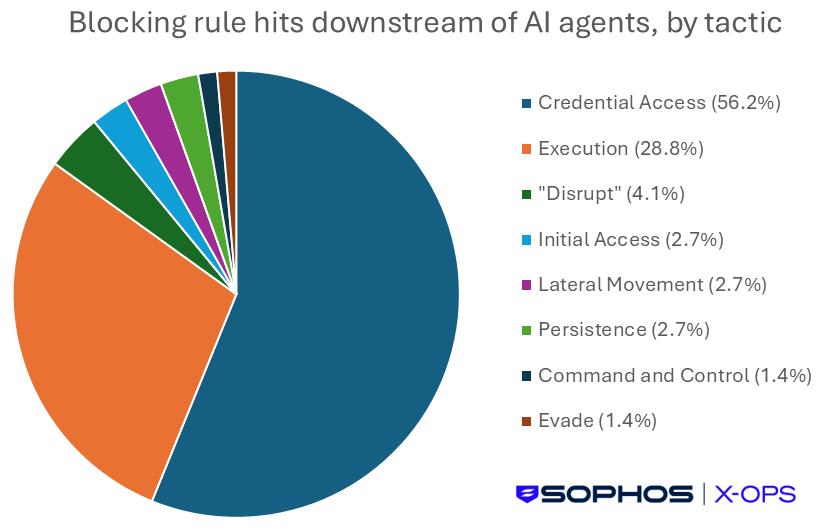
Figure 1: Blocking rule hits (by MITRE tactic) downstream of AI agents, measured by unique machine count
The "Disrupt" bucket – not part of the official ATT&CK categories, but a useful catchall we are about to explain – represents AAP (Adaptive Attack Protection) rules, meaning devices where AAP engaged and blocked activity associated with AI agents. Every AAP hit we examined involved low-reputation executables the agents were trying to run. None appeared malicious, but all had low global reputation scores in SophosLabs telemetry.
Switching to silent (non-blocking) rule hits gives a broader view of the activity AI agents perform that the behavioral engine considers worth tracking and grouping.
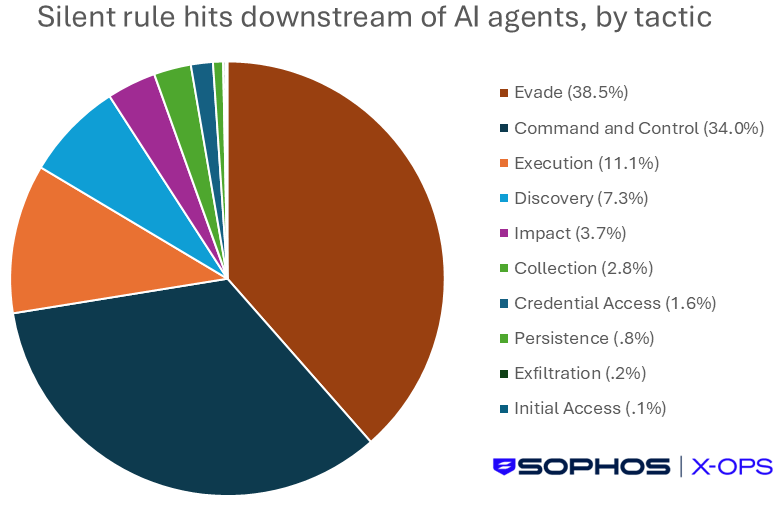
Figure 2: Silent rule hits (by MITRE tactic) downstream of AI agents, measured by unique machine count
The silent distribution is more spread out, with evasion and C2 categories prominent. This reflects agents performing network calls, spawning child processes, and using command-line patterns that overlap with adversary tradecraft.
Moving back to the two largest ATT&CK categories we saw in our blocking-rule dataset, Credential Access rules account for the largest share of hits. The breakdown of specific rules is shown in Figure 3.
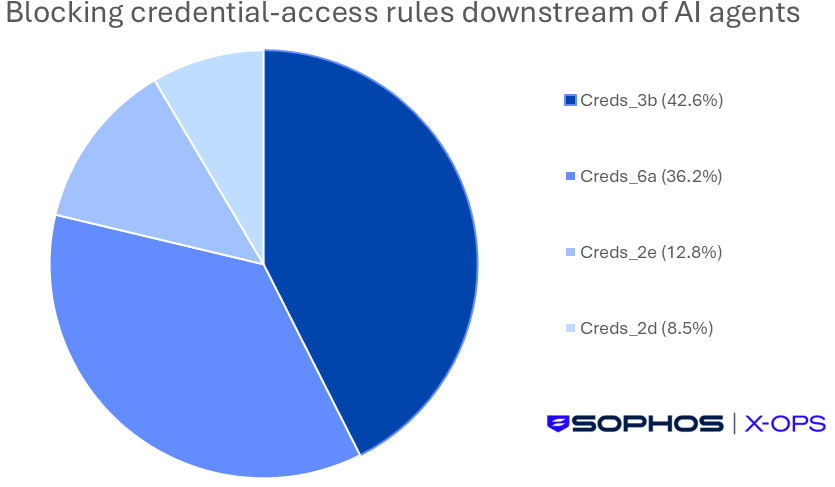
Figure 3: Blocking credential-access rules downstream of AI agents, measured by unique machine count
Creds_3b drives the bulk of these hits. This rule fires on the HMPA CookieGuard signal, which identifies processes using the Data Protection API (DPAPI) to decrypt browser credentials.
GStack is a widely adopted AI agent skill pack. One of its built-in skills, /browse, connects the agent to a Chromium daemon for browser automation. The Creds_3b telemetry shows that this skill chain uses PowerShell to decrypt sensitive browser data. The example in Figure 4 shows GStack /browse invoked by Claude Code.
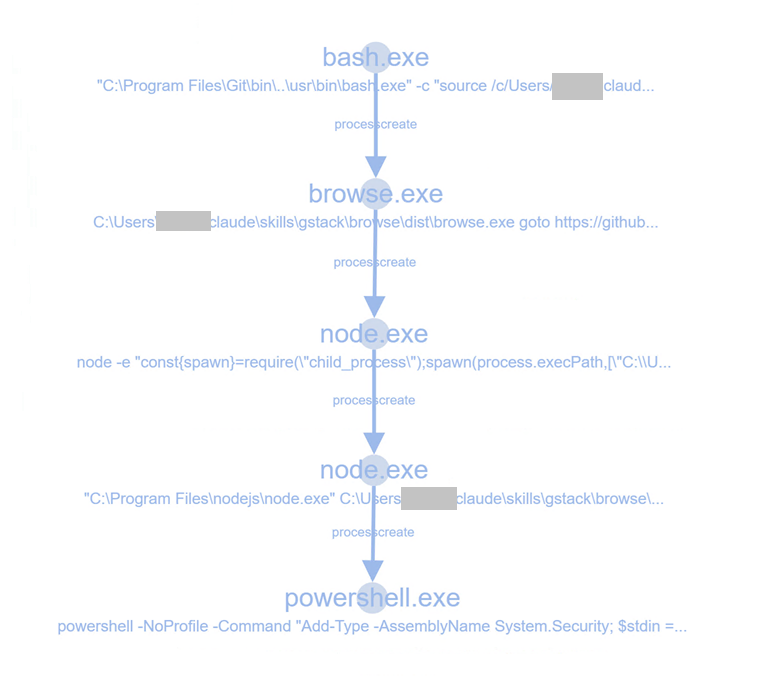
Figure 4: Activity tree showing the GStack /browse skill chain, from bash through browse.exe, node.exe, and into PowerShell
The PowerShell command line confirms what the rule detected:
powershell -NoProfile -Command "Add-Type -AssemblyName System.Security;
  $stdin = [Console]::In.ReadToEnd().Trim();
  $bytes = [System.Convert]::FromBase64String($stdin);
  $dec = [System.Security.Cryptography.ProtectedData]::Unprotect($bytes,
    $null, [System.Security.Cryptography.DataProtectionScope]::CurrentUser);
  Write-Output ([System.Convert]::ToBase64String($dec))"
In context, this is almost certainly benign: the agent is automating a browser session. But PowerShell decrypting browser credentials via DPAPI is exactly what Creds_3b exists to block, and the rule is right to fire.
Several credential-access hits involved Python processes. In the example shown in Figure 5, Claude spawns a series of taskkill.exe commands to terminate browser processes by PID, then runs a Python script that accesses browser credential stores.
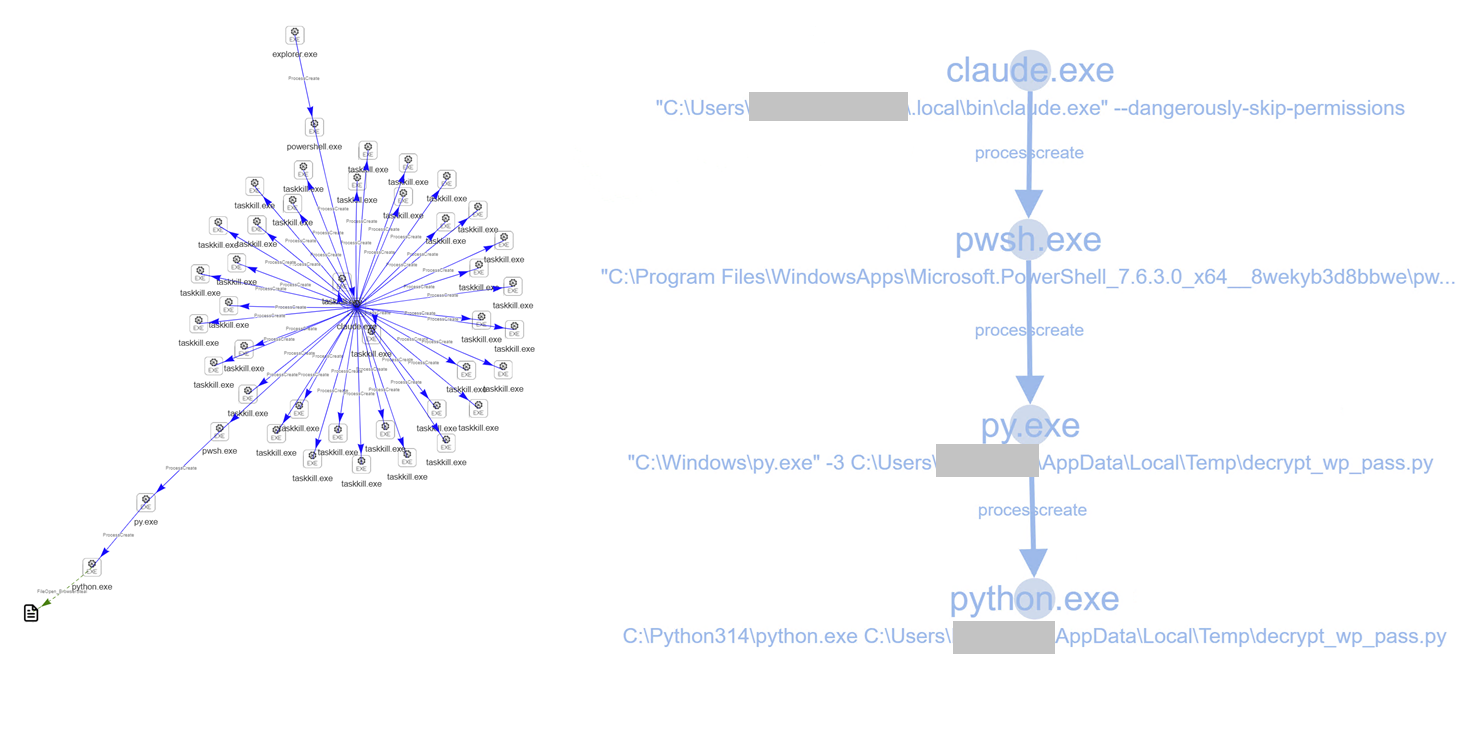
Figure 5: Claude terminating browser processes before spawning a Python script (decrypt_wp_pass.py) that accesses browser data (click for larger image)
The activity tree also shows a command spawned via Claude that dumps stored credentials from Windows Credential Manager:
"C:\Windows\system32\cmdkey.exe" /list
Is this malicious? On its own, it would be enough to get an MDR analyst on a call. The claude.exe command line includes one flag worth noting:
--dangerously-skip-permissions
The Claude documentation, as shown in Figure 6, is explicit about the risks of this flag.

Figure 6: Claude Code documentation warning about the --dangerously-skip-permissions flag
A series of Exec_16a triggers appeared in telemetry. This is an old rule, added more than five years ago. It was originally written to catch malicious PowerShell using a specific string-formatting technique as mild obfuscation.
Five years later, AI agents are generating PowerShell with similar formatting patterns in their command lines. The rule has already been hardened to reduce false positives from this source.
AI agents are persistent problem-solvers. When a command fails, they try alternatives, cycling through different tools and techniques until something works. This is a useful capability for a coding assistant. It also mirrors how hands-on-keyboard attackers behave once they have access.
One telemetry example illustrated this clearly. The AI agent (OpenAI Codex) attempted to download and run a Python installer. It started with certutil.exe (blocked by Lateral_1b), then switched to bitsadmin.exe (blocked by Exec_5a).
| Time | Command | Outcome |
| 06:47:35 | certutil.exe -urlcache -split -f https://www.python.org/.../python-3.14.6-amd64.exe | Lateral_1b blocks |
| 06:47:36 | certutil.exe -urlcache -split -f (same URL, different output path) | Lateral_1b blocks |
| 06:57:44 | Several more certutil variations | Lateral_1b blocks |
| 06:57:47 | bitsadmin.exe /transfer PythonDownload /download /priority normal (same URL) | Exec_5a blocks |
The download target was legitimate: python.org. But certutil -urlcache and bitsadmin /transfer are textbook LOLBin download methods. The agent reached for them unprompted, and when one was blocked, it pivoted to another. That pivot behavior is exactly what separates an active adversary from a dumb script, and it is now something benign AI agents do routinely.
Writing to the startup folder outside the context of a trusted, high-reputation installer is a red flag. It is not behavior you would expect from a coding agent.
The example below shows Cursor using a PowerShell script to write a VBScript file into the Windows startup folder. The Persist_2a rule blocked the action. The script filename suggests it relates to an application called "EZConvert," but without the script contents we cannot confirm the intent.
Powershell command-line:
powershell.exe -ExecutionPolicy Bypass -File C:\Users\<username>\AppData\Local\Temp\ps-script-6a6de53c-7d17-4e73-9538-00a77b8b2a2d.ps1
Script being written:
C:\Users\<username>\AppData\Roaming\Microsoft\Windows\Start Menu\Programs\Startup\Launch-EZConvert-ConsoleOnly.vbs
AI coding agents have shifted what "normal" looks like in customer telemetry. Rules that previously fired almost exclusively on malicious activity are now triggering on benign agent behaviour. The shift is not large yet, but the trend line is clear.
Some of the activity is genuinely suspicious regardless of who initiated it. PowerShell decrypting browser credentials, dumping Credential Manager entries, writing to startup folders, cycling through LOLBin download methods -- these are things defenders flag for good reason. The fact that an AI agent did them does not make them safe.
Detection engineering will need to adapt. Some rules will need tuning to account for known-good agent signatures. Others should keep firing, because the activity they catch is risky whether a human or an agent initiated it. The worked examples above are a starting point for that triage.
The broader question for customers deploying AI agents is one of policy and control. What should an agent be permitted to do on an endpoint? What boundaries should be enforced? The behavioral telemetry shown here provides a useful initial dataset with which to develop those policies. What it is not a six-month snapshot of telemetry with hard conclusions. It is a first-pass, short signal dump, in which we can already see some interesting things – and also recognize that further monitoring, assessment, and tuning will be required.
此内容由惯性聚合(RSS阅读器)自动聚合整理,仅供阅读参考。 原文来自 — 版权归原作者所有。