

惯性聚合 高效追踪和阅读你感兴趣的博客、新闻、科技资讯
阅读原文 在惯性聚合中打开

推荐订阅源

S
Schneier on Security
Hugging Face - Blog
Hugging Face - Blog
V
Visual Studio Blog
博客园 - Franky
酷 壳 – CoolShell
酷 壳 – CoolShell
Last Week in AI
Last Week in AI
博客园 - 叶小钗
博客园_首页
阮一峰的网络日志
阮一峰的网络日志
cs.CV updates on arXiv.org
Application and Cybersecurity Blog
TaoSecurity Blog
TaoSecurity Blog
让小产品的独立变现更简单 - ezindie.com
J
Java Code Geeks
爱范儿
爱范儿
宝玉的分享
宝玉的分享
cs.AI updates on arXiv.org
量子位
N
News and Events Feed by Topic
OSCHINA 社区最新新闻
OSCHINA 社区最新新闻
Recent Commits to openclaw:main
SecWiki News
SecWiki News
MyScale Blog
MyScale Blog
AI
AI
K
KPMG report finds enterprise disconnect between AI and its ROI | CIO
博客园 - 【当耐特】
Security Archives - TechRepublic
F
Fortinet All Blogs
V2EX - 技术
V2EX - 技术
T
Troy Hunt's Blog
有赞技术团队
有赞技术团队
W
WeLiveSecurity
Project Zero
Project Zero
T
Tor Project blog
Help Net Security
Help Net Security
L
LINUX DO - 最新话题
IT之家
IT之家
The Hacker News
The Hacker News
腾讯CDC
Schneier on Security
N
News and Events Feed by Topic
C
Cisco Blogs
博客园 - 聂微东
Webroot Blog
Webroot Blog
Forbes - Security
Forbes - Security
M
MIT News - Artificial intelligence
C
Cyber Attacks, Cyber Crime and Cyber Security
雷峰网
雷峰网
freeCodeCamp Programming Tutorials: Python, JavaScript, Git & More
A
About on SuperTechFans

博客园 - James.H.Fu

PMS-授权中心 如何从现有版本1.4.8升级到element UI2.0.11 Maven私有仓库: 发布release版本报错:Return code is: 400, ReasonPhrase: Repository does not allow upd ating assets: maven-releases. spring boot + dubbo开发遇到过的异常 java,javascript中的url编码 SpringBoot favicon.ico SpringBoot 异常处理 spring boot 跨域请求 在centos 7上安装BIMServer maven 单独构建多模块项目中的单个模块 MongoDB 安装及副本集简单操作 spring-boot dubbo项目使用docker方式部署 Spring Boot和Dubbo整合 springboot 定制错误页面 Maven私有仓库-使用docker部署Nexus - James.H.Fu - 博客园 centos7 sentry部署指南 静态文件服务器部署指南 2016项目开发经验总结及后续计划 - James.H.Fu - 博客园 2016工作总结
开始使用ansible
James.H.Fu · 2017-04-12 · via 博客园 - James.H.Fu

ansible是一个设计巧妙,功能强大,安全,使用简单的IT自动化运维工具。它可以实现统一配置管理,持续部署,流程编排等。
目前控制主机必须是linux,被控制主机可以是linux,类UNIX和windows。

实验环境

  • 控制主机:windows 10 linux subsystem
  • 被控制主机:centos7 虚拟机

ansible控制主机的依赖及安装方式

  • Python 2.6及以上
  • paramiko模块
  • PyYAML
  • Jinja2
  • httplib2
  • six

以上依赖只有在用源码安装方式时才需要使用python-pip工具来安装

$ sudo pip install paramiko PyYAML Jinja2 httplib2 six

如果是ubuntu,centos等可以使用包安装方式,比如在ubuntu下需要输入如下代码来安装

ubuntu

$ sudo apt-get install software-properties-common
$ sudo apt-add-repository ppa:ansible/ansible
$ sudo apt-get update
$ sudo apt-get install ansible

centos 7

$ sudo rpm  –Uvh http:// mirrors.zju.edu.cn/epel/7/x86_64/e/epel-release-7-5.noarch.rpm
$ sudo yum install ansible

ansible控制主机SSH配置

  • 生成公钥和私钥,名字分别为ansible-control,ansible-control.pub
$ ssh-keygen -t rsa
  • 使用ssh-copy-id将公钥拷贝到被控主机,192.168.137.167是一个centos7 虚拟机。
$ ssh-copy-id -i /root/ansible-control.pub root@192.168.137.167
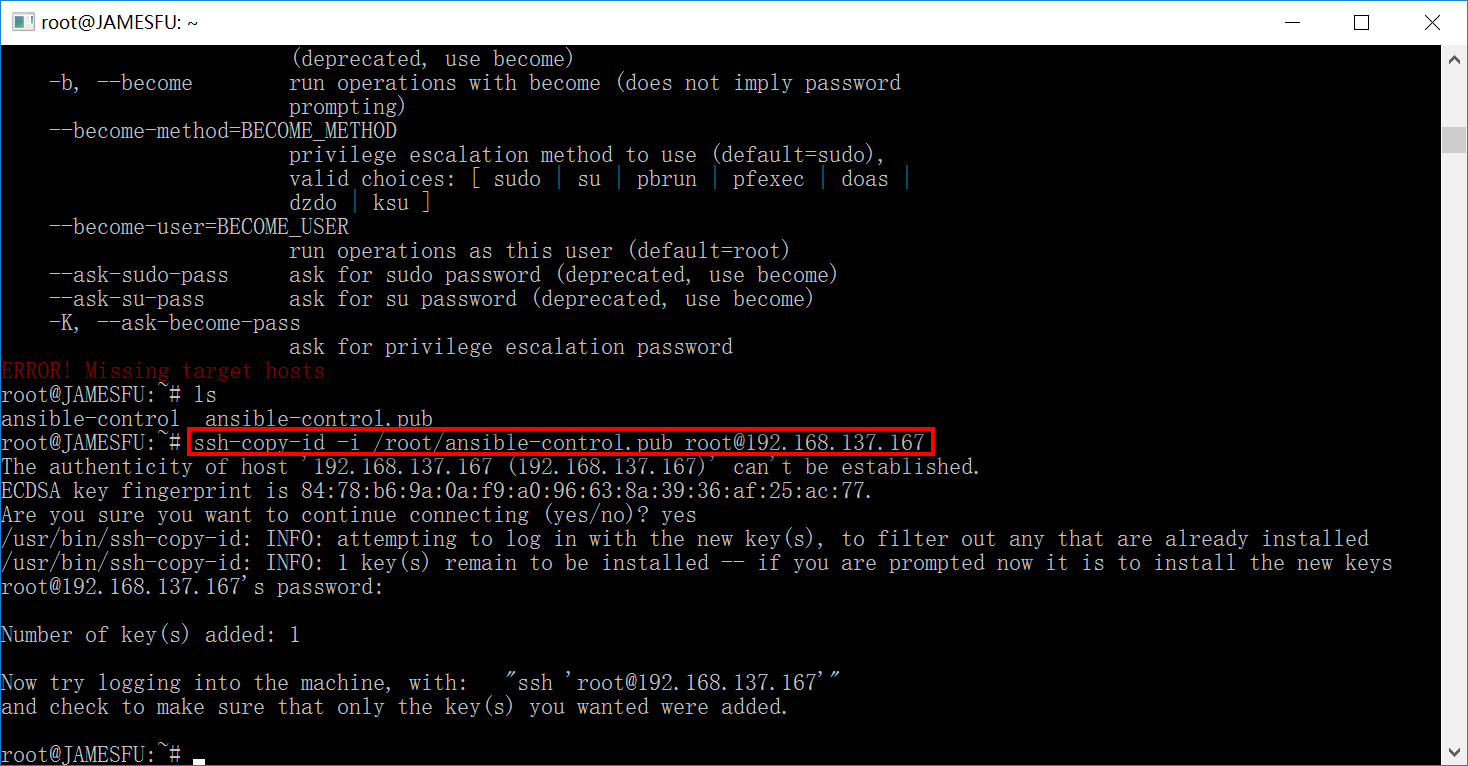
ansible-ssh-copy-id

ansible的常用命令

  • ansible,在命令行中运行,比如使用模块shell在被控主机上执行命令
$ /bin/echo hello ansible!

写法如下

$ vim /etc/ansible/hosts
  #增加一个组test,否则默认只能跟自己(localhost)通信
  [test]
  192.168.137.167
$ ansible 192.168.137.167 -m shell -a '/bin/echo hello ansible!'

上面只是向被控机192.168.137.167发送命令。在正式环境我们需要根据业务需将服务器分组。比如需要在10个服务器上安装tomcat等等。分组信息存储在清单(inventory)中。比如在当前目录中创建文件inventory.cfg并输入以下内容

$ vi inventory.cfg
[webserver]
192.168.137.167
192.168.137.168
192.168.137.169

引用inventory.cfg中的服务器组webserver

ansible -i inventory.cfg webserver -m shell -a '/bin/echo hello ansible!'
  • 使用ansible-doc获取帮助信息
$ ansible-doc -h
  • 使用ansible-playbook播放YAML脚本文件
$ ansible-playbook myplaybook.yml

在执行之前可以使用-C检查YAML脚本文件对被控主机的影响

$ ansible-playbook -C myplaybook.yml
  • 使用ansible-galaxy -h