惯性聚合 高效追踪和阅读你感兴趣的博客、新闻、科技资讯
阅读原文 在惯性聚合中打开

推荐订阅源

N
News and Events Feed by Topic
S
SegmentFault 最新的问题
奇客Solidot–传递最新科技情报
奇客Solidot–传递最新科技情报
Last Week in AI
Last Week in AI
Jina AI
Jina AI
H
Help Net Security
C
Check Point Blog
aimingoo的专栏
aimingoo的专栏
MyScale Blog
MyScale Blog
H
Hackread – Cybersecurity News, Data Breaches, AI and More
Vercel News
Vercel News
L
LangChain Blog
Recorded Future
Recorded Future
F
Full Disclosure
Google DeepMind News
Microsoft Security Blog
I
InfoQ
GbyAI
GbyAI
B
Blog RSS Feed
T
The Blog of Author Tim Ferriss
Engineering at Meta
Engineering at Meta
A
About on SuperTechFans
M
MIT News - Artificial intelligence
爱范儿
爱范儿
V
V2EX
Microsoft Azure Blog
cs.AI updates on arXiv.org
Y
Y Combinator Blog
B
Blog
WordPress大学
WordPress大学
Blog — PlanetScale
Blog — PlanetScale
W
WeLiveSecurity
MongoDB | Blog
MongoDB | Blog
Cloudbric
Cloudbric
N
News and Events Feed by Topic
The Cloudflare Blog
月光博客
月光博客
博客园 - 三生石上(FineUI控件)
有赞技术团队
有赞技术团队
D
DataBreaches.Net
博客园 - 【当耐特】
T
Troy Hunt's Blog
V
Visual Studio Blog
V2EX - 技术
V2EX - 技术
Apple Machine Learning Research
博客园 - 司徒正美
Recent Commits to openclaw:main
Cyber Security Advisories - MS-ISAC
Google Online Security Blog
The GitHub Blog
The GitHub Blog

博客园 - 一瞬间

表格隔行换色与鼠标经过变色 - 一瞬间 - 博客园 如何使SharePoint文档库能为PDF文件显示正确的图标 在WSS搜索结果页面中高亮显示搜索关键字 创建WSS站点时自动应用主题 SharePoint 2007 URL地址快速一览表 如何在MOSS2007删除或隐藏列表的下拉工具栏中的栏目 基于ASP.NET Ajax技术的WebPart开发(转) 利用DelegateControl包装自定义的用户控件(转) 利用Javascript获取上传文件、图片 - 一瞬间 - 博客园 推荐一下一个Sharepoint的Solution——Sharepoint SmartTools Javascript 中的事件绑定 & FireFox中的透明度 Asp.net常用的一些代码(转载+融合) - 一瞬间 - 博客园 Display data from multiple sources in a single Data View(转office.Microsoft) Sharepoint备用连接 浅谈Silverlight2.0 beta1(5)DataGrid@Silverlight (一) 浅谈Silverlight2.0 beta1(4) Silverlight Deep Zoom 浅谈Silverlight2.0 beta1(2) 控件属性中的Style与DataTemplate Silverlight中的DOM Access——使用Window.Eval()(翻译) Silverlight2.0中的计时器类DispatcherTimer——不再使用Storyboard计时器
浅谈Silverlight2.0 beta1(3) Silverlight中的UserControl与CustomControl
一瞬间 · 2008-04-01 · via 博客园 - 一瞬间

    上一次讲了关于控件属性中的Style(样式)与DataTemplate(数据模板)。这次我们来说说Silverlight中的UserControl(用户控件)与CustomControl(自定义控件)。

UserControl

    .net程序员可能大都用过UserControl,当页面中需要多个功能页面来组合的时候,或者需要重用某个功能页面的时候经常会使用到UserControl,来达到重用的效果。

    那么在Silverlight中情况又如何呢,如果你是从Silverlight1.0开始使用的,你可能会发现2.0和1.0的class library项目模板有了一定的变化,现在Silverlight2.0的项目模板都是以UserControl为基准的。而在Silverlight1.0中,如果要使用UserControl的功能的话,你可能需要向下面这样做,即将xaml文件通过Stream生成FramkworkElement对象,然后就可以对对象进行设置和复用了。Silverlight2_UserControl1

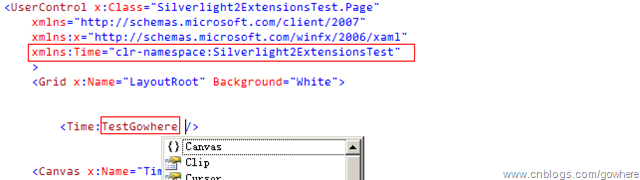
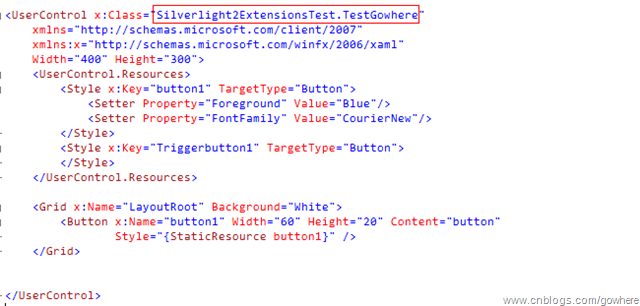
    而在Silverlight2.0 beta1中,所有的Xaml文件都是以UserControl来包装的,这使得UserControl使用起来更加的方便,具体方法如下:
Silverlight2_UserControl2

Silverlight2_UserControl3

PS:注意命名空间的引入和使用。

CustomControl

    自定义控件在Asp.net应用中已经很广泛的使用,当一个满足自定义的功能需要广泛的重用的时候,UserControl就显得非常的局限了。在Silverlight中,用于UserControl更加简单,以及ControlTemplate等模板控制,所以很多情况都可以用UserControl来做到,很多时候其实可以不用CustomControl(自定义控件)。

    那我们什么情况下需要使用自定义控件呢?通常情况下如果我们需要用的一些常用控件无法满足的并且互相组合起来也没办法做到的情况,需要更多的自定义属性支持,这个时候我们就可以考虑使用自定义控件了,当然你也可以继承现有控件做个自己的样式模板作为自定义控件。

    在Silverlight2.0中自定义控件的方法也与之前有所不同,作为比较,我先来说下Silverlight1.0中的自定义控件使用方法。

    下面这个例子也许有人看过,我就拿ExtremeASP里的1.0的例子来说好了。

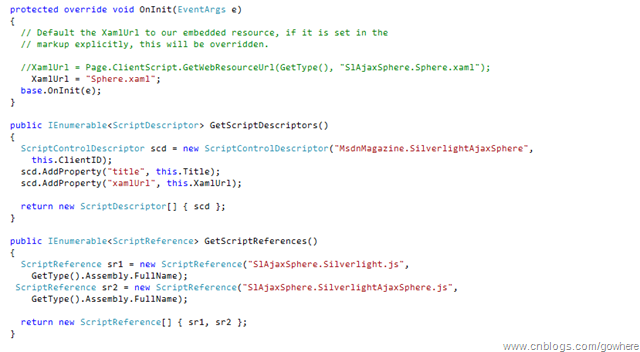
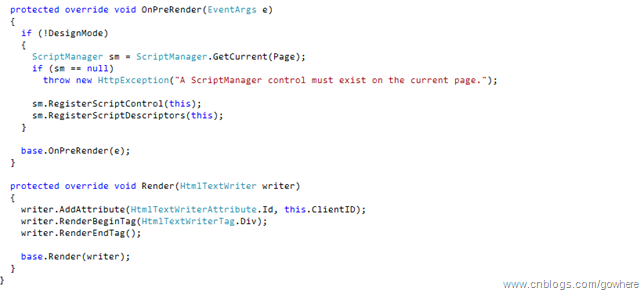
    首先先把脚本和xaml资源作为嵌入资源引用。在cs文件中继承Control和IScriptControl并定义需要开放的属性

Silverlight2_UserControl4

Silverlight2_UserControl5

Silverlight2_UserControl6

    上面的做法是继承Control的方法来做,其实有些时候如果我们需要的自定义控件有现有控件的某些功能的话,我们可以选择从现有控件继承,这样就可以获得一些继承下来的功能和特性比如Style样式模板等等。

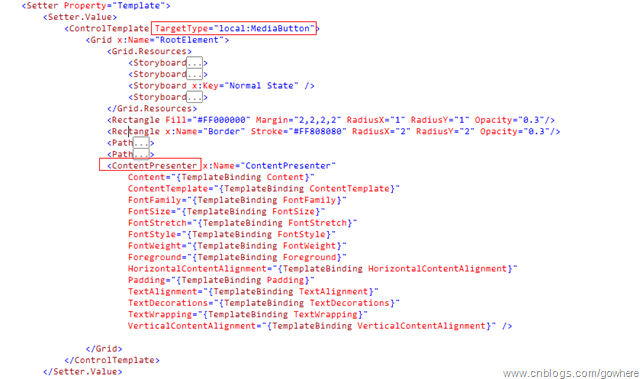
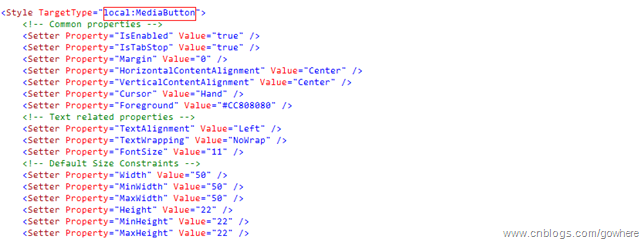
    下面来说说Silverlight2.0中自定义控件的使用方法,参考善友大哥翻译的文章,不过文章中有些错误,本以为是善友大哥笔误,后来发现其实是原文中的代码就有些小小的问题。(其中的Targetproperty应为TargetProperty)

Silverlight2_UserControl7

Silverlight2_UserControl8

Silverlight2_UserControl9

 Silverlight2_UserControl10

    这样我们的自定义控件就完成了,还是比较简单的。

下一篇我们说说Silverlight2.0 beta1中新加入的DeepZoom。