

惯性聚合 高效追踪和阅读你感兴趣的博客、新闻、科技资讯
阅读原文 在惯性聚合中打开

推荐订阅源

罗磊的独立博客
SecWiki News
SecWiki News
酷 壳 – CoolShell
酷 壳 – CoolShell
爱范儿
爱范儿
量子位
M
MIT News - Artificial intelligence
GbyAI
GbyAI
cs.AI updates on arXiv.org
K
KPMG report finds enterprise disconnect between AI and its ROI | CIO
TaoSecurity Blog
TaoSecurity Blog
博客园 - 【当耐特】
H
Heimdal Security Blog
腾讯CDC
The Last Watchdog
The Last Watchdog
Security Archives - TechRepublic
Hacker News: Ask HN
Hacker News: Ask HN
S
Schneier on Security
Microsoft Security Blog
WordPress大学
WordPress大学
博客园 - 司徒正美
Recent Commits to openclaw:main
C
Cybersecurity and Infrastructure Security Agency CISA
S
SegmentFault 最新的问题
大猫的无限游戏
大猫的无限游戏
Application and Cybersecurity Blog
F
Full Disclosure
有赞技术团队
有赞技术团队
T
Tailwind CSS Blog
Engineering at Meta
Engineering at Meta
cs.CV updates on arXiv.org
T
Threatpost
月光博客
月光博客
A
Arctic Wolf
OSCHINA 社区最新新闻
OSCHINA 社区最新新闻
雷峰网
雷峰网
T
Troy Hunt's Blog
freeCodeCamp Programming Tutorials: Python, JavaScript, Git & More
The Cloudflare Blog
D
DataBreaches.Net
O
OpenAI News
L
LINUX DO - 最新话题
宝玉的分享
宝玉的分享
小众软件
小众软件
V
Vulnerabilities – Threatpost
A
About on SuperTechFans
人人都是产品经理
人人都是产品经理
T
The Exploit Database - CXSecurity.com
Martin Fowler
Martin Fowler
美团技术团队
P
Privacy International News Feed

博客园 - 一瞬间

表格隔行换色与鼠标经过变色 - 一瞬间 - 博客园 如何使SharePoint文档库能为PDF文件显示正确的图标 在WSS搜索结果页面中高亮显示搜索关键字 创建WSS站点时自动应用主题 SharePoint 2007 URL地址快速一览表 如何在MOSS2007删除或隐藏列表的下拉工具栏中的栏目 基于ASP.NET Ajax技术的WebPart开发(转) 利用DelegateControl包装自定义的用户控件(转) 利用Javascript获取上传文件、图片 - 一瞬间 - 博客园 推荐一下一个Sharepoint的Solution——Sharepoint SmartTools Javascript 中的事件绑定 & FireFox中的透明度 Asp.net常用的一些代码(转载+融合) - 一瞬间 - 博客园 Display data from multiple sources in a single Data View(转office.Microsoft) Sharepoint备用连接 浅谈Silverlight2.0 beta1(5)DataGrid@Silverlight (一) 浅谈Silverlight2.0 beta1(4) Silverlight Deep Zoom 浅谈Silverlight2.0 beta1(3) Silverlight中的UserControl与CustomControl Silverlight中的DOM Access——使用Window.Eval()(翻译) Silverlight2.0中的计时器类DispatcherTimer——不再使用Storyboard计时器
浅谈Silverlight2.0 beta1(2) 控件属性中的Style与DataTemplate
一瞬间 · 2008-03-17 · via 博客园 - 一瞬间

    上一次讲了关于ContentControl与ContentTemplate的一些东西。这次我们来说说控件属性中的Style(样式)与DataTemplate(数据模板)。

Style样式

    说到样式,想到最多的可能是CSS,那么Silverlight中的Style与CSS又有怎么样的联系与区别呢?

    其实样式也就是程序用来统一UI界面风格,方便管理布局色彩等视觉方面属性的一套方法。在CSS中我们通过selector Filter来实现对页面上不同元素的控制引用来达到统一管理元素样式的。而在Silverlight中我们又应该如何来做呢?

    在Silverlight2.0 beta1中UserControl作为一种新的方式出现在项目模板中,对熟悉WPF的人来说可能已经比较常见了。先新增一个Silverlight UserControl来做个演示。

Style_DataTemplate1

    在这里我将Style做为当前UserControl内的Resources嵌入,当然你也可以在App.xaml中嵌入在<Application.Resources>中。

这代表资源文件的应用范围。

    我们来解释下这里的用法:x:key表示这个样式所定义的引用名称,TargetType属性表示这个样式应用的类型是Button类型,Setter是设置器,分别对应着Property和Value属性即对应上篇文章里说的属性/值类型中的属性和值。我们只要应用这个样式在需要的Button类型的控件里就可以了使用StaticResource来引用静态资源。

Style_DataTemplate2

    如果我们发现需要经常用到这样一个我们写的应用这种样式的控件的时候,我们可能会想,是否能有一个全局性的样式来影响呢,或者生成一个自己的控件呢,比如说按钮。这里先讲到这里,下次我们就这个问题说说Silverlight2.0中怎么构建UserControl和CustomControl。

DataTemplate数据模板

    数据模板,就是利用模板的方式来定制你需要展现的数据。数据模板适用于ContentControl与ItemsControl类控件。

    我们用ListBox来做个例子。(使用的是Scott大牛的例子)

    先定义一个DiggStory类
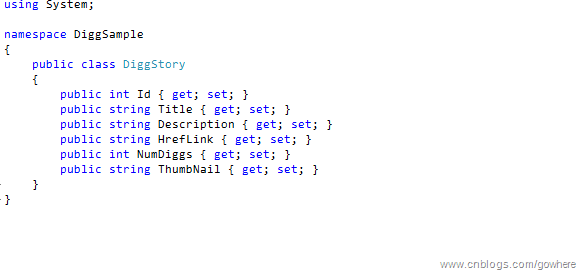
Style_DataTemplate3

    然后我们添加这段代码,默认显示的Title字段。当然我们必须绑定storiesList

storiesList.ItemsSource = stories;涉及到数据绑定的部分就不多说了这里使用LinqtoXml有兴趣的可以看另一篇。

Style_DataTemplate4

    怎样来定制DataTemplate模板呢。

Style_DataTemplate5

    这样我们就可以利用DataTemplate数据模板来定制我们的数据展现了。

    下一篇我们说说Silverlight中的UserControl与customControl.