


惯性聚合 高效追踪和阅读你感兴趣的博客、新闻、科技资讯
阅读原文 在惯性聚合中打开

推荐订阅源

Recent Announcements
让小产品的独立变现更简单 - ezindie.com
O
OpenAI News
D
Docker
freeCodeCamp Programming Tutorials: Python, JavaScript, Git & More
N
Netflix TechBlog - Medium
人人都是产品经理
人人都是产品经理
Y
Y Combinator Blog
M
MIT News - Artificial intelligence
奇客Solidot–传递最新科技情报
奇客Solidot–传递最新科技情报
博客园 - 司徒正美
C
CXSECURITY Database RSS Feed - CXSecurity.com
阮一峰的网络日志
阮一峰的网络日志
K
Kaspersky official blog
Security Latest
Security Latest
T
Tailwind CSS Blog
cs.AI updates on arXiv.org
V
Vulnerabilities – Threatpost
W
WeLiveSecurity
N
News and Events Feed by Topic
aimingoo的专栏
aimingoo的专栏
美团技术团队
OSCHINA 社区最新新闻
OSCHINA 社区最新新闻
Google DeepMind News
CTFtime.org: upcoming CTF events
C
Cyber Attacks, Cyber Crime and Cyber Security
Cyber Security Advisories - MS-ISAC
B
Blog
T
The Blog of Author Tim Ferriss
Google DeepMind News
Help Net Security
Help Net Security
爱范儿
爱范儿
宝玉的分享
宝玉的分享
腾讯CDC
H
Heimdal Security Blog
Webroot Blog
Webroot Blog
AI
AI
WordPress大学
WordPress大学
Recorded Future
Recorded Future
SecWiki News
SecWiki News
cs.CV updates on arXiv.org
Security Archives - TechRepublic
Google Online Security Blog
C
Check Point Blog
TaoSecurity Blog
TaoSecurity Blog
Cisco Talos Blog
Cisco Talos Blog
The Cloudflare Blog
www.infosecurity-magazine.com
博客园 - Franky
云风的 BLOG
云风的 BLOG

博客园 - 范文轩

Sharepoint中的Feature Stapling功能 SharePoint 2010中的WebProvisioned Event Handler 如何向列表中添加数据值(开发篇补充REST) 如何向列表中添加数据值(开发篇) 如何向列表中添加数据值(管理员篇) 在SharePoint 2010中动态加载Visio Web Part 使用编程的方式来启动SharePoint的工作流 InfoPath 2010调用REST的一个小应用 SharePoint 2010 WSP包部署过程中究竟发生什么? 如何查看SharePoint 2010的CU版本 SharePoint 2010多语言包的安装 自定义ASP.NET WebApplication中调用SharePoint2010的对象 在Infopath 2010中调用Web Service 谈谈SharePoint 2010的客户端对象模型的性能问题 给Document Set里面添加文件夹 给Chart Web Part 添加过滤功能 SharePoint 2010的Form认证的用户注册功能 SharePoint 调查列表的自定义错误页面 Reporting Services 2008 and SharePoint 2010
在SharePoint 2010中使用Linq时候,请注意特殊字符
范文轩 · 2011-03-20 · via 博客园 - 范文轩

SharePoint 2010 增加了对LINQ的支持,增强了开发的能力。那么其中好事有一些晓得细节需要我们注意的。

例子:有一个自定义列表“Citys”, 其中包含一个”选项”类型的字段“GDP”,它包含如下的两个选项:
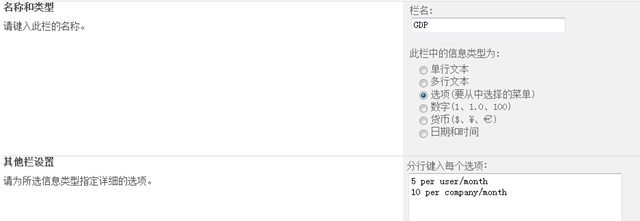
image

那么你有没有尝试过如何去使用LINQ获得这列的值,我们来看一下:

首先使用SPMetal工具生成实体类,我们在实体类中找到“GDP”这个字段:

 internal enum GDP : int
    {
        None = 0,
        Invalid = 1,
        [Microsoft.SharePoint.Linq.ChoiceAttribute(Value = "5 per user/month")]
        _5PerUserMonth = 2,
        [Microsoft.SharePoint.Linq.ChoiceAttribute(Value = "10 per company/month")]
        _10PerCompanyMonth = 4,
    }

如果这个时候,你直接使用

item.GDP.Value

来获得这列的值,那么你得到的肯定是“_5PerUserMonth” 或者 “_10PerCompanyMonth” , 而没有办法得到他真正的值。谁叫C#的变量命名规则不让使用“空格”或者“/”等呢。这个时候我们需要利用发射来获取到里面的值。

public void GetGDP()
{
    var ctx =
       new CityDataContext(WebUrl);
    var cityList = from c in ctx.Citys
                   select c;
    foreach (var item in cityList)
    {
        Console.WriteLine(stringValueOf(item.GDP));
    }
    
}

public string stringValueOf(Enum value)
{
    FieldInfo fi = value.GetType().GetField(value.ToString());
    Microsoft.SharePoint.Linq.ChoiceAttribute[] attributes =
        (Microsoft.SharePoint.Linq.ChoiceAttribute[])fi.GetCustomAttributes(
        typeof(Microsoft.SharePoint.Linq.ChoiceAttribute),false);
    if (attributes.Length > 0)
    {
        return attributes[0].Value;
    }
    else
    {
        return value.ToString();
    }
}
如果列表中的其他列里面也存有这样的值,那么你使用的时候还真的要注意了。