

惯性聚合 高效追踪和阅读你感兴趣的博客、新闻、科技资讯
阅读原文 在惯性聚合中打开

推荐订阅源

S
Schneier on Security
Hugging Face - Blog
Hugging Face - Blog
V
Visual Studio Blog
博客园 - Franky
酷 壳 – CoolShell
酷 壳 – CoolShell
Last Week in AI
Last Week in AI
博客园 - 叶小钗
博客园_首页
阮一峰的网络日志
阮一峰的网络日志
cs.CV updates on arXiv.org
Application and Cybersecurity Blog
TaoSecurity Blog
TaoSecurity Blog
让小产品的独立变现更简单 - ezindie.com
J
Java Code Geeks
爱范儿
爱范儿
宝玉的分享
宝玉的分享
cs.AI updates on arXiv.org
量子位
N
News and Events Feed by Topic
OSCHINA 社区最新新闻
OSCHINA 社区最新新闻
Recent Commits to openclaw:main
SecWiki News
SecWiki News
MyScale Blog
MyScale Blog
AI
AI
K
KPMG report finds enterprise disconnect between AI and its ROI | CIO
博客园 - 【当耐特】
Security Archives - TechRepublic
F
Fortinet All Blogs
V2EX - 技术
V2EX - 技术
T
Troy Hunt's Blog
有赞技术团队
有赞技术团队
W
WeLiveSecurity
Project Zero
Project Zero
T
Tor Project blog
Help Net Security
Help Net Security
L
LINUX DO - 最新话题
IT之家
IT之家
The Hacker News
The Hacker News
腾讯CDC
Schneier on Security
N
News and Events Feed by Topic
C
Cisco Blogs
博客园 - 聂微东
Webroot Blog
Webroot Blog
Forbes - Security
Forbes - Security
M
MIT News - Artificial intelligence
C
Cyber Attacks, Cyber Crime and Cyber Security
雷峰网
雷峰网
freeCodeCamp Programming Tutorials: Python, JavaScript, Git & More
A
About on SuperTechFans

博客园 - 范文轩

Sharepoint中的Feature Stapling功能 SharePoint 2010中的WebProvisioned Event Handler 如何向列表中添加数据值(开发篇补充REST) 如何向列表中添加数据值(开发篇) 如何向列表中添加数据值(管理员篇) 在SharePoint 2010中动态加载Visio Web Part 使用编程的方式来启动SharePoint的工作流 InfoPath 2010调用REST的一个小应用 如何查看SharePoint 2010的CU版本 SharePoint 2010多语言包的安装 在SharePoint 2010中使用Linq时候,请注意特殊字符 自定义ASP.NET WebApplication中调用SharePoint2010的对象 在Infopath 2010中调用Web Service 谈谈SharePoint 2010的客户端对象模型的性能问题 给Document Set里面添加文件夹 给Chart Web Part 添加过滤功能 SharePoint 2010的Form认证的用户注册功能 SharePoint 调查列表的自定义错误页面 Reporting Services 2008 and SharePoint 2010
SharePoint 2010 WSP包部署过程中究竟发生什么?
范文轩 · 2011-05-04 · via 博客园 - 范文轩

在SharePoint 2010中,我们可以使用Visual Studio 2010轻松创建WSP包来安装Web Part, Event Handler, Application Page以及其他。非常方便,但是你有没有研究过在在整个过程中SharePoint究竟做了些什么?以下是我根据http://msdn.microsoft.com/library/aa544500(office.14).aspx这边官方文章翻译,以及做实验的结果。我是用的是PowerShell命令进行部署。

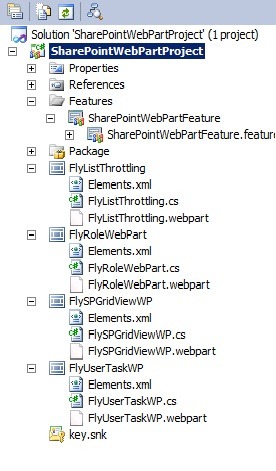
在部署项目之前,看一下我的项目结构(这个项目主要是使用Feature的方式来部署Web part):
SPS-SolutionDeploy-01

使用VS2010打包的结果是生成一个WSP文件“SharePointWebPartProject.wsp”.

第一步:向SharePoint添加解决方案包:

Add-SPSolution -LiteralPath "C:\Deploy\SharePointWebPartProject.wsp"

部署的结果是WSP包被部署到SharePoint的配置数据库中.(默认是SharePoint_Config)

SQL 命令:

select *
from dbo.Objects
where name='SharePointWebPartProject.wsp'

如果你的输入没有错误的话,你可以查询到2条相关的记录。

但是这个时候,数据还是仅仅存在于配置数据库中,我们还需要安装解决方案包。

第二步:安装解决方案包:

Install-SPSolution -Identity "SharePointWebPartProject.wsp" -WebApplication http://www.contoso.com  -GACDeployment

那么这一步的结果是什么呢?那就是先解压WSP包,然后拷贝程序集,Ascx等文件到相应的目录下面。当然咱们部署的是Feature,你就可以在“C:\Program Files\Common Files\Microsoft Shared\Web Server Extensions\14\TEMPLATE\FEATURES” 文件夹下面找到Feature的相关文件。在“C:\Windows\assembly”中也可以找到程序的dll.

如果你是多个Web前端怎么办?是不是还需要挨个部署?当然不需要了,Timer job会帮助你搞定这一切!

第三步:激活Feature:

Enable-SPFeature -Identity "SharePointWebPartProject_SharePointWebPartFeature" -Url http://www.contoso.com

这里值得注意的是 Feature的名字可能和你想象的不一样。是“ProjectName_FeatureName”自动去掉中间的空格。当你使用命令行部署的时候,如果出现错误,不妨去“C:\Program Files\Common Files\Microsoft Shared\Web Server Extensions\14\TEMPLATE\FEATURES” 看一下这个feature叫什么名字。

那么接下来你就可以向页面添加Web Part了!

补充:以下是删除解决方案的一些Powershell 命令,仅供参考:

Disable-SPFeature -Identity "SharePointWebPartProject_SharePointWebPartFeature" -Url http://www.contoso.com -Confirm:$false

Uninstall-SPSolution -Identity "SharePointWebPartProject.wsp" -WebApplication "http://www.contoso.com" -Confirm:$false
Remove-SPSolution -Identity "SharePointWebPartProject.wsp" -Confirm:$false

参考:

http://technet.microsoft.com/en-us/library/cc262995.aspx

http://msdn.microsoft.com/library/aa544500(office.14).aspx