








Artificial intelligence has gone from a technological novelty to a tool so ordinary that kids in elementary school are already using it. Trying to ban children from using AI at this point makes about as much sense as it once did to ban search engines or Wikipedia.
Today we’re breaking down how chatbots actually work, and how to teach your kid to use AI as a study aid rather than a substitute for thinking for themselves
Before explaining anything about artificial intelligence to your child, it helps to understand how it actually works and where its limits are.
Most of the popular chatbots that kids (as well as adults) use are what’s known as large language models, or LLMs. To build such a model, researchers train it to spot patterns across huge amounts of text. The model breaks text down into small units called tokens (each token can be a sequence of words, a punctuation mark, a single word or character, or a whole sentence), then predicts which token is most likely to come next.
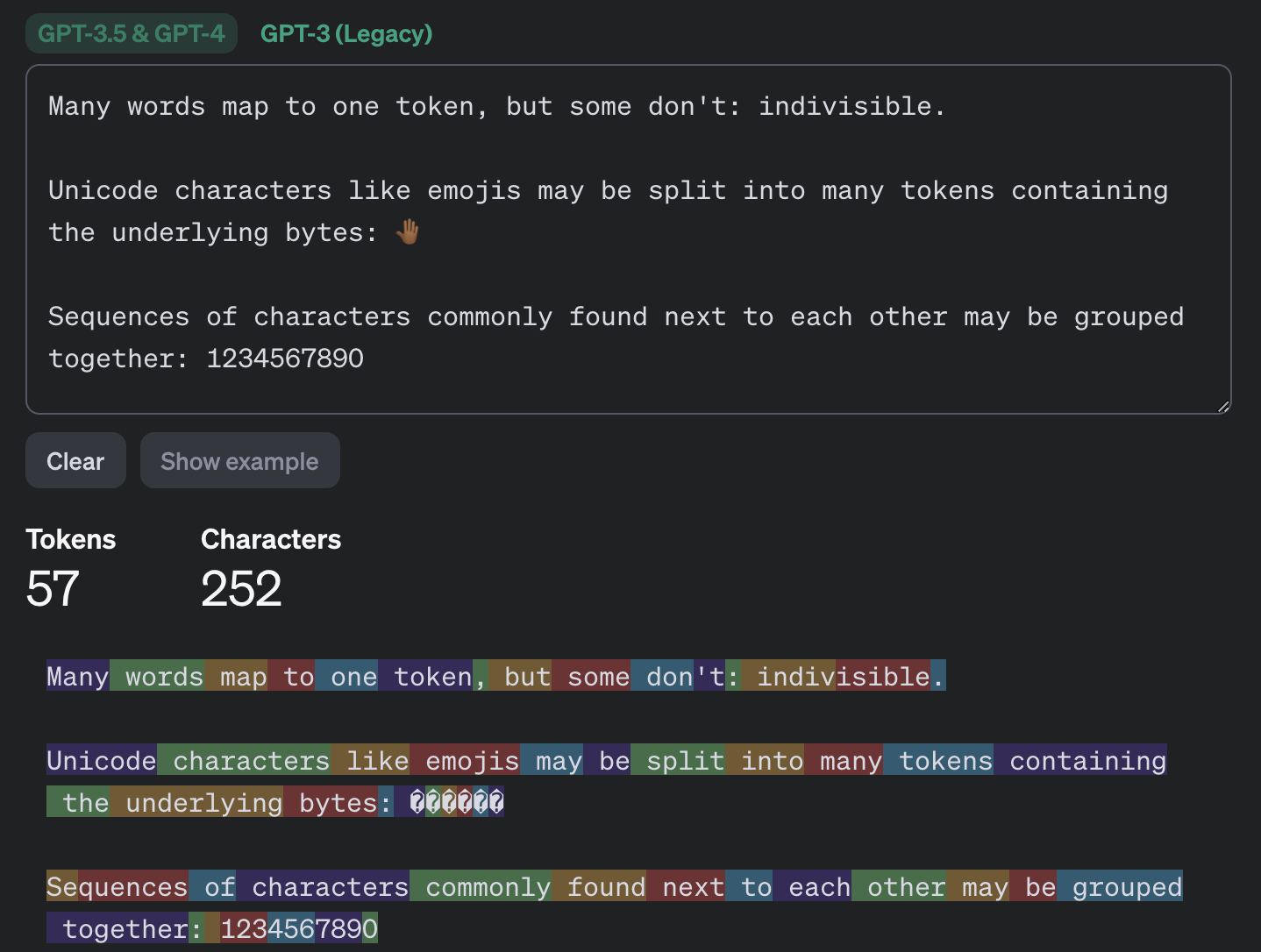
This example shows how the GPT-3.5 and GPT-4 models split messages into tokens. Source
The same thing happens when a chatbot converses with a person. A language model doesn’t actually reason on its own. It’s calculating which words and phrases are most likely to follow one another in order to produce a response that fits your query. That means chatbots will sometimes give incomplete or flat-out wrong answers, no matter how often they’re updated or retrained. A vivid example: just two years ago, popular chatbots confidently assured users that the word “strawberry” has two letters “r” instead of three. Mistakes like these are commonly known as hallucinations.
Many chatbots can also search the internet for information. In that case, the AI pulls in data from an outside source, but it still uses its own internal algorithms to put the answer together. And search results themselves can include outdated posts, advertising content, tabloids, and other questionable sources.
We’ve already seen that artificial intelligence isn’t immune to errors. Unfortunately, hallucinations aren’t the only issue. Even when a chatbot is working from accurate information, it can still present it in a misleading way by leaving something out, putting the emphasis in the wrong place, or drawing a questionable conclusion. Sometimes the result depends on factors a user would never think to consider when asking a question.
One surprising factor is simply what language you’re using. Most of the data that major models are trained on is in English, so these systems tend to perform better in English. The same AI model might answer a question correctly in English but get it wrong when asked the exact same thing in, say, Serbian. This gap shows up most in fields such as science, medicine, technology, and law, where there’s simply far more high-quality English-language material for the model to draw on.
Another quirk of chatbots is that they get worse as you feed them more information. Studies show that the more text and data a model has to work with, the harder it is for it to keep track of details, connect information from different parts of a conversation, and answer questions that require real depth of understanding. Therefore, uploading an entire book to a chatbot and asking detailed questions about it is a surefire way to trigger hallucinations.
It’s also worth questioning not just what the AI tells you, but the way you ask your questions in the first place. Chatbots often try to please the user, and will shape their answer to match the user’s apparent point of view. For example, the same chatbot might give opposite answers to “Why is the Earth overpopulated?” and “Why isn’t the Earth overpopulated?”, each time building its response around the assumption baked into the question. One recent study found that even the most advanced language models failed to challenge false premises in 26–42% of cases.
Many a former student knows that copying others’ work is an art unto itself — one that takes exceptional skill and at least some engagement with the material (sometimes even a fair amount). These days, unfortunately, even that skill is at risk of disappearing: the temptation to copy an answer that took only a few seconds to generate is simply too strong. But chatbots are far from straight-A students themselves.
In one study, researchers had three popular chatbots sit a chemistry exam, and compared their scores to those of real students from 2009–2023. The students came out ahead. Chatbots will sometimes land on the correct answer, but arrive at it via a chain of flawed reasoning, so their answers could just as easily be wrong.
So it’s worth explaining to your child that having AI write essays from scratch, or solve equations without then double-checking them, is a dead end. On top of that, in a real job they’ll be judged on actual skills and knowledge, and chatbots won’t help them fake the expertise. What AI can genuinely help with, without getting in the way of learning, is explaining difficult topics and working through mistakes. Here are some examples:
Make sure your child understands that they shouldn’t blindly trust what a chatbot tells them — even when it cites other sources. And asking the same chatbot to double-check its own work isn’t a great idea either; there’s a real chance it will make the same mistakes twice, or even pile up the errors.
Take any chatbot answer and go through it together, breaking it down into individual statements and asking questions about each one. Where did that date or number come from? Is the AI citing a specific person, publication, or study? Is the quote actually something that person said? If the chatbot includes a link, open it and check how accurately the AI actually represented it.
While you’re at it, take a look at the quality of the source itself. If something is written in an overly emotional tone or makes bold claims without backing them up, that’s a good sign to look for information somewhere else.
Anything your child shares with a chatbot ends up on that company’s servers, and it’s used to further train the model by default. Over the past few years we’ve seen that even the biggest companies aren’t immune to bugs and data leaks. To lower the risk of your child’s information leaking and to keep their account secure, follow a few simple rules:
What else to read about keeping kids safe online and at school:
- Keeping kids safe online: a practical guide for parents
- How to help your kid become a blogger without ever worrying about their safety
- How hackers target Gen Z
- Choosing wisely: a guide to your kids’ first gadget
- Back-to-school threats: gadgets
- Back-to-school threats: virtual classrooms and videoconferencing
- Back-to-school threats: social networking
- Back to School Security Tips
此内容由惯性聚合(RSS阅读器)自动聚合整理,仅供阅读参考。 原文来自 — 版权归原作者所有。