惯性聚合 高效追踪和阅读你感兴趣的博客、新闻、科技资讯
阅读原文 在惯性聚合中打开

推荐订阅源

WordPress大学
WordPress大学
The GitHub Blog
The GitHub Blog
F
Fortinet All Blogs
Cloudbric
Cloudbric
P
Palo Alto Networks Blog
T
Threatpost
T
Tor Project blog
T
Tenable Blog
AWS News Blog
AWS News Blog
Project Zero
Project Zero
L
LangChain Blog
Cyberwarzone
Cyberwarzone
Engineering at Meta
Engineering at Meta
雷峰网
雷峰网
C
CERT Recently Published Vulnerability Notes
钛媒体:引领未来商业与生活新知
钛媒体:引领未来商业与生活新知
Security Latest
Security Latest
云风的 BLOG
云风的 BLOG
I
Intezer
cs.CL updates on arXiv.org
P
Proofpoint News Feed
A
Arctic Wolf
Cyber Security Advisories - MS-ISAC
Google DeepMind News
V
Vulnerabilities – Threatpost
C
Cybersecurity and Infrastructure Security Agency CISA
MongoDB | Blog
MongoDB | Blog
aimingoo的专栏
aimingoo的专栏
K
Kaspersky official blog
Jina AI
Jina AI
N
News | PayPal Newsroom
T
The Blog of Author Tim Ferriss
D
DataBreaches.Net
A
About on SuperTechFans
博客园 - 三生石上(FineUI控件)
博客园 - 【当耐特】
Hugging Face - Blog
Hugging Face - Blog
Recorded Future
Recorded Future
cs.AI updates on arXiv.org
S
Secure Thoughts
TaoSecurity Blog
TaoSecurity Blog
P
Privacy & Cybersecurity Law Blog
P
Proofpoint News Feed
MyScale Blog
MyScale Blog
IT之家
IT之家
Forbes - Security
Forbes - Security
The Hacker News
The Hacker News
Last Week in AI
Last Week in AI
T
Threat Research - Cisco Blogs
Y
Y Combinator Blog

博客园 - zencorn

.NET Core 6 类的私有静态变量关联异常 使用 WinSCP 下载 FTP 文件并用 计划任务 复制到 远程 共享目录 【翻译】什么是 eCPM & RPM 与其计算公式 PMP Fundamentals T-SQL 总结 MySQL 存储配置 MS-TEST 批处理执行测试时的资源文件目录问题 测试换行显示 如何制作简单的 3D 打印模型 搬家Testing. Test Perl初级教程 (5) 遍历文件夹内指定扩展名文件,查找匹配关键字的输出。 最方便的批处理延时方法 SQLServer2005 remove log file. Disable Windows server 2003 Security Warning. Perl Scalar Perl 基于 Windows 环境 搭建 Package you execution files with Iexpress.exe Automation testing framework for RFT execution with STAF+STAX . [Session-1]
TFS 自动同步Server 端文件的批处理命令
zencorn · 2012-08-28 · via 博客园 - zencorn

目前在我们组的工作中很多时候需要将TFSServer端的代码自动无人值守的同步到本地中来, 找到了一些解决方案的资料http://bbs.scmroad.com/archiver/?tid-21003.html

经过试验,我们总结成以下步骤,希望对大家有所借鉴。

Steps

1.       点选VS Source Explorer 上面的TFS目录列表。

2.       新建一个TFS workspace

3.       点击Source Control Folder

4.       Source folder中选择你要用从Server端同步的目录。

5.       Local Folder中选择本地同步的文件夹。


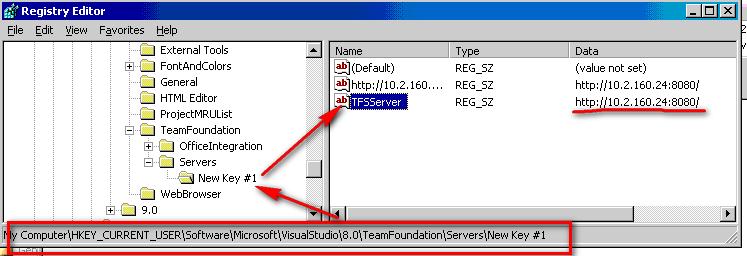
6.打开本地注册表,进入下图中标注的Key node path. 新建一个键值项,键值项的value指向你的TFS Server地址。

      如果新建的key(E.g. TFSServer)的父节点的nodeE.g. Servers)不存在, 则需要先创建一个。

7.新建一个批处理文件,写入以下代码。将批处理加到Windows的计划任务后即可自动执行同步TFS

@ECHO OFF

REM 本地映射TFSproject的路径

SET GetPath="I:\TFSAutoDownload\TFSRFT_Gen850"

REM TFSproject的路径

SET TFSPath="$/Geneva_QA/Branches/Release/Geneva_8.5.Up4/RFTTrunk"

REM 创建的用于同步的TFS Workspace的名字

SET WorkspaceName="TFSAuto850"

REM 在注册表中注册的TFS的键值

SET TFSServer="TFSServer"

REM 本地安装的TFSExplore路径,一般默认的是指向C

SET VSLocPath="E:\Program Files\Microsoft Visual Studio 9.0\Common7\IDE

ECHO Trying TFS get...

ECHO.

REM IF NOT EXIST Create GetPath

IF NOT EXIST %Getpath% MD %Getpath%        

REM if exists remove WORKSPACE and create NEW WORKSPACE

REM 开始执行同步的时候在参数列表中要给出连接帐号和密码

%VSLocPath%\tf.exe" workspace /delete %WorkspaceName% /noprompt /s:%TFSServer% /login:dwei,!ufida1

%VSLocPath%\tf.exe" workspace /new /s:%TFSServer% %WorkspaceName% /noprompt /login:dwei,!ufida1

REM unmap default WORKING FOLDER for newly created WORKSPACE

%VSLocPath%\tf.exe" workfold /s:%TFSServer% /workspace:%WorkspaceName% /unmap $/ /login:dwei,!ufida1

REM map WORKING FOLDER for newly created WORKSPACE

%VSLocPath%\tf.exe" workfold /server:%TFSServer% /workspace:%WorkspaceName% /map %TFSPath% %Getpath% /login:dwei,!ufida1

REM get the recent path through DOS command

pushd %Getpath%

REM get latest source from TFS

%VSLocPath%\tf.exe" get %TFSPath% /recursive /noprompt /login:dwei,!ufida1

ECHO.

REM move back to actual path through DOS command

popd

ECHO TFS get completed...

- Make people around you successful is the biggest contribution to ourselves. -